
There’s a quiet shift happening in AI, and it sounds suspiciously like your laptop fan. For years, the default story was simple: serious models live in data centers, everyone else rents tokens. Gemma 4 12B makes that story feel old. Not dead, not silly, just no longer the only sane option.
Google’s new 12B dense model sits in the useful middle: large enough to reason, small enough to run locally, and odd enough architecturally to be interesting. It’s an encoder-free multimodal model, which means images and audio don’t first travel through large separate encoders before reaching the language model. They enter the main model pathway much more directly. Less ceremony, less latency, fewer moving parts.
The result is a model that feels built for people who actually ship things: document OCR, private assistants, local coding tools, voice workflows, image inspection, and experiments you’d rather not send to a cloud API. It’s not magic. It’s not a frontier model in a hoodie. But it is the sort of release that changes what local AI means for normal developers.
Table of Contents
1. The Practical Snapshot And Official Benchmark Table
Gemma 4 12B is best understood as a laptop-class multimodal workhorse. Google positions it between the tiny edge models and the heavier 26B-A4B and 31B models, with 256K context, audio support, image support, video via frames, and Apache 2.0 licensing. The official model card lists the instruction-tuned evaluation numbers below. For OmniDocBench and FLEURS, lower is better. (blog.google)
Gemma 4 12B Benchmarks
| Benchmark | 31B | 26B-A4B | 12B Unified | E4B | E2B | Gemma 3 27B No Think |
|---|---|---|---|---|---|---|
| MMLU Pro | 85.2% | 82.6% | 77.2% | 69.4% | 60.0% | 67.6% |
| AIME 2026 No Tools | 89.2% | 88.3% | 77.5% | 42.5% | 37.5% | 20.8% |
| LiveCodeBench v6 | 80.0% | 77.1% | 72.0% | 52.0% | 44.0% | 29.1% |
| Codeforces ELO | 2150 | 1718 | 1659 | 940 | 633 | 110 |
| GPQA Diamond | 84.3% | 82.3% | 78.8% | 58.6% | 43.4% | 42.4% |
| Tau2 Average | 76.9% | 68.2% | 69.0% | 42.2% | 24.5% | 16.2% |
| HLE No Tools | 19.5% | 8.7% | 5.2% | N/A | N/A | N/A |
| HLE With Search | 26.5% | 17.2% | N/A | N/A | N/A | N/A |
| BigBench Extra Hard | 74.4% | 64.8% | 53.0% | 33.1% | 21.9% | 19.3% |
| MMMLU | 88.4% | 86.3% | 83.4% | 76.6% | 67.4% | 70.7% |
| MMMU Pro | 76.9% | 73.8% | 69.1% | 52.6% | 44.2% | 49.7% |
| OmniDocBench 1.5 | 0.131 | 0.149 | 0.164 | 0.181 | 0.290 | 0.365 |
| MATH-Vision | 85.6% | 82.4% | 79.7% | 59.5% | 52.4% | 46.0% |
| MedXPertQA MM | 61.3% | 58.1% | 48.7% | 28.7% | 23.5% | N/A |
| CoVoST | N/A | N/A | 38.5* | 35.54 | 33.47 | N/A |
| FLEURS | N/A | N/A | 0.069* | 0.08 | 0.09 | N/A |
| MRCR v2 8 Needle 128K | 66.4% | 44.1% | 43.4% | 25.4% | 19.1% | 13.5% |
*Audio results exclude Chinese language. For OmniDocBench and FLEURS, lower is better.
That table tells the real story. The 12B model does not beat the 26B-A4B everywhere, and it shouldn’t. The win is that it gets close enough to be useful while fitting the machine many developers already own.
2. What Makes The Encoder-Free Multimodal Model Different
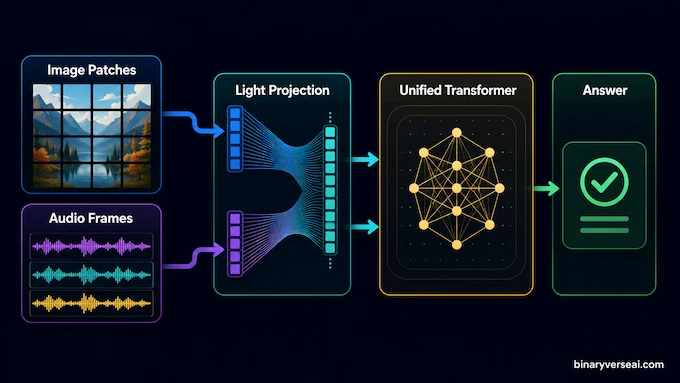
Most multimodal systems look like a committee meeting. A vision encoder looks at the image. An audio encoder listens to the waveform. Their outputs get translated into something the language model can understand. Then the LLM answers. This works, but every extra stage adds latency, memory pressure, and another piece to tune.
Gemma 4 12B takes the more aggressive route. Its vision path uses a small embedding module that projects raw 48×48 image patches into the LLM hidden space. Its audio path projects 16 kHz audio frames directly into that same space. Google’s developer guide says this removes the separate audio encoder and replaces the heavier vision encoder with lightweight projection machinery.
That sounds like plumbing, and in a way it is. Good architecture is mostly good plumbing. The clever part is that text, vision, and audio flow through one decoder-only transformer. Fine-tuning becomes cleaner because you’re not trying to persuade three partially separate systems to agree on reality. Anyone who has debugged multimodal pipelines knows this feeling. The model sees a chart, hears a sentence, reads a prompt, and you hope the embeddings have stopped arguing before the answer comes out.
3. Gemma 4 12B MacBook And PC Requirements
Here’s the part Reddit will fight about forever: “16GB” does not always mean the same thing.
On an NVIDIA machine, you care about VRAM. A 16GB GPU is the practical floor for quantized local inference. System RAM helps the operating system breathe, but it does not magically become fast GPU memory when a full model refuses to fit. A 24GB GPU is much more comfortable for full precision experiments, longer contexts, and fewer “why is this on CPU now?” moments. On Apple Silicon, unified memory is shared between CPU and GPU, so a 16GB MacBook can run some local paths, but headroom matters. A 24GB or 32GB machine will feel less like balancing a couch on a skateboard.
For Hugging Face full-model loading, treat 24GB VRAM as the realistic minimum and 48GB as the relaxed setup. The instruction-tuned safetensors checkpoint is listed around 24GB, and BF16 models are not kind to small GPUs. For Gemma 4 12b GGUF usage through local apps, Q4_K_M or similar quantization is the sane starting point. You give up some precision, but you get your laptop back.
4. Gemma 4 12B Download Options And Exact Commands
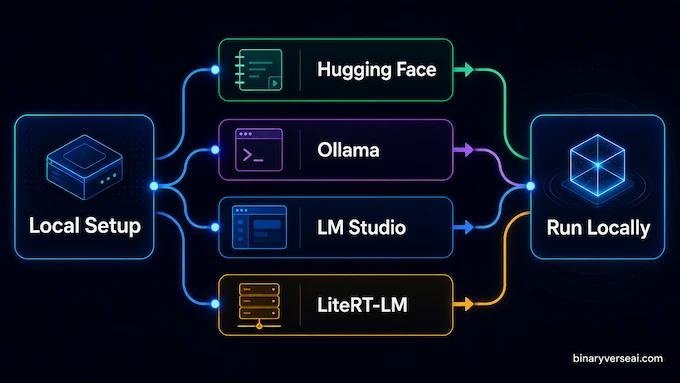
You have four practical routes: Hugging Face for Python, Ollama for simple CLI use, LM Studio for a GUI, and LiteRT-LM for Google’s local server path. The Gemma 4 12b download most developers want first is the instruction-tuned Hugging Face model, google/gemma-4-12B-it.
Use this terminal block on Ubuntu with Conda:
conda create -n gemma4 python=3.11 -y
conda activate gemma4

nvidia-smi

pip install torch torchvision torchaudio --index-url https://download.pytorch.org/whl/cu124
pip install git+https://github.com/huggingface/transformers
pip install git+https://github.com/huggingface/accelerate
pip install huggingface_hub

conda install -c conda-forge --override-channels notebook -y
conda install -c conda-forge --override-channels ipywidgets -y

huggingface-cli login

jupyter notebook
If you prefer the shorter official dependency path, this also works once your CUDA stack is already correct:
pip install -U transformers torch torchvision librosa accelerate
For LiteRT-LM local serving, Google’s developer guide gives this pattern:
litert-lm import --from-huggingface-repo=litert-community/gemma-4-12B-it-litert-lm gemma-4-12B-it.litertlm gemma4-12b
litert-lm serve
For Ollama, the official Gemma integration page currently shows gemma4 as the default pull command and lists E2B, E4B, 26B, and 31B tags. If a dedicated 12B tag appears in your Ollama library, use that tag. Until then, don’t be shocked if ollama pull gemma4:12b fails with a manifest error. Use the published command first:
ollama pull gemma4
ollama list
ollama run gemma4 "Write a short joke about saving RAM."
For image input in Ollama:
ollama run gemma4 "caption this image /Users/$USER/Desktop/surprise.png"
5. Running Gemma 4 12B In Python And Jupyter Notebook
Create a new notebook and use this as the first cell:
import torch
from transformers import AutoProcessor, AutoModelForMultimodalLM
from IPython.display import Markdown, display

model_id = "google/gemma-4-12B-it"

processor = AutoProcessor.from_pretrained(model_id)

model = AutoModelForMultimodalLM.from_pretrained(
    model_id,
    dtype="auto",
    device_map="auto"
)
Use this as the second cell:
prompt = """
How do I find purpose in my life?
Don't give me generic answer. Give me a specific answer.
"""

messages = [
    {"role": "system", "content": "You are a helpful assistant."},
    {"role": "user", "content": prompt},
]

inputs = processor.apply_chat_template(
    messages,
    tokenize=True,
    return_dict=True,
    return_tensors="pt",
    add_generation_prompt=True,
    enable_thinking=False
).to(model.device)

input_len = inputs["input_ids"].shape[-1]

outputs = model.generate(
    **inputs,
    max_new_tokens=2048
)

response = processor.decode(
    outputs[0][input_len:],
    skip_special_tokens=False
)

display(Markdown(processor.parse_response(response)))
The exact prompt used here is:
How do I find purpose in my life? Don’t give me generic answer. Give me a specific answer.
And the system message is:
You are a helpful assistant.
To reduce CUDA out-of-memory pain, try BF16 explicitly:
model = AutoModelForMultimodalLM.from_pretrained(
    model_id,
    dtype=torch.bfloat16,
    device_map="auto"
)
If that still spills into system RAM and crawls, stop pretending. Use a quantized build through LM Studio, Ollama, llama.cpp, MLX, or LiteRT-LM.
6. Fixing Common Local Setup Problems
The nvidia-smi command should show your GPU, driver, CUDA version, and memory. If it fails, don’t install more Python packages yet. Fix the driver first. Python cannot negotiate with a missing GPU.
If Hugging Face warns about unauthenticated requests, run:
huggingface-cli login
Then paste your access token. Also open the model page and accept the license if access is gated.
If Jupyter starts from the wrong environment, reinstall it after activation:
conda activate gemma4
conda install -c conda-forge --override-channels notebook -y
jupyter notebook
If LM Studio crashes while loading, update the runtime. New architectures often land before every local runner has caught up. In LM Studio, go to Settings, then Runtimes, then check for updates. You’re looking for the newest llama.cpp or MLX runtime with support for the gemma4_unified architecture.
If Ollama gives an Error 412 or “manifest not found,” the tag you asked for probably doesn’t exist in your installed library yet. Update Ollama, check the available tags, and start with ollama pull gemma4.
7. Gemma 4 12B Benchmark Reality Versus Reddit Physics
The official Gemma 4 12b benchmark picture is strong, but community tests are where models go to lose their press-release glow. A community RTX 4090 test ran the 12B model and the 26B-A4B model with the same prompt: generate a self-contained HTML5 canvas physics animation with a Galton board, two colliding blocks, and a chaotic triple pendulum.
Gemma 4 12B vs 26B-A4B Local Test
| Local Test | 26B-A4B | 12B Unified |
|---|---|---|
| GPU | RTX 4090 | RTX 4090 |
| VRAM Usage | 15GB | 9GB |
| Output Length | 6.9K Tokens | 8.9K Tokens |
| Speed | 138 Tokens/Sec | 80 Tokens/Sec |
| Reported Winner | 26B-A4B | Close Second |
| Practical Reading | Faster, Better Physics | Lower Memory, Strong Quality |
The 26B-A4B result being faster is not strange. It’s a Mixture-of-Experts model with about 3.8B active parameters, so only a slice of the total model wakes up per token. The 12B model is dense, which means all of it works every time. Sparse models are like restaurants with many chefs and a clever dispatcher. Dense models are like one very talented chef doing the entire tasting menu alone.
The interesting part is not that the 12B model wins every benchmark. It doesn’t. The interesting part is that it’s close enough to make the deployment math awkward. If you’re building on a 16GB laptop, awkward is good. Awkward means the old assumption has cracked.
8. Where This Model Actually Fits
Gemma 4 12B is not the model I’d pick for the hardest multi-day research agent. For that, you still route to a stronger cloud model and pay the token tax with a sigh. Local models shine where privacy, latency, cost, or volume matter more than absolute peak reasoning.
Use it for:
- Confidential document parsing
- Offline note search
- Voice cleanup
- UI understanding
- Image triage
- Codebase helpers
- Test generation
- Local prototypes
Use cloud models when the task needs deep long-horizon planning, heavy tool use, or the best reasoning you can buy.
That’s the future most teams will land on: routing. Small local models handle the boring, private, high-volume work. Bigger models handle the scary parts. The win is not replacing the cloud. The win is not needing the cloud for every little thought.
9. How To Evaluate It Without Fooling Yourself
A good local model test is boring, repeatable, and slightly mean. Don’t ask for a poem about dragons and declare victory because the rhymes didn’t explode. Give Gemma 4 12B a task with a known answer, a messy input, and a failure mode you can spot.
Try three buckets:
- Use a private document and ask for extraction into a strict JSON shape.
- Use a screenshot or chart and ask it to explain only what is visible.
- Use a small coding task where you already know the correct edge cases.
This avoids the classic local-model trap: being impressed by confidence instead of correctness.
For multimodal work, keep modality order clean. Put images before the text prompt. Put audio after the text prompt. If OCR matters, spend more visual tokens. If you’re scanning video frames, spend fewer. The best setup is not the biggest setup, it’s the setup that matches the task.
Gemma 4 12B is strongest when the input is concrete and the desired output is constrained. Give it structure. Ask for tables, JSON, diffs, checklists, or short explanations. The model can be witty, but your production pipeline should not depend on vibes. Vibes are for blog posts and demo videos. Pipelines need contracts.
If a result looks great, rerun it. If it still looks great, change one detail. If it survives that, now you have something worth keeping.
10. Final Takeaway And Next Step
The most exciting thing about Gemma 4 12B is not the name, the launch thread, or even the benchmarks. It’s that it makes local multimodal AI feel ordinary. That’s when technology starts to matter. Not when it dazzles a demo crowd, but when a developer can pull it down, wire it into a notebook, point it at a real file, and get work done before the coffee cools.
Start with the Hugging Face notebook if you want control. Start with Ollama or LM Studio if you want speed to first token. Try a quantized build if your hardware is modest. Then give it a task you already understand well, because the first rule of evaluating local AI is simple: never benchmark a model on a problem where you can’t recognize a lie.
Run it locally. Break it gently. Then build something boring enough to be useful.
1: Why Am I Getting “Error 412: Pull Model Manifest” In Ollama For Gemma 4 12B?
You get Error 412 because Gemma 4 uses the new gemma4_unified architecture, and older Ollama builds may not support it properly. Update Ollama to version 0.30.4 or newer, then pull the model again. If your installer still gives issues, download the latest release or pre-release build from Ollama’s GitHub releases page.
2: Do I Need 16GB Of VRAM Or System RAM To Run Gemma 4 12B?
On Windows or Linux, you ideally need an Nvidia GPU with 16GB of dedicated VRAM for good speed. On Apple Silicon Macs, 16GB of Unified Memory can work because the CPU and GPU share the same memory pool. For smoother local inference, especially with longer context, 24GB or more is safer.
3: What Does An “Encoder-Free Multimodal” Architecture Mean?
An encoder-free multimodal architecture means the model does not rely on separate frozen vision or audio encoders before the language model sees the input. Gemma 4 12B projects image patches and raw audio waveforms directly into the LLM backbone. This reduces latency and can improve detail-sensitive tasks such as OCR, document parsing, and audio transcription.
4: Which Is Better, Gemma 4 12B Dense Or Gemma 4 26B-A4B MoE?
Gemma 4 12B is a dense model, so all parameters are active during inference. Gemma 4 26B-A4B is a Mixture-of-Experts model, so only about 4B parameters activate per token. The 12B model is more practical for 16GB-class machines, while the 26B-A4B often performs better in complex physics, spatial reasoning, and heavier benchmark-style tasks.
5: How Can I Download The Gemma 4 12B GGUF Files?
You can download Gemma 4 12B GGUF files from Hugging Face repositories such as bartowski/gemma-4-12B-it-GGUF, ggml-org/gemma-4-12B-it-GGUF, or lmstudio-community/gemma-4-12B-it-GGUF. For most users, start with Q4_K_M for lower memory use or Q5_K_M if you want a better quality-speed balance in LM Studio or llama.cpp.