

The first time I ran Gemini CLI my terminal felt like it had grown a second brain. I asked for a summary of an unfamiliar Go codebase, hit Return, and watched the prompt answer with a clean, bullet-point audit. Seconds later I pasted a failing stack trace, pressed Enter again, and the shell proposed three fixes with exact line numbers. It read like pair programming with someone who had already memorized every file.
That new voice in the console is not magic. It is the result of Google wrapping its largest public model in a tiny open-source wrapper that speaks fluent Bash. The wrapper installs in under a minute, costs nothing for individual use, and includes a context window that would make most paid copilots blush. Below you will find a ground-level tour of what makes Gemini CLI different, how you can bend it to your workflow, and why its generous license is rattling the tooling market.
Table of Contents
From Static Prompt to Conversational Partner
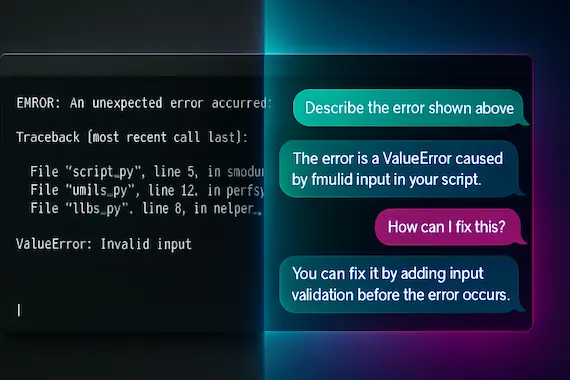
Classic command lines are terse. You type, the machine obeys, and the scrollback fills with cryptic logs. The interaction loop works, yet every time you search the web for the meaning of an error code you step outside that loop. Gemini CLI changes the pattern. Now the question goes to the screen you are already staring at, and the answer shows up beside the error in real time.
That shift improves more than ergonomics. It lets the agent read the same environment variables, repository paths, and process lists that you see. The context becomes data. Because Gemini CLI agent sits inside the working directory it can open a Dockerfile, explain a Make target, or update a README without constant copy and paste. The feedback arrives at human speed yet carries machine precision.
The result feels less like running a utility and more like chatting with a junior engineer who never misses an edge case. Ask the agent to “migrate this project from Express to Fastify,” and it responds with a stepwise checklist, offers to create a branch, and proposes tests before changing even one line. It does not replace expertise, but it removes half the friction between intent and execution.
A Day With Gemini in the Shell

To understand the practical upside, picture this Tuesday I spent on a legacy queue service that had started dropping messages.
09:00
I open the failing repo and run gemini. My first prompt reads, “List modules touching RabbitMQ connectivity.” Three seconds later the agent returns a neat tree of twelve files, grouped by producer, consumer, and health checks.
09:10
I paste a connection timeout stack trace. The agent spots that the call path still uses a deprecated retry flag removed two releases ago. It suggests a patch and offers to apply it behind a feature branch.
09:30
Unit tests are green, but staging still stalls. I ask the agent to run docker ps, then ask, “Which container hosts port 5672?” It highlights the wrong compose label, rewrites the YAML, and restarts the stack.
11:00
Issue closed. I type /stats to see usage. The session consumed 4 000 input tokens and 500 output tokens, a fraction of the free tier. When a colleague drops by with a Sentry alert I hand him the keyboard. No new login, no extra setup. He writes, “Gemini, explain this stack trace,” and the cycle begins again.
That morning showed me how tight the feedback loop becomes when large-language intelligence is literally one Enter key away.
Under the Hood: Model, Context, and Tools
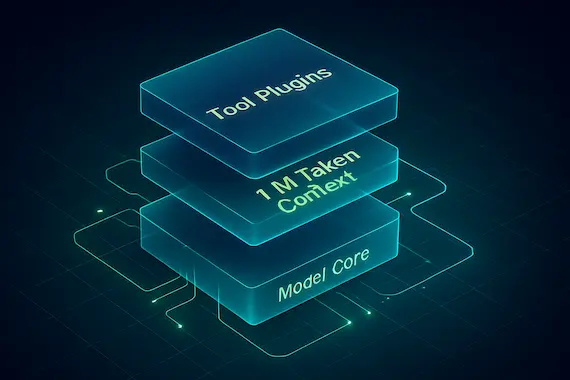
At a high level, the agent’s power can be broken down into several core capabilities:
| Capability | What It Does | Related Tools |
|---|---|---|
| Code comprehension | Summarize repos, explain diffs | gemini > summarize changes |
| File generation | Scaffold projects, build Dockerfiles, write tests | gemini > create FastAPI skeleton |
| Command execution | Run, monitor, and retry shell commands | gemini > run npm test until green |
| Context grounding | Pull fresh web pages with Gemini CLI Google Search | gemini > fetch RFC 9110 |
| Multimodal creation | Generate images or videos with Imagen, Veo | gemini > make a logo for my CLI |
| Workflow automation | Chain tasks through MCP servers | gemini > prepare release notes, post to Slack |
The engine that powers the conversation is Gemini 2.5 Pro, a multimodal model with a one-million-token context window. That number matters. It means the agent can ingest an entire monorepo, plus a week of chat history, plus the Markdown spec, and still have room for a fresh question. Competitors often stop at eight thousand or sixty-four thousand tokens. The extra headroom lets Gemini remember older turns without aggressive pruning.
Context alone does not fix every task. That is where tools come in. Out of the box Gemini AI CLI ships with:
- Google Search grounding so the model can pull live documentation, RFCs, or Stack Overflow posts.
- A web fetcher for arbitrary URLs, handy when the target site blocks crawlers.
- File read and write helpers that inject snippets or entire files into the prompt.
- A diff viewer that mirrors proposed changes in your editor before anything hits disk.
You can add more. A simple REST endpoint becomes a custom tool once registered in the MCP manifest. Need PDF manipulation? Point the agent at a small Flask server that wraps pdftotext, then issue a natural language request. The same approach lets you slot open-source Google agent SDK services or your own binary built with the Google agent development kit.
Installation Deep Dive
The official docs show a one-liner, yet the installer hides a few nuances worth knowing. Below is a walk-through with commentary.
bashCopyEdit# 1. Ensure Node 18+ is present
node --version  # prints v18.20.0 or higher

# 2. Install globally
npm install -g @google/gemini-cli   # adds `gemini` to PATH

# 3. Authenticate with a personal Google account
gemini login                         # opens browser OAuth flow

# 4. Verify free tier limits
gemini /stats                        # should show 60 req/min, 1k req/day

# Optional: provide your own key
export GEMINI_API_KEY="sk-..."       # upgrade requests or models

# Optional: pick a color theme
gemini /theme                        # choose light, dark, or retro
Developers skeptical of global NPM packages can instead run via npx directly from Google CLI download links, or clone the Gemini CLI GitHub repository and execute from source. Windows users who rely on Google Cloud CLI can run the tool in PowerShell with identical commands.
Behind the scenes the installer creates a small cache in ~/.gemini that stores session memory, tool metadata, and a local copy of your GEMINI.md system prompt. Remove the folder and the agent starts fresh. It is a welcome departure from inscrutable hidden directories common in older AI extensions.
Surviving Your First Hundred Commands
Once installed you will lean on a handful of Gemini CLI commands more than anything else.
- /tools reveals what capabilities the agent has loaded. Check here when the model claims ignorance.
- /editor pairs edits with your preferred GUI. The diff viewer supports VS Code, NeoVim, or even raw Git.
- /compress summarizes history into a short chunk, freeing tokens for long sessions.
- /memory add “Our staging RabbitMQ is on port 5673” preserves a fact for future prompts.
- /clear wipes the slate when a branch of conversation loses relevance.
Remember these commands and you will avoid ninety percent of early pain. They also highlight a subtle strength: Gemini CLI command line syntax blends plain chat and slash actions without feeling like a bot net. The slash prefix is borrowed from chat apps, so adoption feels immediate.
Extending the Agent to Match Your Stack
No two teams share an identical workflow. One might build on Kubernetes and BigQuery, another on .NET and Oracle. Gemini CLI anticipates that diversity.
- Custom System Prompt
Create GEMINI.md at your repo root. List coding standards, commit prefixes, or domain language. The agent will read the file each launch. - New Tools via MCP
Suppose you already use a Go binary that lints Terraform. Wrap it behind localhost:4040/lint, follow the MCP schema, and register it with /tools add terralint. Now you can ask, “Run Terralint on infra/ and show errors,” and the agent translates that into an HTTP call. - Specialized Models
If your task calls for image generation, set GEMINI_MODEL=image-alpha-001 before running the tool. The agent respects the variable and routes prompts accordingly. - Pipeline Integration
Because the CLI can run non-interactive commands, a Jenkins job can invoke gemini /plan-release to draft changelogs. Output can be passed to Slack or email without manual effort.
These hooks make the tool feel less like a peanut butter cup glued onto Bash and more like a first-class member of your automation stack.
Real Projects, Real Gains
Below are snapshots from teams already using the agent in anger.
Case Study: Startup API Rewrite
A fintech startup kept an aging Node backend alive through patchwork. They challenged Gemini CLI to port it to Fastify. The agent scanned four thousand lines and produced a migration plan with timing estimates. Engineers accepted seventy percent of the patches as is, rewrote the rest, and completed the job in two days instead of two weeks. Token cost: under the free quota.
Case Study: University Research Lab
Graduate students analyzing climate data needed plots every time a new dataset dropped. They wrote a one-page shell script that called gemini “Plot CO2 trends for 2010-2025 using data.csv” and saved the image. The agent handled pandas, Matplotlib, labeling, and even added a caption. The same script now lives in cron and backs a weekly dashboard.
Case Study: Game Mod Community
A mod pack maintainer created a tool that scans a Minecraft directory, detects version drift, and suggests compatible replacements. They wired the directory walker as a tool. Gemini CLI reads mod metadata, checks Google Search for known issues, and writes an upgrade guide. Community support time fell by sixty percent.
These stories are not marketing copy. They arrived in the issues channel on Gemini CLI GitHub within the first month of public preview.
Benchmarks and Performance
Performance in AI tools splits along two axes: response time and rate limits. Response time depends on network hops and model load, so results vary. Rate limits are easier to quantify. The table below compares public numbers as of June 2025:
| Tool | Free Requests/Day | Context Window | Price Beyond Free |
|---|---|---|---|
| Gemini CLI | 1 000 | 1 000 000 tokens | Usage-based, Google AI Studio |
| Copilot CLI | 25 | 32 000 | $10/month per seat |
| ShellGPT | 100 | 8 000 | OpenAI pay-as-you-go |
| TabbyML Local | Unlimited | 4 000 | Hardware cost |
The balance skews in favor of Gemini unless your priority is offline inference. Even heavy users who compile all day rarely hit a thousand interactive calls.
Comparison with Other Tools
| Feature | Gemini CLI | Copilot CLI | TabbyML | ShellGPT |
|---|---|---|---|---|
| Model | Gemini 2.5 Pro | GPT-4 | Local LLMs | GPT-3.5 |
| Free tier | 1M tokens, 1 000 req/day | Minimal | Unlimited but smaller model | Limited |
| Open source | Yes | No | Yes | Yes |
| Google Search grounding | Built in | No | No | No |
| MCP tool system | Yes | No | Partial | No |
| IDE sync | Full with Code Assist | Limited | None | None |
| Price to scale | Usage-based | Subscription | Hardware | OpenAI credits |
The takeaway is simple: Gemini CLI leads on breadth and generosity, while Copilot wins on polish. Pick your poison.
Guardrails, Privacy, and Governance
Installing any agent that can edit code raises a healthy paranoia. Google addresses part of the concern by releasing the wrapper code under Apache 2.0. You can read every import and audit every network call. Authentication tokens sit in your home directory, not on remote disks.
When you enable Google CLI search grounding the model fetches web pages on your behalf. Those URLs pass through Google’s servers in plain view. Teams with stringent compliance rules can disable the tool with /tools remove google-search, then rely on local fetch scripts instead.
Corporate developers often ask whether prompts leak proprietary snippets back to Google. The answer mirrors other Gemini products: content can be used to improve the model, but enterprise customers can negotiate data control under the Google agent builder program. In practice most startups trade the data risk for the productivity gain, especially with non-production branches.
Community Pulse and Roadmap
Even in preview Gemini CLI GitHub shows a blizzard of activity. At the time of writing the repo hosts over one thousand commits, hundreds of issues, and contributions from outside Google. Features on the near horizon include:
• Binary distributions to remove the Node requirement.
• Inline diff commenting for pull requests.
• Built-in metrics exporter that publishes token stats to Prometheus.
• Tight coupling with Google Cloud SDK download workflows so the agent can run gcloud commands safely.
Roadmap items rely heavily on community feedback, and merge windows open every week. The pace feels more like an open-core startup than a corporate moonlight project.
Closing Thoughts
Tools come and go in the software world. Very few change how you think. Gemini CLI is on that short list. It keeps the ritual of the command line alive yet adds a conversational guide who never tires and rarely stalls. By releasing it as open source, Google built the kind of goodwill that used to belong solely to independent hackers. By offering a limitless context window and a wild free tier they set a bar competitors must now clear.
You can ignore the trend, or you can install the tool, open your favorite project, and ask the question you have been postponing for weeks. The model will not write perfect code, but it might unlock the next idea faster than you thought possible. For the price of one NPM command you get a thinking partner living right in your shell.
The terminal never sounded so alive.
Azmat — Founder of Binary Verse AI | Tech Explorer and Observer of the Machine Mind Revolution. Looking for the smartest AI models ranked by real benchmarks? Explore our AI IQ Test 2025 results to see how top models. For questions or feedback, feel free to contact us or explore our website.
What is Gemini CLI?
It’s an open-source command-line interface from Google that wraps a large multimodal model. You interact with it in your terminal to summarize code, generate files, run and monitor commands, fetch documentation from the web and automate workflows without leaving the shell.
Is Gemini CLI free?
Yes, the free tier offers up to 60 requests per minute and 1,000 requests per day with a one-million-token context window. If you need more capacity or advanced models you can switch to usage-based billing through Google AI Studio.
How to install Gemini CLI?
1. Check Node.js version (v18+ required)
node –version
2. Install Gemini CLI globally
npm install -g @google/gemini-cli
3. Authenticate with your Google account
gemini login
4. Verify your free-tier limits
gemini /stats
Alternative methods:
• Run via npx:
npx @google/gemini-cli
• Clone the GitHub repo and run from source:
git clone https://github.com/google-gemini/gemini-cli.git
cd gemini-cli
npm install
npm start
Does Google have AI agents?
Yes, Google offers open-source agent frameworks that let you embed intelligence into your environment. This shell-based agent talks to models like Gemini 2.5 Pro, reads your files, executes commands and pulls live docs so you don’t have to leave your terminal.
What is Google agent SDK?
It’s a software development kit for building and registering custom tools with the agent manifest. You wrap REST endpoints or local services, follow the MCP schema and then invoke those services through natural-language commands in your shell.