

Introduction
Every few months, the internet discovers a new “coding beast” model and immediately does what it always does. Someone posts a chart, someone posts a slick UI demo, and then a thousand developers ask the only questions that matter, “Where are the weights?” and “Can I run it without rebuilding my whole stack?”
MiniMax M2.1 lands right in that cycle, except it brings two things that are genuinely useful. First, it is framed as agent-first, tuned for tool use, instruction following, and longer task chains, not just one-off chat. Second, it is pushed through the channels developers already use, the minimax api, an Anthropic-compatible endpoint, and plug-and-play routes through aggregators and tools.
This is the respect-your-time version. What MiniMax M2.1 is, how to use it today, how to run it locally without ruining your weekend, what the benchmarks do and do not prove, and my personal take on where it fits in the current minimax llm lineup.
MiniMax M2.1 Plans And Access Options
| Path | Best For | Price | Limits And Notes |
|---|---|---|---|
| Coding Plan Starter | Light coding help, quick experiments | $10 per month | 100 prompts per 5 hours, powered by M2.1 |
| Coding Plan Plus | Daily dev work, longer agent loops | $20 per month | 300 prompts per 5 hours, powered by M2.1 |
| Coding Plan Max | High-volume coding, team workflows | $50 per month | 1000 prompts per 5 hours, powered by M2.1 |
| Yearly Plans | Same tiers, lower effective cost | $100, $200, $500 per year | Annual billing, marketed as “2 months free” |
| OpenRouter Hosted | Fast try, clean token billing | $0.30 per 1M input, $1.20 per 1M output | ~204.8K context listed, preserve reasoning blocks |
| Ollama Cloud Tag | One-command testing from CLI | Varies by provider | Great for evaluation, not the same as local weights |
Table of Contents
1. MiniMax M2.1 In 60 Seconds
M2.1 is the next step in the MiniMax M2 family, a “born for agents” line aimed at coding workflows where the model must stay coherent across tool calls, file edits, test runs, and retries.
If you only remember one thing, remember this. MiniMax M2.1 is not being sold as a poetic chatbot. It is being sold as an operator, the engine behind Claude Code style loops, Cursor edits, and Cline task runs.
There are three practical ways to touch MiniMax M2.1 right now:
- The Open Platform, your direct minimax api route.
- MiniMax Agent, the “just try it” route.
- Open weights for local deployment, the “I want control” route.
And yes, this is why “minimax io” searches spike after launches. People want the official links, fast.
2. Benchmarks Snapshot, And What Those Scores Actually Say
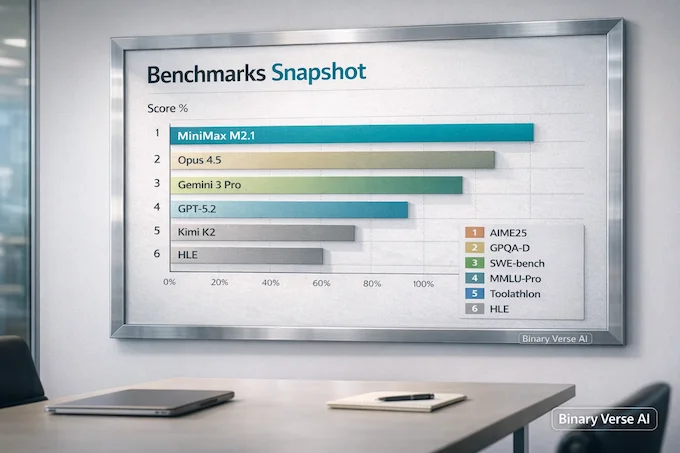
Benchmarks are useful when you treat them like a map, not a crown. A map can still mislead you, but at least you know what it is for.
Here is the benchmark slice, placing M2.1 against familiar heavy hitters:
MiniMax M2.1 Benchmarks vs Top Models
| Category | Benchmark | MiniMax M2.1 | Claude Opus 4.5 | Gemini 3 Pro | GPT-5.2 (thinking) | Kimi K2 Thinking |
|---|---|---|---|---|---|---|
| Logic/Math | AIME25 (Reasoning) | 81.0% | 91.0% | 96.0% | 98.0% | 95.0% |
| Expert STEM | GPQA-D (PhD Level) | 81.0% | 87.0% | 91.0% | 90.0% | 84.0% |
| Engineering | SWE-bench Verified | 74.0% | 80.9% | 78.0% | 80.0% | 71.3% |
| Broad Knowledge | MMLU-Pro | 88.0% | 90.0% | 90.0% | 87.0% | 85.0% |
| Tool Use | Toolathlon | 43.5% | 43.5% | 36.4% | 41.7% | 17.6% |
| Hardest Test | HLE (Humanity’s Last Exam) | 22.0% | 28.4% | 37.2% | 31.4% | 22.3% |
2.1. One-Line Interpretations Of The Tests
- AIME25: short, sharp math reasoning under time pressure.
- GPQA-D: graduate-level STEM questions that punish hand-waving.
- SWE-bench Verified: a real engineering proxy, can the model fix a repo and pass tests.
- MMLU-Pro: broad knowledge plus reasoning across domains.
- Toolathlon: tool use that is judged on doing, not talking.
- HLE: an intentionally brutal stress test.
2.2. Benchmark Realism, Why Your Mileage Varies
A score is not a single property of the weights. It is weights plus scaffolding, prompts, tool schema, system rules, retry policy, and evaluation harness. Change one, and your “same model” acts different.
That matters more here because this is an agent-leaning release. In agent setups, scaffolding differences dominate. One framework truncates context aggressively. Another preserves intermediate reasoning. A third injects extra “helpful” rules that quietly break tool calling.
So yes, you will see someone claim it is a leap, and another person claim it is worse than minimax m2. Both can be true in their environment.
3. Pricing, Context Window, And The Real Cost Of “Thinking”
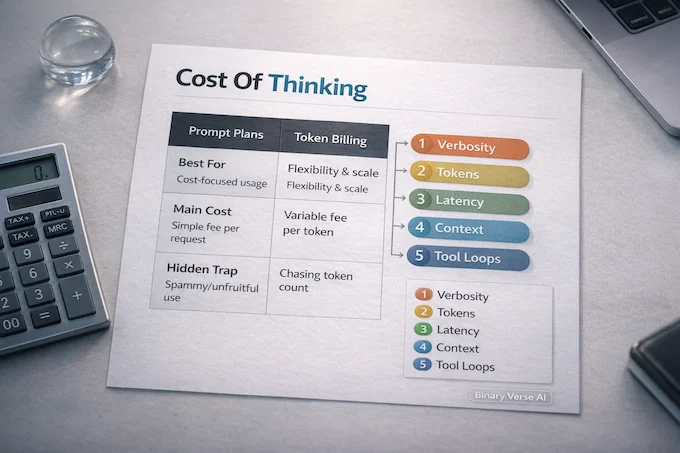
Pricing is where hype gets quiet. It is also where your workflow either becomes viable or dies. M2.1 shows up in two pricing mental models:
- Prompt-bucket plans like the Coding Plan, where you get N prompts per 5 hours.
- Token billing like OpenRouter, where input and output tokens are metered.
The trap is not the sticker price. The trap is verbosity.
If you enable long reasoning and run tool-heavy loops, you pay for it. You pay in tokens, latency, and context pressure. That is why people complain about “endless reasoning,” especially with some minimax llm style models. It is not moral, it is mechanical.
My advice is direct. Decide what you are optimizing for:
- If you want speed and low cost, tune outputs to be concise, and use tools for verification.
- If you want fewer mistakes on complex tasks, accept that long-horizon planning burns context, and budget for it.
4. Where You Can Use MiniMax M2.1 Today
Most readers want one of three experiences. “I want the official API.” “I want a hosted try button.” “I want local control.”
Here is the practical menu:
- Pick the minimax api on the Open Platform if you are building a product and want the shortest path to stable integration.
- Pick a hosted aggregator if you want instant experimentation, and you are fine with extra vendor surface area.
- Pick local weights if you want privacy, reproducibility, and the ability to tune and deploy offline.
And if you are searching “minimax ai chat,” you are basically asking, “Can I just talk to it and see if it feels competent?” That is a valid first test.
5. API Quickstart, A Hello World That Does Not Lie
The most common integration pain is not code. It is the boring glue: base URLs, keys, and “why does this request look valid but fail.” M2.1 supports two patterns developers recognize:
- A native MiniMax API route.
- An Anthropic-compatible route, designed to drop into tooling that expects the Anthropic messages format.
If you are already invested in Anthropic-style tooling, the compatibility layer is a gift. If you are not, start with the native minimax api and avoid accidental mismatch.
5.1. The One Rule That Saves Multi-Turn Agent Runs
When you run tool calling in multi-turn conversations, append the assistant message back into history, including all content blocks. If you keep only the final text and throw away tool and thinking blocks, you break continuity. The model starts acting “forgetful,” and it looks like a capability drop.
This is the difference between “it benched well” and “it works.”
6. Anthropic-Compatible Mode, What Works And What Does Not
Anthropic compatibility is a pragmatic compromise. It buys ecosystem compatibility, and it imposes constraints. The key limitation is input types. In the compatibility interface, text and tool calls work. Image and document inputs do not.
That still covers a huge slice of real work: coding agents, office automation, structured tool use, and long-horizon planning. It just is not the right fit if your critical path depends on multimodal inputs through that specific interface.
7. Using MiniMax M2.1 Inside Coding Tools
This is where the model either becomes a daily driver or a curiosity. If your day is Cursor refactors, Claude Code style repo edits, or Cline multi-step tasks, MiniMax M2.1 is designed to slot in behind the tool.
This is also where “agent model” stops being marketing and becomes a loop:
- Read code and context.
- Plan changes.
- Make edits.
- Run tests or linters.
- Interpret results.
- Repeat until done.
A minimax m2 ai class model that stays stable across that loop is worth more than a model that wins a math chart but collapses when the repo has 60 files and a cranky test harness.
8. Run It Locally, What Open Weights Actually Buy You
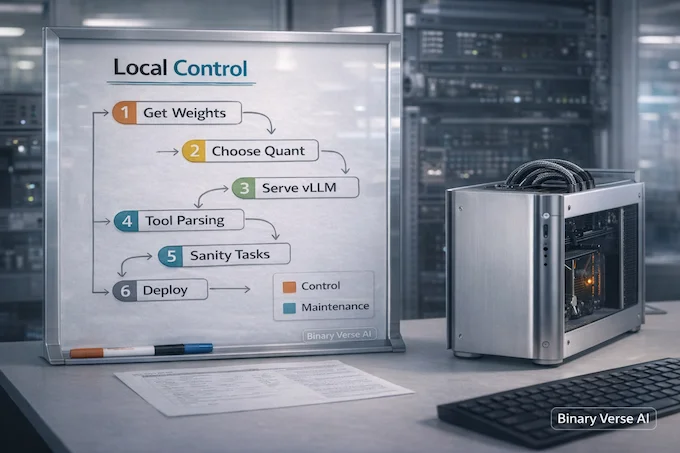
Let us be honest. People say they want “open source,” but what they really want is control. Local weights mean:
- Prompts and code stay on your machine.
- Results are reproducible, which matters for debugging.
- You can quantize to match your hardware, and accept the tradeoff consciously.
- You can fine-tune or adapt the model to your team’s style.
It also means you inherit the hard parts: serving, memory, throughput, and the occasional “why is the output weird” evening.
If you are new to local deployment, start hosted. Confirm you like how MiniMax M2.1 behaves, then invest in local.
9. vLLM Deployment, The Serious Local Path
If you want performance, vLLM is the adult choice. It is built for throughput and practical serving, and it is where many serious local deployments land. A good vLLM rollout usually looks like this:
- Pull the weights.
- Choose tensor parallel based on GPU count.
- Configure tool parsing and reasoning parsing correctly, because agent workflows depend on clean structure.
- Run a few sanity tasks that include tool calls and multi-turn continuity.
9.1. A Reality Check On Hardware
This family is large. If you want high context and solid throughput, you are in multi-GPU land, or you are making deliberate tradeoffs. That is normal.
My rule is simple. If your goal is “ship a product,” start hosted. If your goal is “own the stack,” go local once you know what you are optimizing.
10. Ollama, Quants, And The Fastest Ways To Kick The Tires
10.1. Ollama, Fast Feedback With Minimal Wiring
Ollama is the speedrun option. One command, fast feedback, minimal wiring. Just do not confuse “I can run a cloud tag in a CLI” with “I have full local control.” It is a testing convenience. Still, for evaluation, it cuts through theory.
10.2. Quants, GGUF, MLX, And The “Why Is This Garbage For Me” Thread
Every open-weight launch eventually produces the same story. Someone runs an aggressive quant, gets broken formatting and weird hallucinations, and concludes the model is trash. Then the comments argue about whether the model is bad or the quant is cursed.
Here is the sober version. Quantization is not free. Go too low, and you can lose subtle constraints that matter for code, like indentation consistency, bracket closure, or tool schema discipline. The result looks like “the model is dumb,” but it is often “the model is distorted.”
10.3. A Quick Quality Checklist
If MiniMax M2.1 looks off in your setup, check these in order:
- Prompt template: make sure you are using the intended chat format.
- Temperature: high temperature plus code tasks is chaos.
- Stop tokens: incorrect stops can truncate tool blocks.
- Tool schema: broken schema leads to tool call failures that look like hallucinations.
- Context: if you truncate history, you are not testing the same behavior.
- Quant level: if you are at an ultra-low quant, try a safer one and compare.
This is also where “minimax m2” comparisons get messy. If you run M2 at one quant and run M2.1 at a more aggressive quant, you are not comparing models, you are comparing approximations.
11. Why Your Results May Differ From The Benchmarks
This section exists because it is the honest answer to half the internet. Benchmarks often run with a specific agent harness, prompt configuration, and retry policy. Your setup is different. Your repo is different. Your tools are different.
If you want a fair read, evaluate MiniMax M2.1 the way you would evaluate a new engineer joining your team:
- Give it a small task with a clear definition of done.
- Give it a medium task that requires reading multiple files.
- Give it a task that requires tools, like tests or a linter.
- See if it keeps state across turns without spiraling.
My personal expert take is that coding models are judged too often on first response quality and too rarely on second hour quality. Agentic work is endurance. MiniMax M2.1 is explicitly trying to win that game.
12. Verdict, Who Should Use MiniMax M2.1
MiniMax M2.1 makes the most sense for three groups:
- Developers building coding agents who need a model that plays nicely with tool calling and long-horizon plans.
- Teams who want choice beyond the closed model duopoly, including the option to run local.
- Builders who care about multilingual code, because real stacks rarely live in one language.
It is not the best fit if your workflow depends on multimodal inputs through the Anthropic-compatible interface, or if you want “set it and forget it” perfection without spending time on integration details.
Here is my bottom line. MiniMax M2.1 is interesting not because it claims to be the smartest model on earth. It is interesting because it is trying to be the most useful model in the messy middle, where you have tools, repos, logs, and deadlines.
If you want to get real value out of MiniMax M2.1, do this next. Pick one workflow you actually run every week, wire it in, and measure two things, time saved and failures introduced. Then publish your results, even if they are messy. That feedback loop is how this stuff improves.
If you build something cool, or you hit a sharp edge, drop it in the comments. I will follow up with a practical, copy-paste evaluation harness you can run on your own repo, so you can judge MiniMax M2.1 on the work you actually do, not just on a leaderboard.
Is MiniMax AI free or paid?
MiniMax is paid for API usage and plans, but you can often start with free credits or limited-time access depending on the platform. If you run open weights locally, the model itself can be “free”, but you still pay in GPU/hosting costs.
Is MiniMax Chinese?
Yes. MiniMax is a China-founded AI company and is commonly reported as being based in Shanghai.
How to get MiniMax API?
Go to the MiniMax Developer Platform, create a project, then generate a secret key (you’ll only see it once). MiniMax also provides OpenAI-compatible and Anthropic-compatible interfaces for easier integration.
Can I run MiniMax locally?
Yes. MiniMax M2.1 weights are released as open-source/open-weights for local deployment, and there are also convenient local runners like Ollama for some setups.
What is MiniMax in AI (and what is MiniMax M2.1 specifically)?
MiniMax is an AI company building foundation models and AI-native products. MiniMax M2.1 is their coding- and agent-focused text model update, positioned around stronger real-world programming (including mobile), office/tool workflows, and improved instruction-following.