
1. A Quick Peek Before the Deep Dive
ChatGPT Agent is a virtual colleague that blends OpenAI’s o3 language core with a cloud computer outfitted with a text browser, a visual browser, a full Linux terminal, and an image generator. You type a task in plain English. The Agent thinks, chooses a tool, clicks where you would click, pauses for clarification if it gets stuck, and cites every source or screenshot. All paid ChatGPT tiers except the Free plan will see the option in July 2025. Early reports show credit usage running far below the monthly ceiling for typical knowledge workers.
- ChatGPT Agent handles projects that span many websites, files, and APIs.
- You remain the supervisor, able to interrupt or edit at any step.
- The assistant respects the same privacy toggles that govern ordinary ChatGPT chats.
The rest of this guide unpacks the details.
Table of Contents
2. Genesis of ChatGPT Agent
OpenAI did not invent the concept of an AI agent. Researchers have dreamed of autonomous software since the Dartmouth workshop of 1956. Yet the company noticed two pain points that prevented earlier agents from going mainstream:
- Fragmented tooling. Early prototypes juggled separate wrappers for browsing, coding, and file operations. Misconfigurations abounded.
- Slow, brittle reasoning. Running a large language model through every observation‑action loop strained budgets and produced stalls.
The answer came in phases.
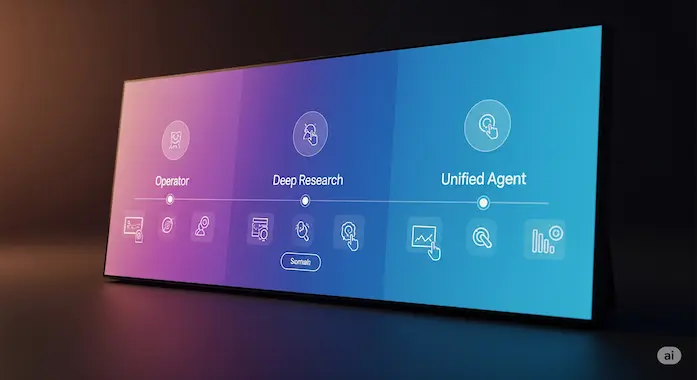
- Operator arrived in January 2025. It could click buttons but struggled to digest long articles.
- Deep Research landed two weeks later. It read fast but lacked true interaction with login walls and dynamic pages.
- The engineering teams, once separate, merged in March and began training a single model that could pick the right sub‑tool rather than brute forcing each attempt.
By mid July, that merged branch passed both internal benchmarks and a public live demo, becoming ChatGPT Agent. In Sam Altman’s words:
“We needed an assistant that can think, switch to a text crawl for speed, jump into a GUI when the page gets tricky, then pivot to a terminal for code. We finally have it.”
The rollout follows OpenAI’s “iterative deployment” policy. Capabilities appear first for Pro users, then Plus, Team, Enterprise, and eventually a trimmed version for Edu.
3. Core Definition and Everyday Meaning

At its simplest, a ChatGPT Agent is a smart worker that:
- Reads a human request.
- Plans a sequence of subtasks.
- Chooses a tool for each subtask: scrape, click, compute, or draw.
- Executes the action in a sandboxed cloud computer.
- Checks interim results.
- Loops or asks you when uncertain.
- Delivers a fully cited answer and optionally schedules itself for repeat runs.
Think of it as the busy friend who volunteers to book your flights, gather refund policies, and draft a trip spreadsheet, all while texting screenshots for approval.
4. Inside the Toolbox: Architecture Explained
4.1 The Four Layers
| Layer | Purpose | Key Tech |
|---|---|---|
| Language Reasoner | Reads prompts, writes plans, explains results | RL fine‑tuned o3 with Codex code weights |
| Memory Vault | Stores long‑term user facts, cached docs, tool outcomes | Vector store and relational index |
| Tool Deck | Executes work | Text browser, visual browser, Bash terminal, Image Gen, JSON API caller |
| Controller Loop | Orchestrates observe‑think‑act cycles | Reinforcement learning policy with tool‑choice logits |
4.2 Training Tricks
Engineers combined curriculum learning (“build this spreadsheet”) with reward shaping. The model earned points for correctness, brevity, and smart tool selection, not just final answers. Over fifty‑thousand synthetic missions taught it to resist rash clicks, improve code after failures, and skip the visual browser if a quick HTTP scrape sufficed.
4.3 Efficiency Hacks
- Lazy Browser Launch. The GUI opens only when the target page demands JavaScript interaction.
- Streaming Diff Prompts. Instead of sending the full terminal transcript back into the model each loop, the Agent passes incremental diffs.
- Cite First Mode. When confidence in a fact is high, the Agent takes a screenshot before forming prose, shaving tokens.
These tweaks explain how a single Pro credit often covers an eight‑minute workflow.
5. Sam Altman on AGI, the Singularity, and Why It Matters
During the July 17 livestream Altman said,
“I think this is the nearest we have come to a real AGI moment on a consumer screen. The horizon where technology meets the singularity is no longer science fiction, it is a product roadmap.”
He later added,
“Society and the technology will co‑evolve. We need contact with reality before the singularity so we can correct course.”
These statements reveal two convictions: tool‑using language models are the bridge to general intelligence, and public exposure is essential for safety research.
6. Pricing, Credits, and Fair Use Limits
| Plan | Monthly Credits | Typical Work Hours per Credit | Estimated Value |
|---|---|---|---|
| Pro (USD 20) | 400 | 4–15 min each | 26 to 100 agent hours |
| Plus (USD 10) | 40 | 4–15 min each | 2.5 to 10 agent hours |
| Team (USD 25 / seat) | 30 (pooled) | Varies | Shared workforce |
| Enterprise | Negotiated | Negotiated | Dedicated throughput |
| Edu | Pending | Class quota | Research eligible |
Only prompts that push the Agent forward subtract credits. If the assistant stops to ask, “Do you approve this hotel in Kyoto?” you can answer without penalty.
A second meter, “Tool Minutes,” appears in August. Heavy terminal compilations and large image generations may consume Tool Minutes, protecting light users from remote compute fees.
7. Step by Step Tutorial: From Toggle to Mastery
7.1 Agent Mode Activation
- You can activate ChatGPT Agent by opening any chat and selecting Tools → Agent.
- Alternatively, you can type /agent in the chat to enable it.
- Once activated, the chat header displays “Agent” with a green dot.
7.2 Eligibility and Access
- Available to Pro users immediately.
- Rolling out to Plus and Team users over the next few days.
- Not yet available in the European Economic Area or Switzerland.
7.3 Prompt Handling
- The Agent performs best with specific and detailed prompts.
- Clear instructions help the Agent complete multi-step tasks more accurately.
7.4 Task Monitoring
While executing tasks, the Agent provides live narration of its steps.
Users can:
- Pause the task.
- Modify instructions mid-task.
- Take over the browser if manual input is needed.
7.5 Confirmation for Critical Actions
- Before irreversible steps (e.g., placing orders, sending emails), the Agent pauses and asks for user approval.
- Users can edit or approve the action before it proceeds.
7.6 User Memory (Short-Term)
- Within a session, the Agent may recall temporary context like location or preferences to shorten future prompts.
After three or four runs you will notice shorter prompts suffice because ChatGPT Agent recalls your city, clothing sizes, and even timezone.
8. Two Essential Tables
| Feature | Pro | Plus | Team | Enterprise |
|---|---|---|---|---|
| Credits/mo | 400 messages | 40 messages | 40 messages (pooled) | Custom (not unlimited) |
| Browsers | Text + GUI | Text + GUI | Text + GUI | Text + GUI |
| Terminal | Yes | Yes | Yes | Yes |
| Connectors | Available (no cap listed) | Available (no cap listed) | Custom allowed | Custom + on-prem |
| SLA | No SLA (community support) | No SLA (community support) | Email support | 24/7 support (negotiated) |
| Opt out of training | Yes | Yes | Yes | Yes (default by contract) |
8.2 ChatGPT Agent vs AutoGPT vs CrewAI
| Feature | ChatGPT Agent | AutoGPT | CrewAI |
|---|---|---|---|
| Model | OpenAI proprietary (o3 RL) | Uses GPT 4 or GPT 3.5 via OpenAI API | Built on LangChain, model flexible (GPT 4/GPT 3.5) |
| Cloud computer | Fully managed in cloud | Typically self-hosted on user’s machine or cloud | Runs on customer infrastructure; cloud/on prem options |
| Visual clicking | Built-in GUI browser for clicking/navigation | No native GUI; only CLI and plugin-based | Has visual builder (drag drop) via LangChain UI |
| Source citation | Displays URLs and screenshots during browsing | Typically manual logging only | Logging/citation supported but manual |
| Memory | Vector + relational memory (session-level) | Supports short and long term memory via vector DB/file store | Framework-level memory per agent/task via LangChain |
| Safety guardrails | Built-in safety, monitors & filters actions | Relies on community scripts and manual oversight | Includes role-based agent structure, security is community-managed |
| Pricing | Based on plan credits | Uses OpenAI API tokens; free software but token costs apply | Subscription or usage plan (varies); often enterprise-oriented |
9. ChatGPT Agent vs AutoGPT and Other Competitors
AutoGPT popularized the buzz around autonomous agents in early 2024. Yet it struggled with five problems: tool‑setup complexity, token expense, hallucinations, security exposure, and lack of user trust dashboards. ChatGPT Agent addresses each by packaging tools in a remote VM, trimming token loops, inserting citation screenshots, enforcing opt‑in connectors, and showing a clear activity feed. CrewAI, Manus, and CoreWeave host similar concepts. Their niche remains developer‑centric. If you want a SaaS‑quality product with direct support channels, ChatGPT Agent leads today.
10. Security, Privacy, and Prompt Injection Defenses
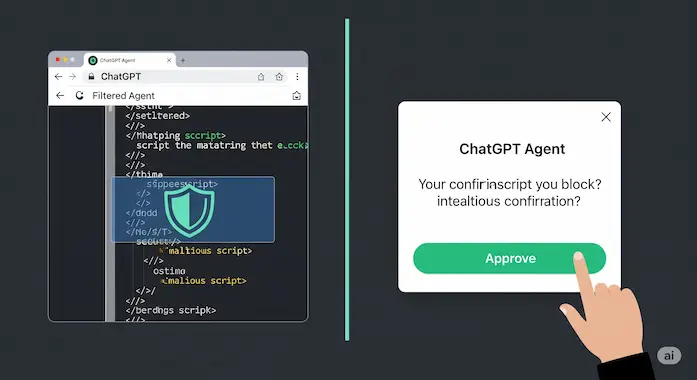
Prompt injection ranks as the hottest risk. An attacker hides malicious instructions inside, say, a blog comment. The Agent might absorb them while scraping. OpenAI counters this way:
- Layered filter watches every action. If a screenshot shows “password reset,” the controller asks for confirmation.
- Defanged crawl. The text browser sanitises HTML, stripping scripts and suspicious tokens.
- Rate and scope limits. Each Agent run sees only the cookies you allowed and only during the session.
Best practices for users:
- Grant the minimum needed connector scope.
- Let the Agent open sensitive sites, then click Take Over Browser before typing passwords.
- Clear cookies in Settings → Data Controls after banking tasks.
- Interrupt any strange loop immediately.
11. Known Limitations and Common Pitfalls: Read This Before You Hit “Run”
Even the best tools have rough edges, and ChatGPT Agent is no exception. Knowing where those edges sit will save you time and a few headaches.
11.1 Task Suitability
The Agent shines on structured knowledge work. It gathers data, builds spreadsheets, drafts emails, and writes clean code snippets. It still stumbles on jobs that hinge on nuanced emotion or deeply subjective taste. Asking it to craft the perfect love song or mediate a family dispute is risky. Use it as a researcher or executive assistant, not a poet or therapist.
11.2 The Over‑Reliance Trap
Because ChatGPT Agent feels capable, it is easy to hand it the keys. Resist that urge. Never let the assistant mass email your entire client list or execute live trades without a final human click. Keep a “two‑person rule”: the Agent prepares, you approve. One extra review step protects your reputation and wallet.
11.3 Handling Ambiguity
Clear prompts equal clear results. Vague requests like “fix my website” can send the Agent into a loop of guesswork that burns credits and time. Compare:
Good prompt: “Audit broken internal links on binaryverseai.com and output a CSV.”
Less good: “Make my site better.”
When in doubt, add specifics, targets, formats, timelines.
11.4 The CAPTCHA Wall
Web automation looks slick until a site throws a reCAPTCHA. The Agent can parse basic challenges, but advanced bot checks stop it cold. In those moments, click Take Over Browser, solve the puzzle, and hand control back. Plan for that detour on ticket sites, banking portals, and government forms.
11.5 Resource Ceilings
Your plan includes a bucket of “Tool Minutes.” Compiling large codebases, rendering high‑resolution images, or scraping thousands of pages can drain that pool fast. If you see long terminal sessions or high GPU time, break the project into smaller runs or upgrade your quota before the well runs dry.
11.6 Memory Isn’t Magic
The Agent’s memory helps but isn’t telepathic. It recalls explicit facts you share—shoe size, favorite airline, project folder paths. It won’t infer details you never mention. Review stored memories in Settings to keep them current and safe.
Keep these caveats in mind and ChatGPT Agent will feel less like a black box and more like a trusted junior partner who just happens to live in the cloud.
12. The Road Ahead
Tool‑augmented language models transformed from novelty to necessity in under two years. ChatGPT Agent marks the start of phase two: outcome‑driven autonomy. Every accountant, teacher, marketer, and student gains a tireless helper that never misses a citation and learns your quirks over time.
Sam Altman ended the livestream with this invitation:
“We hope you will love it. Use all the caution we described, then push the boundaries and tell us what breaks. Only by doing that together will we reach safe AGI.”
OpenAI calls this a “feel the AGI moment.” Whether that moment proves temporary hype or the dawn of the singularity depends on how we, the users, put ChatGPT Agent to work. Start small, iterate, and watch your task list shrink. The next era of personal computing just gained a keyboard, a mouse, and a little imagination of its own.
You have now explored more than three thousand words on the future of autonomous assistance. Close the tab, fire up the Agent, and let it tackle the first chore on your plate.
Azmat — Founder of Binary Verse AI | Tech Explorer and Observer of the Machine Mind Revolution. Looking for the smartest AI models ranked by real benchmarks? Explore our AI IQ Test 2025 results to see how top models. For questions or feedback, feel free to contact us or explore our website.
What is a ChatGPT Agent?
A ChatGPT Agent is an AI assistant built on OpenAI’s o3 architecture that can autonomously complete multi-step tasks using a browser, terminal, image generator, and APIs. It reads your prompt, chooses the right tool for each subtask, and executes actions on a cloud computer. Think of it as a digital coworker that can research, write, click, and code.
Does ChatGPT support agents?
Yes, ChatGPT now supports agents as part of its Pro, Plus, Team, and Enterprise plans. The Agent feature is available within the ChatGPT interface and can be enabled directly from the Tools menu or by typing /agent in any chat.
How do I create my own ChatGPT Agent?
You can create a custom ChatGPT Agent by using the My GPTs feature in the ChatGPT app. This allows you to define behaviors, tools, and knowledge for your agent without writing any code. For more advanced setups, developers can use the OpenAI API and connectors.
How to enable ChatGPT Agent in my OpenAI account?
To enable ChatGPT Agent:
Open ChatGPT and go to any chat window.
Select Tools → Agent, or type /agent.
A green “Agent” indicator will appear once active.
Note: Availability is currently limited to paid plans and is rolling out gradually by region.
How to deploy ChatGPT Agent on my website?
To deploy an agent on your website:
Use the OpenAI API with your agent logic.
Set up endpoints that communicate with your web app.
Optionally use an iframe, chatbot wrapper, or full-stack integration to embed the agent.
At this time, full GUI-based Agent deployment is only available through custom development.
How to fine-tune a ChatGPT Agent with my own data?
While full fine-tuning is not yet supported for Agents directly, you can:
Upload custom files and documents via ChatGPT’s memory or tool interface.
Use vector databases for retrieval-augmented generation (RAG).
Use the OpenAI API to create specialized prompts and functions that simulate fine-tuning with structured knowledge.