
Introduction
Your AI assistant is great at talking. Your computer still needs you to do the work.
That gap is why people keep bouncing between tabs, copying text into docs, nudging spreadsheets into shape, renaming files one by one, and generally playing the role of “human glue” between tools. It’s not hard work. It’s just relentless.
Claude Cowork is Anthropic’s attempt to kill that glue work. Instead of treating the model like a chat buddy, it treats it like a coworker who can take a task, operate inside a folder you choose, and hand back finished files. You stay in control, it asks before it does anything significant, and the outcome is something you can actually ship.
This post breaks down what Claude Cowork changes, where it’s basically familiar, and how it stacks up against ChatGPT agent mode in the real world.
Table of Contents
1. Cowork In One Minute
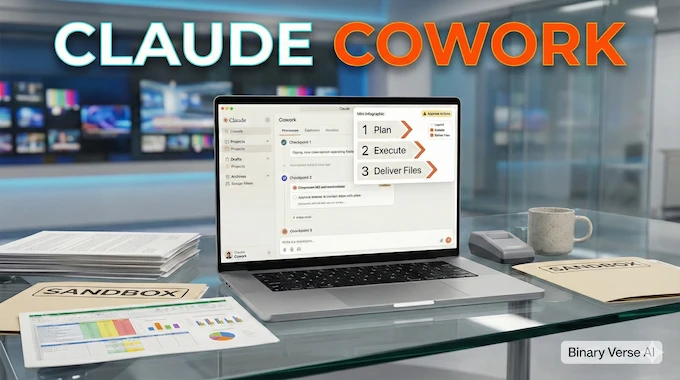
Claude Cowork is a desktop “task mode” for knowledge work. You point it at a folder on your machine, describe the outcome, and it plans and executes the steps to produce outputs inside that folder.
For bigger jobs, it can split the work into smaller subtasks, run a few workstreams in parallel, then stitch the results into one clean deliverable.
The simplest way to understand Claude Cowork is this: chat gives you answers, task mode gives you deliverables.
Here’s the quick snapshot.
Claude Cowork Task Mode, Inputs To Deliverables
A compact view of how Claude Cowork turns a folder plus a goal into real files, with clear checkpoints for control.
| Input You Provide | What Happens Next | Output You Receive | Best Fit | Where You Stay In Control |
|---|---|---|---|---|
| A folder, plus a goal | It writes a plan, then runs steps | Real files saved locally | Docs, spreadsheets, slide decks, file cleanup | You approve significant actions |
| Messy sources, like notes or screenshots | It extracts, structures, formats | Clean, usable artifacts | Turning “pile of stuff” into structure | You can interrupt and steer |
| Optional connectors and browser access | It pulls external info when allowed | A finished deliverable, not just text | Research plus writing plus formatting | You can restrict scope and permissions |
If you’ve ever wished your assistant could do the boring middle parts, Cowork is aimed straight at that problem.
2. What’s New Vs Regular Claude Chat
Regular chat is a conversation loop. You ask, it answers. You refine, it answers again. That’s perfect for thinking and debugging, and it’s exhausting for production work.
Claude Cowork changes the contract. You give it an outcome, it proposes a plan, then it executes. You don’t have to keep refeeding context or converting outputs into the right file format.
2.1 It Feels Like Delegation, Not Prompting
The “task mode” vibe matters. You can drop instructions, go make coffee, and come back to progress, not a frozen cursor waiting for you to paste the next thing.
2.2 It Produces The File, Not A Description Of The File
A normal chat model can tell you what a spreadsheet should look like. Claude Cowork can write the spreadsheet, with working formulas, clean headers, and the annoying details already handled.
2.3 It’s Built For Longer Runs And Check Ins
When a task takes time, you want visibility and steering, not a giant monolithic response. Claude Cowork surfaces progress, loops you in, and keeps moving.
3. Cowork Vs Claude Code Desktop
If you’ve used Claude Code, your first thought is probably, “So is this just Claude code desktop in a nicer outfit?” The honest answer is that the foundation is similar, but the target user and workflow are different.
Claude Cowork is Claude Code’s agentic style, packaged for non coding work and non terminal people. That sounds simple. It’s a big deal in practice.
3.1 Why The Surface Area Matters
Power users like the terminal because it’s direct. Everyone else avoids it because it feels like stepping onto a stage without a script. Cowork lowers the barrier, which means it can show up in marketing, ops, finance, research, and anywhere else documents are the currency.
3.2 When You Should Still Use Claude Code Desktop
Use Claude code desktop when you want maximum control and composability, like automating repo tasks, chaining scripts, or building repeatable workflows. Cowork is optimized for “get this artifact done,” not “let’s build tooling.”
4. Cowork Vs ChatGPT Agent Mode
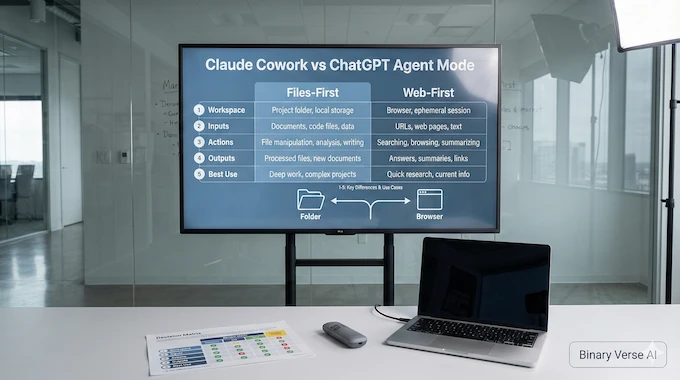
People keep asking if Claude Cowork is “the same thing” as a ChatGPT agent, specifically an OpenAI ChatGPT agent. It isn’t. The difference is the default workspace.
ChatGPT agent mode usually starts from the chat session and the web. Claude Cowork starts from your local folder.
4.1 Default Workspace, Files First Vs Web First
Claude Cowork assumes your source of truth is the stuff on your computer, docs, notes, spreadsheets, images, and folders that already exist. ChatGPT agent mode assumes the source of truth is the task plus whatever the agent can fetch, browse, and assemble during the run.
Neither is “better.” They’re built for different work.
4.2 Interaction Model, Desktop Workflow Vs Web Task Runner
Claude Cowork feels like you handed work to someone sitting at your machine, inside a controlled folder, producing artifacts. ChatGPT agent mode feels like a web native operator, great at stepping through online flows and research.
4.3 Where Each One Wins
Cowork tends to win on artifact heavy jobs, the kind where the final answer is a file. ChatGPT agent mode tends to win when the job is action and navigation across sites and tools.
If you only remember one heuristic: pick based on where the work lives.
5. What Cowork Can Do
Agent demos love theatrics. The useful stuff is quiet and practical.
Claude Cowork shines on “high friction, low creativity” tasks, the work you can do, but really don’t want to.
5.1 File And Folder Chores
Organize a Downloads folder by type and date. Rename screenshots into a consistent pattern. Sort assets into subfolders. Build an archive. This is the kind of tedium that drains your day, and it maps cleanly to a folder scoped agent.
5.2 Spreadsheets From Messy Inputs
Drop receipts, invoices, or screenshots into a folder. Ask for an Excel file with columns, totals, categories, and formulas. The win is not the extraction, it’s that you end up with a spreadsheet you can use immediately.
5.3 Drafts From Scattered Notes
Give it a folder of notes, outlines, and half written fragments. Ask for a first draft with clear headings, consistent terminology, and a structure that makes editing fast.
5.4 Long Running Tasks With Sanity Checks
The best agent behavior is not “autopilot forever.” It’s “run, then ask at the sharp edges.” Cowork can pause before a big rename or rewrite, show the plan, and let you approve or adjust.
6. What ChatGPT Agent Mode Can Do
ChatGPT agent mode is at its best when the environment is the internet. When the job is “go do things online,” it feels natural.
Good examples look like this:
- Research a topic across sources, then synthesize a brief
- Compare products, pricing, and specs across vendor sites
- Build a travel itinerary, then turn it into a structured plan
- Execute repetitive web workflows with permission checks
If your task starts in the browser and ends in the browser, ChatGPT agent mode is hard to beat.
7. Pricing And Usage Limits

Claude Cowork is positioned as a compute heavy feature. In the current research preview, it’s tied to Claude Max on macOS, with a waitlist for broader access.
That gating tells you something important: Cowork is meant for jobs where “agent overhead” is worth it.
7.1 Use It When File Access And Execution Matter
If you are asking a quick question, task mode is the expensive way to do it. Reserve Claude Cowork for work where it saves you real time, like producing artifacts, processing piles of files, or running multi step transformations.
7.2 Treat Agent Runs Like A Budget
A practical pattern is: brainstorm in normal chat, tighten the instructions, then hand the final task to Cowork once the goal is crisp. You get better outputs and you burn fewer resources.
ChatGPT agent mode has its own availability and limits that can change by plan and rollout. Don’t guess, check what your account exposes before you build a workflow around it.
8. Security Reality Check
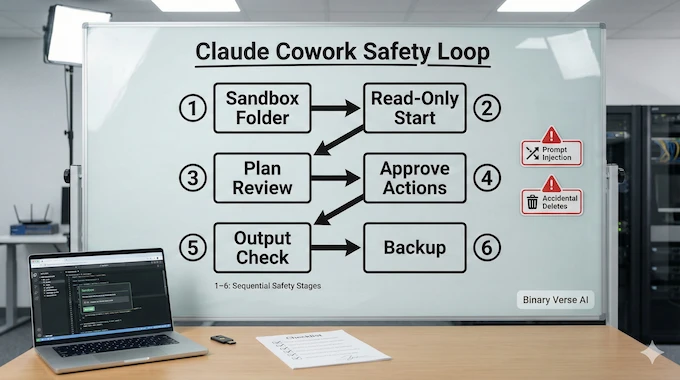
Once an agent can act, security gets real. This is not “it might answer wrong.” This is “it might change things.”
Cowork runs the work in an isolated environment on your computer, effectively a virtual machine style sandbox, but the files you grant access to are still real, so your guardrails matter.
Claude Cowork is built with guardrails like scoped folder access and approvals, but the risks are still worth taking seriously, especially in a research preview.
This is where agentic AI security stops being a buzzword and starts being a checklist.
8.1 Prompt Injection Becomes An Action Problem
If an agent reads untrusted content, a malicious document or webpage can try to steer the run. That’s prompt injection with teeth, because the model can act on your files. This is a core AI agent security concern, not a corner case.
8.2 Accidental Damage Is The Most Common Failure
The biggest risk is you. People write vague instructions, approve a plan they did not read, then regret the result. The fix is boring. Scope the folder, ban destructive verbs unless needed, and review the plan like code review.
8.3 Sensitive Data Exposure Is Easy To Create
Local access is powerful. It also means you can accidentally point the agent at a folder with credentials, customer data, or private docs. Treat this like you would any AI security tool decision inside a team, least privilege, clear boundaries, and strong defaults.
Claude Cowork can be safe to use. It just needs the same respect you’d give any system that can read and write real files.
9. Safe Workflow Checklist
If you want the upside without the drama, use this.
- Work in a dedicated sandbox folder, not your whole drive.
- Start with read only instructions, ask for a plan, then approve edits.
- Back up the folder before big runs.
- Keep connectors minimal and trusted.
- Review the plan, if it’s vague, rewrite the task.
- Make destructive actions explicit and scoped, no “clean up everything.”
- Spot check outputs, especially spreadsheets and claims in drafts.
These rules make Cowork feel boring. That’s a compliment.
10. Will This Kill Startups?
Agent platforms don’t kill startups, they kill thin wrappers.
Claude Cowork and ChatGPT agent mode compress the value of “prompt plus UI” products. If your entire product is a nicer chat box, you’re going to feel pressure.
Startups still win by owning something real:
- Deep integrations into a workflow people already live in
- Domain data and feedback loops that improve output quality
- Compliance and governance that teams can trust
- Distribution inside an organization, which beats a slick demo every time
The bar is higher. The opportunity is still there.
11. Cowork Vs ChatGPT Agent Mode, The Decision Matrix
Choose based on where your work lives and what you want the agent to touch. That sounds obvious. It’s also the most common mistake.
Cowork is the stronger default when your day is files and artifacts. ChatGPT agent mode is the stronger default when your day is web workflows and online actions.
Claude Cowork Decision Matrix For Daily Work
Pick the right starting point based on where your workflow lives, local files or the web, and how much control you want.
| Your Typical Work | Start Here | Why It Fits |
|---|---|---|
| Docs, spreadsheets, slide decks, local file organization | Claude Cowork | Folder scoped access plus artifact quality is the core loop |
| Web research, browsing, forms, online actions | ChatGPT agent mode | Web native navigation and action sequences are the core loop |
| Turning messy local inputs into polished outputs | Cowork | It can read the pile and write the finished files back |
| Repetitive online workflows with approvals | ChatGPT agent | It’s designed for orchestrating steps with check ins |
| You want maximum control and composability | Claude code desktop | Terminal level flexibility for repeatable automation |
If you’re choosing for a team, run a simple bake off. Give two people the same messy task, one in Cowork and one in ChatGPT agent mode, and compare time to a deliverable you’d actually send.
12. The Real Product Is Delegation
The hype cycle wants to argue about model IQ. Your calendar doesn’t care.
What matters is whether you can hand off work and get back something usable. Claude Cowork is compelling because it treats your computer as the workspace, not the chat window. It makes deliverables the default output and planning plus approvals the default workflow.
Do this next: pick one annoying weekly task, set up a sandbox folder, and run it end to end. Then run the same task in ChatGPT agent mode. You’ll learn the real strengths in twenty minutes.
If you want more teardown style guides like this, subscribe to the blog. Send me your messiest workflow too, the ones you keep postponing. Those are exactly the jobs agents are finally good at.
For more insights on AI agent capabilities, check out our coverage of Grok 4 Heavy, AgentKit, and the best LLM for coding in 2025. You can also explore our guide on Claude Skills and learn about MedGemma for specialized applications. Stay updated with the latest developments by following our AI news coverage.
What Is Claude Cowork, And Who Is It Actually For?
Claude Cowork is a desktop “task mode” that lets Claude plan and complete multi-step work using a folder you share, then deliver real files like docs or spreadsheets. It’s built for knowledge work, especially people who live in folders, drafts, and deliverables, not chat threads.
Is Claude Cowork Genuinely New, Or Just Claude Code/MCP In A Friendlier UI?
Under the hood, Claude Cowork is closely related to the same agentic approach behind Claude Code, but packaged so non-technical users can run tasks without living in a terminal. The novelty is the product surface, the workflow UI, and “deliverables-first” defaults, not a brand-new idea.
How Safe Is Cowork With Local File Access And Browser Access?
Cowork is safer than “full computer control,” but it still expands the blast radius because it can read and write files you grant, and it may browse via a connector. Key risks are prompt injection, accidental deletions, and sensitive-data exposure, which is why agentic AI security and AI agent security practices matter here. Treat it like an AI security tool only inside a controlled sandbox workflow.
What Are Cowork’s Limits Right Now, And How Expensive Is It In Real Use?
Right now, Cowork is positioned as a research preview in the Claude Desktop macOS app and gated behind Claude Max. Usage is real and task-heavy, meaning you can hit limits faster than normal chat, especially on long-running or multi-step jobs.
Claude Cowork vs ChatGPT Agent (Operator), Which One Should You Use And Why?
Use Claude Cowork when your workflow is file-centric, like reports, spreadsheets, slides, and organizing folders, because it’s designed around local deliverables and iterative task execution. Use OpenAI ChatGPT agent mode (and the OpenAI ChatGPT agent ecosystem) when your workflow is web-heavy, research-driven, or centered inside ChatGPT, especially when “do the steps online” is the main job.