
Introduction
Most “model launch” posts read like a victory lap. This one is a field manual.
If you’re here, you probably want one of two things: get Qwen3 Coder Next running fast, or fix the annoying error that’s blocking you. Either way, you deserve something better than a scattered thread, a half-working command, and a weekend disappearing into dependency purgatory.
So let’s do this like a grown-up engineer: define what Qwen3 Coder Next is actually good at, pick the right run mode, install it cleanly, and keep a tight checklist for the common failures. Along the way we’ll talk about tool calling, what “agentic” benchmarks really measure, and why this model’s design choices are quietly interesting, even if you never read another architecture diagram again.
Table of Contents
1. What Qwen3 Coder Next Is And What It’s Actually Good At
Qwen3 Coder Next is a coding-agent specialist that’s optimized for the real shape of software work: multi-step edits, repo context, tool use, execution feedback, and recovery after something breaks. The key trick is efficiency. It’s an 80B-parameter model, but only about 3B parameters are active per forward pass, which is the whole point: strong agent-style behavior without paying the full “giant dense model” tax.
The training philosophy is equally blunt: stop worshipping parameter count, and scale the training signals instead. The report describes agentic training built around large-scale synthesis of verifiable coding tasks paired with executable environments, then learning from environment feedback via mid-training and reinforcement learning. That’s not marketing fluff. It’s an explicit bet that agent skills come from practicing the loop, not from growing the brain forever.
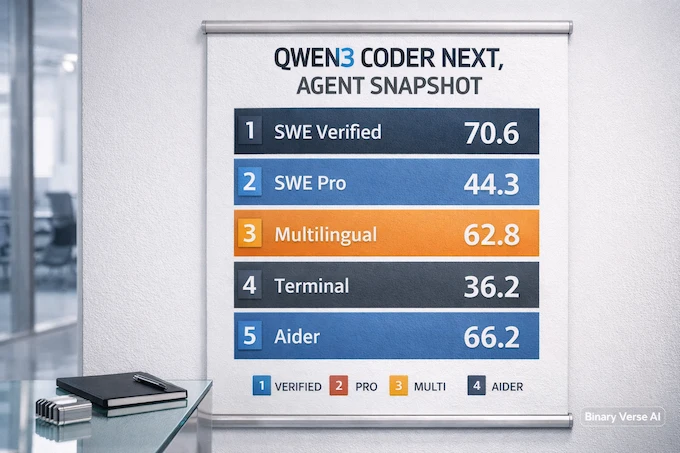
Performance On Coding Agent Benchmarks (Score %)
Qwen3 Coder Next Benchmarks
| Benchmark | Qwen3 Coder Next | DeepSeek-V3.2 | GLM-4.7 | MiniMax M2.1 |
|---|---|---|---|---|
| SWE-Bench Verified (w/ SWE-Agent) | 70.6% | 70.2% | 74.2% | 74.8% |
| SWE-Bench Multilingual (w/ SWE-Agent) | 62.8% | 62.3% | 63.7% | 66.2% |
| SWE-Bench Pro (w/ SWE-Agent) | 44.3% | 40.9% | 40.6% | 34.6% |
| Terminal-Bench 2.0 (w/ Terminus-2 json) | 36.2% | 39.3% | 37.1% | 32.6% |
| Aider | 66.2% | 69.9% | 52.1% | 61.0% |
Those numbers come straight from the technical report’s benchmark figure.
What should you take away?
- Qwen3 Coder Next is especially strong on SWE-Bench Pro, which is the one that punishes shallow “pattern matching” and rewards long-horizon task completion.
- It’s competitive on Verified and Multilingual, which means you can actually use it for real work without it collapsing the moment the repo isn’t a toy.
- Terminal-Bench is still hard for everyone. That’s not a failure, it’s a reality check.
When is Qwen3 Coder Next the wrong tool? If you only need short completions, strict low latency, or you’re trying to run on tiny hardware with zero VRAM headroom, you’ll have a better day with something smaller and simpler.
2. Quick Start Decision Tree: Local GGUF Vs Cloud H100 Vs API Server
Here’s the fastest way to stop overthinking.
2.1 The “I Want It Running In 10 Minutes” Path
- Pick Local GGUF if you want instant experimentation and you don’t need massive concurrency.
- Use Ollama if you want the least friction.
- Use LM Studio if you want a UI and don’t want to touch terminals.
- Use llama.cpp if you want control and reproducibility.
2.2 The “I Want Max Throughput Plus Agents” Path
- Pick Cloud H100 if you’re going to run multi-agent workflows, batch requests, or serve multiple clients.
- Run an inference server (vLLM or SGLang-style) behind an OpenAI-compatible endpoint, so your tools and IDE agents plug in cleanly.
2.3 The “I Want To Wire This Into My Stack” Path
- Pick API server mode when you care about:
- consistent latency
- authentication
- logging
- rate limits
- safe tool execution boundaries
If you’re unsure, start local. Once you feel the model’s behavior and costs, move to H100. Most people do this backwards and then blame the model.
3. Download Options And Naming Traps: Base Vs Instruct, GGUF Vs Full Weights
Half of “this model is broken” reports are really “I downloaded the wrong artifact.”
Here’s the map:
- Base vs Instruct Base is for research and custom post-training. Instruct is what you want for chat, coding agents, and day-to-day use.
- GGUF vs Full Weights GGUF is what you want for local runners in the llama.cpp ecosystem. Full weights are for frameworks like Transformers, vLLM, SGLang, and custom serving stacks.
3.1 “Why Does This File Not Load” Checklist
If your runner refuses to load:
- you grabbed full weights but tried to run them in a GGUF tool
- you grabbed a GGUF but your runner is too old for that GGUF version
- you picked a quant that doesn’t fit your VRAM
- you’re using a chat template mode that your runner doesn’t support
This is why “Qwen3 Coder Next Install” guides that skip file types are secretly sabotage.
4. Run Locally With GGUF: The 3 Easiest Paths
If your goal is qwen3 coder next run local, pick one of these and commit. Don’t mix and match runners mid-debug. That’s how you end up with three broken setups instead of one working setup.
4.1 Path A: Ollama
Ollama is the fastest on-ramp for most people. You trade a bit of control for a lot of calm. It’s great for quick testing, prompt iteration, and “does this model fit my workflow” decisions.
Best for: speed, convenience, low ceremony.
4.2 Path B: LM Studio
LM Studio is a UI-first workflow. You get model management, prompt presets, chat sessions, and a smoother “desktop app” feel.
Best for: UI lovers, quick local chats, interactive testing.
4.3 Path C: llama.cpp
llama.cpp is where power users end up. It’s direct, scriptable, and predictable. If you care about reproducibility, performance flags, and knowing exactly what your runner is doing, this is the path.
Best for: control, automation, performance tuning.
5. GGUF Quant Pick Guide: What To Use For 8GB, 16GB, 24GB, 48GB VRAM
Quant choice is not a moral decision. It’s a budget decision.
Your best default is the one that:
- fits comfortably in VRAM
- leaves room for KV cache
- doesn’t force your system into swap thrash
Here’s a practical cheat sheet that matches how people actually work.
Qwen3 Coder Next VRAM Targets
| VRAM Target | Practical Quant Pick | What You’ll Feel In Use |
|---|---|---|
| 8GB | Smallest quant that loads reliably | Shorter context, more tradeoffs, still useful for quick edits |
| 16GB | Mid quant, balanced | Good interactive coding, decent context if you stay disciplined |
| 24GB | Higher quant, comfortable | Better stability on longer sessions, fewer “why is this drifting” moments |
| 48GB | High quality quant with headroom | Strong local experience, bigger context, more agent-style workflows |
Two non-obvious truths:
- Past a point, higher quant won’t help if your bottleneck is KV cache or context length.
- A smaller quant that stays fast often beats a bigger quant that makes you wait.
If you’re writing an internal guide, call this section “don’t be a hero.”
6. Cloud H100 Setup: The “Works Every Time” Stack
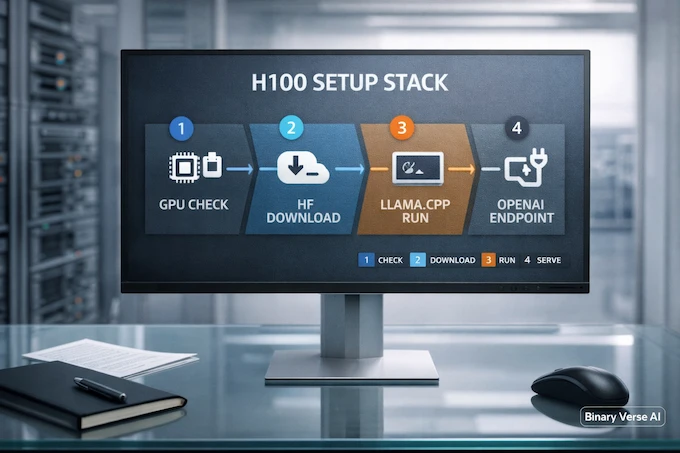
Cloud is where Qwen3 Coder Next starts feeling like a real tool instead of an experiment. You get throughput, stable latency, and enough headroom to run agent loops without sweating every token.
The report’s framing is consistent with this: the model is built for coding agents and trained around environment interaction and recovery, so giving it a proper serving stack pays off.
Below is the exact step guide and commands you asked to include, unchanged.
6.1 Step-By-Step Guide For Cloud H100 GPU Setup OR Any GPU
6.1.1 Assuming llama.cpp is already installed
6.1.2 Download the Model
Run this exact command to download the 48.9 GB file.
hf download unsloth/Qwen3-Coder-Next-GGUF \
  --local-dir ~/Qwen3-Coder-Next-GGUF \
--include "*UD-Q4_K_XL*"6.1.3 Load and Run the Model
Run this exact command to load the model and begin talking to it.
~/llama.cpp/llama-cli \
  --model ~/Qwen3-Coder-Next-GGUF/Qwen3-Coder-Next-UD-Q4_K_XL.gguf \
  --ctx-size 32768 \
  --temp 1.0 \
  --top-p 0.95 \
  --min-p 0.01 \
  --top-k 40 \
--jinja6.2 vLLM Vs SGLang, How To Choose
If you care about high-throughput serving and want a familiar OpenAI-style endpoint, vLLM-style stacks are popular. If you care about flexible serving and fast iteration with agent-friendly settings, SGLang-style stacks are also common.
The decision is boring in a good way:
- choose the one your team can operate
- choose the one your observability supports
- choose the one you can upgrade without fear
7. Tool Calling With Qwen3 Coder Next: OpenAI-Style Functions, End-To-End
This is where Qwen3 Coder Next separates itself from “smart autocomplete” models.
The technical report directly calls out an XML-style tool calling format designed for string-heavy arguments and long code without nested quoting pain. It also highlights training on diverse tool representations so the model learns format-invariant tool use rather than memorizing one schema. That’s the core of modern tool calling done right.
If you’ve ever watched a model implode because a JSON quote got escaped twice, you already understand why this matters.
7.1 Tool Schema Design That Avoids Brittle Parsing
When you define tools:
- keep parameter types strict
- keep names boring
- keep outputs predictable
- treat free-form text as a last resort
This is the practical side of tool calling AI: you’re not just defining a function, you’re defining a contract that has to survive failure.
7.2 Tool-Call Loops That Don’t Melt Down
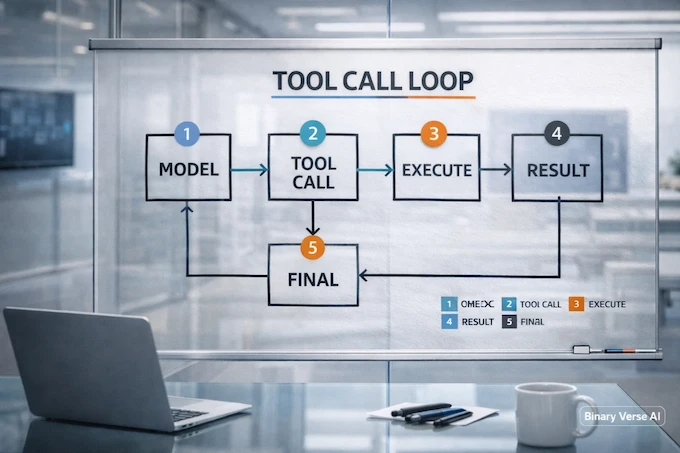
A stable loop looks like this:
- model proposes a tool call
- your system runs it
- you return the structured result
- model continues, or finalizes the answer
If your loop is “tool call, panic, prompt again,” you don’t need a better model. You need a better harness.
And yes, if you’re thinking about tool calling LLM setups in production, treat tool execution like untrusted input. Because it is.
8. VS Code Plus Agents Workflow: Aider, Continue, Cline-Style
If you’re running agents inside an IDE, the actual magic isn’t the model. It’s the workflow.
A good agent loop is:
- plan
- patch
- test
- commit
And it repeats until the repo stops screaming.
The report includes evidence that Qwen3 Coder Next generalizes well across different community scaffolds and templates, which is exactly what you want when you bounce between agent frameworks.
8.1 OpenAI-Compatible Endpoint Wiring
Use an OpenAI-compatible endpoint so your agent tooling doesn’t care what’s behind the curtain. Your IDE plugin wants a standard API shape. Give it that, and save your future self from a maintenance nightmare.
8.2 Prompts That Actually Work
Try prompts that enforce structure:
- “Draft a plan in 5 bullets, then implement the smallest patch.”
- “Write tests first, then fix.”
- “If tests fail, explain why, then patch again.”
The point is not to sound clever. The point is to keep the agent’s working memory organized.
9. Benchmarks Section: What Matters, What Doesn’t
Let’s talk about qwen3 coder next benchmarks without turning this into a leaderboard fandom war.
9.1 SWE-Bench Verified And Pro, How To Interpret Claims
SWE-Bench Verified is a solid signal for repo-scale bugfix capability in a controlled setting. SWE-Bench Pro is the stress test, longer horizons, more chances to drift, more chances to break your own patch halfway through.
The report also notes Qwen3 Coder Next scores around the low 70s on SWE-Bench Verified across multiple scaffolds, which matters because scaffolds are where models often fall apart.
If you’re searching for qwen3 coder next swe-bench verified, here’s the practical meaning: it can survive real repository context and keep its grip for multiple steps.
9.2 TerminalBench And Real Dev Throughput
If you’re searching qwen3 coder next terminal-bench, you’re probably asking, “Can it handle CLI work without hallucinating commands into a crater?”
TerminalBench is tough because it mixes tool use with real operational constraints. A good score helps, but your harness still matters more than the model.
9.3 Comparisons Without The Drama
If your mental model is “which is better,” make it concrete:
- qwen3 coder next vs deepseek is mostly about tradeoffs between agent behavior, scaffolding generalization, and your cost structure.
- qwen3 coder next vs glm 4.7 is similar, plus differences in how they behave under long-horizon pressure.
Benchmarks tell you what to try first. They don’t tell you what to deploy blind.
10. Common Errors And Fixes: The Section People Search For
This is where the runbook pays rent.
10.1 LM Studio Template Error: “Unknown StringValue … filter safe”
This error usually means your runner is trying to render a template that expects a filter or Jinja feature your build doesn’t support.
Fix it fast:
- update LM Studio to the newest version
- switch the chat template mode away from embedded Jinja rendering
- try a different GGUF variant, some embed different templates
- if you’re on llama.cpp, update it, then rerun with the –jinja flag when appropriate
The underlying issue isn’t “the model is broken.” It’s a template mismatch.
10.2 GGUF Load Failures: Version Mismatch, Wrong File, Wrong Runner
When a GGUF won’t load:
- confirm it’s actually GGUF, not full weights
- confirm your runner supports the GGUF metadata version
- confirm you didn’t grab the wrong quant for your VRAM
This is the boring checklist that saves hours.
10.3 Tool Calling Weirdness: Schema Mismatch, JSON Parsing, Stop Tokens
If tool calls are malformed:
- simplify tool schemas
- remove optional fields the model keeps inventing
- enforce a strict “tool call or final” policy
- tighten stop sequences so the model doesn’t spill extra text into the tool payload
Remember: a model can be good at tool use and still fail your particular parser. That’s not a contradiction. It’s Tuesday.
11. Performance Tuning: Local Plus H100
Qwen3 Coder Next can run fast, but only if you stop asking it to do everything at once.
11.1 Context Length Vs Speed Tradeoffs
The report explicitly mentions extending training context to 262,144 tokens to support multi-turn agent trajectories. That’s impressive, and it’s also a trap if you assume you should always run huge context.
Bigger context increases memory pressure and slows generation. Use long context when the task demands it. Otherwise, keep it tight and win on speed.
11.2 Batch Size, KV Cache, And The “GPU Is Idle” Mystery
If your GPU is underutilized:
- you’re CPU-bound on tokenization
- your batch size is too small
- your KV cache settings are constraining throughput
- your requests are too serial and you need batching
On H100, it’s easy to waste power by feeding it like it’s a laptop GPU. Don’t.
11.3 Notes On Community Tweaks
People will suggest dynamic quants, exotic sampling, and 40 flags that allegedly unlock hidden performance.
Most of the time, the biggest wins are boring:
- pick a sensible quant
- keep context sane
- use stable sampling defaults
- avoid pathological prompts
You’re building a tool, not a shrine.
12. Security Plus Stability Notes: Don’t Skip This If You Serve Publicly
If you expose an inference server to the internet, treat it like any other service. Patch it, monitor it, and assume someone will try to break it.
Also, tool execution is a security boundary. The technical report emphasizes tool use as a core capability, and that’s exactly why you need guardrails.
Practical rules:
- never let the model run arbitrary shell commands on your host
- sandbox tool execution
- validate tool arguments strictly
- log every tool call and result
- rate-limit by key and by IP
- keep parsers updated
Closing: Your Next Move
If you want a single sentence summary, here it is: Qwen3 Coder Next is built for the loop. It’s trained to edit, run, recover, and keep going, and it does that with an efficiency profile that makes it genuinely deployable.
Now make it useful.
Start by running Qwen3 Coder Next locally, get a feel for its “agent brain,” then move it to an H100 stack when you’re ready to scale. Bookmark this runbook for when LM Studio throws a template tantrum or your tool calling pipeline starts producing cursed JSON.
You can learn more about Qwen3 Coder Next on the official Qwen blog, check out the model on Hugging Face, or follow updates on X. For more insights on best LLMs for coding in 2025, explore our comprehensive guides at BinaryVerse AI.
If you want, paste your exact error output and your runner details, and I’ll turn it into a targeted fix list you can apply in minutes.
1) How do I run Qwen3 Coder Next locally (GGUF) the easiest way?
For the fastest qwen3 coder next run local setup, use a GGUF build in Ollama or LM Studio. If you want full control over context length, GPU offload, and sampling, run the GGUF with llama.cpp.
2) Which Qwen3 Coder Next quant should I download for my GPU (8GB / 16GB / 24GB / 48GB VRAM)?
Start with a Q4-class GGUF as the best balance for most people. Drop to Q3/IQ3 only if you cannot fit the model, and go higher (Q6/Q8) only if you have plenty of VRAM and you’ve confirmed it improves your actual repo tasks.
3) Why am I getting “missing tensor ‘blk.0.ssm_in.weight’” when loading Qwen3 Coder Next?
This usually means your runner is too old for the model format, or you downloaded an incompatible file. Update Ollama/LM Studio/llama.cpp first, then re-download the intended GGUF and try again.
4) How do I serve Qwen3 Coder Next as an OpenAI-compatible API for agents and tool calling?
Serve it with vLLM or SGLang, expose an OpenAI-style endpoint, then point your agent tool (Cline, Aider, Continue, or your app) at that base URL. This is the cleanest path for tool calling and multi-step agent loops.
5) Why is Qwen3 Coder Next slow for me even though it’s “3B active” (MoE)?
“3B active” doesn’t guarantee tiny-model speed. Performance depends on GPU offload, CPU and RAM bandwidth, KV cache size, context length, and the backend (llama.cpp vs vLLM/SGLang). Most slowdowns come from overly long context, heavy offload, or a suboptimal backend setup.