

Introduction
Two years ago, “reasoning” meant a GPU somewhere else doing the thinking for you. Today, you can tuck a surprisingly capable model into a phone-sized memory budget and run it like an appliance: tap, prompt, answer, no network dependency, no waiting for a server to wake up.
That’s the promise of LFM2.5-1.2B-Thinking, released by Liquid AI, and it’s a big deal for on device ai. I’m not interested in marketing magic words, I’m interested in what happens when you actually ship this stuff on edge ai devices: what fits, what breaks, what’s fast, and what’s still secretly expensive.
This guide is my engineer’s walk-through of the model’s real-world behavior, the under-1GB claim, and how to run it locally in minutes. Along the way we’ll compare it to Qwen3-1.7B and Granite-1B, because your laptop doesn’t care about narratives, it cares about tokens per second and not melting your battery.
Table of Contents
1. LFM2.5-1.2B-Thinking In One Minute
If you only read one section, read this.
LFM2.5-1.2B-Thinking is a 1.2B-parameter model tuned to “think” before it answers. In practice, that means it often produces a short reasoning trace, then a final response. The goal is simple: better planning, better tool use, and stronger math-style reliability without needing a bigger model.
What makes it interesting is not the parameter count, it’s the packaging: it’s designed to live comfortably inside edge ai architecture constraints. The broader LFM2 line is built around an “edge-first” design philosophy, where model layout is chosen under tight device-side latency and peak memory budgets, using hardware-in-the-loop profiling instead of proxy metrics.
Table 1 is the fastest way to decide if this is even in the right neighborhood for your project.
LFM2.5-1.2B-Thinking: Quick Deployment Reality Check
Mobile-friendly table, scroll horizontally if needed, built for readability and clean comparison.
| What You Care About | What You’ll Likely Notice | Why It Matters |
|---|---|---|
Offline reliability | Works as an offline ai assistant | Great for travel, field work, and privacy-first workflows |
Latency | Snappy first token, steady decode on CPU or NPU | Feels “interactive,” not like a batch job |
Memory | Can land around ~0.9GB in optimized paths | Makes phone-class deployments plausible |
Best at | Reasoning-heavy prompts, structured extraction, tool calls | Small models usually fail here first |
Not best at | Deep world knowledge, heavy coding, creative longform | That’s still a “bigger model” job |
1.1 Who Is Liquid AI?
Very short version: they’re building a family of “edge-first” models and shipping them in multiple formats so you can run them where your data lives. The technical report leans hard into the idea that architecture choices should be evaluated with real device constraints, like time-to-first-token and peak memory, not just abstract FLOPs.
My personal take: whether you love or hate the branding, the direction is correct. A good edge ai model respects budgets first, because that’s what turns demos into products.
2. On Device Ai Vs Cloud Ai
The debate is not philosophical, it’s operational.
Edge ai vs cloud ai boils down to four constraints:
- Latency: Local inference removes network round trips. You still pay compute, but the latency distribution tightens.
- Privacy: Your prompt and data stay on the device. That’s a feature, not a checkbox.
- Cost: If you’re serving millions of requests, cloud bills creep. On-device shifts cost to hardware you already own.
- Reliability: Planes, basements, bad Wi-Fi, restrictive corporate networks, outages. Local keeps working.
Cloud still wins when you need big context plus big world knowledge plus heavy reasoning, or when you want one model to serve everyone regardless of device class. But for many edge ai applications, the “good enough, always available” model is the product.
3. The “Under 1GB” Claim, What It Actually Means
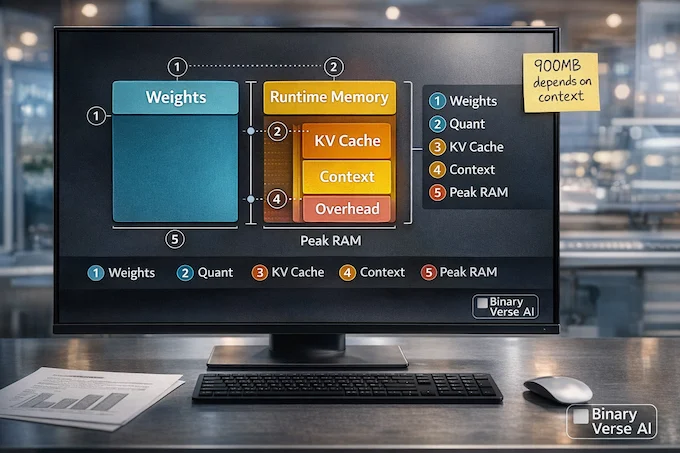
“Under 1GB” is true in the same way “this backpack weighs 900 grams” is true. It depends what you put in it.
There are two buckets:
- Model weights: the parameters stored on disk and loaded into memory.
- Runtime memory: everything else, including the KV cache that grows with context length and generation length.
If you’ve ever seen the same model report 0.9GB on one setup and 1.6GB on another, you weren’t imagining things. Different runtimes, different quantization, different cache strategies, different contexts.
Here’s the key mental model: context length is a lever that quietly taxes memory. The LFM2 family is trained with long context windows, including a 32,768-token context used in later training stages. That’s great, but it means your KV cache can balloon if you actually use it.
3.1 Weights Vs Runtime Memory
A quantized format (like GGUF) can shrink weights dramatically, but it doesn’t erase runtime memory. If you run this model with a short prompt and you generate 150 tokens, you might stay under the famous number. If you run 16K context with tool traces, you should expect higher peaks.
3.2 Why “900MB” Shows Up, And Why It Sometimes Doesn’t
A good rule: the closer you are to phone-class defaults, the more likely you’ll see ~0.9GB. Start asking for huge context windows, or run a less optimized backend, and the number goes up.
This is not a flaw, it’s physics. Small models are finally good enough that memory budgeting is a real engineering problem, not a research curiosity.
4. Hardware Requirements, Realistic Not Marketing
Let’s talk like we’re deploying, not demoing.
4.1 Minimum Viable Setup
You can run LFM2.5-1.2B-Thinking on:
- A CPU-only laptop or mini PC
- A modern phone with enough RAM headroom
- An NPU-enabled laptop if your runtime supports it
If you’re on CPU, your biggest knobs are quantization and context. If you’re on phone, thermals and sustained performance matter more than peak numbers.
4.2 Phone-Class Constraints: The Stuff That Actually Hurts
On edge ai devices, three things sneak up on you:
- Thermals: sustained decode can throttle.
- Storage: model files plus caches add up.
- Battery: tokens are cheap compared to radios, but they’re not free.
My rule of thumb: if your workflow is “short prompts, short answers, frequent calls,” you’re in the sweet spot. If it’s “long essays, 8K context, lots of tool chatter,” you’re edging back toward cloud.
5. Benchmarks That Matter, And The Ones That Don’t
Benchmarks are like gym PRs. They tell you something, but they don’t tell you whether you can carry groceries up three flights of stairs.
The good benchmarks for small reasoning models test:
- instruction following under constraints
- math and structured reasoning
- tool use and format discipline
The weak benchmarks are the ones where memorized knowledge dominates. A 1.2B model is not your encyclopedia. When you see LFM2.5-1.2B-Thinking do well on reasoning tasks, the point is not “it knows everything,” the point is “it behaves predictably.”
6. LFM2.5-1.2B-Thinking Vs Qwen3-1.7B Vs Granite-1B
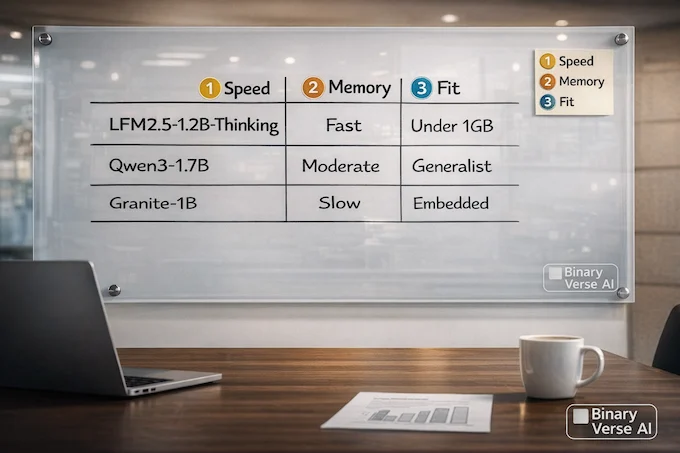
Comparisons get messy because there are multiple modes (thinking vs instruct), and multiple runtimes. Still, the shape of the trade is clear.
LFM2.5-1.2B-Thinking often competes with Qwen3-1.7B in reasoning-focused tasks despite fewer parameters. On CPU throughput, the LFM2 line reports large gains at the 1B scale over Qwen3-1.7B and Granite-1B in prefill and decode.
Here’s the practical way to choose:
- Pick LFM2.5-1.2B-Thinking if you care about edge latency, structured outputs, and agent-style workflows.
- Pick Qwen3-1.7B if you want stronger broad knowledge and you can afford extra compute.
- Pick Granite-1B if your workload is narrow, format-heavy, and you want conservative behavior.
Table 2 is a deployer-friendly comparison.
LFM2.5-1.2B-Thinking: Small Model Comparison Table
Side-by-side strengths and tradeoffs for choosing an edge-friendly model.
| Model | Strengths | Weak Spots | Best Fit |
|---|---|---|---|
LFM2.5-1.2B-Thinking | Planning, tool use, math-style reliability, speed focus | Deep knowledge, heavy coding | Local agents, extraction, private workflows |
Qwen3-1.7B (thinking) | Strong reasoning scores, broader capability | Often heavier, can be slower | Hybrid setups, bigger devices |
Granite-1B class | Small, predictable, often safe | Lower ceiling on reasoning | Narrow task assistants, embedded use |
7. What People Are Actually Asking (And What I’d Answer)
This is the Reddit and X layer of the conversation, translated into engineering reality.
7.1 “Is 900MB Real?”
Sometimes. If you run LFM2.5-1.2B-Thinking in a quantized, optimized runtime with modest context, you can land around that. The moment you push context or run a different backend, memory rises. Treat the number as a target profile, not a universal constant.
7.2 “Is Quantization A Free Lunch?”
No, but it’s close enough to be useful. Lower-bit weights usually trade a bit of quality for a lot of deployability. For edge ai applications, “slightly worse at trivia, still good at structure” is often acceptable. The best plan is to test your own prompts on Q4 and Q8, then decide.
7.3 “Is It Good In Real Life Or Just Benchmarks?”
It’s good in the places small models usually embarrass themselves: tool calls, extraction, instruction discipline. If your “real life” is deep domain knowledge, it will feel small.
7.4 “Does It Doom Loop Like Other Thinking Models?”
Doom looping is the dark art of small reasoning models, they sometimes get stuck repeating patterns. The training write-up describes explicit mitigation strategies, including sampling multiple candidates and discouraging repetition. If you still hit loops at inference, your settings matter (we’ll fix it in Section 9).
7.5 “What’s The Context Limit?”
The model family is built around long context, with a 32K window used in training stages for LFM2. You can often run long contexts, but you should treat long context as a budget you spend intentionally, not a right you always exercise.
7.6 “Is The License A Problem?”
Licensing is a real deployment constraint. Don’t assume “open weights” means “do anything.” Read the license for your use case, especially if you’re shipping commercially.
8. How To Run Locally In 10 Minutes (3 Paths)
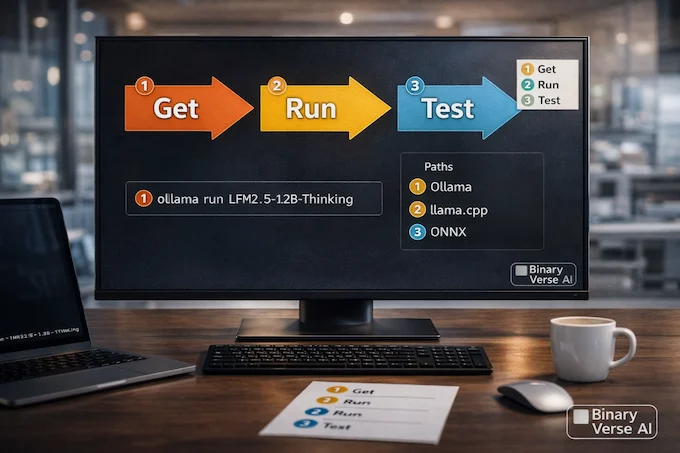
I’m going to keep this simple. Pick one path, run one prompt, then iterate. I’m using a short model name in commands to keep the page readable. Use the exact repo ID from the model card in your tooling.
8.1 Path A: Ollama (Fastest For Most People)
If you want a frictionless local loop, Ollama is hard to beat.
ollama pull LFM2.5-1.2B-Thinking
ollama run LFM2.5-1.2B-Thinking
Then test with 5 prompts: one extraction, one tool-style plan, one math word problem, one “format exactly like this,” and one “summarize this note.”
8.2 Path B: llama.cpp (Best For CPU Tuning)
If you care about squeezing performance on CPU, llama.cpp plus GGUF is your friend. You’ll get control over threads, context, and quant variants.
./llama-cli -m LFM2.5-1.2B-Thinking.gguf -p "Give me a 3-step plan to..." -n 200Start with smaller context. Increase only if you can justify it.
8.3 Path C: ONNX Runtime (Deployment-Friendly)
If your end goal is an edge pipeline, ONNX Runtime matters because it fits better into production stacks. This is where edge ai architecture stops being a buzzword and becomes your CI pipeline.
The right use case here is: a service-like wrapper around the model on a device, with strict input and output formats.
9. Recommended Settings For Small “Thinking” Models
Small “thinking” models need guardrails, not because they’re bad, but because they’re eager.
Here are settings I’ve found boringly effective:
- Keep temperature low for reliability (0.05–0.2).
- Use a light repetition penalty (around 1.05).
- Cap max tokens when you don’t need long answers.
- Tell it when to stop: “Answer in 6 bullets. No preamble.”
And here’s a decision rule:
- Use LFM2.5-1.2B-Thinking when the task benefits from planning, tool calls, or strict format.
- Use an instruct variant when you want conversational flow or creative tone.
10. Best Real-World Use Cases (Edge Ai Applications)
This is where the model earns its keep.
10.1 Offline RAG Over Local Docs
A small model plus a local index is a great pairing. The model doesn’t need to know everything, it needs to read what you give it and answer with discipline. That’s prime territory for an offline ai assistant.
10.2 Extraction And Form Filling
If you’ve ever built an extraction pipeline, you know the enemy is not “wrong,” it’s “almost right.” The model that follows instructions and outputs clean JSON is the one that saves you time.
10.3 Tool-Using Mini-Agent Workflows
Small agents shine when they can plan a few tool calls and then stop. That’s exactly where LFM2.5-1.2B-Thinking tends to look smarter than its size.
10.4 Private Notes Assistant
On-device summarization and action extraction is a sweet spot: low risk, high usefulness, low need for global knowledge.
10.5 Lightweight Customer Support On-Device
For kiosks, embedded systems, and offline-first products, a local assistant can be the difference between “works everywhere” and “works until the Wi-Fi dies.”
11. Common Failure Modes And Fixes
If you deploy small models, you learn to debug behavior like it’s a production system, because it is.
11.1 “It’s Slow”
Fixes:
- Use a more aggressive quant.
- Reduce context length.
- Shorten prompts.
- Prefer shorter outputs.
11.2 “It Hallucinates”
Fixes:
- Ground it with retrieval.
- Ask for citations to provided text, not the internet.
- Use stricter output formats.
11.3 “It Refuses”
Fixes:
- Be specific, not vague.
- Provide constraints and intent.
- Avoid prompts that look like policy traps.
11.4 “It Loops”
Fixes:
- Lower temperature.
- Add a repetition penalty.
- Add explicit stop criteria.
- Ask for the final answer only, no hidden reasoning.
This is where LFM2.5-1.2B-Thinking benefits from being small: when it goes wrong, you can usually steer it back quickly.
12. Verdict, Is This A Game-Changer?
LFM2.5-1.2B-Thinking is not here to replace cloud giants. It’s here to make local, private, reliable assistants feel normal. That’s a quiet shift, and it matters.
If you’re building on device ai experiences, especially on edge ai devices where latency and privacy are first-class constraints, this model is worth a weekend of testing. If your job is heavy coding, deep research, or long-form creative output, you should still reach for something bigger.
My closing advice is boring, which is how you know it’s real:
- Pick one runtime (Ollama, llama.cpp, or ONNX).
- Pick one quant.
- Test five prompts that match your product.
- Measure memory and speed on your actual hardware.
- Ship the smallest thing that works.
If you do that, LFM2.5-1.2B-Thinking stops being a headline and becomes a tool. And if you end up building something interesting, write it up, share your numbers, and tell the rest of us what surprised you.
1) What is an on-device AI model?
An on-device AI model runs directly on your phone, laptop, or embedded hardware instead of sending prompts to a remote server. That means lower latency, better privacy, and the ability to keep working without internet. The tradeoff is tighter limits on memory, battery, and sustained performance.
2) What is the difference between cloud AI and on-device AI?
Cloud AI runs on powerful servers, so it can handle larger models, longer contexts, and heavier workloads. On-device AI runs locally, so it’s faster for short tasks, more private, and works offline. In practice, the best systems combine both, default local, escalate to cloud when needed.
3) Is there an AI I can use offline like ChatGPT?
Yes. You can run smaller language models locally as an offline ai assistant using tools like Ollama or llama.cpp. The experience can feel surprisingly close for structured tasks like summaries, extraction, and workflow help, but it won’t match cloud models for deep knowledge or long creative writing.
4) Can AI models be used offline on a phone under 1GB RAM?
Sometimes, but “under 1GB” depends on quantization, context length, and the runtime. A model can fit near that budget for typical prompts, then exceed it with long context windows or heavy generation. For best results, keep context modest, use 4-bit or 8-bit quantization, and test on your exact device.
5) What is LFM2.5-1.2B-Thinking best used for (and what is it bad at)?
LFM2.5-1.2B-Thinking is best for on device ai tasks that reward structured reasoning: extraction, tool-style planning, lightweight RAG, and reliable instruction following on edge ai devices. It’s weaker at deep world knowledge, heavy coding, and long creative writing, where bigger models still dominate.