
Introduction
For the last two years, we have been watching ghosts. We generated stunning, high-definition characters that moved with fluid grace. They walked through neon-lit streets and sat in coffee shops. But they were silent. The disconnect was palpable. You could see the lips moving, but the world inside the video was dead. To fix it, you had to leave the generation loop and enter the “post-production hell” of finding stock music, generating separate ElevenLabs voiceovers and manually stretching audio waveforms to match video frames. That era ended this week.
Kling 2.6 represents the “Talkies” moment for generative video. It is not just an update. It is a fundamental shift in how the model understands reality. We are moving from a visual-only inference to a multimodal understanding where the model generates the sound of a crashing wave at the exact moment it renders the water hitting the rock.
This guide looks under the hood of the new Kling 2.6 model. We will break down the architecture, the costs, and, most importantly, the specific prompt engineering techniques you need to make these models act.
Table of Contents
1. The “Talkies” Era: What Is Kling AI 2.6?
If you have been using the Kling AI video generator, you know the drill. You type a prompt, you get a silent video. Kling 2.6 changes the fundamental architecture. It introduces “Native Audio.”
This is distinct from “lip-syncing.” Lip-syncing takes a pre-existing audio file and warps the pixels of a video to match it. Native Audio means the model generates the audio waveform and the video pixel stream simultaneously. It understands that a dog opening its mouth requires a barking sound. It understands that a distant car looks different and sounds different than a close one.
This update also pushes the resolution to 1080p by default, putting it in direct competition with heavyweights like OpenAI’s Sora and Google’s Veo. But unlike those research previews, Kling 2.6 is available to the public right now.
The killer feature here is text to video with audio. You are no longer directing just the camera. You are directing the microphone.
2. Core Features Breakdown: Seeing the Sound
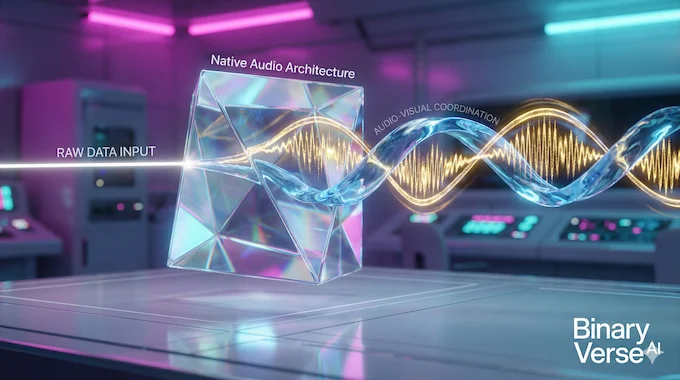
To use this tool effectively, you have to understand what the neural network is actually doing. It is not magic. It is high-dimensional probability.
2.1 Native Audio Architecture
The system relies on Audio-Visual Coordination. In previous pipelines, audio and video were two strangers meeting in a video editor. In Kling 2.6, they are siblings. If you generate a character who pauses to think, the audio track pauses. If the character screams, the facial muscles tense up in the visual render to match the acoustic intensity of the scream.
2.2 Semantic Understanding
This is where it gets interesting for prompt engineers. The model parses the semantic context of your words. If you type “whispered secret,” the model does not just lower the volume. It changes the camera angle to be more intimate. It changes the lighting. It understands that “whispering” is a visual vibe as much as an auditory one.
2.3 Supported Modes
You have two main attack vectors here:
- Text-to-Video: Creating reality from scratch.
- Kling AI image to video: Taking a static asset—like a product shot or a Midjourney character—and breathing life and sound into it.
3. Kling AI Pricing & Credit Costs
Let’s talk about the economy of pixels. Compute is expensive. Generating audio and video simultaneously requires significantly more GPU inference time than silent video.
If you are looking for Kling AI price details, the structure is based on a credit system. The Kling 2.6 model is a premium feature. It will burn through your credits faster than the standard 1.5 or 1.6 models. Here is the breakdown of the current tiers:
Kling 2.6 Pricing Plans Overview
| Plan | Approx. Monthly Price | Credits | Best For |
|---|---|---|---|
| Standard | ~$10 | ~660 | Hobbyists and testing. |
| Pro | ~$35 | ~3,000 | Content creators. |
| Premier | ~$92 | ~8,000 | Production studios. |
3.1 The Cost of 2.6
Be aware of the burn rate. A standard 5-second silent generation might cost you 10 credits. A high-quality Kling 2.6 generation with Native Audio and 1080p resolution will cost significantly more.
There are Kling AI free credits available—roughly 66 per day. However, free tier users are often deprioritized in the queue, and you will deal with watermarks. If you are serious about production, the free tier is just for learning the syntax.
4. Step-by-Step Guide: How to Generate Video with Audio
The interface is clean, but there are specific toggles you need to hit to make the audio work.
Step 1: Accessing the Interface
Go to the Kling AI log in page or open the Kling AI app. The web interface generally offers more granular control for professional workflows.
Step 2: Model Selection
Ensure you have selected the “2.6” model tag in the top menu. This is critical. The older models are still there and are cheaper, but they are silent.
Step 3: The Native Audio Toggle
There is a switch specifically labeled for audio. You must enable this. If you leave it off, Kling 2.6 will simply generate a higher-quality silent video.
Step 4: Aspect Ratio and Duration
For social media, you want 9:16. For cinema, 16:9.
Pro Tip: Choose 10 seconds. Five seconds is rarely enough time for a character to take a breath, speak a sentence, and react. The 10-second window reduces the “uncanny” jerkiness of short clips.
5. Mastering Prompts: The Director’s Mindset
This is the code behind the magic. You cannot just type “a man talking.” You have to direct the scene.
A Kling 2.6 prompt needs five elements:
- Scene: Lighting, location, atmosphere.
- Character: Demographics, clothing, vibe.
- Action: Movement, physical acting.
- Dialogue: The exact script.
- Tone: The emotional delivery.
5.1 The Trigger Word Library
The model has been trained on captioned video data. It associates specific verbs with specific audio patterns. I call these “Trigger Words.” Using these verbs forces the model to load specific audio weights.
Audio Triggers & Effects Guide
| Audio Category | Trigger Words | Effect |
|---|---|---|
| Volume | Whispering, Mumbling, Shouting, Screaming | Adjusts audio gain and facial intensity. |
| Pace | Fast Talking, Rapid Speech, Slow Drawl | Changes the speed of lip-sync. |
| Interaction | Arguing, Quarrelling, Chatting | Creates back-and-forth cadence. |
| Vocal Quality | Hoarse, Deep Voice, High-pitched | Modifies the pitch and texture of the voice. |
5.2 Case Studies: Gold Standard Prompts
Below are high-performance prompts extracted from successful Kling 2.6 generations. Notice the structure.
Scenario 1: The Beauty Influencer (Close-up Lip Sync)
“In a beauty live-streaming room, warm yellow lighting illuminates the table. [Caucasian beauty influencer] raises a matte dusty rose lipstick. [Caucasian beauty influencer, sweet and fresh voice] says: ‘Perfect for yellow undertones! Brightens the complexion without drying.’ Background: Soft beauty BGM playing.”
Why this works: It explicitly tags the character [Caucasian beauty influencer] and assigns a tone [sweet and fresh voice]. This binds the voice actor to the visual avatar.
Scenario 2: The Intense Sports Moment (High Energy)
“In front of the main grandstand at an F1 racetrack, the cars zoom by. [Narrator, excited male voice] says: ‘Final lap! He’s on the inside! Oh, what a move!’ Background: The roar of engines and the screech of tires, with the camera following the two cars.”
Why this works: It separates the [Narrator] from the background noise. It explicitly asks for screech of tires, prompting the model to generate SFX layers.
Scenario 3: The Multi-Character Interview (Complex Interaction)
“Visual: A modern office. [Man in suit] stands by the window. [Woman at desk] looks up. [Man, serious voice] says: ‘The report is due.’ Immediately, [Woman, confident voice] says: ‘I sent it an hour ago.'”
Why this works: It uses the word “Immediately” to control the timing gap between the two speakers.
6. Fixing Common Issues (Reddit & Twitter Solutions)
The model is not perfect. Here is how you debug the common failures.
6.1 The “Studio Sound” Bias
The Problem: Your video looks like it was shot in a war zone, but the audio sounds like it was recorded in a padded booth. This breaks immersion.
The Fix: You need to prompt for audio “dirt.” Add phrases like background wind noise, street ambience, echo, or acoustically untreated room to your prompt. You have to tell Kling 2.6 to make the audio messy.
6.2 The “AI Zoom” Problem
The Problem: The camera keeps drifting or zooming in when you want a static shot.
The Fix: Use the camera control prompts found in the advanced settings, or add static camera, tripod shot, fixed lens to the negative prompt or main prompt.
6.3 Lip-Sync Desync
The Problem: The lips stop moving before the audio finishes.
The Fix: This usually happens in 5-second clips. The model tries to rush the sentence. Switch to 10-second generation. It gives the model the temporal space to resolve the phonemes correctly.
7. Kling AI 2.6 vs. The Competition
How does this stack up against the rest of the market?
7.1 Kling 2.6 vs. Sora
Sora is the ghost in the machine. Everyone has seen the demos; almost no one has touched the code. Kling 2.6 is available today. You can log in and use it. Availability is the best ability.
7.2 Kling 2.6 vs. Wan (Open Source)
Wan is great if you have a stack of H100 GPUs in your basement and know how to run Python scripts. For the average user who wants a web interface and immediate results, Kling is the superior product.
7.3 Kling 2.6 vs. Veo
Google’s Veo is impressive, but integration is slow. Kling is moving at the speed of a startup. They are shipping features while others are writing white papers.
8. Pros and Cons: The Honest Verdict
Pros
- Synchronization: The lip-sync is the best in class for a public model.
- Resolution: 1080p looks crisp, especially for Kling AI image to video workflows.
- Accessibility: The web interface is intuitive.
Cons
- Cost: High-quality generations burn credits fast.
- Hallucinations: Sometimes the audio will speak gibberish or switch languages if the prompt is ambiguous.
- Consistency: Getting the exact same face across ten different clips is still a challenge, though better than version 1.0.
9. Conclusion: Should You Subscribe?
Kling 2.6 is currently the state-of-the-art for public AI video generation. It has successfully crossed the barrier from “moving images” to “video.”
If you are a content creator looking for B-roll, a marketer testing concepts, or just a technologist who wants to see the future, it is worth the price of entry. The ability to generate text to video with audio in a single pass saves hours of post-production time.
My advice? Start with the Kling AI free credits. Test the waters. Get a feel for the “Trigger Words.” If you find yourself consistently getting usable clips, then look at the subscription. The silent film era of AI is over. It is time to make some noise.
9.1 Kling Audio Challenge
One final note for the creators: Kling is currently running an Audio Challenge to celebrate the Kling 2.6 launch. They are offering cash rewards (up to $1000) and massive credit bundles (up to 16,000 credits) for the best audiovisual content.
If you are going to experiment, you might as well get paid for it. The deadline is December 16, 2025. Go break the model.
Is Kling AI 2.6 free or paid?
Kling AI operates on a “freemium” model. Users receive approximately 66 free credits daily, which is enough for testing. However, the Kling 2.6 model with Native Audio consumes significantly more credits (approx. 20+ per 5s clip) than the older 1.5 model. Serious creators will need a paid subscription (starting at ~$10/month) to unlock the credit volume required for consistent 1080p audio-visual generation.
Is Kling AI worth it compared to open-source models like WAN?
Yes, for most users. While WAN (and other open-source alternatives) is free, it requires powerful local hardware (like an RTX 4090) and technical knowledge to install. Kling AI runs entirely in the cloud, allowing you to generate professional video on a smartphone or weak laptop. You are paying for the convenience of not managing your own GPU cluster.
How do I use Kling AI Native Audio?
To use Native Audio, select the Video 2.6 model from the top menu in the Kling interface. You must manually toggle the “Native Audio” switch to “On” before generating. In your prompt, specifically describe the sound you want (e.g., “Narrator, excited voice” or “Sound of crashing waves”) to trigger the model’s audio weights.
Is Kling AI available in the USA?
Yes, Kling AI is available globally, including in the USA, via their official web platform and mobile app. There are no region-locks for standard access. Users can sign up using a standard email or phone number and access all features, including the new 2.6 model, without a VPN.
Does Kling AI 2.6 support 1080p native resolution?
Yes. Unlike previous versions that generated at 720p and required upscaling, Kling 2.6 generates natively at 1080p. This results in sharper details, better texture on skin and fabrics, and less “AI shimmer” or artifacts when the video is viewed on larger screens.