

Introduction
Coding used to be a lonely sport: editor on the left, terminal on the right, and your attention getting ping-ponged by bugs, reviews, and “quick” requests that aren’t quick.
Now we have agents. The shock isn’t that they can write code, they can. The shock is that they’ll happily try, retry, and iterate for hours, while you still have to keep the repo coherent and the release on track. The real bottleneck moved from typing to orchestration.
That’s why Codex App matters. It isn’t “Chat, but for developers.” It’s a coordination layer designed for running multiple coding threads in parallel, reviewing diffs, and keeping long-running work from eating your day.
If you’ve been wondering whether Codex App is worth installing, or whether you should just stay in the normal ChatGPT UI, this guide is the practical answer. No fluff. Just the workflow.
Table of Contents
1. Codex App In 60 Seconds
Here’s the simplest model: one surface to coordinate, one surface to edit, one surface to verify.
Codex App: Best Tool by Workflow
| If You’re Doing This… | Use This | Why It Wins |
|---|---|---|
| Quick edits, tight iteration | VS Code extension | Editor context, fast feedback, easy undo |
| Parallel tasks, clean supervision | Codex App desktop | Separate threads, built-in worktrees, review queue |
| Long jobs you don’t want on your laptop | Codex Cloud | Offload heavy runs, come back to a diff |
| Terminal-first workflows and automation | codex cli | Scriptable, remote-friendly, CI-ready |
The promise is modest and powerful: ship faster by delegating in parallel, then reviewing like a human who likes sleeping at night.
2. What It Is And What It Isn’t
Codex App is a command center for agents. OpenAI’s framing is direct: manage multiple agents at once, run work in parallel, and collaborate over long-running tasks.
What it is:
- A place where tasks live as separate threads, organized by project.
- A review lane where you can inspect diffs, comment, and then pull changes into your editor.
- A workflow that nudges you toward smaller, testable chunks.
What it isn’t:
- A replacement for your IDE.
- A license to skip tests.
- A mind reader. You still have to write the spec.
Treat it like an intern with infinite stamina and zero product context. You’ll get weird code. Treat it like a compiler for your intent, and Codex App becomes genuinely useful.
3. App Vs Extension Vs CLI
The confusion usually sounds like, “So… is it just a UI?” It’s better to think of it as three doors into the same house, each optimized for a different part of the day.
3.1 When Each One Makes Sense
- IDE extension: best for small edits and fast loops.
- Codex App: best when you have multiple tasks and want a clean review process.
- codex cli: best for terminal-native work and automation.
3.2 A Quick Example
Bugfix mode: use the extension to reproduce and patch, then ask the app to run a broader sweep, “find similar cases and add tests.” Refactor mode: let an agent tackle one module in isolation, while you keep shipping the rest.
If you only ever use the extension, you’ll still get value. You’ll miss the part where the app turns “one agent” into “parallel progress.”
3.3 Codex App Vs Cursor, The Short Version
People searching “openai codex vs cursor” usually mean one thing: “Am I switching tools, or just adding another tab?”
Cursor (and other VS Code forks) are still great at the editor moment, inline edits, quick refactors, and rapid back-and-forth. Codex App shines at the coordination moment, when you have multiple threads of work and you want isolation, diffs, and a review queue that doesn’t depend on you remembering what you asked an hour ago.
The practical answer is boring but true: you can run the Codex extension inside Cursor, then use the desktop app when you want multi-tasking and supervision. Pick the surface that matches the task, not the brand name.
4. Availability, Requirements, And The “Mac First” Reality
The Codex App desktop app launched on macOS. That’s the “Mac first” headline. The IDE story is wider. The Codex extension for Visual Studio Code is available on macOS and Linux. Windows support is experimental, and the official recommendation is to use it in a WSL workspace for the best experience.
So the practical take:
- On macOS, you get the full stack: desktop app, extension, CLI.
- On Windows, you can still do serious work through the extension in WSL, even if you skip the desktop app for now.
5. The Fastest Setup In VS Code
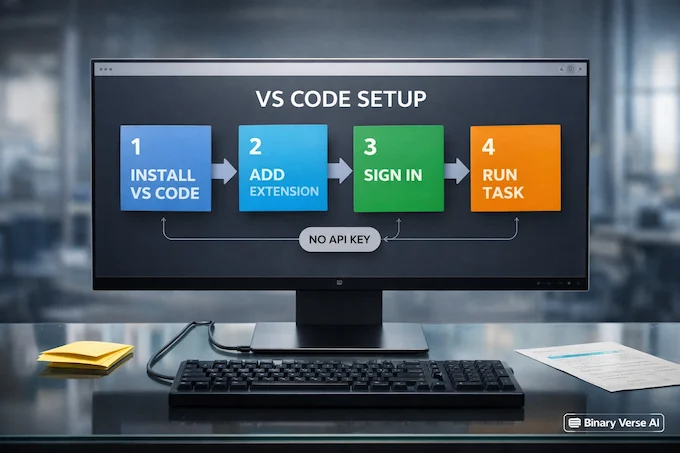
If your goal is “I want this working today,” this is the shortest path.
5.1 Install, Open, Sign In
- Install VS Code (or a fork).
- Install the Codex extension.
- Open the Codex panel in the sidebar.
- Sign in with your ChatGPT account.
That’s it. For most paid users, you do not need an API key because your subscription includes usage.
If you’re searching for codex vscode setup, this is the whole flow. If you want the official openai codex vscode instructions, the developer docs say the same thing, plus the platform notes and the “restart the editor if you don’t see it” advice.
5.2 When An API Key Actually Matters
Use an API key when you need shared automation, like CI, or when you want usage billed to a project instead of a person. Otherwise, don’t complicate your life.
One nice detail: the desktop experience is designed to pick up your session and configuration from the extension and the CLI, so you can bounce between surfaces without re-teaching everything. Codex App works fine with a normal ChatGPT login for day-to-day development.
6. The Safe Loop That Keeps You In Control
Agent tools go off the rails when you skip the boring ritual. Codex App is most valuable when it reinforces the ritual.
6.1 The Loop
- Ask for a plan first.
- Implement in an isolated worktree.
- Review the diff like a teammate wrote it.
- Run tests and build.
- Merge only when it’s clean.
OpenAI emphasizes diffs and worktrees for exactly this reason: parallel work needs isolation and review, or it turns into merge soup.
6.2 Prompt Rules That Save You Time
Ask for:
- minimal diffs
- tests
- a short explanation of changes
- a stop point, “don’t refactor unrelated code”
Short prompts. Strong constraints. That’s the whole trick.
7. Multi-Agent Coding Without The Drama
Codex App runs agents in separate threads, so you can switch tasks without losing context. Multi-agent sounds like a sci-fi concept, but it’s really just parallelism with boundaries.
7.1 Starter Roles
- Triage agent: reproduce, isolate, propose fix.
- Refactor agent: clean one module, no behavior change.
- Docs agent: update README, migration notes, examples.
7.2 When Parallelism Breaks
Parallelism helps when tasks don’t overlap. It hurts when two agents touch the same abstraction while the design is still fuzzy. In that case, do exploration in parallel, then converge in the IDE with one final human pass.
8. Worktrees Explained, In Human Terms
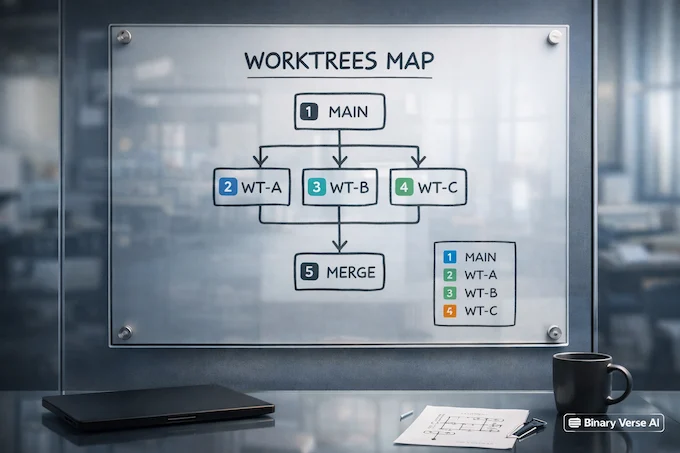
A worktree is a separate working copy of the same repo. Separate directory, separate branch, separate changes. Same history. Why you should care: agents collide less. Your main working directory stays clean. You can review each change set independently, then merge in the right order. Codex App treats worktrees as a first-class feature because multi-agent work needs isolation.
A simple convention prevents 80 percent of confusion:
- one agent per branch
- one branch per worktree
- branch names that reflect the task, like agent/docs-install-windows
9. Skills: “Do This My Way” For Real Teams
Skills are reusable playbooks. Instructions, resources, scripts, packaged so outcomes become repeatable across projects. OpenAI describes skills as a way to extend Codex beyond code generation to tool-driven workflows, including common team tools like Figma, Vercel, and Linear.
This is where the tool starts feeling like more than an autocomplete engine. You can codify “our deployment steps,” “our PR checklist,” or “how we structure docs,” then reuse it without rewriting the same guidance every week. Keep skills small and testable. If a skill reads like a manifesto, split it. The best skills read like good runbooks.
10. Automations: Background Work, Reviewed Like Code
Automations run on a schedule and drop results into a review queue. That’s the right shape: background execution, foreground accountability.
Good automation ideas:
- daily issue triage summaries
- CI failure digests
- draft release notes from merged PRs
- “scan recent commits for likely bugs, propose minimal fixes”
Guardrails that matter:
- require approval by default
- restrict permissions
- keep destructive commands off auto-run
If you want to trust Codex App more, raise your standards, not your autonomy.
11. Pricing, Credits, And Rate Limits

People search “codex pricing” for a reason. They want to know what’s included and what blows up their bill. The official story is straightforward: Codex is included in ChatGPT Plus, Pro, Business, Edu, and Enterprise plans, with the option to buy extra credits when you hit limits.
There’s also a launch promo: Codex is temporarily available to Free and Go users, and paid plans get 2x rate limits for a limited period, stated on OpenAI’s announcement and pricing pages, echoed publicly by Sam Altman, and covered in a news write-up by Reuters.
Here’s what you need for planning, not debating, and how Codex App fits into it:
Codex App: Plans, Pricing, and Typical Limits
| Plan | Monthly Price | Typical Use | Typical Limits |
|---|---|---|---|
| Plus | $20 | Weekly focused sessions | 45-225 local messages or 10-60 cloud tasks per 5h, 10-25 code reviews per week |
| Pro | $200 | Daily development | 300-1500 local messages or 50-400 cloud tasks per 5h, 100-250 code reviews per week |
| Business | $30/user | Teams and admin controls | Per-seat limits similar to Plus by default, can extend with workspace credits |
| Enterprise & Edu | Contact | Org-wide rollout | No fixed caps, usage scales with credits and enterprise controls |
| API Key | Usage-based | CI and shared automation | Token-based billing, no bundled cloud features like GitHub reviews |
A few numbers help set expectations. OpenAI publishes ranges rather than a single cap because message cost depends on task size. The current table shows local messages and cloud tasks per 5-hour window, plus code reviews per week, with Pro far higher than Plus, and a note that local and cloud share the same 5-hour window.
If you’re trying to stretch your allowance, the official playbook is also simple: trim prompt context, keep AGENTS.md small, disable extra MCP servers you don’t need, and switch to the mini model for simpler tasks to get roughly 4x more local usage.
For “openai codex pricing” decisions, remember the practical lever: big context burns allowance faster. Smaller tasks and tighter prompts stretch your limits.
12. Troubleshooting And Performance Fixes
Most problems fall into three buckets: auth, visibility, and workload.
12.1 “Refresh Token Already Used”
Log out, quit the editor, restart, sign in again. If it persists, reinstall the extension and re-auth. It’s usually a stale session conflict, not a deeper issue.
12.2 “Usage Limits Not Visible”
Update the extension, then check the Codex usage dashboard. In the CLI, some workflows expose a /status command for remaining limits during a session.
12.3 Slow, High CPU, Hot Laptop
Reduce context. Split tasks. Lower reasoning effort for simple changes. Offload long-running work to the cloud when it makes sense. Codex App feels best when you treat it like a pipeline, not a single giant prompt.
12.4 Permissions Confusion
Pick the narrowest approval mode that still works, then widen only when the workflow is predictable. OpenAI’s “secure by default” sandboxing model expects explicit permission for elevated actions. A few extra gotchas from Reddit threads:
- Branch selection feels locked, it’s usually a convention problem, stick to one agent per branch and one branch per worktree.
- Drag and drop missing, copy paths instead and keep tasks small so context is cheap.
- Cancel key doesn’t always behave, prefer shorter runs, then iterate.
Closing: Use The Tool, Don’t Worship It
Codex App is not a shortcut around engineering discipline. It’s a multiplier for it. When you can delegate in parallel, you start writing cleaner specs. You start leaning on tests. You start reviewing diffs with sharper eyes, because you’re supervising a tireless contributor who will happily do exactly what you asked, including the parts you forgot to ask.
Install the extension, run one real bugfix end to end, and keep the loop boring: plan, isolate, diff, test, merge. Once that rhythm clicks, you’ll stop wondering whether it’s “better than ChatGPT,” because you’ll be using it for a different job.
If you want more guides like this, plus prompt templates and workflow playbooks, follow Binary Verse AI, and check the latest Codex posts in the sidebar.
1) What is the Codex app?
The Codex app is a macOS desktop “command center” for agentic coding. It’s built to manage multiple coding agents in parallel, review diffs, keep changes isolated with worktrees, and run longer tasks without losing context.
2) What is Codex used for?
Codex is used to ship real engineering work faster: answering questions about a codebase, making targeted edits, running tasks end to end, and drafting pull requests. It also supports multi-agent workflows where different agents tackle bugs, refactors, and docs in parallel, including via Codex Cloud delegation.
3) Can I use OpenAI Codex for free?
For a limited time, Codex is available through ChatGPT Free and Go, depending on OpenAI’s current promo window. Outside promos, it’s included with paid plans like Plus, Pro, Business, Enterprise, and Edu, with optional credits if you hit limits.
4) What is Codex in ChatGPT?
Codex in ChatGPT is the same coding agent you can access across surfaces using your ChatGPT account, including the web experience, the IDE extension, and the Codex app. In practice, “Codex in ChatGPT” means a shared identity, shared workflows, and plan-based usage limits and credits.
5) How much does Codex cost in OpenAI?
Codex pricing is bundled with ChatGPT subscriptions: Plus ($20/month), Pro ($200/month), Business ($30/user/month), and Enterprise/Edu (contact sales). There’s also an API key option for usage-based billing, which is popular for automation in shared environments like CI.