
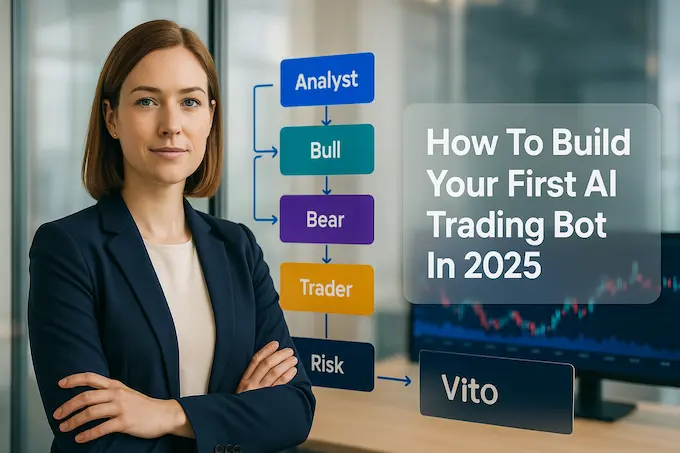
You do not need a Bloomberg terminal, a PhD, or a seat on a trading floor to build an edge. What you need is a clear plan, a calm head, and a working prototype you can explain. This guide gives you exactly that. We’ll build a small, auditable AI system that reads market signals like a junior analyst, debates like a seasoned team, and outputs a decision you can test. If you’ve wanted an AI trading bot that is both practical and teachable, this is your on-ramp.
I’ll keep the promises simple. You’ll understand what an AI trading bot is and what it is not. You’ll get a project that runs on your laptop. You’ll see how to keep costs low and how to expand the system later. No hand-waving. No magic.
Table of Contents
1. What Is An AI Trading Bot And Why It Matters
An AI trading bot is software that converts information into action. A rules engine buys when a moving average crosses another. An AI trading bot reads wider context, then explains its choice. Think of it as a junior associate who can scan charts, parse news, summarize filings, and argue both sides before the senior trader signs off.
1.1 The Agent Mindset

The interesting shift is the AI trading agent. Instead of one monolithic script, you compose a few narrow specialists. One agent tracks fundamentals. One watches sentiment. One checks technicals. A researcher pair, bull and bear, argues. A trader agent synthesizes the case. A risk manager taps the brakes when needed. The system is modular, visible, and much easier to debug than a black box.
2. Meet TradingAgents, A Transparent Open-Source Framework
For a starter system that still feels like a “real” desk, I recommend TradingAgents AI. It is free, Apache-2 licensed, and models a small virtual firm. You get analysts, a debate stage, a trader, and a risk team. Each role writes a short, structured report. Those reports are the backbone of the decision. That structure is what makes it ideal for learning, and it is why many people call it the best AI trading bot to study before you build your own.
In plain English, you get three wins. First, explainability, because every step leaves a text trail. Second, flexibility, because you can swap model sizes and tools. Third, safety, because the risk team can veto silly overconfidence. It is not a magic money machine. It is a good lab that teaches you how a credible AI trading agent should behave.
3. Build Your First Project, Step By Step
We’ll stand up a working demo you can run today. It will analyze a single ticker for a single date, then print a decision with reasoning. From there, you can explore the CLI, lower your API costs, and log results for paper trading.
3.1 Set Up Your Environment
Prerequisites
- Python 3.10 or newer.
- An OpenAI API key for language models.
- A Finnhub API key for market data. The free tier works to start.
- A clean virtual environment.
Commands
# 1) Create a project folder
mkdir ta-lab && cd ta-lab

# 2) Clone the framework
git clone https://github.com/TauricResearch/TradingAgents.git
cd TradingAgents

# 3) Create and activate a virtual environment (use the tool you prefer)
python -m venv .venv
# Windows:
. .venv/Scripts/activate
# macOS/Linux:
# source .venv/bin/activate

# 4) Install dependencies
pip install -r requirements.txt

# 5) Set your keys in the environment
# Windows PowerShell
setx OPENAI_API_KEY "YOUR_OPENAI_KEY"
setx FINNHUB_API_KEY "YOUR_FINNHUB_KEY"

# macOS/Linux (current shell)
export OPENAI_API_KEY="YOUR_OPENAI_KEY"
export FINNHUB_API_KEY="YOUR_FINNHUB_KEY"
That gives you a clean workspace. If you prefer Conda, feel free to create conda create -n tradingagents python=3.13 then conda activate tradingagents, and continue with the install.
3.2 Run Your First Analysis

Let’s write a tiny script that asks the system to analyze Nvidia on a given date. It runs the full multi-agent process, then returns a human-readable decision.
# file: quick_nvda.py
from tradingagents.graph.trading_graph import TradingAgentsGraph
from tradingagents.default_config import DEFAULT_CONFIG

if __name__ == "__main__":
    # Enable debug to print the agent steps
    config = DEFAULT_CONFIG.copy()
    config["debug"] = True
    # Keep the research modest for a first run
    config["max_debate_rounds"] = 1
    config["online_tools"] = True  # allow fresh data via tools where available

    ta = TradingAgentsGraph(debug=True, config=config)

    # Pick a past market day you want to study
    ticker = "NVDA"
    date = "2024-05-10"

    # Forward propagate through analysts, researchers, trader, risk, and PM
    _, decision = ta.propagate(ticker, date)

    print("\n=== Final Decision ===")
    print(decision)
Run it:
python quick_nvda.py
What you’ll see: short logs from analysts, a brief bull vs bear exchange, the trader’s synthesis, a risk check, then a final recommendation. This is not a mystery box. It is an AI trading bot that explains itself.
3.3 Use The CLI For A Guided Run
Prefer a simple menu that lets you pick tickers, dates, and models without writing code?
python -m cli.main
You’ll get a clear interface that streams progress. Watch the “research depth” parameter. More depth means more model calls and higher cost. For a first test, keep it minimal. This keeps your AI trading bot fast, and your bill small.
3.4 Drop Your Costs With Smaller Models
The framework supports quick models for light work and deeper models for reasoning. To cap spend while you learn, switch both “deep” and “quick” models to efficient variants and limit debate rounds and limit debate rounds.
# file: low_cost_nvda.py
from tradingagents.graph.trading_graph import TradingAgentsGraph
from tradingagents.default_config import DEFAULT_CONFIG

config = DEFAULT_CONFIG.copy()
config["deep_think_llm"]  = "gpt-4.1-mini"  # or "o4-mini" if available to you
config["quick_think_llm"] = "gpt-4.1-mini"
config["max_debate_rounds"] = 1
config["online_tools"] = True

ta = TradingAgentsGraph(debug=False, config=config)
_, decision = ta.propagate("NVDA", "2024-05-10")
print(decision)
This keeps your AI trading bot responsive while still giving you reasoned output. If you hit rate limits, lower the research depth, or run fewer tickers per session.
3.5 Log Paper Trades Cleanly
Before you connect a broker, build healthy habits. Log decisions to a CSV for later analysis. This turns your prototype into a python AI trading bot you can evaluate without risking capital.
# file: paper_logger.py
import csv
from datetime import datetime
from tradingagents.graph.trading_graph import TradingAgentsGraph
from tradingagents.default_config import DEFAULT_CONFIG

def log_trade(row, path="paper_trades.csv"):
    header = ["timestamp", "ticker", "date_evaluated", "action", "confidence", "rationale"]
    write_header = False
    try:
        with open(path, "r"):
            pass
    except FileNotFoundError:
        write_header = True

    with open(path, "a", newline="") as f:
        w = csv.writer(f)
        if write_header:
            w.writerow(header)
        w.writerow([datetime.utcnow().isoformat()] + row)

if __name__ == "__main__":
    ta = TradingAgentsGraph(debug=False, config=DEFAULT_CONFIG.copy())
    ticker = "AAPL"
    date = "2024-03-05"
    _, decision = ta.propagate(ticker, date)

    # Expect fields like: action, confidence, and a short rationale in the decision object or text
    # Simple parse for a demo. Adjust to the decision schema your run returns.
    action = "HOLD"
    confidence = "medium"
    rationale = str(decision)[:280]

    log_trade([ticker, date, action, confidence, rationale])
    print("Logged a paper signal for", ticker)
You can schedule this script to run nightly on a list of tickers, then measure how your AI trading bot would have performed. It’s boring, and that’s a virtue.
4. Costs, Free Where It Matters
TradingAgents is a free AI trading bot in the software sense. You pay only for the models and data you call. Keep the bill in check with a few habits:
- Use smaller reasoning models where possible. Many cases do not need the deepest chain-of-thought.
- Lower debate rounds. One or two rounds often give you a solid signal.
- Limit tickers per session. Test one idea at a time.
- Cache static data like company profiles. Your AI trading bot shouldn’t fetch the same metadata every run.
- Start with end-of-day experiments, not tick-level streaming.
If you’re truly budget sensitive, you can switch to cached offline tools while you debug the flow. That reduces external calls and helps you test the orchestration of your AI trading bot for beginners without costs creeping up.
5. From Toy To Tool, A Practical Roadmap
You have a working prototype. Now grow it like a serious project.
5.1 Sharpen Data Interfaces
Give your AI trading agent richer inputs. Add structured technical features, normalized news sentiment, and a few clean macro indicators. Keep the schema tight. The goal is not to drown the model. The goal is to hand it the right summary. If you’re doing open source algorithmic trading, treat your data pre-processing like a product. Deterministic. Versioned. Reproducible.
5.2 Tighten Reasoning And Risk
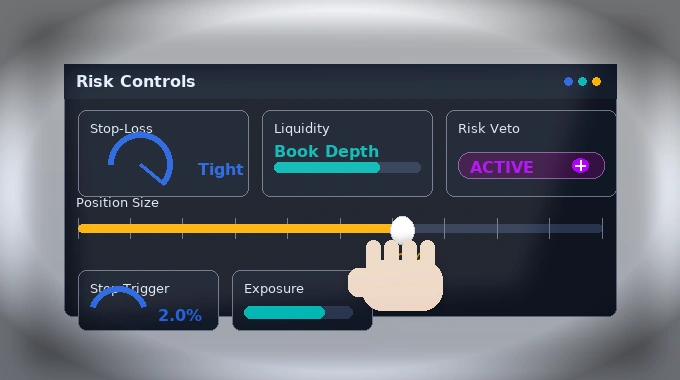
The debate stage is your safety net. Increase depth slowly. Add a reflective pass that hunts for weak assumptions. Strengthen the risk manager with simple portfolio rules, not just language. Position size limits. Stop-loss rules. Liquidity filters. Your AI trading bot should be opinionated about survival.
5.3 Separate Research From Execution
Let the AI trading agent write a clear trade rationale and a proposed order. Hand execution to a dedicated service. Start with paper accounts. When you’re ready, use a broker with a proper paper-trading API. Keep the code that talks to a broker small and audited. If you adopt TradingAgents for open source algorithmic trading, enforce strict separation between “decide” and “do.”
5.4 Build Monitoring You’ll Actually Read
Log every decision and the upstream reports. Track how often the trader overrode the debate. Track how often risk stepped in. A small dashboard beats a giant spreadsheet you never open. This habit is what turns an AI trading bot into an asset instead of a toy you forget after a week.
6. What Works, What Fails, And Why That’s Fine
A sober view helps you move faster.
- LLMs write great prose. They can also be confidently wrong. Keep the structured data checks in code. Let language do what language does best, which is explain, summarize, and argue.
- Label drift is real. A sentiment pipeline that worked last quarter may fade. Retrace your steps often.
- The goal is a process you can defend. If you cannot explain a decision in two short paragraphs, your AI trading bot needs work.
The upside is meaningful. You can encode a way of thinking. You can adapt quickly when regimes shift. You can teach the system to admit uncertainty and skip trades. That humility pays.
7. A Straight Answer On “Best,” “Free,” And “Beginner Friendly”
People ask for the single “best AI trading bot.” There isn’t one. There is the best fit for a given goal and budget. If you want to learn real mechanics with a visible pipeline, TradingAgents AI is hard to beat. It feels like a desk with guardrails, which makes it ideal as an AI trading bot for beginners. If your constraints are tight, keep it small, keep it cached, and keep it explainable.
If you want a weekend project, assemble a minimalist AI trading bot with one or two agents, a single debate round, and daily candles. If you’re aiming for production, enforce strict observability, clear handoffs, and human sign-off for anything non-trivial. Either path is valid. The difference is discipline.
8. A Short, Actionable Checklist
- Clone the repo and run the CLI. Learn the flow before you change a line.
- Run the NVDA example and read the logs end to end. If you cannot follow the story, pause and fix that. Your AI trading bot must be explainable.
- Switch to smaller models and limit debate to control cost.
- Add CSV logging and build a seven-day paper trail. Only then widen scope.
- Add a simple risk rule, then two more. Make them visible in the final report.
- Write a one-page “how it decides” note. If a teammate cannot understand it, refine it.
- Keep iterating toward a reliable AI trading bot that you can hand to a reviewer without excuses.
9. Closing Thoughts And A Clear CTA
Software is leverage when it makes judgment visible. The real win here is not a lucky gain. It’s a system that thinks in public. You can see how analysts collect signals, how a bull and a bear sharpen each other, how a trader decides, and how risk managers shape the final call. That is what sets this approach apart from a pile of indicators glued together in haste.
Spin up your lab today. Clone TradingAgents. Run the CLI. Ship one small improvement a day. Grow a prototype into a disciplined AI trading bot you trust. When you’re ready, share a link to your repo and a one-pager that explains your agent roles, debate depth, and risk rules. I’ll be the first to read it.
Appendix, Quick Reference Commands
# Repo
git clone https://github.com/TauricResearch/TradingAgents.git
cd TradingAgents
python -m venv .venv && . .venv/Scripts/activate  # Windows
# source .venv/bin/activate                        # macOS/Linux
pip install -r requirements.txt

# Keys
setx OPENAI_API_KEY "YOUR_OPENAI_KEY"            # Windows
setx FINNHUB_API_KEY "YOUR_FINNHUB_KEY"
# export OPENAI_API_KEY="YOUR_OPENAI_KEY"        # macOS/Linux
# export FINNHUB_API_KEY="YOUR_FINNHUB_KEY"

# CLI
python -m cli.main

# Programmatic run
python quick_nvda.py
Important note
This article is for education. It is not investment advice. Test ideas with paper trading. Start simple. Improve your AI trading bot with evidence and restraint.
1) Do AI trading bots actually work?
Yes, an AI trading bot can automate research and execution, but consistent profits are not guaranteed. Regulators warn about hype and unregistered “auto-trading” claims, and recent research flagged risks like unintended algorithmic collusion. Treat bots as tools to test strategies, not money machines.
2) What is the best AI trading bot for beginners?
For learning, start with open-source options that support paper trading and clear logs. Freqtrade and Jesse are Python frameworks with backtesting and live-trading hooks. They let you iterate safely before risking capital. Comparison lists can help, but open-source plus paper accounts is the most forgiving path for beginners.
3) Can you create a trading bot with AI for free?
You can build a free AI trading bot using open-source code and free-tier market data, then add low-cost LLM calls if you need reasoning. Finnhub offers a free API key for retail use. Small OpenAI models keep costs down when you add an AI trading agent layer.
4) Is it legal to use AI bots for trading?
Yes, using an AI trading bot is generally legal when you follow securities laws, market rules, and your broker’s terms. In the U.S., algorithmic activity is subject to SEC and FINRA oversight, and FINRA has cautioned investors about unregistered auto-trading services. Know your venue’s rules, disclose automation where required, and avoid manipulative practices.
5) Is Python good for building a trading bot?
Yes. Python is the most common stack for an AI trading bot thanks to mature libraries for backtesting and execution, including Backtrader, Backtesting.py, and Zipline. These tools let you prototype, simulate, and move to paper or live trading with minimal glue code.