
Introduction
Most speech-to-text demos are magic tricks. They talk. You nod. Nobody shows the part where your GPU fans start sounding like a drone strike.
This one’s different. Voxtral Mini 4B is the first open-weights realtime transcription model I’ve used that actually behaves like the pitch: it streams, it keeps up, and it doesn’t fall apart when you whisper, shout, or switch languages mid-thought. You can run it locally, keep your audio private, and tune the delay like a knob on a mixing console.
If you’re building live captions, voice agents, meeting transcription, or anything that smells like “real time speech to text”, you want two things: low latency and boring reliability. This guide is the boring part, in the best way.
Table of Contents
1. Voxtral Mini 4B Realtime In One Minute
Voxtral Mini 4B is a streaming-first speech-to-text model released as open weights under Apache 2.0. It transcribes audio as it arrives, instead of waiting for you to finish a sentence and then thinking about it later. That sounds obvious. It isn’t. Voxtral Mini 4B Realtime is the rare release where the realtime part is not marketing, it’s architecture.
The key design choice is a causal audio encoder that only looks at the past, plus a language model that turns those audio tokens into text. The practical result is simple: Voxtral Mini 4B can deliver “near offline” accuracy while staying under about half a second of delay in the sweet spot settings.
1.1 The “What Changed” Bit
Earlier open models often did realtime by faking it, slicing audio into chunks and running an offline model repeatedly. Voxtral Mini 4B is built to stream. That’s why it feels responsive, not just fast.
Table 1: What You Actually Care About In The First 60 Seconds
Voxtral Mini 4B: Quick Answers Table
| Question | The Short Answer | Why It Matters |
|---|---|---|
| Can it do realtime? | Yes, it streams as you speak. | This is what makes voice UX feel alive. |
| What latency can I get? | Tunable, with a practical sweet spot around 240 to 480 ms. | Lower is faster, higher is steadier. |
| Can I run it locally? | Yes, using vLLM. | Privacy, cost control, no network drama. |
| What’s the catch? | VRAM can spike hard depending on settings. | “It loads” is not the same as “it’s stable.” |
2. Quick Specs That Matter
Let’s pin down the basics, because specs only matter when they change your decisions.
- Languages: 13 supported languages in the current release (including English, Chinese, Hindi, Spanish, Arabic, French, Portuguese, Russian, German, Japanese, Korean, Italian, Dutch).
- License: Apache 2.0, which is refreshingly straightforward for commercial work.
- Architecture: roughly a ~3.4B language model plus a ~0.6B audio encoder.
- Delay range: configurable delay, with recommended settings often landing at 480ms for a balance of speed and quality.
This is also the moment to say it plainly: Voxtral Mini 4B is not “speech magic”. It’s a well-engineered realtime stack. Treat it like one.
You’ll also see the family name floating around as voxtral realtime. In practice, that just means the streaming variant built for live use.
3. Before You Install: Hardware Reality Check
You will see two numbers floating around:
- “It can run on 16GB.”
- “It eats 36GB.”
Both can be true, and Voxtral Mini 4B is a perfect example of why “VRAM required” is not a single number.
3.1 Weights Vs Runtime VRAM
- Weights VRAM is what it takes to load the model parameters.
- Runtime VRAM is weights plus buffers, attention caches, pre-allocations, and the serving framework’s choices.
The big lever here is max context. Realtime transcription can run for minutes, hours, or “until the meeting ends”. If you let the server assume you might stream for a long time, it will reserve memory like it’s packing for winter.
In the demo setup that many people follow, the model ends up consuming around the mid-30s GB once fully loaded on a 48GB card. That tracks with what you’d expect when you combine BF16 weights with generous streaming buffers.
3.2 Practical GPU Guidance
- If you have 48GB (RTX 6000 class), you’re in the comfort zone.
- If you have 24GB, you might run, but you’ll need to tune for shorter sessions and tighter limits.
- If you have 16GB, you may load the model, yet stability depends on how aggressively you cap context and batching.
If your goal is live transcription for long sessions, VRAM headroom buys sanity, much like the considerations in TPU vs GPU AI hardware decisions.
4. Install The Right vLLM Build
Right now, Voxtral Mini 4B is served through vLLM, and realtime audio serving support sits behind vLLM’s Realtime API and audio dependencies. The vLLM OpenAI-compatible server docs call out the Realtime API explicitly, and note that you should install audio extras for realtime transcription.
Also, the Voxtral model card points to a vLLM nightly install path and a known-good serve command.
So the plan is simple: install vLLM from nightly wheels, then install audio libraries.
5. Run Voxtral Locally: Copy-Paste Install (uv + vLLM Nightly)
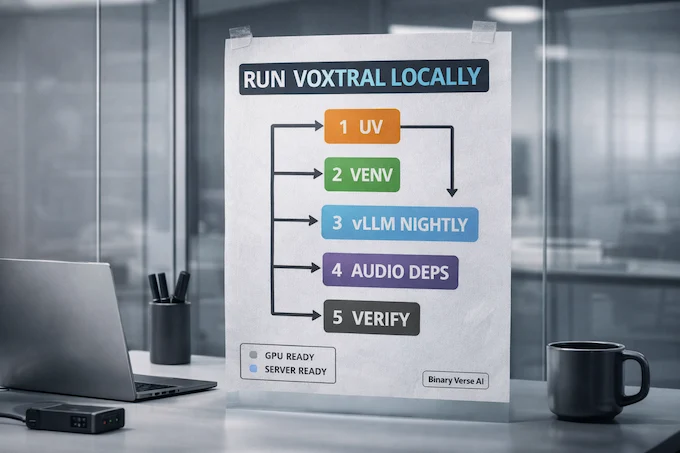
This section is intentionally boring. You want exact commands, not vibes.
To run voxtral locally, you only need a clean environment, the vLLM nightly wheels, and the audio libraries.
5.1 Step 1: Environment Setup
uv --version
uv venv voxtral-env
source voxtral-env/bin/activate
5.2 Step 2: Install Dependencies
uv pip install -U vllm \
  --torch-backend=auto \
  --extra-index-url https://wheels.vllm.ai/nightly
uv pip install soxr librosa soundfile
5.3 Step 3: Verify Installation
python -c "import vllm; import soxr; import librosa; import soundfile; print('All packages installed')"A quick note on the nightly URL: vLLM documents its nightly wheel indices and variants, including the default nightly index and CUDA-specific variants.
At this point you’ve done the part most people skip, creating a clean environment that you can nuke and rebuild in minutes. That’s not overhead. That’s future-you insurance.
6. Serve Voxtral Mini 4B With vLLM: The Known-Good Command
Open a terminal, keep it running, and start the server.
VLLM_DISABLE_COMPILE_CACHE=1 vllm serve mistralai/Voxtral-Mini-4B-Realtime-2602 --compilation_config '{"cudagraph_mode": "PIECEWISE"}'This exact line is recommended on the model card.
6.1 Why These Flags Exist
- VLLM_DISABLE_COMPILE_CACHE=1 avoids a class of “cache weirdness” issues when compilation artifacts get reused across changes. vLLM’s compilation system includes caching behavior, and disabling it can be a pragmatic stability move when you’re debugging.
- cudagraph_mode=PIECEWISE is about capturing GPU graphs where it’s safe, without forcing full-graph capture. vLLM’s CUDA graphs design notes explain piecewise capture as a compatibility-first approach.
The vibe here is not “make it faster at all costs”. The vibe is “make it work today and still work tomorrow”.
7. Run The Local Demo (Gradio) And Sanity-Test It
Now open a second terminal, activate the same environment, and run the Gradio app from the model card (the app.py you grabbed from Hugging Face).
python app.py --host localhost --port 8000 --shareThe demo UI is basic. That’s good. It keeps the surface area small.
7.1 A 3-Minute Sanity Checklist
Do these before you declare victory:
- Whisper test: speak softly, keep your mouth away from the mic.
- Shout test: speak loudly, clip the mic a bit.
- Speed test: talk fast for 20 seconds straight.
- Language flip: switch languages mid-sentence if you can.
- Noise test: play a bit of background audio and see what happens.
If Voxtral Mini 4B survives these, it’s ready for integration work.
8. Use The Realtime Endpoint: vLLM Realtime API And The /v1/realtime WebSocket
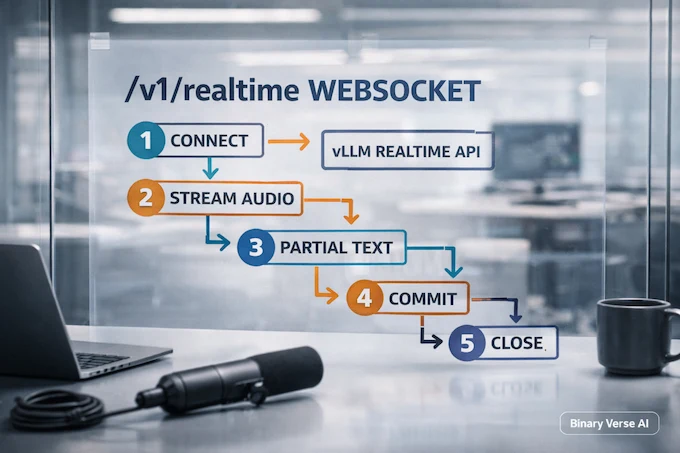
This is the part everyone skips because it looks “API-ish”, and then they wonder why production is painful.
vLLM exposes a vLLM realtime api that speaks WebSockets, and the canonical client example connects to:
ws://<host>:<port>/v1/realtime
That exact /v1/realtime websocket URI shows up in the vLLM Realtime client example.
8.1 The Mental Model
Think of a realtime session as a loop:
- You open a WebSocket.
- You send audio chunks as they arrive.
- You receive partial transcripts, then commits.
- You update the UI or downstream system continuously.
It’s less like “upload a file, get a response” and more like “carry on a conversation with a streaming service”.
vLLM’s internal Realtime connection docs describe a WebSocket lifecycle with session events, buffering, and cleanup, which matches how you should reason about your own client state machine.
If your product needs a local, private “real time speech to text” pipeline, this endpoint is the main event.
If you’re integrating voxtral realtime into an app, treat the WebSocket session like a first-class state machine, not a side quest, similar to how ChatGPT agents handle state.
9. Latency Tuning That Actually Works
Latency is not a badge. It’s a trade.
The transcript demo and the model documentation circle the same practical sweet spot: 480ms tends to give near-offline behavior while still feeling live. For Voxtral Mini 4B Realtime, that setting is the default recommendation for a reason. The reason is simple. At very low delay, the model has less context and guesses more. At higher delay, it has more context and corrects itself more.
9.1 A Useful Rule Of Thumb
- 240ms: snappy, sometimes twitchy. Great for live captions that can tolerate small corrections.
- 480ms: the happy middle. Great for voice agents, meetings, and anything where you want stability.
- 960ms and up: smoother text, more like subtitling. Less “live”.
When people ask for “voxtral realtime”, they usually want the 480ms experience. It feels like you’re talking to a fast typist, not a batch job.
10. VRAM And Stability Tuning: The Knobs That Save You
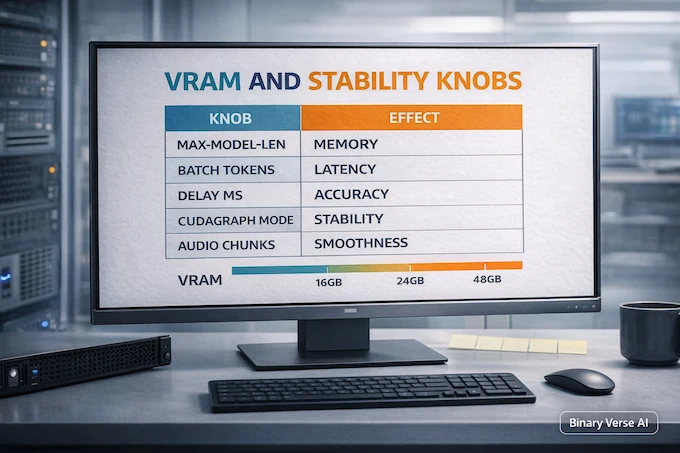
If you load Voxtral Mini 4B and it works for 30 seconds, congrats. Now make it work for 30 minutes.
The two most common causes of pain:
- Context set too large for your actual session length.
- Batching tuned for throughput, not latency.
The model card calls out two flags that map directly onto these problems: --max-model-len (or max model length) and --max-num-batched-tokens.
Table 2: Stability Knobs You Can Turn Without Regret
Voxtral Mini 4B: Realtime Tuning Knobs
| Knob | What It Controls | What You’ll Notice | When To Change It |
|---|---|---|---|
| Max model length | How long a session can run before hitting context limits | VRAM usage, long-session stability | If you don’t need multi-hour streams |
| Max num batched tokens | How much work is batched per step | Throughput vs latency | If you need lower delay and smoother streaming |
| Compilation mode | GPU graph capture strategy | Startup quirks, runtime stability | If cudagraph capture fails or gets flaky |
| Audio chunking | Size and cadence of audio frames | Transcript “smoothness” | If partials lag or jitter |
10.1 The “Hours Of Audio” Trap
If you run meetings that are 10 minutes long, don’t allocate like you’re recording a three-hour podcast. Tighten max model length and you’ll often see VRAM drop and stability improve.
This is where Voxtral Mini 4B rewards being honest about your product. Most apps don’t need infinite streaming. They need reliable streaming.
11. Common Errors And Fix Kit
Every new serving path has the same three failure modes: missing dependencies, mismatched versions, and “it worked yesterday”.
Here’s the fix kit I reach for first when Voxtral Mini 4B gets grumpy.
11.1 “WebSocket Connects, But Nothing Transcribes”
- Confirm you’re hitting the right endpoint,
/v1/realtime. - Confirm audio deps are installed, vLLM’s Realtime API docs explicitly call out audio extras for realtime transcription.
- Confirm the server log shows the realtime route. If the route is missing, you are not running a build that includes the realtime endpoint.
11.2 “CUDA Graph Capture Fails” Or Random Graph Errors
- Keep the piecewise cudagraph config, it’s designed for compatibility.
- If you still see capture failures, switch to eager compilation mode for debugging. You’re not chasing leaderboard latency yet, you’re chasing a stable service.
11.3 “Nightly Installed, But Import Errors Happen”
- Recreate the venv. It’s faster than spelunking dependency conflicts.
- Stick to one environment per project. Don’t “pip install” into your base system and hope for the best.
11.4 “VRAM OOM After A Few Minutes”
- Cap max model length for your real session duration.
- Reduce batching pressure so latency stays predictable.
- Watch for silent defaults that assume long sessions.
The recurring theme: Voxtral Mini 4B is fast enough that your bottleneck becomes system design, not model speed, much like optimizing LLM inference.
12. Limitations And Production Tips
A good model does not remove product work. It just changes what product work matters.
12.1 Turn Detection Is Not Guaranteed
Transcription is not the same thing as “knowing when someone is done talking”. If you’re building agents, you still need turn detection, VAD, or both, similar to considerations in agentic AI workflows.
12.2 Overlapping Speech Is Still Hard
Even strong models struggle when two people talk at once. Design your UI and expectations accordingly. If you need diarization and meeting-grade speaker attribution, you may prefer the batch-focused siblings in the Voxtral family for post-processing workflows.
12.3 Local Vs API: Pick Your Pain
Local gives you privacy, control, and predictable costs. It also gives you GPUs to manage.
APIs give you convenience, fast iteration, and fewer late-night driver updates. They also mean your audio leaves the machine.
If you’re evaluating a real time speech to text api, do it honestly. Compare end-to-end latency, network jitter, and pricing at your expected minutes-per-day, not just the model’s benchmark WER.
Closing: Build The Thing, Not The Demo
There’s a moment in every realtime project where you stop admiring the transcription and start trusting it. That’s when voxtral realtime stops being a demo and starts being infrastructure. That’s the moment Voxtral Mini 4B earns its keep.
Run Voxtral Mini 4B locally, wire up the /v1/realtime websocket, tune for the 480ms sweet spot, and cap your context like you mean it. You’ll end up with a transcription pipeline that feels instant, stays private, and actually holds up under messy human speech.
If you’re building with Voxtral Mini 4B, ship something real. Live captions. A voice assistant. Meeting notes that never touch the cloud. Then write down what broke, fix it, and keep the runbook updated.
Want more practical guides like this, the kind that save you hours instead of selling you hype? Subscribe, share this with a friend who owns a GPU, and keep an eye out for the next deep-dive on BinaryverseAI.
How do I run Voxtral Mini 4B Realtime locally with vLLM (/v1/realtime)?
To run Voxtral Mini 4B Realtime locally, install the vLLM nightly build with audio deps, start vllm serve for the model, then connect using the vLLM Realtime API over the /v1/realtime WebSocket. vLLM’s example clients show the session flow (create session → stream audio chunks → receive partial transcripts).
How much VRAM do I really need for Voxtral Mini 4B, and why can it use ~35GB when the download is ~9GB?
The ~9GB is mostly compressed weights on disk. Runtime VRAM includes BF16 weights on GPU, plus KV cache, plus pre-allocations tied to streaming and --max-model-len (and related buffers). If you leave defaults aimed at long sessions, VRAM can jump far beyond the download size.
What’s the best transcription delay setting (e.g., 480ms) for latency vs accuracy?
For most “feels instant” apps, 480ms is the practical sweet spot: it stays close to offline-quality accuracy while keeping the transcript responsive enough for voice agents and live captions. Go lower (240ms/160ms) when you value speed over accuracy, and go higher (960ms–2400ms) when subtitles must be cleaner.
Why is Voxtral Realtime currently “vLLM-only,” and can I run it with Transformers or llama.cpp?
Right now, the streaming architecture is supported in vLLM and the model authors explicitly call out that it’s not yet implemented in Transformers or llama.cpp. You can expect that to change only when someone ports the architecture and streaming interface, it’s not a simple “swap the loader” situation.
Does Voxtral Mini 4B Realtime support diarization, timestamps, or context biasing in the open model?
The Realtime model’s core deliverable is low-latency streaming transcription. Features like speaker diarization, context biasing, and word-level timestamps are highlighted as “enterprise-ready” capabilities in the broader Voxtral Transcribe 2 family, but whether you get them in your open-weights Realtime pipeline depends on the specific model endpoint and tooling you’re using. For many local setups, plan on adding diarization as a separate step unless the served interface exposes it directly.