
Introduction
Computer vision used to be a distinct, somewhat isolated field. You had your object detectors, your OCR engines, and your captioning models. They were useful, sure. But they were narrow. They saw pixels, but they didn’t really understand them. That era is effectively over.
With the release of Qwen3-VL, we are witnessing the commoditization of high-fidelity visual reasoning. This isn’t just another open weights release that gets buried in the Hugging Face feed a week later. The Qwen Team has dropped a model family that fundamentally challenges the supremacy of closed giants like Gemini 2.5 Pro and GPT-4o, specifically in how machines perceive, process, and act upon visual data.
If you are a developer, a researcher, or just someone tired of paying API costs for OCR, you need to pay attention. Qwen3-VL introduces architectural shifts—specifically DeepStack and Interleaved-MRoPE—that solve the “blindness” issues plaguing previous vision language models.
This is your deep dive. We are going to look at the architecture, the benchmarks that actually matter, and then I am going to show you exactly how to run this on your own hardware to build a visual AI agent.
Table of Contents
1. What is Qwen3-VL? A New Era of Vision-Thinking Models
At its core, Qwen3-VL is the latest iteration of the Qwen vision-language series, designed to bridge the gap between “seeing” an image and “reasoning” about it.
Most previous models treated images like a foreign language that had to be translated into text tokens immediately. They lost nuance. Qwen3-VL changes the plumbing. It is built on the Qwen3 backbone but integrates a few critical innovations that make it a vision language model capable of dense reasoning.
1.1 The “DeepStack” Architecture
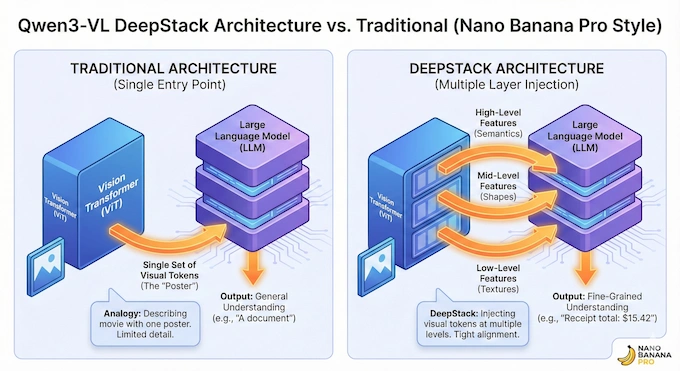
The most interesting technical leap here is something the team calls DeepStack. In traditional architectures, visual tokens (the pieces of an image the AI “sees”) are usually dumped into the language model at a single entry point. It is like trying to describe a movie to someone by showing them a single poster.
DeepStack changes this by injecting visual tokens into multiple layers of the Large Language Model (LLM). It takes features from different levels of the Vision Transformer (ViT)—from low-level textures to high-level semantic shapes—and routes them to the corresponding layers in the LLM. This tightens the alignment between what the model sees and what it says. It is why the model is suddenly so much better at fine-grained tasks like reading tiny text on a receipt or analyzing a dense chart.
1.2 Interleaved-MRoPE for Video
Video is just a stack of images, right? Not really. Video is time. Previous models struggled with long videos because they crammed temporal information into high-frequency bands, which confused the model over long contexts.
Qwen3-VL uses Interleaved-MRoPE. It distributes time, height, and width uniformly across the embedding dimensions. This allows the model to maintain a native 256K token context window, which is enough to watch a 2-hour movie and recall specific details down to the second.
1.3 The Lineup: From Edge to Cloud
The release strategy here is aggressive. They haven’t just dropped one massive model; they have covered the entire compute spectrum:
- Qwen3-VL-2B/8B: These are the dense models. Perfect for consumer hardware and edge devices. The 8B, in particular, is the sweet spot for local development.
- Qwen3-VL-30B-A3B: This is the interesting one. It is a Mixture-of-Experts (MoE) model. It has 30 billion parameters total, but only activates about 2.4 billion per token. It gives you the intelligence of a large model with the inference speed of a small one.
- Qwen3-VL-235B: The flagship. This is the one beating giants on the leaderboards.
2. Qwen3-VL Benchmarks: Beating Giants on Consumer Hardware
Benchmarks are often just marketing confetti, but the specific evaluations for Qwen3-VL reveal where its strengths lie. We are seeing a trend where open-source models are no longer just “good enough”, they are specialists.
2.1 OCR Performance and Document Parsing
Optical Character Recognition (OCR) is the killer app for VLMs. If a model cannot read a PDF reliably, it is useless for business automation.
In the benchmarks, the flagship Qwen3-VL model achieves state-of-the-art results on document understanding tasks. On the MMLongBench-Doc benchmark, which tests understanding of long documents, it hits an accuracy of 57.0%, effectively setting the standard for long-context retrieval.
But it is not just the big model. The smaller Qwen3-VL-8B punches significantly above its weight class, outperforming the previous generation’s 72B model in several text-centric tasks. This is largely due to the improved resolution handling and the new multilingual OCR training data that covers 39 distinct languages.
2.2 Reasoning: The “Thinking” Models
We are seeing a divergence in model training. Qwen3-VL comes in “Instruct” and “Thinking” variants.
The Thinking models are trained with Reinforcement Learning (RL) specifically for complex reasoning chains—similar to the logic behind OpenAI’s o1 series. On the MathVista benchmark (a standard for visual math reasoning), the 235B Thinking model scores an 84.9, beating GPT-4V and matching Gemini 2.5 Pro. If you are building an application that needs to solve geometry problems or analyze engineering schematics, the Thinking variant is non-negotiable.
2.3 Video Understanding
The needle-in-a-haystack test is the ultimate vibe check for long-context models. The team inserted a single “needle” frame into a video and asked the model to find it.
Qwen3-VL achieved 100% accuracy on videos up to 30 minutes long (256K tokens). Even when extrapolated to 1 million tokens (about 2 hours of video), accuracy held at 99.5%. This is powered by that Interleaved-MRoPE architecture we discussed. It means you can upload a full lecture or a security feed, and the model won’t hallucinate the timeline.
3. Hardware Requirements: Can Your GPU Run It?
This is the question that stops most projects dead in their tracks. Visual models are VRAM hungry because they have to encode high-resolution images into massive embedding stacks.
The Qwen3 VL 30B A3B is particularly interesting here. Because it is an MoE, its active parameter count is low (Active 2.4B). This means inference is fast, but VRAM requirements for loading the weights remain high.
Here is a breakdown of estimated requirements for running these models locally (assuming 4-bit quantization for the larger ones):
Qwen3-VL Hardware Requirements & Specs
| Model Variant | Context | Minimum VRAM (4-bit) | Recommended GPU | Use Case |
|---|---|---|---|---|
| Qwen3-VL-2B | 256K | 4 GB | RTX 3050 / 4060 | Edge devices, fast OCR |
| Qwen3-VL-8B | 256K | 8 GB | RTX 3080 / 4070 | General purpose, chat |
| Qwen3-VL-30B-A3B | 256K | 24 GB | RTX 3090 / 4090 | Coding, complex reasoning |
| Qwen3-VL-235B | 256K | 140 GB+ | 2× H100 / A100 | Enterprise / research |
The “30B A3B” Secret:
Do not let the “30B” tag scare you off. If you are running on a consumer card like an RTX 4090 (24GB), the 30B MoE model is the one you want. The “A3B” stands for “Active 2.4B” (approximate). While you need the VRAM to hold the experts, the compute cost is incredibly low. You get the reasoning of a 30B model with the latency of a 3B model.
4. Step-by-Step Installation Guide (Ollama & Llama.cpp)
You have two main paths here: Qwen3 VL Ollama for ease of use, or direct interaction for power users.
4.1 Method 1: Ollama (The Easiest Path)
Ollama has become the Docker of LLMs. It standardizes everything. Support for Qwen3-VL requires version 0.12.7 or higher, so update your binary first.
- Update Ollama: Ensure you are on the latest build. Old versions will choke on the vision adapters.
- Pull the Model: Open your terminal and run the 8B model. It is the best starting point for most users.
ollama run qwen3-vl:8b- Run the MoE (If you have the VRAM):
ollama run qwen3-vl:30bThat is it. You can now paste image paths directly into the chat prompt, and it will analyze them.
4.2 Method 2: vLLM (For Production)
If you are building an API or a visual AI agent backend, Ollama might be too slow due to lack of batching optimization. You want vLLM.
Install vLLM:
pip install vllm>=0.11.0Serve the Model: This command spins up an OpenAI-compatible API server. Note the flags for enabling expert parallelism if you are using the MoE model.
vllm serve Qwen/Qwen3-VL-235B-A22B-Instruct-FP8 \
--tensor-parallel-size 8 \
--enable-expert-parallel \
--host 0.0.0.0 --port 8000
This setup allows you to hit http://localhost:8000/v1/chat/completions with image URLs in the payload, just like you would with GPT-4o.
5. How to Prompt Qwen3-VL for Perfect OCR
One of the most frustrating things about switching to a local Qwen3-VL OCR workflow is the “There Are None” bug. You upload a crisp 4K screenshot of a spreadsheet, ask the model to read column B, and it replies: “I cannot see any text in this image.”
This usually happens because the vision encoder downsamples the image too aggressively to save tokens.
5.1 The Fix: Force Resolution
You need to force the model to respect the native resolution. In your API call or Python script, ensure you are utilizing the min_pixels and max_pixels constraints effectively.
If you are using the Hugging Face transformers library, do this:
# Force higher resolution processing
min_pixels = 256 * 28 * 28
max_pixels = 1280 * 28 * 28
processor = AutoProcessor.from_pretrained(
"Qwen/Qwen3-VL-8B-Instruct",
min_pixels=min_pixels,
max_pixels=max_pixels
)
5.2 JSON Extraction Template
Qwen3-VL is surprisingly good at following schema constraints. If you need structured data from an invoice or a receipt, do not just ask “read this.” Use a prompt that enforces JSON output.
Prompt Template:
“Analyze this image. Extract all line items, dates, and totals. Return the data strictly as a JSON object with the keys: ‘date’, ‘vendor’, ‘items’ (array of objects with ‘name’ and ‘price’), and ‘total’. Do not include markdown formatting or explanation. Just the JSON.”
This works exceptionally well with the 8B and 30B models because of their extensive training on document parsing datasets like OmniDocBench.
6. Building Visual Agents: Computer Use and GUI Control
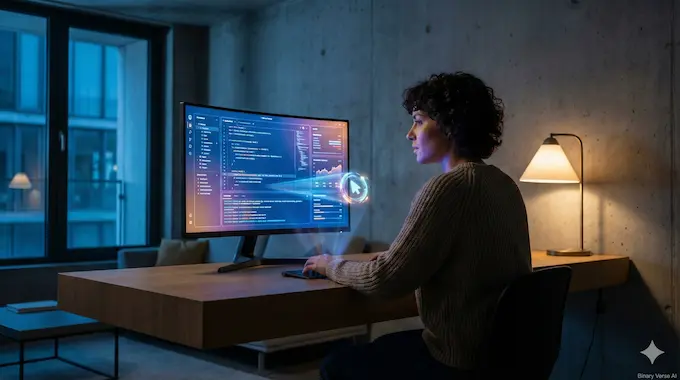
This is where things get wild. Qwen3-VL isn’t just passive; it’s designed to be a visual AI agent.
The model has been trained on datasets like OSWorld and ScreenSpot. This means it understands Graphical User Interfaces (GUIs). It knows what a “Save” icon looks like, even if it doesn’t say “Save.”
6.1 The Coordinate System
To build an agent that clicks things, you need coordinates. Qwen3-VL uses a normalized 0-1000 coordinate system.
If you ask: “Where is the ‘Submit’ button?”
The model might return: [box_2d: 850, 900, 950, 950]
This translates to the bottom-right corner of the screen. You can map these 0-1000 values to your actual screen resolution (e.g., 1920×1080) to drive a mouse cursor using Python libraries like pyautogui.
6.2 Use Cases for Visual Agents
- Automated QA Testing: Take screenshots of your web app and ask Qwen3-VL to “Click the login button” to verify the UI layout hasn’t broken.
- Data Entry: Have the agent watch a video of a user filling out a form, extract the data, and replicate the action.
- Accessibility: Build a screen reader that actually understands context, not just DOM elements.
The model’s ability to handle “function calling” based on visual inputs allows it to act as the brain for a robotic process automation (RPA) bot that doesn’t break every time the CSS changes.
7. Qwen3-VL vs. The Competition (Gemini & GPT-4o)
We have to address the elephant in the server room. Is this actually better than Gemini 2.5 Pro or GPT-4o?
7.1 The Pros of Qwen3-VL:
- Deep Customization: You can fine-tune the 8B model on your specific receipts or medical records. You cannot fine-tune GPT-4o’s vision layers easily or cheaply.
- Privacy: For Qwen3-VL OCR tasks involving medical records or financial data, sending images to the cloud is often a non-starter. Running Qwen locally solves this.
- Video Context: The 256K context window for video is massive. While Gemini has a large context window, Qwen’s ability to run this on your own infrastructure (if you have the H100s) or effectively via API is compelling.
7.2 The Cons:
- Speed: The “Thinking” process in the reasoning models is slower than the highly optimized inference of GPT-4o.
- Hardware Cost: Running the 30B or 235B model requires serious hardware. You can rent a GPU, but it is more friction than an API key.
However, in benchmarks like MathVista and MMMU, Qwen3-VL is trading blows with the best closed models, often winning in specific verticals like document understanding.
8. Conclusion: Is Qwen3-VL the Best Open Source VLM?
The short answer is yes. Right now, Qwen3-VL represents the ceiling of open-source vision. It is not just about the raw benchmarks; it is about the architectural decisions—specifically the DeepStack integration and the MoE implementation—that make it usable.
If you are a developer looking to integrate visual understanding into your app, stop messing around with Tesseract or older CLIP models.
Your Next Step:
Download the Qwen3-VL-8B model via Ollama. It is small enough to run on a decent laptop but smart enough to handle 90% of OCR and description tasks.
ollama run qwen3-vl:8b
Go build something that sees. The blinders are off.
What are the hardware requirements to run Qwen3-VL locally?
To run Qwen3-VL locally, your hardware needs depend heavily on the model size and quantization level (e.g., Int4 vs. FP16).
2B Model: Requires approximately 4GB VRAM with quantization, making it runnable on most modern consumer laptops.
8B Model: Comfortable on 8-10GB VRAM GPUs (like the RTX 3080 or 4070) when using 4-bit or 8-bit quantization.
30B MoE (Mixture-of-Experts): Surprisingly efficient due to having only ~2.4B active parameters; it can run on 24GB VRAM GPUs (RTX 3090/4090) using Int4 quantization.
235B Model: Requires enterprise-grade hardware, typically multi-GPU setups like H100s or A100s, requiring 140GB+ VRAM even when quantized.
How do I install Qwen3-VL using Ollama or llama.cpp?
Installation is straightforward for both tools:
Ollama (Easiest): First, ensure you have Ollama installed. Then, simply run the command ollama run qwen3-vl for the default model, or specify the size like ollama run qwen3-vl:8b or ollama run qwen3-vl:30b.
Llama.cpp (Performance): Clone the llama.cpp repository and build it using cmake. You can then run the model using the llama-cli command. For the 8B model, use a command like: ./llama-cli -hf unsloth/Qwen3-VL-8B-Instruct-GGUF ... with flags like --n-gpu-layers 99 to offload layers to your GPU.
How does Qwen3-VL compare to GPT-4o and Gemini 1.5 Pro?
Qwen3-VL challenges these proprietary giants in specific niches:
Reasoning: The “Thinking” variant of Qwen3-VL outperforms GPT-4o and matches Gemini 2.5 Pro on complex STEM benchmarks like MathVista and MathVision.
OCR & Document Parsing: The model excels at long-context document understanding (up to 1M tokens), often beating Gemini in extracting data from dense technical PDFs.
Cost: While GPT-4o and Gemini charge per token, Qwen3-VL is open-weight and can run locally for free, providing a massive cost advantage for high-volume tasks.
What is the difference between Qwen3-VL Instruct vs. Thinking models?
The two variants serve different purposes:
Instruct Model: Optimized for speed and direct task execution. It is ideal for standard tasks like OCR, image captioning, and UI parsing where low latency is critical.
Thinking Model: Uses a Chain-of-Thought (CoT) process similar to OpenAI’s o1. It takes longer to generate a response because it “reasons” through the problem step-by-step, making it superior for complex math, coding, and scientific analysis.
Can Qwen3-VL be used as a “Computer Use” agent?
Yes, Qwen3-VL is specifically trained for Visual Agent capabilities.
It can analyze screenshots to identify GUI elements (buttons, forms, icons) using a coordinate system (0-1000).
It achieves state-of-the-art results on the OSWorld benchmark, allowing it to perform tasks like controlling a mouse and keyboard to navigate operating systems or web browsers.
Users can integrate it with tools like pyautogui to build autonomous agents that can click, type, and scroll based on visual prompts.