
Introduction
Text-to-speech used to be the “nice-to-have” layer you glued onto a product at the end. Now it’s the product. A good voice turns a demo into something people keep open. A bad voice turns your app into a tab people close and forget.
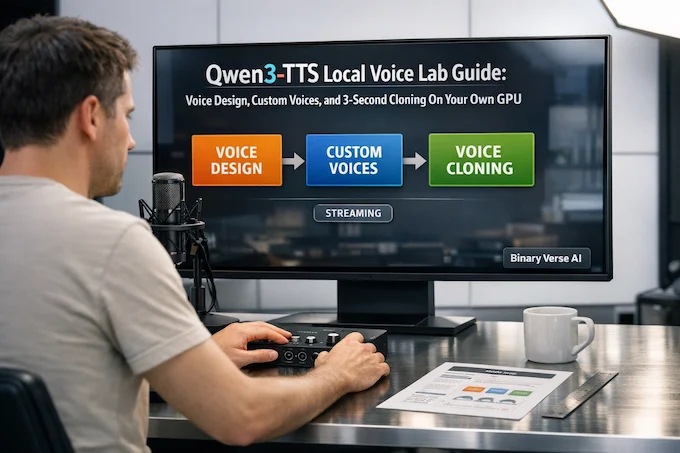
That shift is why the open-sourcing of Qwen3-TTS matters. It’s not just another checkpoint on Hugging Face. It’s a pretty complete voice toolbox, built around three practical modes, voice design, reusable custom voices, and fast voice cloning from a short sample. And yes, it can stream, meaning you can start playback while generation is still happening.
This guide is for anyone who wants to run Qwen3-TTS locally, keep their audio on-device, and build a repeatable workflow for narration, character voices, and interactive agents. Think of it as your Qwen3-TTS starter lab. We’ll stay focused on the stuff that actually ships: model choice, install, quality tips, and the sharp edges that waste afternoons.
Table of Contents
1. What Is Qwen3-TTS, And Why Run It Locally?
At a high level, Qwen3-TTS is an end-to-end text-to-speech stack that tries to solve three jobs developers care about:
- Voice design, create a brand-new voice from a natural language description.
- Custom voices, pick from a set of curated timbres and steer style with instructions.
- 3-second voice cloning, mimic a target speaker from a short reference clip.
The open release ships under an Apache-2.0 license and targets 10 major languages, including English, Chinese, Japanese, Korean, German, French, Russian, Portuguese, Spanish, and Italian. That mix makes it useful for real products, not just English-only demos.
The “why local” argument is simple: voice is data. It’s personal, it’s brand-critical, and it tends to show up in places where you do not want a third party in the loop. Running locally also lets you amortize cost at scale, reproduce outputs, and iterate fast without rate limits.
Here’s the cheat sheet that will save you the first hour.
Qwen3-TTS Voice Modes Overview
A quick, mobile-friendly comparison of modes, controls, inputs, and best-fit use cases.
| Goal | Mode | What You Control | What You Provide | Best Fit |
|---|---|---|---|---|
| Make a fresh character voice | Voice Design | Persona, tone, cadence, accent, emotion | Text + voice description | Fiction, games, agents, demos |
| Ship usable voices fast | Custom Voices | Style on top of preset timbres | Text + optional instruction | Apps, narration, internal tools |
| Match a real speaker | Voice Cloning | Timbre similarity plus style via text | Reference audio, usually transcript too | Dubbing, personalization, prototyping |
If you only remember one thing: treat this as a local voice lab, not a single “TTS model.” The workflow matters more than the marketing label.
2. Qwen3-TTS Capabilities That Matter In Practice
A lot of TTS announcements read like a feature checklist. The reality is more nuanced. The parts that change your day-to-day workflow are these.
2.1 Description-Based Control That Actually Behaves
The Qwen3-TTS voice design mode is the standout. You write a compact description of the voice you want, and the model tries to synthesize that identity, not just “read the text.” In practice, you get better results when your description is specific about signal-level traits (pitch range, speaking rate, articulation) and intent (warm, dry, theatrical), not just vibes.
2.2 What “3 Seconds” Means
The cloning pitch sounds magical, but it isn’t a free lunch. Three seconds can be enough to lock in a timbre embedding, but it’s not enough to capture every expressive quirk of a speaker in all contexts. Think of it like a face ID photo. It gets you a consistent identity, then the text and instructions drive the performance.
The best clones come from three seconds of clean, steady speech, not three seconds of a podcast with music and laughter.
2.3 Streaming That Feels Interactive
The streaming design is the difference between “TTS as a batch job” and “TTS as a conversation.” The architecture is built to emit audio quickly, so you can start playback while the rest is still generating. For interactive use, that’s the whole game. Latency is a product feature.
3. Choose The Right Model: Size, Tokenizer Rate, And What You Actually Need
Before you install anything, decide what you’re optimizing for. Otherwise you’ll end up benchmarking your patience.
3.1 A Practical Model Chooser
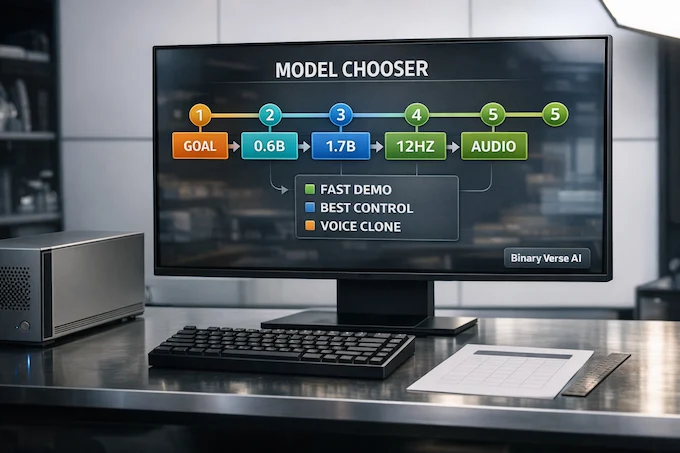
- Fastest local demo on a modest GPU: the 0.6B line, especially if you want quick iteration.
- Best control and overall quality: the 1.7B line, when VRAM allows.
- Voice design: use the VoiceDesign checkpoint, it’s purpose-built.
- Cloning: use a Base checkpoint, it’s the one intended for reference-audio prompting.
You’ll also see two tokenizer rates discussed, 12Hz and 25Hz. The 12Hz tokenizer is built for strong compression and fast reconstruction, which helps throughput and streaming. The 25Hz variants can trade extra compute for detail in some setups.
3.2 Don’t Overthink It
Start with the smaller model, confirm your pipeline, then upgrade. Most early issues in qwen3 tts are text normalization, audio preprocessing, or vague instructions.
4. Hardware And OS Prerequisites, Plus The Gotchas People Trip On
Let’s be blunt: local TTS is mostly a GPU story.
4.1 GPU Expectations And VRAM Reality
If you have a modern NVIDIA GPU with decent VRAM, you’re in a good place. The 1.7B checkpoints are heavier and benefit from half-precision. The 0.6B checkpoints are friendlier for mid-range cards and quick demos. If you’re on CPU-only, you can still run it, but you’re signing up for “go make coffee” latencies.
4.2 Audio Dependencies You Should Install First
Install ffmpeg. You will need it. You will need it again later. It’s the duct tape of audio pipelines.
Keep your reference audio clean: consistent sample rate, minimal compression, minimal reverb. Cloning quality is allergic to room echo.
4.3 Privacy And The Stuff You Should Not Feed Into Cloning
Voice is biometric-ish. Only clone voices you own or have explicit permission to use. Don’t feed private calls or anything you cannot justify publishing.
5. Qwen3-TTS Install: Clean Environment, Correct Torch, Optional Speedups
A clean Python environment is the cheapest insurance you’ll ever buy.
5.1 Minimal Setup
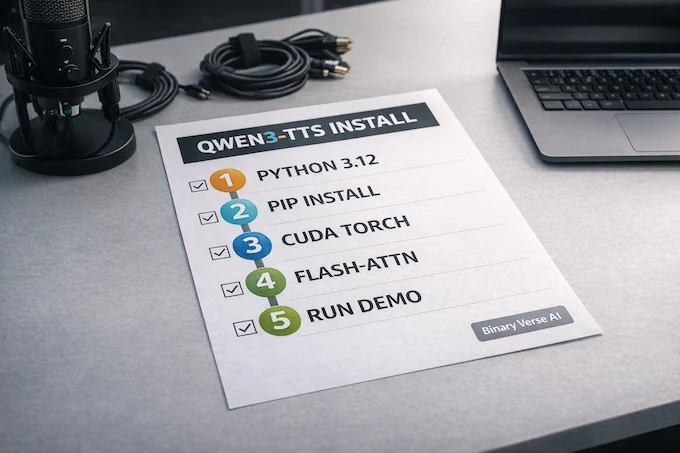
Use a fresh environment (conda or venv), Python 3.12, then install the package:
conda create -n qwen3tts python=3.12 -y
conda activate qwen3tts
pip install -U qwen-ttsAt this point you can already run Qwen3-TTS through the demo CLI or via Python.
5.2 Optional Acceleration
If your hardware supports it, FlashAttention 2 can reduce memory and speed up attention. Not mandatory, but it can be the difference between smooth runs and memory errors.
6. Downloading Checkpoints And Tokenizers Without Getting Lost
There are two ways to get weights: let the runtime pull them on demand, or pre-download them.
6.1 Auto-Download Vs Manual Download
Auto-download is convenient until you deploy in an environment with locked egress, slow mirrors, or strict reproducibility needs. If you’ve ever watched a container start-up hang while it “just downloads one more file,” you already understand why manual snapshots exist.
6.2 Where The Tokenizer Fits
The tokenizer is not optional plumbing. It’s core to how Qwen3-TTS represents speech. The 12Hz tokenizer is designed to preserve paralinguistic cues and background characteristics while compressing hard enough to keep generation fast. If you use the official packages, you usually don’t have to touch it, but it helps to know where quality and latency are coming from.
7. Basic Text-To-Speech Mode: Fast Iteration Without Drama
Start boring. Boring is how you get to good.
7.1 Keep Text Normalization Simple
Most TTS failures look like “the model can’t speak,” but the real issue is the input text. Normalize punctuation. Spell out weird symbols. Decide how you want to read URLs and numbers. Then do it consistently.
7.2 Stabilize Pronunciation And Pacing
When you find an instruction that gives you the pacing you like, save it as a preset. Small wording changes can shift rhythm a lot. This is not mysticism, it’s repeatability.
8. Voice Design: Prompting A Voice Into Existence
Voice design is where you stop thinking like an API user and start thinking like a casting director.
8.1 Write Descriptions Like You’re Describing Audio, Not A Character Sheet
Good descriptions anchor on measurable cues:
- pitch range (low, mid, high)
- speed (slow, conversational, brisk)
- articulation (crisp, breathy, slurred)
- emotional contour (flat, warm, tense, playful)
- accent or dialect, only if you truly need it
Bad descriptions are pure vibe. “Cool hacker voice” is not a spec.
8.2 Common Failure Modes
- Samey voices: your description is too generic. Add two concrete constraints.
- Clipped consonants: your output is too loud, too fast, or your audio chain is clipping.
- Emotion drift: long text can pull the voice toward the semantics of the content. Break scripts into smaller segments and keep the instruction consistent.
This is also a great moment to build reusable “voice cards” for your project, a small document of voice descriptions you can paste into future runs.
9. Custom Voices: Build Reusable Presets For Real Projects
If voice design is the art room, custom voices are the production floor.
9.1 Preset Timbres Plus Instructions
The custom-voice models ship with a fixed set of timbres. You pick a speaker and then steer with an instruction like “whisper,” “sound irritated,” or “speak slowly like you’re teaching.” For many products, that’s enough. You get consistency without managing your own speaker dataset.
9.2 Organize Voices By Use Case
Create a small folder structure:
- Narration, calm, steady, low variance
- Shorts and reels, fast, punchy, high energy
- Dialogue characters, distinct cadence and emotion
- System voice, neutral, minimal personality
This sounds trivial, but it stops you from re-inventing voices every week.
10. 3-Second Voice Cloning Locally: A Checklist For Good Results
Qwen3-TTS voice cloning is powerful, but it’s picky.
10.1 Record Like You Mean It
Use a quiet room. Keep the mic distance consistent. Avoid aggressive noise suppression. Don’t record next to a laptop fan that sounds like a tiny jet engine. Save WAV if possible.
If you can, record 10 to 20 seconds and then pick the cleanest 3 to 5 seconds.
10.2 Transcript Matters More Than People Expect
For cloning workflows that accept a reference transcript, write it exactly as spoken. Fillers, contractions, all of it. The model uses the alignment between reference audio and reference text to extract a better speaker prompt. Skip this and your clone gets blurrier.
10.3 Ethics And Consent, Non-Negotiable
Here’s the simple rule: if you wouldn’t be comfortable explaining the source of the voice sample on a public changelog, don’t do it. Always get permission. Always label synthetic audio when you publish. You’re not just building software, you’re building trust.
11. Run The Local Web UI Demo: The Fastest Way To Learn The Workflow
If you want the shortest path from “installed” to “I can hear it,” use the web demo.
11.1 Launch A Demo
After installation, you can start a UI for the mode you want. For example:
qwen-tts-demo Qwen/Qwen3-TTS-12Hz-1.7B-CustomVoice –ip 0.0.0.0 –port 8000
Open it locally, or use port forwarding through VS Code.
11.2 Microphone Capture And HTTPS
If you use voice cloning through the browser, you’ll hit a modern-web reality: microphone permissions often require HTTPS when you’re not on localhost. For quick tests, a self-signed certificate works. For anything shared with a team, use a real certificate and treat it like a normal service.
The practical takeaway: the “why doesn’t the mic work” bug is not a model bug.
12. Best ElevenLabs Alternative: Local Vs Qwen API, And Where Qwen3-TTS Fits
Let’s address the elephant in the room. Many teams start with a hosted voice service because it’s easy. Then they hit cost, privacy, or reproducibility constraints and go hunting for an elevenlabs alternative.
If your question is “is this the best elevenlabs alternative,” it depends on what you mean by best. For some teams, best is “sounds great with zero setup.” For others, best is “I can run it in my stack, control it, and sleep at night.”
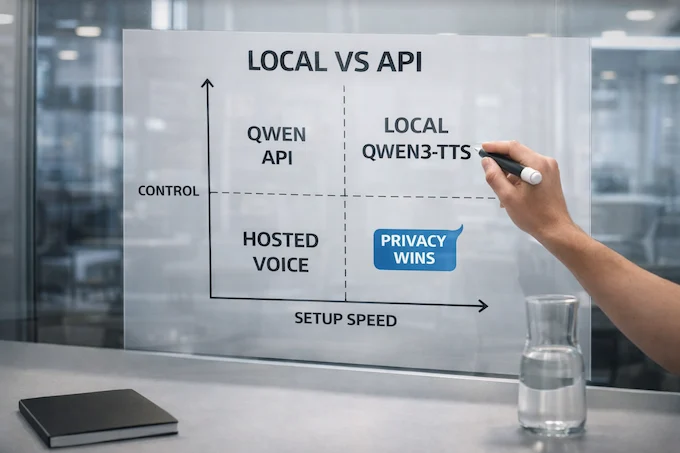
12.1 Local Vs API: The Real Tradeoff
The qwen API exists for when you want the voice capability without owning the GPU ops. The trade is classic:
- Local gives you privacy, predictable cost at scale, and reproducibility.
- API gives you fast start-up, easy scaling, and fewer moving parts.
If you’re experimenting, API is a clean on-ramp. If you’re shipping long-form narration or agent audio at volume, local wins quickly. You stop paying per character for something you generate all day.
12.2 ElevenLabs Conversational AI Alternative, What Changes?
If you specifically want an elevenlabs conversational ai alternative, streaming matters more than absolute peak audio quality. You care about first audio packet latency, stability over long sessions, and how well the voice tracks instruction changes mid-dialogue.
This is where Qwen3-TTS is unusually strong for an open model. It’s built with streaming in mind, and it supports instruction-driven control instead of locking you into a tiny set of fixed voices.
12.3 Decision Table: Pick The Right Path
Qwen3-TTS Deployment Choice Guide
Pick the setup that matches your priority: speed, privacy, cost, or quality goals.
| You Care Most About | Choose This | Why |
|---|---|---|
| Fastest integration | qwen API | No GPU setup, good for prototypes |
| Privacy and local control | Local Qwen3-TTS | Audio stays on your machine or VPC |
| Lowest cost at scale | Local Qwen3-TTS | Pay for hardware, not per request |
| Best ai text to speech for long narration | Local first | Easier to batch, tune, and reproduce |
| Best ai voice generator for character work | Local voice design | You can iterate on voice cards fast |
A subtle point: “open source text to speech ai” is not just about price. It’s about owning your constraints. When the model is local, you can build policy, logging, and safety around it. That’s hard when the voice is a black box behind a billing dashboard.
12.4 Build A Voice Workflow, Not Just A Demo
The most useful way to think about Qwen3-TTS is as a set of building blocks for a voice pipeline. Start with the web UI to learn the knobs. Move to a script once you know what “good” sounds like for your project. Then lock in repeatable presets, voice cards, and a clean Qwen3-TTS cloning checklist.
If you try it, do yourself a favor: pick one short script, generate it three different ways (custom voice, voice design, clone), and listen back-to-back. You’ll instantly understand which mode matches your product.
Next step: run Qwen3-TTS locally, save your best voice cards, and ship one small feature that actually uses them. Then go star the repo, share a sample with your team, and stop treating voice as an afterthought.
Can I use Qwen3-TTS commercially?
Yes. Qwen3-TTS is released under Apache 2.0, which generally allows commercial use, modification, and redistribution. You still need to follow the license requirements, like keeping notices and meeting your compliance needs. If you use the qwen API instead of running locally, that usage is billed separately by the provider.
Can I use text-to-speech for audiobooks?
Yes, if you have the rights to narrate the content. Qwen3-TTS supports controllable, streaming generation, which fits long-form narration. For best results, generate chapter-by-chapter, keep one consistent voice preset, normalize loudness, and do a proof-listen pass to catch mispronunciations before publishing.
Can ChatGPT do text to voice?
ChatGPT has voice features in its apps, like voice conversations, but that’s not the same thing as running a local TTS stack. If you want offline control, you write the script anywhere you like, then generate audio with Qwen3-TTS on your own hardware. It’s a clean separation: writing brain, voice engine.
Is Speechify free?
Speechify offers a free option, but it’s limited, typically fewer voices and fewer advanced features. The paid tiers add higher quality voices, more tools, and higher limits. The exact details change over time, so treat “free” as “starter access,” not “everything unlocked.”
How can I get a book read aloud to me?
Two common routes. First, use a reader app or OS accessibility feature that supports read-aloud. Second, generate narration using TTS. If you want privacy and repeatability, run Qwen3-TTS locally as an open source text to speech ai option. If you want zero setup, use a hosted API and trade money for convenience.