
Introduction
Medical AI looks deceptively simple until you touch real inputs. The day you move from “a chest X-ray JPEG” to “a CT volume with 300 slices” is the day your pipeline, your budget, and your patience all file a complaint.
That’s why MedGemma 1.5 is worth your time. Not because it’s a plug-and-play doctor, it’s not. It’s worth your time because it brings high-dimensional medical imaging closer to the everyday developer workflow: local experiments, repeatable tests, tight feedback loops.
This post stays practical. You’ll get a clear map of what the model can do, what it still messes up, and how to run it locally with a setup that won’t surprise-fail halfway through your first demo.
Table of Contents
1. What Is MedGemma 1.5 And Why People Care
At a high level, MedGemma 1.5 is an open multimodal model tuned for medical text and medical vision, built on the Gemma family. The big upgrade is support for higher-dimensional modalities, CT and MRI volumes and whole-slide pathology, plus stronger longitudinal chest X-ray comparisons and better extraction from lab reports.
The “why now” is the size. MedGemma 1.5 ships as a 4B instruction-tuned variant. That’s small enough to explore on a single GPU while still being capable enough to justify real prototyping.
MedGemma 1.5 Model Components At A Glance
Quick selection guide for local inference, larger reasoning, speech, and embeddings.
| Component | What It Does | When You’d Pick It |
|---|---|---|
| MedGemma 1.5 4B (multimodal IT) | Image-to-text plus medical reasoning across 2D, CT slice sets, WSI patch sets, and longitudinal CXR pairs | Prototyping and medgemma 1.5 local inference on one workstation |
| MedGemma 1 27B | Larger text-heavy sibling | When you need deeper text reasoning and can afford the compute |
| MedASR | Medical dictation speech-to-text | When voice notes should become prompts or structured text |
| MedSigLIP | Medical image encoder | When you want embeddings and retrieval more than generation |
Tip: On phones, scroll horizontally inside the table to keep columns readable without shrinking text.
1.1 The Real Meaning Of “High-Dimensional Support”
Forget the hype. In practice, “high-dimensional” means you can feed a set of slices or patches, not one image, and the model is designed to make use of that bundle while still handling normal 2D images and text.
1.2 Offline-Capable Changes The Workflow
Running MedGemma 1.5 locally changes your iteration workflow:
- you can test prompts repeatedly without API friction
- you can log failures and replay them deterministically
- you can keep sensitive, de-identified samples inside your environment
If you build healthcare software, that’s not a footnote, it’s the whole point.
2. Capabilities Explained Like You’re On Call
Here’s the feature list translated into tasks you might actually ship. MedGemma 1.5 is most useful when you ask it to produce careful text, summaries, structured fields, comparisons, and “what do you see” style descriptions.
2.1 CT And MRI Volume Reasoning
You provide multiple slices plus a question. The model replies in text. Think assistance for triage workflows, research labeling, and QA, not “DICOM in, diagnosis out.”
2.2 Whole-Slide Pathology With Patch Sets
WSI is huge and the signal is local. The workable pattern is patch extraction, then reasoning over a curated set of patches. The model supports that pattern directly.
2.3 Longitudinal Chest X-Rays
Give the current CXR and a prior CXR, then ask for progression, stability, or new findings. The model was trained to talk in those terms, which makes it much easier to build “compare and summarize” tools.
2.4 Anatomy Localization And Lab Report Extraction
Two underrated wins:
- anatomy localization for region-aware reasoning on chest X-rays
- lab report extraction to pull values, units, and labels into structured output
If you’ve ever fought PDFs with regex, you’ll appreciate this, and you’ll still validate the outputs like your job depends on it, because it does.
3. Benchmarks You Can Quote, Plus The Fine Print
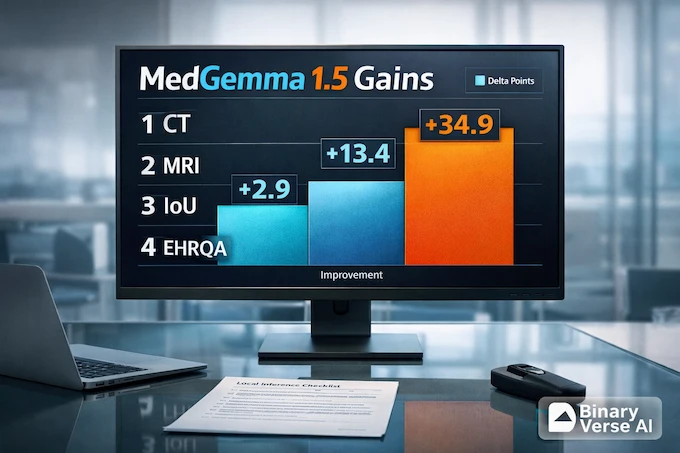
Benchmarks aren’t a trophy, they’re a rough forecast. MedGemma 1.5 shows meaningful improvements in MRI classification, anatomy localization, EHR-style retrieval, and several other areas.
MedGemma 1.5 Benchmark Gains Versus MedGemma 1 (4B)
Key deltas across 3D imaging, longitudinal CXRs, and medical QA.
| Area | Metric | MedGemma 1 4B | MedGemma 1.5 4B | What It Suggests |
|---|---|---|---|---|
| CT findings (3D) | Macro accuracy | 58.2 |
61.1 | Better baseline CT finding classification |
| MRI findings (3D) | Macro accuracy | 51.3 |
64.7 | Large jump, still needs validation |
| Anatomy bounding boxes | IoU | 3.1 |
38.0 | From barely working to genuinely useful |
| Longitudinal CXR | Macro accuracy | 61.1 |
65.7 | Better change-over-time language |
| MedQA | Accuracy | 64.4 |
69.1 | Stronger exam-style medical reasoning |
| EHRQA | Accuracy | 67.6 |
89.6 | Major lift on retrieval-style Q&A |
Tip: If you later add percentage values (like “+12%”), the cell will auto-render a subtle progress bar.
3.1 Where The Numbers Don’t Save You
Some formats don’t match the model’s sweet spot. Certain VQA question styles can be harder, and report generation is not automatically “solved” just because other metrics improved. Treat this as a strong base model that still needs adaptation.
4. Hipaa Compliant Llm, What Offline Does And Doesn’t Mean
People Google “hipaa compliant llm” because they want a shortcut. There isn’t one. Compliance is a property of your system, your processes, and your contracts, not a property of a model file.
Local inference helps because it gives you control. If you run MedGemma 1.5 on hardware you manage and you keep PHI from leaving your environment, you remove a big class of vendor and transfer risks. You also inherit the responsibility to do the boring parts correctly.
A practical checklist:
- Data handling: de-identify when appropriate, enforce least privilege, keep audit logs.
- Storage hygiene: don’t leak images and prompts via notebook history, shared caches, crash dumps, or logs.
- Human review: treat outputs as drafts, require clinical correlation and second-reader checks for anything patient-facing.
- Validation: build a holdout set that matches your real deployment setting, then test per modality and population.
- Disclosure: don’t present MedGemma 1.5 as a diagnostic device, and don’t let product copy drift into that territory.
Local isn’t a compliance spell. It’s a design choice that makes compliance achievable.
5. Local Setup And MedGemma 4B Requirements
Time to make it run. Keep it reproducible, keep it boring.
5.1 Hardware Expectations
If you’re searching for medgemma 4b requirements, here’s the short version, a CUDA-capable GPU, modern PyTorch, and recent Transformers.
MedGemma 1.5 is 4B parameters, which is friendly by modern standards. You still want a GPU. CT and WSI workflows also want extra RAM for preprocessing. If you only do CXRs, life is easy. If you do volumes or slides, your preprocessing will dominate runtime before the model generates a single token.
5.2 Software Stack
You need:
- Python
- PyTorch with CUDA
- transformers 4.50+ (Gemma 3 support starts here)
- accelerate
That’s the practical core behind “install medgemma 1.5.” Pin versions if you care about reproducibility.
6. Download And Run MedGemma 1.5 Locally, The Fastest Demo
Quick SEO aside, the keyword medgemma has real demand because people want an open medical model they can actually run and test.
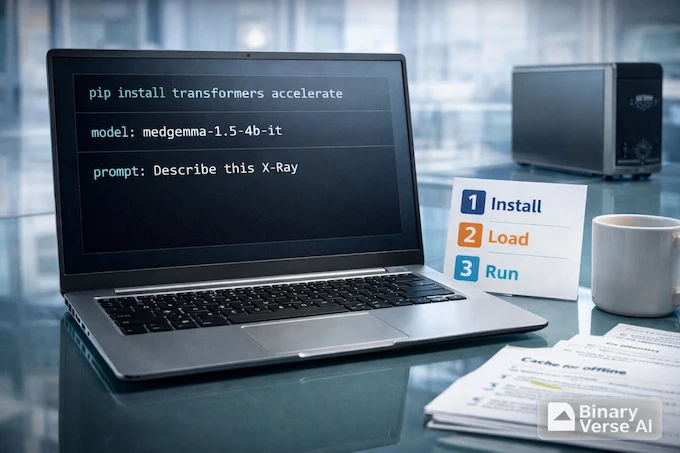
The canonical model ID is google/medgemma-1.5-4b-it. If you’ve seen searches like “medgemma google,” that’s why, the official release lives under the Google org on Hugging Face.
If your goal is to run medgemma locally, start with this CXR demo, then graduate to volumes and slides once your environment is stable.
6.1 Install Dependencies
pip install -U transformers accelerate6.2 Run With The Pipeline API
Uses image-text-to-text with google/medgemma-1.5-4b-it.
Set device="cuda" for NVIDIA GPU, or switch to device="cpu" if needed.
from transformers import pipeline
from PIL import Image
import requests
import torch

pipe = pipeline(
    "image-text-to-text",
    model="google/medgemma-1.5-4b-it",
    torch_dtype=torch.bfloat16,
    device="cuda",
)

image_url = "https://upload.wikimedia.org/wikipedia/commons/c/c8/Chest_Xray_PA_3-8-2010.png"
image = Image.open(requests.get(image_url, stream=True).raw)

messages = [{
    "role": "user",
    "content": [
        {"type": "image", "image": image},
        {"type": "text", "text": "Describe this X-ray in plain language and list key findings."}
    ],
}]

out = pipe(text=messages, max_new_tokens=600)
print(out[0]["generated_text"][-1]["content"])
If that runs, you can run MedGemma locally. The next step is making your inputs match your modality.
6.3 Run With The Direct Model API
Use this when you want more control, faster batching, or custom templating.
Uses device_map="auto" to place weights on GPU if available (otherwise CPU).
bfloat16 works best on modern GPUs; if you hit dtype issues, try torch.float16 or remove torch_dtype.
from transformers import AutoProcessor, AutoModelForImageTextToText
import torch

model_id = "google/medgemma-1.5-4b-it"
model = AutoModelForImageTextToText.from_pretrained(
    model_id,
    torch_dtype=torch.bfloat16,
    device_map="auto",
)
processor = AutoProcessor.from_pretrained(model_id)
That’s the setup for “serious prototype” mode.
7. How Vision Input Works, And Why 3D Feels Weird At First
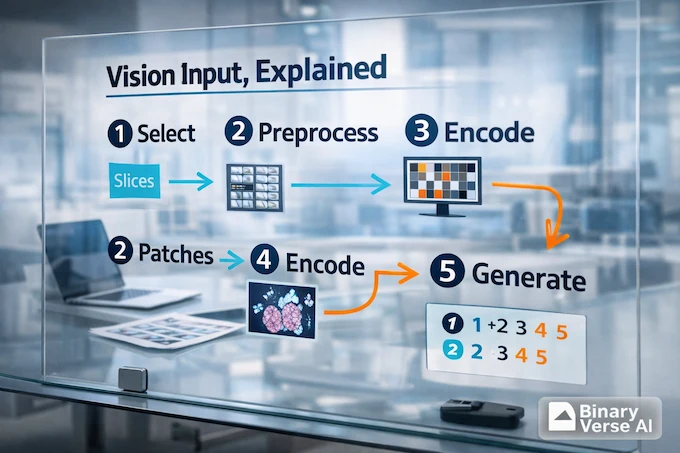
Here’s the mental model that prevents frustration. MedGemma 1.5 does not ingest a DICOM volume the way a radiologist scrolls through it. It ingests a sequence of images, each encoded into tokens, then it reasons over those tokens with the language model.
7.1 Slices And Patches, Your Preprocessing Is Part Of The Model
- CT and MRI: sample slices, then feed them as a sequence.
- WSI: extract patches, then feed a curated subset that covers the tissue.
The model can’t see what you don’t feed it. Slice and patch selection is not a detail, it’s the work.
7.2 Three Constraints You’ll Hit Immediately
- Selection: which slices or patches represent the case?
- Ordering: does sequence matter for your task?
- Budget: how many images fit before you run out of context?
If you don’t control these, you’ll end up benchmarking your preprocessing more than the model.
8. Step-By-Step CT And MRI Volumes Locally
A pragmatic pipeline for MedGemma 1.5 on CT or MRI looks like this:
- Load DICOM series into a volume.
- De-identify and verify de-identification.
- Normalize intensities and window appropriately.
- Select slices that cover the anatomy you care about.
- Convert slices to the images the processor expects.
- Prompt the model with a task-focused instruction.
For medgemma 1.5 local inference on volumes, your prompt should say what you want, and what you don’t want. Example: “List suspected findings with confidence. If you can’t assess something from these slices, say so.”
9. Step-By-Step Whole-Slide Pathology Locally
WSI is where “small enough to run offline” becomes real. MedGemma 1.5 can reason over patch sets, but you still need a slide pipeline.
9.1 A Baseline Patch Strategy
- build a tissue mask so you don’t waste patches on background
- sample patches at a consistent magnification
- batch patches, then ask a focused question per batch
9.2 Aggregation And Consistency Checks
You’ll usually run multiple batches and then aggregate into a slide-level summary. Add one simple guardrail: flag contradictions between batches. If batch A claims necrosis and batch B claims normal tissue everywhere, you want the system to surface that tension, not bury it.
10. Longitudinal Chest X-Rays, Prompting That Forces Comparison
Longitudinal tasks are where the model shines because the output is naturally text. With MedGemma 1.5, the simplest pattern is labeling:
- “Image A is prior. Image B is current. Compare B against A. Output: New, Improved, Worsened, Unchanged. Then one-sentence impression.”
That structure prevents the most common failure, describing each image separately and forgetting to compare.
11. Ollama, GGUF, Quantization, Can You Run This On A Laptop
This is where dreams meet memory bandwidth. The 4B model is small enough that laptop-class hardware might run it with aggressive quantization, but imaging is tougher because you need the vision pathway and enough headroom to stay sane.
If you see GGUF builds or an Ollama package, check:
- is it the multimodal instruction-tuned variant
- does the quantization keep quality for your task
- does the runtime support the vision input you need
For text-only experimentation, laptops can be fine. For CT and WSI, a GPU still makes life dramatically easier.
12. Doctor-Friendly Templates, Structured Outputs, And A QA Loop That Fits Reality
The easiest way to get value from MedGemma 1.5 is to stop asking it to be a doctor and start asking it to be a careful assistant.
12.1 Prompt Templates You Can Reuse
Findings summary
- “Describe visible findings in bullet points. If uncertain, say so. Don’t guess history.”
Differential suggestions with caution
- “List possible explanations. Tag each as common, less common, or rare. End with: Not a diagnosis.”
Lab extraction JSON
- “Extract lab name, value, units, reference range, abnormal flag. Output strict JSON only.”
Longitudinal comparison report
- “Compare current vs prior. Output: New, Improved, Worsened, Unchanged. Then one sentence impression.”
12.2 A Lightweight Two-Reader Workflow
A validation loop teams actually follow:
- run MedGemma 1.5 on a fixed case set, log prompts and outputs
- have a human reviewer score factuality and usefulness
- cluster recurring failures, then adjust preprocessing and prompts
- only then fine-tune, only if the failure is systematic
12.3 Your Next Move
Pick one modality and start small. Run the demo, collect five ugly failures, and turn them into tests. That’s how you get from “cool model” to “reliable tool.”
If you build something, publish your learnings. The community needs fewer screenshots and more honest evals. And if you want a straightforward local starting point for serious medical prototyping, MedGemma 1.5 is a strong place to begin.
Can you run MedGemma 1.5 offline locally?
Yes. You can run MedGemma 1.5 offline locally after the one-time download of model weights and dependencies. Once cached, MedGemma 1.5 local inference can run without an internet connection, as long as your code isn’t pulling images or assets from URLs.
What hardware do I need for MedGemma 1.5 4B local inference?
For MedGemma 1.5 4B local inference, a modern NVIDIA GPU is the practical baseline. Expect smoother runs with ~12GB+ VRAM, while 8GB can work with tighter settings or quantization. CPU-only is possible but usually too slow for real workflows. Your medgemma 4b requirements grow fast for CT volumes and WSI due to preprocessing and batching.
What can MedGemma 1.5 do with 3D CT/MRI, WSI pathology, and longitudinal X-rays?
MedGemma 1.5 can reason over multiple CT/MRI slices, multiple WSI patches, and pairs or sequences of chest X-rays. In practice, it’s useful for structured descriptions, finding-focused summaries, comparison narratives (“new vs prior”), and extracting structured fields from related clinical documents, when you prompt it like a careful assistant, not an oracle.
Is MedGemma 1.5 HIPAA compliant, and can I use it with patient data?
A model is not “HIPAA compliant” by itself. HIPAA compliance depends on your full system: access controls, audit logging, encryption, retention policies, and staff process. Running MedGemma 1.5 locally can reduce exposure because PHI doesn’t need to leave your environment, but you still must implement safeguards, de-identification where appropriate, and validation. Treat outputs as draft work that needs clinical review.
How does MedGemma 1.5 compare to ChatGPT/Gemini/Claude on medical QA and imaging?
Closed models (ChatGPT, Gemini, Claude) often feel stronger for broad medical reasoning and polished dialogue. MedGemma 1.5 wins when you need open weights, controllable local deployment, and a workflow you can adapt, fine-tune, and audit. The honest answer is: compare them on your own tasks, your own images, and your own failure modes, because medical quality is workload-specific.