
There’s a certain satisfaction in watching a 25MB model outrun the hype around models fifty times its size. Kitten TTS doesn’t ask for a GPU, doesn’t need a cloud subscription, and doesn’t apologize for being small. It just works, faster than real-time, on your laptop, your Raspberry Pi, or whatever modest hardware you have sitting on a shelf. That’s the pitch. And for once, it mostly holds up.
This is a complete guide to installing, running, and honestly assessing Kitten TTS v0.8, including the parts the announcement posts skip over. If you’ve been following the broader wave of local AI voice agent tooling or tracking open source TTS models as part of your stack decisions, this one deserves a closer look.
Table of Contents
1. What Kitten TTS Is and Why It’s Worth Your Attention
Kitten TTS is an open-source text-to-speech library from KittenML, released under the Apache 2.0 license. It ships three model tiers, each tuned for a different point on the size-quality tradeoff. The architecture draws from StyleTTS2, uses ONNX weights for framework-agnostic inference, and stores pre-built voice embeddings as NumPy .npz files. The result is a system that loads fast, runs on CPU without complaint, and doesn’t pull in a sprawling dependency tree.
The table below gives you the full picture at a glance.
| Model | Parameters | Disk Size | Hugging Face ID |
|---|---|---|---|
| kitten-tts-mini | 80M | ~80MB | KittenML/kitten-tts-mini-0.8 |
| kitten-tts-micro | 40M | ~41MB | KittenML/kitten-tts-micro-0.8 |
| kitten-tts-nano | 15M | ~56MB | KittenML/kitten-tts-nano-0.8 |
| kitten-tts-nano-int8 | 15M | <25MB | KittenML/kitten-tts-nano-0.8-int8 |
The nano-int8 variant is the headline model: quantized to 8-bit, under 25MB on disk, and still capable of generating speech faster than it plays back. That last part is measured by the Real-Time Factor, or RTF, where a number below 1.0 means generation finished before playback would have ended. In practice, the nano-int8 routinely hits an RTF well below 0.8 on a standard laptop CPU.
Worth flagging: KittenML’s own README notes that some users are seeing minor issues with the nano-int8 model. If you hit problems, the nano-fp32 variant is more stable while still being impressively small.
2. Under the Hood: Mini, Micro, and Nano Models Explained
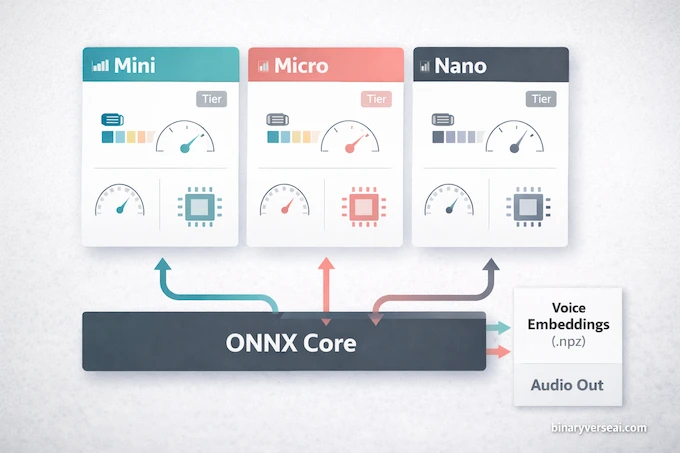
The three model sizes aren’t just marketing tiers with arbitrary names. Each one makes a genuine architectural tradeoff.
The mini, at 80 million parameters, is the quality-first option. It sounds noticeably more natural on longer sentences and handles complex punctuation better than its smaller siblings. If you’re building a local AI voice agent for a desktop assistant and disk space isn’t the constraint, mini is the one to reach for.
Micro sits at 40 million parameters and 41MB. It’s the honest middle ground, neither the fastest nor the most expressive, but consistent. Testing on a poetry excerpt from Byron revealed one hiccup where it parsed an ampersand oddly and split a word mid-syllable. Not a dealbreaker, but a reminder that these models are still in developer preview.
Nano at 15 million parameters is where things get genuinely interesting from an engineering standpoint. Fitting a passable TTS system into 25MB by combining aggressive quantization with precomputed voice embeddings is a real achievement. The embeddings approach is clever: instead of computing voice style at inference time, KittenML bakes the style characteristics into .npz files that load in milliseconds. It shifts computation to training time rather than runtime, which is exactly the right call for edge deployment.
All three models use ONNX for the core inference graph. That means no PyTorch at runtime, no CUDA, no framework-specific versioning headaches once the wheel is installed. If you’ve spent time with LLM inference optimization you’ll recognize this as the same reasoning that drives ONNX adoption in production pipelines more broadly.
3. Kitten TTS vs. Piper vs. Kokoro: Which Should You Choose?
This comes up constantly in local AI communities, and the answer is actually pretty clean once you’re honest about what each model optimizes for.
Piper TTS is the speed king among open source TTS models. It’s battle-tested, has broad language support, and generates audio with minimal latency. The tradeoff is that it can sound robotic on expressive or emotional content. For reading back system notifications or navigation prompts, Piper is hard to beat. For anything where voice character matters, it starts to feel flat.
Kokoro offers a step up in naturalness and expressiveness. The voices have more personality, and it handles prosody better than Piper on most benchmarks. It’s also heavier, which is a real consideration the moment you’re targeting anything smaller than a modern desktop.
Kitten TTS finds a specific niche that neither of those models targets well: edge deployment with decent voice quality. If you’re building for a Raspberry Pi, a browser extension, an IoT device, or any situation where the CPU is modest and GPU is absent, Kitten TTS is currently the most serious option among CPU only TTS solutions. It’s not trying to beat ElevenLabs or compete with Kokoro on cinematic quality. It’s trying to be the best TTS that fits in your pocket. For that job, it’s genuinely good.
4. Step-by-Step Kitten TTS Installation Guide
A few posts on Reddit have surfaced dependency conflicts, mostly on Debian and Arch systems where the system Python doesn’t match what Kitten TTS expects. Don’t just pip install blindly into your base environment. Isolate it first.
4.1 Step 1: Set Up Conda and Create a Clean Python 3.11 Environment
The misaki dependency that Kitten TTS pulls in has known issues with Python 3.12 on some Linux distributions. Python 3.11 in an isolated Conda environment is the stable path.
conda create -n ai python=3.11 -y
conda activate ai
If you don’t have Conda, install Miniconda first from the official site. It takes two minutes and saves you a frustrating afternoon of dependency debugging.
4.2 Step 2: Install the v0.8 Wheel and the soundfile Dependency
Kitten TTS is distributed as a pre-built wheel from the Kitten TTS GitHub releases page. Install it directly from the URL.
pip install https://github.com/KittenML/KittenTTS/releases/download/0.8/kittentts-0.8.0-py3-none-any.whl
pip install soundfile
The soundfile library handles writing your .wav output. It’s not bundled with Kitten TTS itself, so install it separately. The wheel installation pulls in ONNX runtime and the other core dependencies automatically.
4.3 Step 3: Run Your First Inference Script
Create a file called app.py in your working directory and paste the following. This script picks a model, synthesizes a sentence, measures inference timing, calculates the RTF, and saves the output.
from kittentts import KittenTTS
import soundfile as sf
import time

# Choose your model tier
m = KittenTTS("KittenML/kitten-tts-mini-0.8")
# m = KittenTTS("KittenML/kitten-tts-micro-0.8")
# m = KittenTTS("KittenML/kitten-tts-nano-0.8-fp32")

prompt = """
Artificial intelligence is not here to replace human creativity,
but rather to amplify it to unprecedented levels.
"""

# Available voices: Bella, Jasper, Luna, Bruno, Rosie, Hugo, Kiki, Leo
voice = 'Jasper'

words = len(prompt.split())
approx_tokens = int(words * 1.3)

print(f"Prompt     : {prompt.strip()}")
print(f"Words      : {words}")
print(f"~Tokens    : {approx_tokens}")
print(f"Voice      : {voice}")
print(f"Generating...")

start = time.perf_counter()
audio = m.generate(prompt, voice=voice)
end = time.perf_counter()

duration_generated = len(audio) / 24000
inference_time = end - start
rtf = inference_time / duration_generated

print(f"\n--- Timing ---")
print(f"Inference time   : {inference_time:.3f}s")
print(f"Real-Time Factor : {rtf:.3f}")

sf.write('output.wav', audio, 24000)
print("\nSaved: output.wav")
Run it with:
python app.pyThe first run downloads the ONNX model and the voice embedding files from Hugging Face. Subsequent runs load from cache and start almost instantly. Your output lands in output.wav in the same directory.
A quick note on the RTF output: a value of 0.767 means the model spent 0.767 seconds generating audio for every 1 second of playback. Anything below 1.0 is real-time capable. The nano-int8 model on a mid-range laptop typically prints something around 0.3 to 0.6, which is genuinely fast.
5. Deploying Kitten TTS via Docker and FastAPI
For anyone building a local AI voice agent into a larger stack, running Kitten TTS as a service makes more sense than importing it directly into your application. The community has been active here.
Several repos on GitHub wrap Kitten TTS in a FastAPI server that exposes an OpenAI-compatible /v1/audio/speech endpoint. That means you can drop Kitten TTS into any pipeline that already talks to the OpenAI TTS API by changing one environment variable. Projects like Open WebUI pick it up automatically. If you’ve explored similar patterns with AgentKit or other agent orchestration layers, the integration model here is familiar.
A typical Kitten TTS Docker Compose setup looks like:
services:
  kittentts:
    image: your-kittentts-image
    ports:
      - "8880:8880"
    volumes:
      - ./models:/app/models
    environment:
      - DEFAULT_VOICE=Jasper
      - DEFAULT_MODEL=nano
The CPU-only nature of the model is a genuine asset in containerized environments. You don’t need to configure GPU passthrough, worry about CUDA version compatibility inside the container, or provision GPU instances on your hosting provider. A standard container with enough memory runs it fine.
If you want voice synthesis available to multiple simultaneous users, mini or micro handles concurrent requests more gracefully than nano under load, because the larger models tend to produce fewer artifacts on edge cases in the input text.
6. Current Limitations: Punctuation, Languages, and Voice Cloning
Being honest about limitations is more useful than padding a review with caveats buried in a footnote. Here’s what actually falls short.
Punctuation handling is inconsistent. The models sometimes ignore commas and periods for pacing purposes, which affects the natural rhythm of longer sentences. This is most noticeable with complex nested clauses. The micro model seems more susceptible than mini. There’s no reliable workaround yet beyond manually adjusting your prompt text.
English only. The README mentions multilingual support as a roadmap item with no committed timeline. KittenML’s previous release cadence suggests this is genuinely coming, but not soon. If your use case requires any language other than English, Kitten TTS is not the right tool today.
No voice cloning. The eight bundled voices (Bella, Jasper, Luna, Bruno, Rosie, Hugo, Kiki, Leo) are fixed. You can’t provide a reference audio clip and clone a new voice. For most edge deployment scenarios this is fine, since you’re picking a consistent system voice anyway. If voice cloning is a requirement, look at different tooling. The Qwen3 TTS local install guide covers a model that does support voice cloning if that’s your priority.
Python only for now. Web and WASM ports are apparently in development, which would open up direct browser deployment without a server. Until those land, you’re wiring Kitten TTS into Python environments or wrapping it behind an API.
Expressiveness has a ceiling. The nano model in particular sounds clean but flat on emotionally charged text. It reads the words correctly without much inflection. That’s a function of model size and training data, not a bug. For informational content, navigation prompts, or assistant responses, it’s perfectly appropriate. For audiobook narration or character dialogue, you’ll notice the gap. This is roughly the same expressiveness ceiling you encounter across lightweight open source TTS models at this parameter count.
7. The Verdict: Is Kitten TTS Ready for Production?
For the right use case, yes.
If you’re building a privacy-first local AI voice agent, an on-device assistant, a browser extension, an IoT application, or anything where sending audio to a remote server is either too slow or a non-starter, Kitten TTS is currently the most credible open source TTS option in its weight class. The CPU only TTS architecture isn’t a limitation dressed up as a feature. It’s a deliberate design decision that makes deployment dramatically simpler across a huge range of hardware. That’s the same philosophy driving interest in on-device AI more broadly, where inference cost and latency matter as much as raw quality scores.
It’s not going to replace ElevenLabs for high-quality voice production work. The expressiveness ceiling is real, and the punctuation quirks will occasionally require prompt engineering workarounds. But the gap between what a 25MB CPU-only model can do in 2025 and what people expected two years ago is striking. Kitten TTS punches well above its weight, and that’s exactly the point.
The project is active, the GitHub issues queue is engaged, and the community around it is growing. The nano-int8 stability issues are being tracked. Multilingual support is on the roadmap. For a developer preview, v0.8 is solid.
If you’ve been waiting for a reason to experiment with fully local voice synthesis, this is a good one. Clone the repo, follow the installation steps above, and run the script. The whole setup takes about ten minutes. Your first output.wav will be sitting in your directory before you’ve finished your coffee. And if you want to see how this fits into a broader agentic AI workflow, binaryverseai.com has you covered on the surrounding tooling and infrastructure decisions.
Found this useful? The Kitten TTS GitHub repository is the best place to file issues, track fixes, and follow the roadmap. If you build something with it, the Discord community is genuinely active and worth joining.
How does Kitten TTS compare to Kokoro and Piper TTS?
Kitten TTS sits in a practical middle ground. Piper TTS is often faster on CPU and has a huge voice ecosystem, while Kokoro is often chosen for more expressive output. Kitten TTS is the better fit when you want a small footprint, CPU-only deployment, and good enough quality for local AI voice agent workflows, especially on edge devices.
How do I fix the “No matching distribution found for misaki” error during install?
This usually happens when your Python version is too new, especially Python 3.13. The reliable fix is to create a clean virtual environment and install Kitten TTS with Python 3.11 or 3.12 before running the wheel install command. Conda is the easiest way to avoid dependency conflicts.
Does Kitten TTS support voice cloning or custom voice training?
Out of the box, Kitten TTS v0.8 is focused on preset voices and lightweight inference, not zero-shot voice cloning or custom training workflows. If you need cloning, treat it as a separate requirement and verify the latest release notes before planning production around it.
Are languages other than English supported?
As of the current public release flow around Kitten TTS v0.8, English is the primary supported language for the lightweight models and demos. If you need multilingual TTS today, you should validate alternatives or wait for updated Kitten TTS releases that explicitly list added languages.
Can I run Kitten TTS in a Docker container or via API?
Yes, through community projects. The official repo is Python-first, but community wrappers and server projects already expose Kitten TTS through FastAPI and self-hosted service setups. This makes it easier to connect Kitten TTS to local apps, internal tools, and web interfaces.