
Introduction
AI video used to feel like ordering food delivery in a thunderstorm. You place the order, you wait, you refresh, you wait again, and eventually you get something… sort of like what you asked for, except the hands are haunted and the “camera” is having a mild existential crisis.
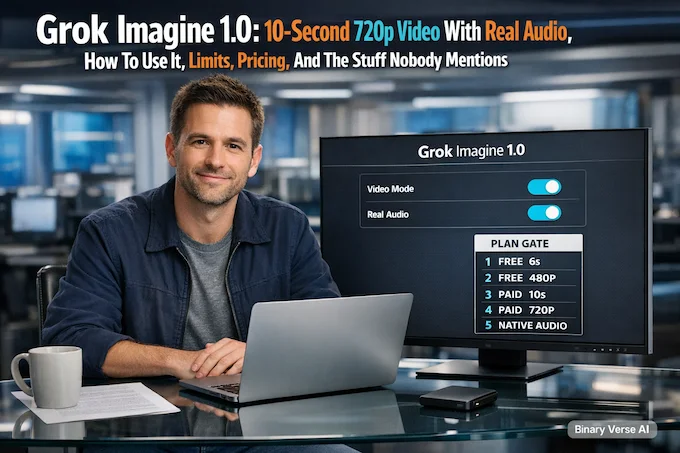
Quick reality check before we go any further: in the current Grok UI, the Free plan is capped at 6 seconds and 480p for video. If you click 10s or 720p, Grok immediately pushes you to the SuperGrok upgrade screen.
Grok Imagine 1.0 changes the vibe. The headline is simple: short clips, sharp enough to post, and audio that arrives already attached to the scene instead of bolted on later.
The more interesting part is what that implies: if you can iterate fast and the sound is native, you stop treating video generation like a lottery ticket and start treating it like a sketchbook. That shift is the whole game.
Table of Contents
1. Grok Imagine 1.0 In 60 Seconds: What’s New
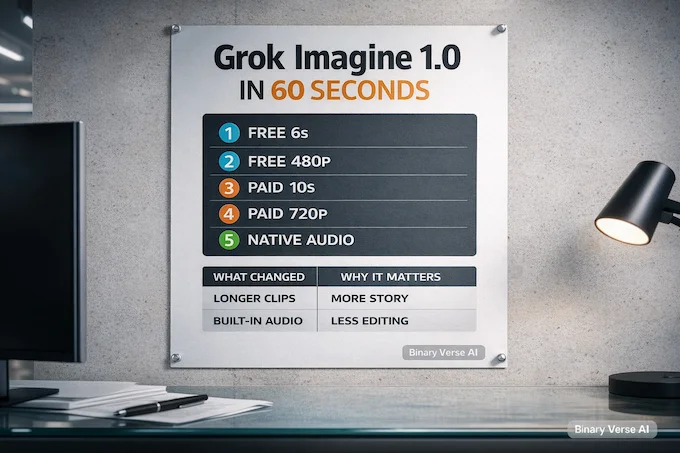
Here’s the “tell me in one coffee” version. Grok Imagine 1.0 pushes three things into the mainstream workflow: 10-second clips, 720p output, and audio that’s part of the generation.
Grok Imagine 1.0: What Changed and Why It Matters
| What Changed | What You Actually Feel | Why It Matters |
|---|---|---|
| 10-second clips | Shots can breathe, not just twitch | Enough time for a beat, a reveal, a punchline |
| 720p by default | Cleaner edges, fewer “mushy” textures | Looks acceptable on phones and socials without excuses |
| Native audio | Dialogue, SFX, and mood land together | You stop doing the “export video, export audio, sync, re-export” dance |
| Faster iteration mindset | You try 6 variants instead of praying over 1 | Better results come from selection, not perfectionism |
Note: Free accounts currently generate video at 6s / 480p. 10s and 720p appear to require SuperGrok.
And yes, scale is part of the story. xAI publicly claimed 1.245 billion videos generated in the last 30 days around the launch chatter, which tells you this isn’t a tiny lab demo anymore.
2. What Grok Imagine Actually Is, And What It’s Not
Grok Imagine 1.0 is best understood as a short-form video generator with two core entry points:
- Text-to-video: you describe a scene and motion, you get a clip.
- Image-to-video: you hand it a still, it animates it into a clip.
What it is not: a “make my entire film” button. Ten seconds is the canvas. That constraint is a feature. You’re composing shots, not directing a trilogy.
There’s also a subtle shift from “generation” to editing. The API launch materials emphasize video editing capabilities like restyling scenes and add/remove object edits, plus motion and scene control concepts. That matters because editing is where real workflows live. Generating is fun. Editing is how you ship.
3. Where You Can Use It: Web, Mobile App, And What ‘1.0’ Rollout Looks Like
You can use it across the usual surfaces: web, iOS, Android, and inside X depending on your region and account access.
The rollout reality is boring but important: availability and limits can vary by account, geography, and load. Even xAI says model access can vary depending on factors like location and account limitations.
Practical takeaway: if you’re planning a content pipeline, treat the app as the fast sketchpad and the API as the controllable engine.
4. Text-to-video + image-to-video quick start
If you want your first usable clip quickly, don’t start “creative.” Start specific. The quickest way to get a good grok imagine video is to describe a scene like you’re briefing a friend who will shoot it tomorrow.
4.1 Text-to-Video In 5 Steps
- Pick one subject (one character, one vehicle, one main object).
- Pick one location (street, room, ridge, kitchen, subway platform).
- Pick one motion (pan right, pull back, slow dolly in, handheld wobble).
- Pick one action (walks, turns, laughs, points, opens a door).
- Add one audio intention (quiet rain, muffled crowd, crisp footsteps, a single voice line).
Now generate 4 variations. Don’t overthink. Your job is to choose, not to conjure perfection in one shot.
4.2 Image-to-Video In 3 Steps
- Use a clean image with a clear subject.
- Ask for small motion first (blink, head turn, breeze, subtle camera drift).
- Only then ask for big motion (run, jump, whip pan).
If you’re learning the tool, image-to-video is training wheels in a good way. It anchors identity and composition so the model’s creativity doesn’t spill everywhere.
5. Image-to-video: Animate Pets, Family Photos, And Memes Without Weird Motion
Grok Imagine 1.0 gets a lot better when you stop demanding chaos. For pets, family photos, and meme images, the goal is usually “alive,” not “stunt choreography.”
Use these rules:
- Keep the camera calm: slow pan, slow push, gentle handheld.
- Keep the action short: smile, wave, look up, tail wag, blink, nod.
- Avoid rapid limb motion: sprinting and dancing still raise the odds of odd anatomy.
- Tell it what must not change: “same face,” “same outfit,” “no warping,” “no extra fingers.”
xAI explicitly pushed the “everyday fun” angle, including animating old photos and pets, which is a good hint about where the model is meant to feel frictionless.
6. Prompt templates + audio prompting
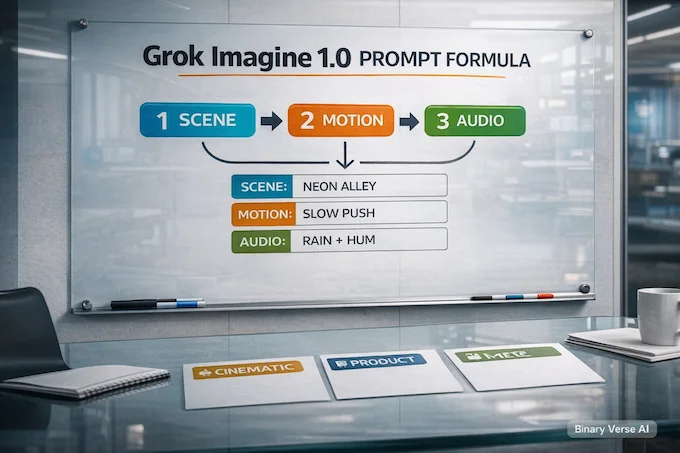
This is where most people waste time. They write a beautiful paragraph and hope the model reads it like a screenplay. Instead, use a simple three-layer structure:
Scene → Motion → Audio
That’s it. You’re defining what exists, how it moves, and what it sounds like.
Below are templates you can copy. Swap nouns, keep the structure. Use them as grok imagine prompt scaffolding, not as sacred text.
6.1 The 3-Layer Formula
- Scene: subject, setting, lighting, style.
- Motion: camera move, subject action, pacing.
- Audio: one primary sound, one secondary sound, optional dialogue line.
6.2 Prompt Templates (Pick One And Modify)
- Cinematic “Neon-lit alley at night, rain on pavement, lone cyclist under a streetlamp. Slow push-in, slight handheld. Audio: rain patter, distant traffic hum, bicycle chain clicks.”
- News Meme “A serious anchor desk in a tiny apartment kitchen. Slow pan right as the anchor points at a ridiculous chart. Audio: studio mic voice, faint fridge buzz, one comedic sting.”
- Product Shot “Minimal studio, matte-black gadget on a pedestal, soft rim light. Slow 180-degree orbit. Audio: quiet room tone, subtle whoosh, one clean click.”
- Nature Loop “Waterfall into a crystal pool, morning fog, soft sun rays. Static camera, gentle mist motion. Audio: water roar, birds far away.”
- Character Moment “Close-up portrait, warm window light, thoughtful expression. Slow dolly in as they glance up. Audio: cloth rustle, soft inhale, one whispered line: ‘I’m ready.'”
- Sci-Fi Establishing Shot “Orbital station above a blue planet, tiny ships passing. Slow pull back, steady camera. Audio: low engine hum, subtle radio chatter.”
- Comedy Beat “A cat wearing a tiny chef hat in a spotless kitchen. Quick zoom-in on the cat’s deadpan face. Audio: whisk scraping bowl, one dramatic ‘dun dun.'”
- Sports Hype “Street basketball court at sunset, one player dribbling. Slow pan left, then snap to a close-up. Audio: ball bounce, crowd murmur, sneakers squeak.”
The trick: one dominant idea per layer. When prompts get messy, audio is usually the first casualty.
7. Audio In Grok Imagine 1.0: Dialogue, SFX, Music Sync
Audio is the difference between “cool tech demo” and “people actually share this.” xAI has emphasized improved audio and native video-audio generation in its launch messaging and API materials.
Here’s how to keep it from turning into noise soup:
7.1 The Audio Directive Checklist
- Choose one foreground: dialogue or a clear sound effect or a musical cue.
- Keep dialogue short: one line, maybe two. Ten seconds is not a monologue.
- Anchor the environment: rain, room tone, crowd, wind, traffic.
- Control intensity: “soft,” “distant,” “muffled,” “crisp,” “subtle.”
7.2 Two Audio Patterns That Work
- Dialogue-first: “Audio: close mic voice, calm tone, light room tone.”
- Atmosphere-first: “Audio: wind and distant thunder, no dialogue.”
If you want music, describe it like a mood tag, not like sheet music: “low synth pad,” “playful ukulele riff,” “tense cinematic pulse.”
8. Export/download + aspect ratios
If your goal is social, plan your aspect ratio before you generate. Don’t treat framing as a post-production rescue mission.
- Vertical for shorts and stories.
- Square for feeds that crop aggressively.
- Landscape for cinematic vibes and YouTube-style layouts.
xAI explicitly calls out support for portrait and landscape formats and “platform-ready aspect ratios.”
Now, about grok imagine download workflows: exporting is easy, but re-editing is where people get burned. Save versions. Keep your best prompt. Treat every good clip like a checkpoint you may want to revisit, restyle, or extend.
8.1 A Practical Shorts Workflow
- Generate vertical first.
- Pick the best variation.
- If you need sharper output later, upscale after export, not inside the prompt.
- Add captions last, outside the generator, so you can iterate without re-rendering everything.
9. Daily limits, rate limits, intermittent errors
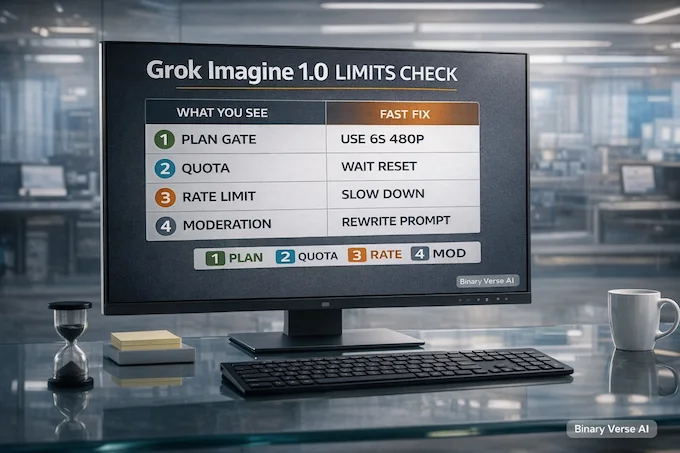
Let’s talk about the part everyone pretends is a “bug” until it happens five times in a row: grok imagine limit behavior.
There are three different walls you can hit:
- Quota limits: daily caps that reset later.
- Rate limits: too many requests too fast.
- Moderation blocks: content policy triggers.
Even xAI frames the system as load-sensitive and account-dependent, which is a polite way of saying “you will see variability.”
Grok Imagine 1.0: Quick Troubleshooting Cheatsheet
| What You See | What It Usually Means | Fast Fix That Doesn’t Waste Your Day |
|---|---|---|
| “Try again later” or long queues | Load spike or temporary throttling | Wait 10–20 minutes, then retry with fewer variations |
| “Rate limit” | Too many requests in a short window | Slow down, batch prompts, avoid spam-clicking generate |
| “Content moderated” | Safety filter triggered | Rewrite with neutral wording, remove real-person references, avoid sexual content involving real people |
| Output is off-target | Prompt too vague or too ambitious | Reduce to one subject, one motion, one audio cue |
| Strange motion artifacts | Too much action in too little time | Ask for subtler motion, stabilize camera, simplify the scene |
Most of the time, the fix is not technical. It’s editorial. Make the request easier to satisfy.
10. Modes, safety, what ‘spicy’ really means
People ask about grok imagine spicy like it’s a hidden graphics setting. In practice, it’s a content sensitivity mode. It may relax some filters, but it does not turn the system into a lawless sandbox, and it shouldn’t.
Two things can be true at once:
- Users want creative freedom.
- Platforms have to prevent abuse, especially anything involving real people and sexual content.
So what is grok imagine spicy mode, really? Think “content classification,” not “bypass.” It’s about whether adult-oriented content is shown or allowed in certain contexts, and it’s still wrapped in moderation and policy boundaries.
If you’re using the tool responsibly, the safe lane is obvious:
- Don’t generate sexual content involving real people.
- Don’t generate minors, ever.
- Don’t use identifiable faces in sensitive contexts.
- Don’t treat “spicy” as a dare.
The fastest way to lose access is to treat safety like a puzzle to solve instead of a boundary to respect.
11. API exists? When to use it
Yes, the grok imagine api exists, and the reason you’d pick it over the app is control.
Use the app when:
- You’re exploring ideas fast.
- You don’t care about programmatic workflows.
- You’re okay with UI-driven iteration.
Use the API when:
- You want reproducibility, logging, and prompt versioning.
- You’re building a product.
- You need automation: generate, score, select, post-process.
xAI positions the Grok Imagine API as a “unified bundle” for end-to-end creative workflows, including video generation and video editing, plus links to docs, playground, and SDK.
One more practical note: xAI’s own benchmark description pegs latency measurements to 720p with an 8-second duration for apples-to-apples testing. That’s a hint about how teams evaluate production performance: consistent settings, consistent prompts, lots of trials.
12. Pricing: app vs API; cost per clip
Let’s keep this grounded: grok imagine price depends on where you use it.
- App pricing is typically bundled into subscription tiers on the consumer side.
- API pricing is usage-based, and your bill scales with how much you generate and how you iterate.
There’s also a policy-shaped footnote that matters if you’re building something serious: xAI documents a $0.05 usage-guidelines violation fee per violating request. That’s not a revenue strategy, it’s a behavior-shaping mechanism. If your product encourages risky prompts, your finance team will feel it.
12.1 Cost-Per-Clip Math That Actually Helps
Think in two numbers:
- Cost per second of video generated
- How many variants you generate per keeper
If you generate 8–10 seconds and you try 4 variations, your real cost is “price per second × duration × 4.” The teams who win aren’t the ones who generate the most, they’re the ones who select well and stop iterating once the clip is good enough to publish.
12.2 A Reality Check On Comparisons
If you like benchmarking, Artificial Analysis publishes public leaderboards with ELO-style rankings and API pricing for many video models, including entries like OpenAI’s Sora variants and Google’s Veo variants.
Separately, xAI claims a #1 rank in its own cited “Artificial Analysis: Text-to-Video Rankings” snapshot as of Jan 28, 2026, and emphasizes quality, cost, and latency together. Read that as: they’re optimizing for the thing creators actually feel, which is iteration speed per dollar, not just raw quality.
12.3 Privacy: Can People See Your Creations, And How To Share Safely
Act like every exported clip can travel.
- Assume shared links are public once they leave your hands.
- Don’t upload private IDs, addresses, or sensitive locations.
- Don’t use real faces in risky contexts, even as a joke.
- If it would be a problem on a billboard, it’s a problem here too.
This is less “paranoia” and more “adult supervision for your future self.”
Closing: How To Get Real Value From This Fast
If you treat Grok Imagine 1.0 like a magic trick, you’ll get magic-trick results. Fun, random, disposable.
If you treat it like a new kind of editor, short shots, clear motion, intentional audio, you’ll get something more interesting: a repeatable workflow where taste matters more than luck.
Your next step is simple: pick one idea you’ve wanted to visualize, write three prompts using the Scene → Motion → Audio structure, generate four variations each, then keep only the best two. That’s twelve attempts, and you’ll learn more from that batch than from an hour of prompt poetry.
If you want to go deeper, use the API docs and the playground to build a real pipeline, then ship something this week.
For more insights on AI tools and best LLM for coding, check out our comprehensive guides on AI healthcare applications and other cutting-edge developments.
What is Grok Imagine?
Grok Imagine is xAI’s image and video generator inside Grok. Grok Imagine 1.0 focuses on short video creation (like 10-second clips), 720p output, and better native audio so you can get picture and sound together without extra tools.
Is Grok Imagine free?
There’s usually a free way to try Grok, but video features and quotas can vary by plan, region, and rollout. If you need consistent output at scale, the paid routes (subscription tiers or the Grok Imagine API) are the predictable option.
How spicy is Grok Imagine, and what does “spicy mode” mean?
“Spicy mode” is best understood as a looser creativity setting with guardrails, not a free-for-all. It’s still moderated, and rules can change quickly. Content involving real people, privacy invasion, or anything illegal is where you’ll most often see blocks or refusals.
Can people see your Grok Imagine creations?
Assume anything you share via a public link can be viewed by others who have that URL. If you want safer sharing, avoid private faces, IDs, sensitive locations, or anything you’d regret being reposted. Treat “share link” as “public enough.”
Does Grok Imagine have an API?
Yes. The Grok Imagine API supports text-to-video, image-to-video, and video edits. In the official docs, generation duration can be set from 1 to 15 seconds, and you can pick aspect ratios and resolutions like 720p.