
Introduction
You know that moment when an image model nails the lighting, the composition, the vibes, then fumbles the one thing your boss will actually read, the text? You zoom in and your “Q1 Revenue” headline turns into something that looks like it was typed by a caffeinated octopus.
GLM-Image shows up for exactly that pain. It’s built for knowledge-dense images, the kind you’d drop into a slide deck, a poster, or a diagram where words are not decoration, they’re the point. This guide is a practical walkthrough of GLM-Image, not a hype tour.
Table of Contents
1. What It Is And Why This Release Matters
At a high level, GLM-Image is a hybrid image generator that tries to do two hard things at once, understand an instruction like a language model, then render the result with the crisp detail you expect from modern diffusion. That combo sounds obvious until you’ve watched “instruction-following” turn into “vibes-following” the second your prompt asks for layout, labels, or multi-panel structure.
This model is aimed at the practical stuff that keeps showing up in real workflows:
GLM-Image Practical Failure Modes and Fixes
A quick reference table for common GLM-Image poster and diagram pitfalls, plus the simplest fixes that usually work.
| What You’re Trying To Make | What Usually Breaks | The Practical Fix |
|---|---|---|
| Posters with headlines, bullets, and callouts | Misspellings, drifting fonts, garbled glyphs | Put all intended text in quotes, keep copy short, re-run with a fixed seed |
| PPT-style multi-panel layouts | Panels collapse, hierarchy gets messy | Describe regions explicitly, name sections, constrain aspect ratio early |
| Diagrams and science explainer cards | Labels overlap, arrows point nowhere | Use fewer labels per panel, increase resolution, keep shapes simple |
| Social graphics with dense captions | Text turns into texture | Favor short lines, larger font intent, and clean contrast |
The bigger story is simple: pretty pictures are solved enough. “Pretty and correct” is still the frontier. GLM-Image pushes toward correctness by adding an explicit planning step.
2. Why Diffusion Still Trips On Text And Layout
Diffusion models are fantastic paintbrushes. They can learn style, texture, lighting, and the whole high-frequency “this looks real” package. They’re less reliable at discrete structure, especially when structure is linguistic.
Text rendering is the obvious example. A letter is a tiny, discrete target. Change one stroke and the word is wrong. Diffusion doesn’t naturally “spell-check” as it denoises. Layout is the quieter problem. A poster or a slide is basically a spatial program. Title goes here, hero image goes there, legend sits in the corner, four steps line up.
When GLM-Image plans in tokens first, it tends to hold those decisions steadier. That’s the whole bet.
3. Architecture In Two Minutes: Plan First, Render Second
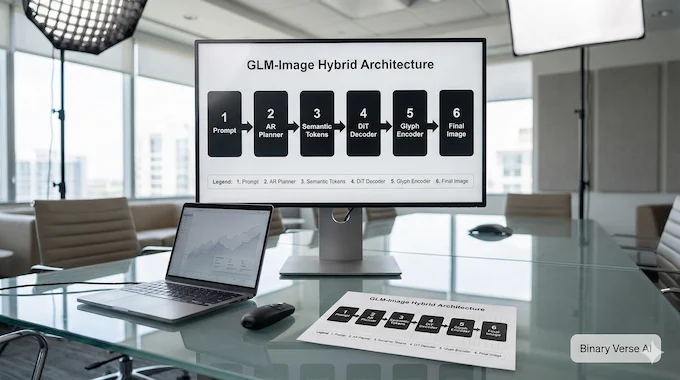
GLM-Image splits the job into two modules that feel like two specialists on the same team.
3.1 The Autoregressive Module: The Planner
Stage one is autoregressive. It generates discrete visual tokens the way a language model generates words. In GLM-Image, those tokens are intentionally semantic (semantic-VQ), so the sequence captures layout and meaning more than micro-texture.
It’s also trained progressively. A small token grid sets the broad composition, then higher-resolution tokens fill in. If you’ve ever wondered why some models “forget” the layout halfway through, this is one fix.
3.2 The Diffusion Decoder: The Renderer
Stage two is a DiT-style diffusion decoder in latent space. It takes the planner tokens as conditioning and focuses on high-frequency detail, edges, textures, and the annoying bits like clean typography strokes.
A glyph-oriented text module sits in this path. That’s a big reason the rendered characters look less like melted stickers and more like intentional writing.
The split is the point: planning in a discrete space, rendering in a continuous one.
4. Text Rendering Is The Feature People Actually Notice
Most people will meet this model the same way: they’ll ask for a poster with real words, then do a double-take when the words are readable.
GLM-Image tends to shine at:
- Multi-region text, like four callout boxes each with its own label
- Poster hierarchy, like title, subtitle, bullets, footer
- Diagram captions where alignment and spacing matter
- Slide-like panels that respect borders and regions
If you only take one prompt habit, take this one: put all intended text in quotation marks. It gives a crisp target and reduces the “close enough” spelling drift.
Second habit: don’t cram a novel into the image. If your copy needs scrolling, it belongs in the caption, not the pixels. Treat GLM-Image like a layout engine, keep the text short, then scale complexity up.
5. Benchmarks That Predict Real-World Results
Benchmarks are easy to overthink, so focus on tests that punish misspellings and reward correct multi-region text:
- CVTG-2K, which measures word accuracy and edit distance across multiple text regions
- LongText-Bench, which targets longer lines and multi-line rendering in English and Chinese
In the reported results, GLM-Image sits at the top of open-source models on the CVTG-2K table and near the top on LongText-Bench. That maps to the core claim: it’s built for posters, PPT-style panels, and science diagrams, not only for pretty portraits.
On general “overall quality” suites, the story is more mixed. That’s normal. You don’t pick tools by a single average score, you pick them by failure mode.
6. Three Ways To Use It Today, From Fastest To Most Controllable
You can get value out of this model in three modes. Pick based on your tolerance for setup and your need for control.
6.1 Z.ai First: Fast Results With Minimal Setup
If you want the shortest path to output, use the Z.ai image API. You send a prompt, you get back an image URL, you download it.
This is also where most developers will first touch the GLM-Image API. In the docs you’ll see “z.ai glm” used as shorthand across their ecosystem, so don’t overthink the naming. Treat it like a brand namespace.
6.2 Hugging Face Pipelines: Reproducible Local Runs
If you want reproducibility, local control, and versioned dependencies, the Hugging Face pipelines is the cleanest route. This is the path most people mean when they ask about GLM-Image local setup.
Three rules that prevent dumb errors:
- Set height and width explicitly, both must be multiples of 32.
- Use a fixed seed while iterating on layout and text.
- Keep guidance modest, then increase only if the model ignores structure.
6.3 Serving With SGLang: An Internal Endpoint
If you need an internal images endpoint, serving with SGLang is a pragmatic option. It exposes generation and edits behind a familiar API shape, which is great for products and pipelines.
This mode is where hardware reality shows up fast, because concurrency turns every inefficiency into latency.
7. GLM-Image Pricing: What You’re Paying For

GLM-Image pricing is straightforward in the public docs: $0.015 per image.
That number matters because it puts a price tag on convenience. API calls buy you speed, fewer dependency headaches, and less GPU drama. Local runs buy you control, reproducibility, and sometimes lower marginal cost once you’ve already sunk the hardware investment.
One operational detail: the API response is an image URL, not raw bytes by default. That’s friendly for demos and a trap for production if you forget downloads, retries, and lifecycle cleanup.
8. GLM-Image Requirements: VRAM Reality, Not Marketing Slides
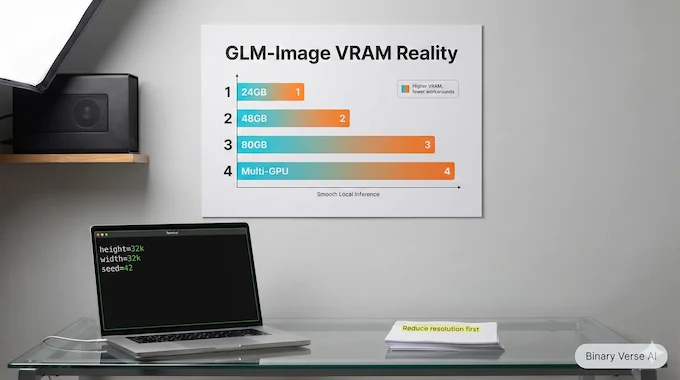
Let’s talk about the thing Reddit cares about more than the architecture, GLM-Image requirements (VRAM).
The official note is blunt: runtime and memory cost are high right now, and you should expect either a single GPU with more than 80GB of memory or a multi-GPU setup. That’s the current baseline if you want smooth local inference without heroic workarounds.
If you’re hoping for a miracle setting, the fastest wins are boring: reduce resolution, reduce batch size, and avoid adding extra conditioning branches. Over time, quantization and offload will help, but today you plan around the memory footprint.
9. Quality Knobs That Matter Without Cargo Culting
Most image generators end up with a ritual: copy someone’s settings, bump steps, hope. You’ll get better results faster if you treat the knobs like levers with clear effects:
- Resolution controls legibility and layout breathing room, it also controls memory.
- Steps trade time for refinement, returns flatten after a point.
- Guidance trades creativity for compliance.
- Temperature and top-p on the autoregressive side trade diversity for stability.
If you’re generating posters, stability wins. Use a seed, keep temperature reasonable, iterate on structure first, then chase aesthetics. Save your prompt and settings in a notes file, because the one time you don’t, you’ll never reproduce the best layout again.
10. Image Editing And Image To Image: What Works, What Breaks
The editing story is promising because the pipeline can condition on semantic tokens and reference latents. That helps preserve details when you ask for targeted changes.
In practice, these usually work:
- Background swaps where the subject stays intact
- Style transfer that keeps composition
- Edits that say exactly what to preserve and what to change
The failures are familiar: hands, tiny text, and identity drift when you ask for too many changes at once. The fix is to do fewer changes per step. Lock one edit, then do the next.
11. ComfyUI Workflows: What People Want And How To Prepare
ComfyUI workflows will matter because ComfyUI has become the glue layer for a lot of open image tooling.
11.1 What Is ComfyUI
If you’ve ever asked what is comfyui, it’s a node-based graph editor for generation. Instead of writing code, you wire blocks together: load, prompt, sample, decode, save. It’s popular because graphs are easy to share and tweak.
11.2 What A Sensible Graph Looks Like
A practical graph for a hybrid pipeline usually includes:
- A loader for the main pipeline
- A prompt node with explicitly quoted text
- Sampler and decoder nodes with resolution constraints
- Optional reference image nodes for edits
- A save node that records seed and settings
The watch-out is memory. Graphs make it easy to add “just one more” branch. Your GPU will notice.
12. Picking The Right Model And Avoiding Regrets
Here’s the decision table that matches how people actually ship things:
GLM-Image Model Choice Decision Table
Match your goal to the model type that fits best, with the core reason in one line.
| Your Primary Goal | The Model Type That Fits Best | Why |
|---|---|---|
| Posters, diagrams, slide-like layouts with readable words | Text-first hybrid planners | Discrete planning tends to keep layout stable and text legible |
| Fast iterations on consumer hardware | Lightweight diffusion stacks | Lower memory, simpler serving, mature tooling |
| Heavy image editing with strong reference control | Edit-specialized pipelines | Tight reference conditioning can preserve details better |
| Maximum aesthetic polish for art prompts | High-end closed models | The polish is often in the data and post-training |
Now the comparison you came for, GLM-Image vs Qwen-Image. If the output is a poster, a diagram, or anything where the text is the product, pick the planner-first approach. If you live inside a consumer GPU workflow and you value speed over layout discipline, diffusion-first options often feel better day to day.
12.1 Limitations, Safety, And Licensing
Expect three recurring questions:
- Safety filters vary by deployment. Open weights reduce mystery, hosted endpoints can still enforce policy.
- Commercial use is helped by permissive MIT licensing for the main model, with some components under Apache-2.0 terms.
- Troubleshooting is mostly three checks: resolution divisible by 32, text in quotes, and out-of-memory means smaller sizes or more GPUs.
12.2 Do This Next
Pick one real asset you ship, a slide, a poster, a diagram, and rebuild it end to end with GLM-Image. Keep the copy short, quote it, and iterate until it looks like something you’d actually present. Then share the prompt internally and collect the weird looks.
If you want more walkthroughs like this, save the prompts that worked, and subscribe to the next deep-dive. GLM-Image is the start of a “words finally work” era, and it’s worth learning early.
Is Z.ai completely free?
No. Z.ai’s chat experience can be free, but API usage is a separate, paid bucket with model-based pricing. Treat it like this: free chat for experimentation, paid API for building products, automation, or anything you need to meter and ship.
How much does GLM-Image cost per image on the API?
Z.AI lists GLM-Image pricing at $0.015 per image. The API returns an image URL, so your app typically downloads the image after generation. Also, keep sizes within 512–2048 px and make sure both dimensions are multiples of 32.
What is ComfyUI used for?
ComfyUI is used to build reproducible, node-based image workflows. Instead of clicking sliders in a linear UI, you connect nodes (load model → encode prompt → sample → decode → save) into a graph you can reuse, share, and rerun exactly.
Can I run ComfyUI on an AMD GPU?
Often yes, but it depends on your GPU and setup. Historically, Linux + ROCm was the cleanest route. Recently, ComfyUI Desktop added official AMD ROCm support on Windows (v0.7.0+) for compatible hardware, which simplifies things a lot. If your card isn’t supported, people still use fallbacks like DirectML, but performance and memory behavior can vary.
What is DiT diffusion?
DiT stands for Diffusion Transformer. It’s a diffusion model where the core denoiser backbone is transformer-based. In GLM-Image’s published architecture, the diffusion decoder is described as a single-stream DiT-style decoder that turns the model’s intermediate representation into the final high-fidelity image.