

Introduction
The “Gemini Bomb” dropped a few weeks ago, and Dev community immediately lit up with takes. Some called it “ruthless.” Others said it felt “cold.” A few claimed it was overhyped compared to GPT-5.2. Here’s what they’re actually noticing: Gemini 3 Pro doesn’t waste your time with pleasantries. It packs maximum information density into every response, which feels jarring if you’re used to models that apologize before answering. For professionals who bill by the hour or ship code on deadlines, this isn’t a bug. It’s the feature.
The real question isn’t whether Gemini 3 beats GPT-5.2 on benchmarks (it does, especially on multimodal reasoning and formal logic). The question is: can you actually use it? Most people treat AI like a chatbot. They ask vague questions, get vague answers, then complain about hallucinations. This guide flips that script. We’re covering ten Gemini 3 Pro use cases that span Deep Research, vibe coding with Google Antigravity, and agentic workflows. Each one includes the exact prompt and implementation steps. No fluff, no filler.
Table of Contents
1. The Universal Preflight: Fixing Context Drift Before It Starts
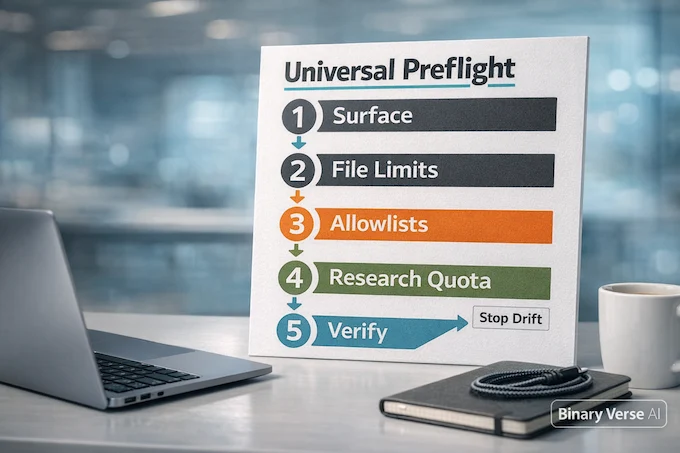
Reddit users constantly complain that Gemini “forgets instructions” halfway through a task. The model doesn’t have ADHD. You’re giving it conflicting signals across surfaces. Before running any workflow, run this checklist:
- Confirm your surface. Are you in the Gemini app, Google AI Studio, or Antigravity? Each has different file limits and feature sets. Antigravity supports multi-file repos. AI Studio gives you live preview for web apps. The Gemini app connects to Gmail and Calendar. Using the wrong surface kills your workflow before it starts.
- Check file limits. Video uploads max out at different durations depending on your plan. Audio files have size caps. If you’re uploading a two-hour meeting recording on a plan that supports 30 minutes, Gemini will silently truncate it and you’ll wonder why the synthesis missed half your action items.
- Set allowlists for automation. If you’re using computer use features (the agent that can click through Slack or Jira on your behalf), whitelist only the domains you need. Don’t hand it carte blanche access to your entire browser. One wrong click costs hours of cleanup.
- Understand the Gemini Deep Research limit. Deep Research is capped at a certain number of searches per session depending on your plan tier. If you’re asking for a 50-source literature review and you hit the limit at search 12, you get a half-baked report. Check your quota first.
This preflight takes 60 seconds. Skipping it costs you an hour of troubleshooting later.
2. Deep Research: The Battery Report Strategy
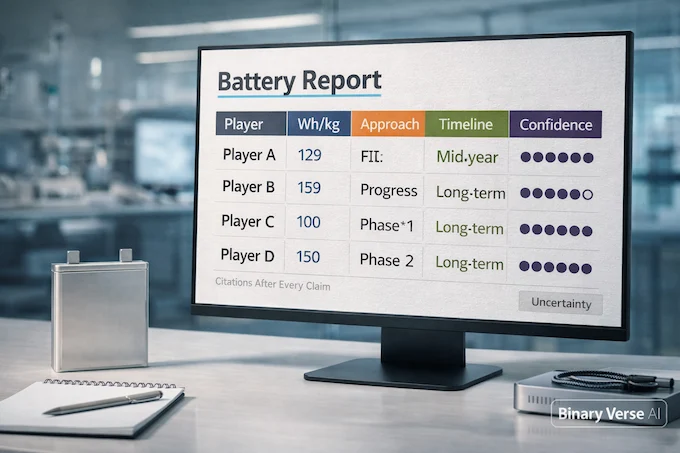
Gemini 3 Pro Deep Research is the highest-value feature in the entire suite. It’s also the most misused. People ask for “research on solid-state batteries” and get back a Wikipedia summary with no citations. Here’s how to force clickable citations and academic rigor.
The Prompt:
“I need a Deep Research report on the current state of solid-state battery technology for EVs as of late 2025. Plan an iterative research plan that identifies the top 5 players (define whether these are OEMs, startups, or electrolyte suppliers), and for each player capture: Current or most credible reported energy density (Wh/kg) and how it compares to conventional Li-ion (state your baseline Li-ion reference). Technical approach (e.g., sulfide oxide polymer hybrid). Current stage (lab, pilot, pre-production). Projected mass-production timeline (with confidence level and direct source). Output requirements: A structured report formatted to be roughly 10 pages when exported to Google Docs (11pt font, 1.15 spacing, 1-inch margins). Executive Summary (1 page). One comparison table (players x energy density x approach x timeline x confidence). For every numeric or technical claim, place a clickable citation link immediately after the sentence. Add a short Uncertainty & Conflicts section listing any contradictory sources and what you trust most.”
Implementation:
- Open Gemini and select Deep Research. Paste the prompt. Gemini will generate a research plan showing you which queries it intends to run. This is your moment to intervene. If the plan looks too shallow (only querying press releases instead of peer-reviewed papers), tell it to revise before starting.
- Let it finish the synthesis. Export to Google Docs. Then spot-check at least ten numeric claims to confirm each has a citation directly beside it. If a claim says “QuantumScape reported 800 Wh/kg” without a link, the report is unusable for anything requiring accountability.
Why this works: The explicit instruction to place citations after every claim forces Gemini to structure its search around verifiable sources instead of stitching together vague summaries. The Uncertainty & Conflicts section handles the hallucination problem by making the model admit when sources disagree.
This is the money keyword for this article: Gemini 3 Pro Deep Research runs about $50 per report at current API pricing, but it replaces 8 hours of manual research.
3. How To Use Google Antigravity For Vibe Coding

Google vibe coding (sometimes called Generative UI) is Gemini’s killer feature for frontend developers. You sketch an idea on a napkin, upload the photo, and get back a working React app. No boilerplate, no fiddling with Webpack configs. Antigravity handles the entire build chain.
The Prompt:
“I want to build a Personal Greenhouse dashboard. Input: I will upload a photo of a hand-drawn UI sketch. Platform: Google Antigravity. Please translate the sketch into a functional React UI with a minimalist, dark-mode aesthetic. Use a modular architecture so I can later connect real IoT sensors. Requirements: Use a standard React project template (Vite or Next.js). Use Tailwind (or comparable utility CSS) for fast styling. Create components: SensorCard, Gauge, MiniTrendChart (dummy data), StatusPill, Header. Include dummy data providers in a separate layer (/services/mockSensors.ts) and define an interface (SensorAdapter) for future real sensor integration. Include sections for: Soil Moisture, UV Index, Water Level, Temperature, Humidity. Add responsive layout for mobile plus desktop. Provide a short README that explains where to connect live sensor data later.”
Implementation:
- Open Antigravity and sign in. Create a new workspace. Choose a React template when prompted. Upload your napkin sketch into the agent panel and paste the prompt.
- Antigravity will generate a task list: project setup, styling, component breakdown, mock data layer. Review it. If something’s missing (like the SensorAdapter interface), flag it now. Approve dependency installs after a quick scan. You’re giving an agent permission to npm install. Don’t autopilot this step.
- Run the preview. Validate the dark mode, the responsive layout, and the component modularity. If the gauge looks wrong or the spacing is off, iterate with targeted edits: “Split Gauge into its own folder,” “Add sensor adapter interface,” “Improve spacing on mobile.”
Gemini vibe coding shines here because it handles the tedious parts (file structure, import statements, CSS classes) while you focus on the actual product. This isn’t a toy demo. It’s production-ready scaffolding.
4. Generative UI: Building Physics Sims Without A Build Step
You don’t need a PhD in graphics programming to build interactive physics simulations anymore. Gemini 3 Pro can generate a fully functional orbital resonance simulator using Three.js in a single HTML file. No build step, no npm, no bundlers. Just open it in a browser.
The Prompt:
“Act as an expert Creative Coder and Physics Simulator. Goal: Create a self-contained interactive orbital resonance simulation using Three.js in a single HTML file (no build step). CDNs: Import Three.js and lil-gui via CDN. Visuals: A yellow star and two planets with persistent orbital trails (cap trail length for performance). Interaction: Sliders for each planet: Semi-major axis (distance), Orbital speed (or gravitational parameter), Trail length. HUD: Display the current period ratio (e.g., 2:1, 3:2) and a Resonance Lock indicator when the ratio is within a defined tolerance for N consecutive orbits. Add a Reset button that restores default parameters. Technical requirements: Use script type module. Keep the simulation stable and avoid numerical blow-ups (use simple integrator plus clamped ranges). Ensure it runs in a modern browser as-is.”
Implementation:
- Open Google AI Studio and choose Build (the live preview surface). Select the web app or interactive preview option. Paste the prompt and generate.
- Use the live preview to test sliders, trails, stability, and the resonance ratio detection. If trails fade too fast or the planets spiral off-screen, iterate with targeted edits: “Make trails fade slower,” “Add pause button,” “Increase resonance tolerance.”
- Copy the final single HTML artifact and run it locally in a browser to confirm it works outside the preview. This is critical. Some people assume if it works in the preview, it’s production-ready. Preview environments have different security policies and resource limits. Always test standalone.
Why this matters: Gemini 3 benchmarks show it outperforms other models on zero-shot code generation for complex visual tasks. It doesn’t just spit out boilerplate. It understands physics, numerical stability, and user interaction patterns.
5. Agentic Engineering: Safe Multi-File Refactoring
Refactoring authentication from JWT to OIDC across a microservice codebase is exactly the kind of task that scares developers. One missed middleware update and you’ve locked users out of production. Gemini 3 Pro handles this with a file-by-file summary that prevents code regression.
The Prompt:
“I am uploading a repository for a Python-based microservice. Task: Refactor authentication from our custom JWT implementation to an OIDC-compliant approach across all relevant files. Before coding, ask me for (or infer from repo config) these required parameters and list them explicitly: OIDC Provider (e.g., Keycloak, Auth0, Azure AD, etc.), Issuer URL (iss), Audience (aud), Required scopes, Role/permission claim mapping (e.g., roles, groups, or custom claim), Auth flows: Authorization Code plus PKCE for user-facing flows, Client Credentials for service-to-service (if applicable). Implementation requirements: Validate tokens using JWKS (with caching plus rotation handling), Enforce iss, aud, exp, nbf, clock skew tolerance, Reject insecure algorithms and alg=none, Update all endpoints/middleware consistently, Update environment/config docs, Add/Update tests (unit plus minimal integration), Provide a file-by-file summary of changes and why, plus migration notes and a rollout checklist (including staged rollout/feature flag if appropriate).”
Implementation:
- Upload the repo (zip) into Antigravity or another environment that supports multi-file editing. Paste the prompt. Wait for the agent to output the required OIDC config checklist before it touches any code. Provide the missing values.
- Require the agent to produce: an auth architecture note, a dependency map (where auth is used), and diffs grouped by area (middleware, config, endpoints, tests). Review the diffs file-by-file. Don’t skim. One typo in a middleware guard breaks everything.
- Run tests locally. Confirm endpoints still behave the same except for the auth mechanism. Apply the rollout checklist. If you’re on a large team, stage the rollout with a feature flag so you can dual-accept JWT and OIDC tokens during the transition period.
This is agentic engineering done right. The model doesn’t just write code. It plans the migration, documents the changes, and gives you a checklist to prevent disaster.
6. Interactive Data Viz: The Cobalt Supply Chain Map
Building an interactive map with live data filters sounds like a weekend project. With Gemini 3 Pro, it’s a 20-minute task. The trick is forcing the model to use only your data instead of inventing supply chain stats.
The Prompt:
“Analyze the global supply chain for cobalt over the next decade and produce an interactive map with two toggleable scenarios: Standard Growth, Recycling-Heavy. Important: Do NOT invent data. Use only: An uploaded dataset (CSV/JSON) I provide, OR a clearly cited public dataset you list before using it. Data model requirements: Regions/countries with cobalt production, refining, and manufacturing hubs, Trade flow magnitudes (if available), A geopolitical risk score per region (0 to 100) with a clear definition and source. UI requirements: Interactive map (Leaflet or MapLibre), Scenario toggle that changes the underlying data layer (not just colors), Hover tooltips showing: hub type, key metrics, risk score, and source reference, Legend plus filter to show only Mining, Refining, or Battery Manufacturing hubs. Output: A runnable interactive map artifact (single-page web app preferred), A short methodology note listing data sources and how risk scores are computed.”
Implementation:
- Decide your data path. Preferred: upload your own CSV/JSON with trade data, hubs, and risk scores. If using public data, request the model first list the exact datasets and links it will use before building the map.
- Use Gemini Canvas (or AI Studio Build) and paste the prompt. If uploading data, attach files first, then regenerate so the app reads your actual fields.
- Validate that the toggles change actual data and tooltips match dataset values. Spot-check three regions. If Mongolia shows cobalt production when your dataset has zero, the model ignored your data and invented stats.
- Export the interactive artifact and keep the methodology note with the same version. Six months from now, someone will ask where the risk scores came from. You’ll be glad you saved the note.
7. PhD-Level Math: Beating GPT-5.2 On Academic Rigor
Gemini 3 Pro crushes GPT-5.2 on formal logic and rigorous proofs. This isn’t marketing spin. Gemini 3 vs GPT-5.1 coding benchmarks show measurably higher accuracy on mathematical reasoning tasks, especially when the proof requires multiple lemmas and edge case handling.
The Prompt:
“Provide a rigorous proof (or disproof) for the following conjecture: [Insert conjecture]. Requirements: State all assumptions and definitions first. Present the proof in a formal structure: Definitions, Lemmas, Theorem, Proof. If the conjecture is open or only partially known, clearly state what is known, what is unproven, and provide the strongest partial results or proof sketch you can. Address known counterexamples, edge cases, or failure modes explicitly. Include a short Sanity Checks section with small examples or boundary conditions.”
Implementation:
- Select the strongest reasoning model available (look for “Thinking” or “Reasoning” mode if shown). Paste the conjecture plus any required background constraints.
- If the UI offers “show thinking,” treat it as optional. Rely on the formal proof output, not the chain-of-thought traces.
- Follow up with: “Now rewrite the proof for publication style,” or “Now produce a simpler proof sketch for a non-specialist audience.”
Why this works: The explicit request for definitions, lemmas, edge cases, and sanity checks forces the model to structure the academic rigor like a mathematician would. Most models rush to the conclusion. Gemini 3 Pro knows when to slow down and build foundations.
8. Multimodal Mastery: Video Coaching And Omni-OCR
Gemini 3 Pro’s 1 million token context window means you can upload an hour-long tennis match video and get timestamped coaching feedback. Or feed it crumpled, handwritten shipping manifests and extract structured JSON. These aren’t party tricks. They’re workflows that used to require specialized software.
Video Coaching Prompt:
“Analyze my backhand form during rallies. Deliverables: Identify three specific timestamps where footwork is out of sync with the swing. For each timestamp, describe the mismatch (what the feet did vs what the upper body did), and estimate trunk rotation error qualitatively (e.g., under-rotated, over-rotated, late rotation). If precise angle measurement is unreliable from a single camera perspective, state uncertainty and explain why. Provide three targeted drills to correct the issues, each with cues and progression. Optional (only if supported by the tool): Export 3 key still frames and annotate them with simple angle lines/arrows.”
Omni-OCR Prompt:
“Extract data into JSON with this schema per manifest entry: date, origin, destination, item_weight, condition, notes_raw (exact text as seen, even if messy), notes_normalized (cleaned interpretation), confidence object with per-field confidence: High/Medium/Low. Rules: Do not guess. If uncertain, output null and set confidence to Low. Flag mathematical inconsistencies (e.g., total weight mismatch) and include computed checks. Return: entries array, inconsistencies array, low_confidence_fields list for manual review.”
Implementation (Video):
- Upload the video in Gemini or AI Studio. Confirm your plan supports the file size and duration. Paste the prompt. Validate timestamps by scrubbing the video yourself to confirm the moments match. Iterate: “Focus only on cross-court backhands,” “Ignore warmup,” “Give me one drill per issue.”
Implementation (OCR):
- Upload images. If possible, include multiple angles or a flattened re-photo for the worst pages. Paste the prompt and generate JSON. Run a second pass request: “Re-check only Low confidence fields and show the exact cropped text snippet for each.” Copy JSON into your system and run your validator (sum checks, date format normalization).
How to access Gemini 3: Both video coaching and Omni-OCR require Gemini Advanced (the $20/month tier) for full file size support. The free tier has tighter limits.
9. Computer Use And Automation: The Slack/Jira Agent
Gemini 3 Pro can navigate web interfaces on your behalf. This is powerful. It’s also dangerous if misconfigured. The key is allowlisting domains and requiring human confirmation for sensitive actions.
The Prompt:
“I need to onboard a new contractor. Their details are in the attached doc. Using a computer-use automation agent: Navigate only on allowlisted domains: slack.com and my atlassian.net Jira domain. Create a private Slack channel named project-delta. Invite the contractor via the email from the attached doc. In Jira, create five starter tasks under the Contractor Onboarding epic, using the details from the doc. Safety requirements: Pause and ask for human confirmation before (a) inviting the user, and (b) creating Jira tickets. Do not access unrelated channels or boards. Provide an action log at the end: channel created, invite status, ticket keys created.”
Implementation:
- Use a computer-use capable agent environment (commonly via an API/Vertex harness or a supported agent app). Log into Slack and Jira manually first in the same browser context the agent will use.
- Configure allowlists and require confirmations for sensitive actions. Upload the contractor details doc and paste the prompt. Confirm invite and ticket creation when asked. Save the final action log (channel link plus Jira keys).
Why this matters: Computer use is Gemini’s most underused feature because people fear it will go rogue. Allowlists and confirmations solve this. The agent can’t accidentally delete a production board or invite the wrong person if you’ve restricted its domain access and required approval for every action.
10. The Ruthless Executive Assistant: Meeting Synthesis
This is where Gemini’s “ruthless” efficiency becomes an asset. Upload a two-hour product strategy meeting and get back a decision matrix that highlights unresolved conflicts between stakeholders. No fluff, no diplomatic hedging, just the CTO vs CFO disagreement laid bare.
The Prompt:
“Synthesize the meeting with: Speaker diarization (Speaker A/B/C) and mapping to real names where confidently supported by the audio or an attendee roster I provide. For each stakeholder: summarize stance on the Cloud Migration debate. Produce a Decision Matrix table: Decision topic, Options discussed, Points of agreement, Unresolved conflicts (explicitly highlight CTO vs CFO disagreements), Evidence/quotes (short excerpts or paraphrases with timestamps). Provide five action items, each with: owner (or unknown if not clearly stated), due date (if mentioned), timestamp reference. If identity mapping is uncertain, state uncertainty instead of guessing.”
Implementation:
- Upload the audio. Confirm your plan supports the duration and file size. Provide an attendee roster (names plus roles) in text to improve speaker-to-name mapping. Paste the prompt and generate.
- Verify action items by searching for each timestamp segment in the output. Iterate: “Only focus on cloud migration parts,” “Extract risks and mitigations.”
This prompt delivers value because it forces Gemini to surface conflict instead of papering over it. Most meeting notes say “We discussed cloud migration and next steps.” This one says “CTO wants on-prem for security. CFO wants cloud for cost. No resolution. Action item: schedule follow-up by Friday.”
11. Pricing And Access: Antigravity, AI Studio, Or Advanced?
Confusion around pricing kills adoption faster than feature gaps. Here’s the llm pricing comparison breakdown.
- Gemini Advanced ($20/month): Gives you Gemini 3 Pro in the app, larger file upload limits, Deep Research, access to experimental features like Dynamic View and Visual Layout. This is the consumer tier. If you’re doing video coaching, meeting synthesis, or personal research, this is your plan.
- Google AI Studio (Pay-as-you-go): API access to Gemini 3 Pro. Pricing varies by token usage. Use this if you’re building products that need Gemini under the hood. You get live preview for web apps, Canvas for iterative editing, and tighter control over system prompts.
- Google Antigravity (Developer plan): Agentic development platform. Uses Gemini 3 Pro for multi-file refactoring, terminal automation, and browser-based testing. Google Antigravity price is currently bundled into the API pricing model. If you’re doing serious engineering work (like the SWE-bench tasks), this is the only surface that handles it well.
The most common mistake: paying for Advanced when you need AI Studio, or using AI Studio when you need Antigravity’s agentic features. Match the surface to the task.
Final Verdict: Gemini 3 Is A Force Multiplier, Not A Friend
Gemini 3 Pro won’t ask how your day went. It won’t apologize for being too technical. It assumes you know what you’re doing and gives you the densest, most useful response it can generate. For professionals who respect their own time, this is exactly what you want.
The ten Gemini 3 Pro use cases in this guide aren’t toys. They’re production workflows: Deep Research that replaces 8 hours of manual citation hunting, vibe coding that scaffolds React apps from napkin sketches, agentic refactoring that prevents auth migration disasters, and meeting synthesis that surfaces unresolved conflicts instead of hiding them.
The model’s ruthlessness is its strength. Stop treating AI like a chatbot. Start treating it like the most competent junior engineer or research assistant you’ve ever worked with, one who never gets tired and never needs hand-holding.
Ready to unlock Gemini 3 Pro’s full potential? Pick one prompt from this guide. Run it today. Compare the output to what you’d get from GPT-5.2 or Claude. Then come back and run the other nine. By the end, you’ll understand why the “Gemini Bomb” wasn’t hype. It was a warning shot.
Is Gemini 3 Pro Deep Research free?
Kind of, but it’s quota-bound. On the free tier, Deep Research is available with a tight cap, then you hit the Gemini Deep Research limit and you’re done until the quota resets. Paid tiers raise the ceiling a lot (reports per day vs. per month). Always check your current plan screen because limits can change.
Can Google Gemini do vibe coding?
Yes. Google positions “vibe coding” as building apps from natural language, and the most direct paths are Google AI Studio Build (Vibe Code) for fast interactive prototypes and Google Antigravity when you want agents working across editor, terminal, and browser.
Is Gemini 3 Pro better than GPT-5.1 for academic research?
Often yes for research workflows, because it’s built to browse, cite, and synthesize across sources and modalities. If your definition of “better” is “I need a report with clickable sources and I’m uploading files,” Gemini 3 Pro tends to shine. For pure long-form text reasoning, it’s closer and depends on the task.
What is the difference between Gemini Advanced and Google Antigravity?
They solve different problems. “Gemini Advanced” (now typically surfaced as paid consumer tiers like Google AI Pro/Ultra) is the upgraded Gemini app experience, models, Deep Research, and higher limits. Google Antigravity is an agentic IDE, built for developers, where agents operate directly on projects using IDE tools and artifacts.
Why does Gemini 3 Pro seem “cold” or “ruthless”?
Because it’s tuned to compress fluff and optimize for decisions. Instead of social padding, it tends to lead with the answer, list constraints, and call out contradictions. That can feel “cold” in casual chat, but in professional work it reads like a blunt teammate who wants the task finished.