
Introduction
There’s a small magic trick your brain pulls off every time you watch a video. You do not just see pixels. You infer a world. You know what’s behind the mug when a hand passes in front of it. You keep track of a person who ducks behind a door and pops out somewhere else. You even feel the camera motion as something separate from the objects inside the scene.
Machines have been trying to copy that trick for decades, mostly by building pipelines that look like a Rube Goldberg machine in academic font. One model for depth. Another for flow. Another for pose. Then a final optimization stage that prays geometry will reconcile the mess.
D4RT is a clean swing at a different idea: treat “understanding a video” as answering one kind of question, over and over, fast. It is built for Dynamic 4D Reconstruction and Tracking, meaning it tries to recover geometry plus motion, across space and time, from a single video.
And yes, it’s also a speed story. The paper reports it can be 18–300× faster than recent baselines for 3D tracking throughput, depending on the target frame rate.
Table of Contents
1. What D4RT Is And What 4D Means Here
“4D” is one of those terms that can sound like marketing, then quietly turn into math the moment you look away. Here it is simple: 3D space plus time. The goal is 4D scene reconstruction from video, where the scene is not frozen. Things move, deform, disappear behind each other, and sometimes leave the frame.
The paper frames this as a shift away from rigid “reconstruct everything, everywhere” decoding, toward on-demand querying from a single learned representation of the video. In practice, that puts it squarely in the “monocular 4D reconstruction” camp, single video in, world out, no multi-camera rig required.
Here’s the mental model that makes the rest of the post easier to read:
D4RT Video Understanding, What You Get, Why It’s Hard
Scroll horizontally on mobile to view all columns, content wraps for readability.
| What You Want From A Video | What It Means In Plain English | Why It's Hard |
|---|---|---|
| Geometry | Where surfaces are in 3D | You only see 2D projections |
| Motion | How points move through time | Occlusions break continuity |
| Camera Motion | Where the camera is, and how it moved | The camera and objects both move |
| A Unified Output | One system that does all of the above | Pipelines tend to fracture into parts |
D4RT takes a unified approach: encode the whole video once, then answer targeted questions about points in space and time through a lightweight decoder.
2. The Core Challenge, Dynamics, Occlusion, And Camera Ego-Motion
If you have ever tried to track a point on a moving object in a handheld video, you have met the enemy trio:
2.1. Dynamic Objects Break “Static World” Assumptions
Classical reconstruction methods love static scenes because multi-view geometry can lean on consistency. Add a walking person and the scene stops agreeing with itself.
2.2. Occlusion Is The Default, Not The Edge Case
Objects pass behind other objects. A point can vanish for ten frames and come back. Good 3D point tracking from video needs a memory, not just local matching.
2.3. The Camera Is Also Moving
Even if the world were static, the camera may not be. So the system needs camera pose estimation from video, while also tracking object motion. This “disentangle ego-motion from object motion” problem is where many systems start to wobble.
The paper calls out a practical limitation in prior approaches: many methods either fail to establish correspondences on dynamic parts of a scene, or rely on multi-stage pipelines and costly refinement.
3. The Key Idea, A Single Universal Query
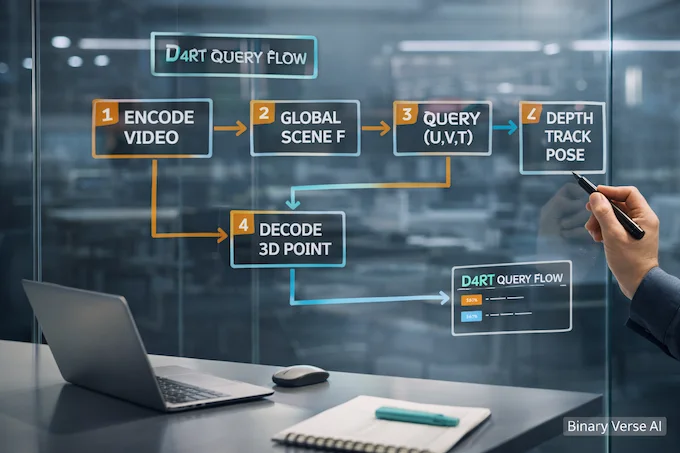
The core move is delightfully blunt: reduce the entire problem to one question type.
A query is defined as (q = (u, v, t_{src}, t_{tgt}, t_{cam})). In words: pick a 2D point ((u, v)) in a source frame at time (t_{src}), then ask where it is in 3D at a target time (t_{tgt}), expressed in the coordinate system of a chosen camera reference (t_{cam}).
This design has three big consequences the paper emphasizes:
- The indices do not need to match, so space and time are disentangled instead of glued together.
- Each query is decoded independently, which makes it naturally parallel and flexible.
- The same interface can produce multiple downstream outputs by changing which queries you ask.
If you like unifying abstractions, this is the whole party.
4. Architecture And Outputs, Global Encoder, Query Decoder, What Gets Predicted
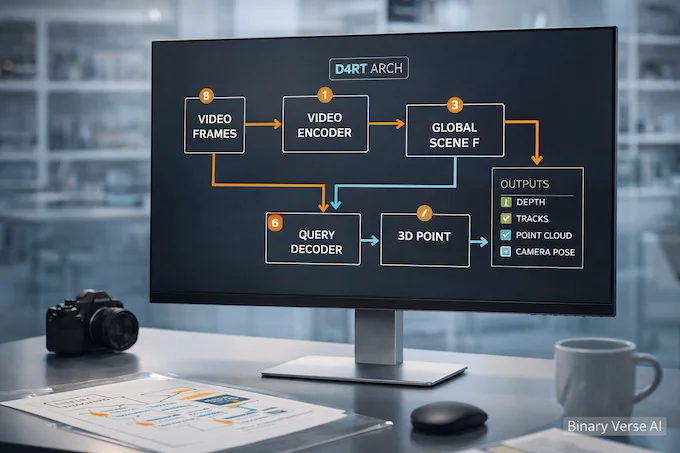
At a high level, it is an encoder-decoder Transformer. The video goes through a powerful encoder that produces a Global Scene Representation (F). Then a small decoder cross-attends into (F) to answer queries.
4.1. The Encoder Builds A Global Scene Representation
The encoder is based on a Vision Transformer with interleaved local, frame-wise and global self-attention layers. The important part is not the brand name of the backbone, it’s the intent: compress the video into something that contains geometry, correspondence, and temporal structure.
4.2. The Decoder Is Small, And The Queries Do Not Interact
The decoder is a small cross-attention Transformer. Queries are constructed using Fourier features of ((u, v)) plus learned timestep embeddings, and the paper says augmenting the query with a local 9×9 RGB patch embedding improves performance a lot.
Independence is not just a compute trick. The authors explicitly say they observed major performance drops when enabling self-attention between queries in early experiments, so they keep queries separate.
4.3. What Comes Out Of A Query
Each query yields a 3D point position (P \in \mathbb{R}^3). With the right query patterns, you can extract depth maps, point tracks, point clouds, and camera parameters through one interface.
That is the unification: one model, one query language, many outputs.
5. Capability 1, 3D Point Tracking From Video
To get a track, you fix the source point and vary the target timestep across the video. The paper describes it directly: choose a fixed ((u, v)) from a source frame, vary (t_{tgt} = t_{cam} = {1..T}), and you get a 3D trajectory through time.
This matters because “tracking” is the real unit of understanding in dynamic scenes. If you can track, you can stabilize. You can segment by motion. You can build object-level memory. If you cannot track, everything else becomes a brittle post-process.
A subtle but important detail: because the model answers queries into a global representation, it is not forced to rely on frame-to-frame appearance alone. That is exactly what occlusion breaks.
6. Capability 2, Point Cloud Reconstruction From A Single Video
Point cloud reconstruction often looks like a patchwork pipeline: estimate pose, estimate depth, fuse, clean up, optimize. It works, but it is not elegant, and it is rarely fast.
Here the paper’s approach is almost cheeky. For full reconstruction, it can predict the 3D position of all pixels directly in a shared reference frame (t_{cam}). That means it can avoid coordinate transformations that depend on explicit, potentially noisy camera estimates.
Depth maps are just a special case: query with (t_{src} = t_{tgt} = t_{cam}) and keep only the Z component.
If you have worked with 4D scene reconstruction from video systems before, you will appreciate how much engineering complexity disappears when the core representation can answer “where is this pixel in 3D” without assembling a separate toolkit for each output.
7. Capability 3, Camera Pose Estimation From Video
Camera pose estimation is often treated as its own world: SLAM, bundle adjustment, reprojection errors, endless knobs. This model takes a more direct route: derive camera parameters by asking the same kind of point questions, then aligning.
The paper even sketches how to recover intrinsics. For a frame (i), construct queries on a grid of source points, decode their 3D positions (P = (p_x, p_y, p_z)), then under a pinhole model with principal point at (0.5, 0.5), compute focal lengths as:
- (f_x = p_z (u – 0.5) / p_x)
- (f_y = p_z (v – 0.5) / p_y)
and take a robust median across estimates.
That is a refreshingly concrete example of what “unified” can mean: pose is not a separate module, it is another thing you can read out of the same scene understanding.
8. Why It’s Fast, Parallel Queries And Efficient Dense Tracking
The speed story comes from two choices that play well with modern hardware.
8.1. Encode Once, Then Query Many
Once the encoder computes the Global Scene Representation, it stays fixed while the decoder cross-attends from any number of queries.
That turns inference into a batching problem: if you want more points, you do not re-run heavy per-frame decoding, you just run more queries.
8.2. Independent Queries Make Parallelism Trivial
Each query is processed independently, and the paper frames this as a deliberate design decision that enables efficient inference through “trivial parallelism.”
8.3. Dense Tracking Without Being Naive
Dense tracking can be brutal if you do it the naive way, track every pixel, every frame, regardless of whether you already covered it.
The paper proposes an efficient dense tracking algorithm that only initiates new tracks from unvisited pixels, marking pixels as visited as tracks pass through visible regions. They report an adaptive speedup of 5–15× depending on motion complexity.
This is the kind of speedup that feels less like a benchmark trick and more like a good algorithm.
9. Benchmarks And Results, What 18–300× Faster Means
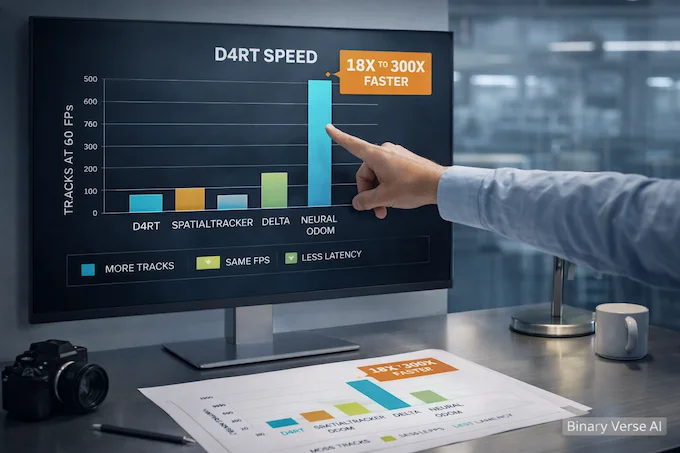
Benchmarks are where claims go to either become boring or become real. The paper gives at least two concrete speed anchors.
9.1. 3D Tracking Throughput
They measure maximum full-video track count while maintaining target FPS on a single A100 GPU. In Table 3, the reported max track counts at 60 FPS are 0 for DELTA, 29 for SpatialTrackerV2, and 550 for the model, with the paper summarizing this as 18–300× faster than others across settings.
Those numbers matter because “throughput” is what determines whether 4D scene reconstruction from video is a research demo or a component you can ship.
9.2. Pose Estimation Speed And Accuracy
Figure 3 frames a speed-accuracy tradeoff for pose. The paper reports 200+ FPS pose estimation, 9× faster than VGGT and 100× faster than MegaSaM on an A100 GPU, while also claiming superior accuracy in that comparison.
9.3. A Quick Reality Check On Training Compute
It is worth keeping one foot on the ground. The training setup described includes an encoder and decoder with large parameter counts and training across 64 TPU chips for a bit over two days. This is not a weekend project. The reason the results are exciting is that the inference interface is simple and fast once trained.
10. D4RT In The Landscape, SLAM, NeRF, And 4D Gaussian Splatting
The easiest way to understand where this fits is to compare what each family optimizes for.
10.1. Classical SLAM And SfM Pipelines
Traditional Structure-from-Motion style pipelines enforce geometric consistency explicitly, but they are computationally intensive and can be brittle, especially in dynamic scenes. They also tend to treat moving objects as outliers to reject, which is awkward if your actual goal is to model the moving world.
10.2. NeRF-Style Methods
NeRF and its descendants can produce gorgeous reconstructions, but many variants pay with test-time optimization, heavy per-scene fitting, or a runtime profile that is tough for real-time robotics and AR. The appeal of this query-based design is that it aims to be feedforward and on-demand.
10.3. Gaussian Splatting And The 4D Variant
3D gaussian splatting has become a practical rendering workhorse because it is fast and looks good. 4D Gaussian Splatting pushes that into dynamic content, often with clever representations of time. It is a different axis of the design space: rendering-first, representation-heavy.
This model’s pitch is not “the prettiest render,” it is “a unified 4D understanding interface” that can do tracking, reconstruction, and pose from the same mechanism.
If you are browsing implementations, you will run into repos and writeups under gaussian splatting github. Treat them as complementary tools, not direct replacements. One side leans into view synthesis and efficient rendering. The other leans into consistent geometry and correspondence queries that scale across tasks.
11. Practical Adoption, Robotics, AR, Autonomy, World Models, And Governance
Once you can ask “where is this pixel in 3D at that time, from this camera,” you get a lot of downstream leverage.
- Robotics: A robot does not need a photoreal render, it needs stable geometry, motion understanding, and low latency. Query-based 3D point tracking from video is a natural primitive for navigation and manipulation.
- AR And Spatial Computing: AR hates lag. If you can get camera pose estimation from video plus scene geometry quickly, overlays stick instead of swimming.
- Autonomous Driving: Dynamic scenes are the whole deal. People, cars, cyclists, occlusions, harsh motion. A unified Dynamic 4D Reconstruction and Tracking system is a strong fit conceptually, even if deployment will depend on robustness and compute constraints.
- World Models: If you believe “world models” are a path to more capable agents, then 4D scene reconstruction from video is one way to build persistent state that respects physics and time.
Then there is the governance question, and it deserves blunt language. Systems that reconstruct spaces and track motion at scale can become surveillance infrastructure by default. The technical community tends to wave this off as “dual use,” then act surprised later. If you are building with monocular 4D reconstruction, make privacy, consent, and data retention first-class design constraints, not a footnote.
12. Resources And How To Try It, Paper, Project Page, Demos, Code Status
If you want to go deeper, start with the primary sources the authors point to:
- The arXiv report: arXiv:2512.08924v2 (the PDF you provided)
- The project website is listed directly in the paper.
A practical way to read the paper is to keep one question in mind: “What queries would I ask for my application?” If your goal is dense tracking, focus on the independent query design and the efficient dense tracking algorithm. If your goal is reconstruction, study how point clouds and depth fall out of query choices, instead of separate heads and fusion logic. If your goal is pose, pay attention to the way intrinsics are derived from decoded 3D points.
My suggestion: treat this as a new “video understanding API,” not just another model. D4RT matters because it compresses multiple brittle sub-problems into a single interface you can scale up or down. If you are building anything that needs 4D scene reconstruction from video, pick one small experiment, one clip, one task, then map it into queries. Once that clicks, the rest of the paper reads like an engineer finally getting to delete code, which is the best kind of progress.
If you want a next step that actually moves the needle, grab a short handheld video from your domain, define what success means for tracking, reconstruction, or pose, then sketch the query set you would need. Do that, and D4RT stops being a headline and starts being a tool.
For more insights on cutting-edge AI models and their applications, check out our guides on Grok 4 Heavy, AgentKit, ChatGPT Atlas, best LLM for coding, ChatGPT agent use cases, MedGemma, LLM orchestration, Claude Skills, agentic AI tools, and AI IQ test results.
You can also follow Google DeepMind’s announcement for the latest updates on D4RT.
1) What is D4RT (Dynamic 4D Reconstruction and Tracking)?
D4RT is a DeepMind model that reconstructs a 3D scene over time from a single video, so it can do tracking, depth, and camera estimation in one unified system.
2) How does D4RT work, in simple terms? (What is the “query” idea?)
It works like this: encode the whole video once, then ask targeted questions like “Where is this pixel in 3D at time t, from camera view v?” The decoder answers lots of those queries in parallel, which is a big reason it’s fast.
3) How does D4RT handle occlusion or objects leaving the frame?
Instead of relying only on what’s visible frame-by-frame, D4RT uses its global video representation to keep tracking a point’s 3D trajectory even when the object is temporarily hidden or not visible in other frames.
4) Is D4RT open source, and where is the GitHub/checkpoints?
As of today, the official DeepMind materials point you to the blog post, the technical report on arXiv, and the project page with demos. They do not link an official GitHub repo, downloadable checkpoints, or model weights.
Also, beware the name collision: “d4rt” often refers to unrelated Dart tooling on GitHub/pub.dev, not DeepMind’s D4RT.
5) What can you build with D4RT (robotics, AR, autonomous driving), and what are the limitations?
What you can build: real-time-ish perception for robot navigation/manipulation, AR scene understanding, and generally any pipeline that benefits from tracking + geometry + camera motion from video.
Practical limitations today: no official open checkpoints means most teams can’t directly deploy it, and performance claims are demonstrated on specialized hardware (example given: a TPU). Expect engineering work to adapt the idea to your latency, hardware, and failure modes.