
The Codex Sandbox story starts with a wonderfully ordinary developer problem: a coding agent wants to run a command. That sounds harmless until the command is reading your SSH config, editing the wrong folder, or phoning home with a token it found in a forgotten .env file. The old software model was simple. Humans click things. Apps ask for permissions. Operating systems protect one user from another. AI agents make that model feel a bit antique.
OpenAI’s Windows sandbox work for Codex is interesting because it’s a stress test for the operating system itself. Codex needed to read broadly, write narrowly, and stay offline unless the user allowed network access. macOS and Linux had useful primitives for this shape of problem. Windows had pieces, but no clean “let this autonomous developer do useful work, safely” button. OpenAI says Codex needed OS-enforced isolation, because every command and child process must stay inside the same boundary.
Table of Contents
1. The Fast Map For Busy Developers
The Codex Sandbox problem is not “how do we stop AI from doing anything?” That would be easy and useless, the software equivalent of securing your laptop by throwing it into a lake. The real problem is harder: let an agent behave enough like a developer to be productive, while preventing the worst failure modes of developer tooling.
| Question | Practical Answer |
|---|---|
| What is being protected? | The host machine, credentials, private files, Git history, and network boundary. |
| Why not ask before every command? | It kills the agent workflow. Nobody hires a robot intern to approve every ls. |
| Why not allow full access? | Because coding agents can execute real commands with real side effects. |
| Why was Windows hard? | Its native tools did not map cleanly to open-ended agent workflows. |
| What changed in the final design? | OpenAI moved from an unelevated design to an elevated setup with dedicated sandbox users and firewall rules. |
The Codex Sandbox shows where AI infrastructure is heading. Agents now run tests, inspect repos, call build tools, edit files, and chain commands for minutes or hours. That moves risk from “bad answer on a screen” to “bad action on a machine.”
2. Why Coding Agents Need Real Operating System Boundaries

A chatbot can hallucinate. A coding agent can hallucinate and then run the hallucination. That distinction matters.
Codex runs near the user’s development environment through the CLI, IDE extension, or desktop app. By default, a local command executed by Codex inherits real user power. That includes access to files, tools, shells, package managers, Git, and custom scripts. OpenAI’s default target for Codex is practical: broad read access, write access inside the current workspace, and no internet unless the user asks for it.
That design reflects a sane security instinct. Reading code is necessary. Editing the project is the point. Sending traffic to the open internet is often unnecessary and sometimes dangerous. The Codex Sandbox exists to make those boundaries real instead of polite suggestions.
A normal app usually has a known shape. A coding agent is more like a junior engineer with shell access and a suspiciously high typing speed. It may invoke Python, Git, Node, Rust, PowerShell, package installers, test runners, and custom scripts. The sandbox must contain the whole process tree, not just the first executable.
3. Codex Linux Had The Easier Security Shape
The Codex Linux story is comparatively boring, which is exactly what you want from security infrastructure. Linux has a long tradition of small composable primitives. You can restrict system calls, isolate namespaces, shape filesystem access, and build container-like boundaries from pieces that already exist.
OpenAI’s system card describes local Codex sandboxing across macOS, Linux, and Windows. On Linux, the implementation can lean on seccomp and landlock for isolation. On macOS, it can use Seatbelt policies. In the cloud, Codex runs in an isolated OpenAI-hosted container with network access disabled by default.
This matters for Codex Linux adoption. If your team already develops on Linux servers, Linux desktops, containers, or CI-like environments, the mental model is clean. Run the agent in a constrained environment. Give it the repository. Decide whether it can reach the network. Keep secrets out of reach. The machinery is not magical, but it is at least the right shape.
Windows, by contrast, had plenty of security machinery, just not a natural fit for “spawn arbitrary developer tools under a durable agent boundary.”
4. Why Native Windows Security Tools Missed The Target
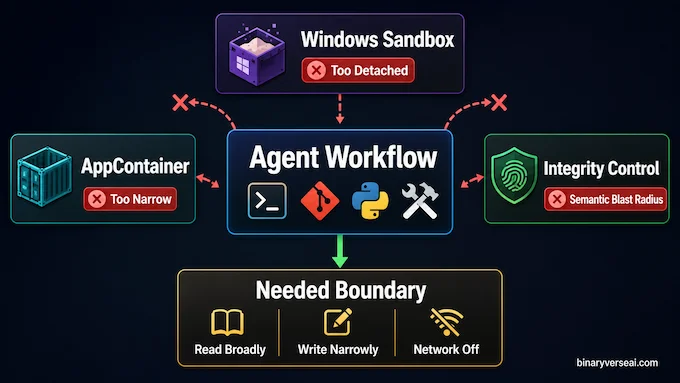
OpenAI evaluated three obvious Windows options: AppContainer, Windows Sandbox, and Mandatory Integrity Control. Each one looked promising until it touched the messy reality of developer workflows.
| Windows Tool | Why It Looked Good | Why It Failed For Codex |
|---|---|---|
| AppContainer | Strong native sandbox boundary. | Too narrow for arbitrary shells, Git, Python, package managers, and build tools. |
| Windows Sandbox | Strong disposable VM isolation. | Too detached from the user’s real checkout, tools, and environment. Also unavailable on Windows Home. |
| Mandatory Integrity Control | Could run processes at lower trust and relabel writable roots. | Changed the real trust semantics of the workspace, making it risky as a general developer-machine strategy. |
AppContainer is excellent when the app knows its needs upfront. Codex does not. It is a tool-driving agent, not a tidy little app asking for permission to access Pictures.
Windows Sandbox had the opposite problem. It is strong, but too distant. A disposable VM is great for testing unknown installers. It is clumsy when an agent needs to operate directly on your actual repository with your actual toolchain.
Mandatory Integrity Control sounded elegant until the filesystem got involved. Marking a workspace as low integrity does not mean only Codex can write there. It changes what other low-integrity processes can do too. That is a lot of semantic blast radius for one coding session.
5. The Unelevated Prototype Was Clever, But Not Enough
The first Codex Sandbox prototype tried to avoid administrator privileges. That goal was user-friendly and politically wise. Nobody enjoys a tool that asks for elevation before doing the thing it was installed to do.
The unelevated design used Windows SIDs and write-restricted tokens. A SID is the identity Windows ties to permissions. A write-restricted token adds an extra access check for writes. In plain English, Codex could write only where the normal user had access and where a special sandbox identity also had write permission.
That solved a real part of the problem. OpenAI could create a synthetic sandbox-write SID, grant it access to the workspace and configured writable roots, and deny it access to sensitive folders inside the workspace, such as .git, .codex, and .agents. The result was granular file control without asking for admin rights.
Then the network ruined the party.
Without elevation, OpenAI could not use Windows Firewall in the way it needed. So the prototype tried environment-based blocking: poison proxy variables, make Git HTTP traffic go to a dead endpoint, disable Git over SSH, and put stub SSH tools earlier in PATH. This catches normal tools that respect normal conventions. Adversarial code can ignore it. So can ordinary code that opens sockets directly.
For a toy sandbox, that may be acceptable. For an AI coding agent reading a real repo, it is not.
6. The Final Codex Sandbox Architecture Needed Elevation
The final Codex Sandbox design accepted an uncomfortable truth: strong network control on Windows required a real Windows principal. Not a synthetic restricted SID hiding inside a token. A separate user.
So OpenAI created two local sandbox users: CodexSandboxOffline, which is targeted by firewall rules, and CodexSandboxOnline, which is not. The setup step needs elevation because it creates users, stores their credentials locally, encrypts them with DPAPI, creates or validates firewall rules, and installs access control rules so the sandbox users can read the files they need. OpenAI
This is more complex than anyone would choose for fun. It also makes sense. If you want Windows Firewall to block outbound traffic for a sandboxed command tree, the command tree needs to run as something the firewall can recognize. A fake identity embedded as a restricted SID is not enough.
The Codex Sandbox therefore becomes a layered design:
- codex.exe remains the normal user-facing harness.
- codex-windows-sandbox-setup.exe handles elevated setup.
- codex-command-runner.exe runs commands as the sandbox user.
- Child processes inherit the restricted boundary.
This architecture is not pretty in the minimalist sense. It is pretty in the engineering sense, where each ugly-looking part has a job and the whole thing survives contact with reality.
7. Why The Command Runner Exists
One of the funniest lessons in systems engineering is that the weird helper binary often exists because the operating system drew a line somewhere inconvenient.
In this case, codex.exe could not simply log in as the sandbox user, mint a restricted token, and launch the final process from the real-user side of the boundary. The privilege wall appeared at process creation. OpenAI needed a process already running as the sandbox user so restriction and spawning could happen on the correct side. That is the job of codex-command-runner.exe. To a casual reader, this sounds like overengineering. To anyone who has tried secure cross-user process launching on Windows, it sounds like Tuesday. The Codex Sandbox needed a runner because the design had to run arbitrary developer commands, run them as a firewall-recognizable sandbox user, and still restrict what those commands can write.
The result is a small chain of binaries, each doing a different boundary-crossing job. It is the opposite of “just wrap it in Docker and call it a day,” because local Windows developer environments are not neat cloud containers.
8. Network Lockdown Is The Real Security Divider

File writes are scary, but network access is where agent risk becomes slippery. A bad write can break a repo. A bad outbound connection can leak credentials, proprietary code, logs, prompts, or build artifacts.
The Codex Sandbox uses Windows Firewall rules tied to the offline sandbox user. That is a meaningful jump from environment-variable blocking. Firewall policy does not depend on whether Git, Python, curl, Node, or a custom binary agrees to honor HTTPS_PROXY. It blocks outbound traffic at the OS policy layer for the specific sandbox principal.
This aligns with OpenAI’s broader product posture. The GPT-5.3-Codex system card says Codex cloud launched with network access disabled by default, then added user-controlled internet access per project because developers need to install dependencies, update packages, and reach trusted services in real workflows. It also warns that internet access can introduce prompt injection, leaked credentials, and license risks.
That tradeoff is the whole game. A uselessly locked-down agent is safe because it cannot do work. A fully open agent is fast until it is expensive. The Codex Sandbox is the middle path: useful by default, constrained by default, expandable by deliberate choice.
9. Codex WSL Vs. Codex CLI Windows
For developers, the practical question is simple: should you use native Codex CLI Windows, or run Codex WSL inside Windows Subsystem for Linux?
My bias: if your project already lives comfortably in WSL2, Codex WSL is the cleaner path. You get the Linux security shape, a familiar terminal environment, and fewer Windows-specific sandbox surprises. Node, Python, Go, Rust, and Docker-heavy workflows often feel more natural there anyway.
Native Codex CLI Windows makes sense when your repo, toolchain, IDE hooks, paths, and build scripts are deeply Windows-native. Think Visual Studio stacks, PowerShell-heavy workflows, Windows-only SDKs, or projects where WSL path bridging creates more pain than it solves.
The Codex Sandbox makes the native path safer than Full Access mode, but it cannot erase the underlying complexity of Windows security. Codex WSL is often simpler because the isolation primitives line up better with the agent model. Codex CLI Windows is more direct when the actual work must happen in Windows.
There is no universal winner. There is only the least annoying fit for your stack.
10. E2B Sandbox, Docker, And The Wider Agent Containment Market
OpenAI’s Windows design is one answer to a broader industry question: where should agent execution happen?
A local Codex Sandbox gives the agent proximity. It can see your real checkout, your local tools, and your development quirks. That is powerful. It is also why the sandbox has to be serious.
Docker-style containment gives more reproducibility and cleaner reset behavior, but it often struggles with desktop workflows, filesystem permissions, GUI tooling, and host integration. It is less magical when your dev environment is a snow globe of local assumptions.
Cloud agent environments, including categories people search for as E2B Sandbox solutions, go further. They can spin up disposable machines, run tools away from the user’s laptop, and reduce host risk. The cost is distance: syncing code, provisioning secrets, mirroring dependencies, and deciding what “local” means.
The winning model will not be one sandbox to rule them all. It will be a menu: local for proximity, WSL or Linux for clean primitives, containers for reproducibility, and cloud sandboxes for isolation at scale.
11. What The Codex Sandbox Teaches About Operating Systems
The deepest lesson from the Codex Sandbox is that operating systems were built around human intent. A user launches an app. The app asks for access. The user says yes or no. That model assumes the user can reasonably understand the action.
Agents break that assumption. They do many small actions on behalf of a broad goal. The risky operation may be five tool calls away from the instruction that caused it. The user did not say “exfiltrate my token.” They said “fix the tests.” The agent found a script, the script found an environment variable, and now we are all having a security meeting.
Future operating systems need first-class agent permissions. Not just “run as user” or “run as admin.” We need policies like: read this repo, write these directories, never touch credentials, block outbound traffic except allowlisted domains, ask before destructive Git operations, expire permissions after the session, and show a useful audit trail.
That sounds ambitious. It also sounds inevitable.
12. The Real Takeaway For Developers
The Codex Sandbox is not just a Windows implementation detail. It is a preview of the next security layer in software development.
If you use coding agents, treat sandboxing as part of your development stack, not an optional preference buried in settings. Keep secrets out of workspaces. Use allowlists instead of broad internet access. Prefer reproducible environments. Review diffs. Watch for destructive commands. Give agents room to work, but not the keys to the whole house.
The promise of Codex is not that agents become harmless. The promise is that they become useful enough to deserve careful boundaries. That is the grown-up version of the AI coding story.
The next time a coding agent offers to “clean up the project,” smile, check the sandbox, and maybe keep one eye on Git. Then let it work. Safely.
What Is Codex Sandbox?
Codex Sandbox is the protected execution environment that limits what Codex can do when it runs local commands. It helps control file writes, network access, and tool execution so the agent can work on code without getting unrestricted access to the whole machine.
Why Does Codex Sandbox Matter For AI Agents?
Codex Sandbox matters because AI coding agents don’t just answer questions. They can run commands, edit files, install packages, and trigger scripts. A sandbox gives those actions enforceable boundaries, reducing the risk of accidental damage, credential exposure, or unsafe network activity.
Is Codex Sandbox Better On Linux Or Windows?
Codex Sandbox is generally simpler on Linux because Linux already has strong composable isolation tools. Windows support is improving, but native Windows sandboxing needs more custom machinery because developer workflows, filesystem permissions, and network controls are harder to isolate cleanly.
Should I Use Codex WSL Or Codex CLI Windows?
Use Codex WSL if your project already lives in Linux tooling, Docker, Node, Python, Go, or Rust workflows. Use Codex CLI Windows if your build system, paths, IDE setup, or dependencies are truly Windows-native. For many developers, WSL gives the cleaner sandboxing model.
How Is Codex Sandbox Different From Docker Or E2B Sandbox?
Codex Sandbox protects local Codex commands on your own machine. Docker gives a more reproducible container boundary, while E2B Sandbox provides cloud-based isolated environments for AI agents. The best choice depends on whether you need local access, repeatable builds, or stronger remote isolation.