
Introduction
The weirdest part of “AI coding agents” in 2026 is not that they can fix bugs. It’s that they can fix bugs expensively. You watch an agent do the right thing, then you watch the invoice do its own little victory lap.
MiniMax M2.5 is interesting because it shifts the conversation from “Which model is smartest?” to “Which model lets me run the loop until it’s actually done?” That is the difference between a demo and a tool you keep open all day.
This is a builder-first review. We’ll translate the benchmarks into behaviors, unpack the MiniMax M2.5 pricing claims like the $1 per hour line, and talk about what to test before you bet your workflow on it.
Table of Contents
1. Frontier Parity, Defined In Practical Terms
“Frontier parity” sounds like marketing. For agents, it has a clean meaning: you can drop MiniMax M2.5 into a real harness, with tools, retries, and repo state, and it keeps up with the models that cost dramatically more.
Here’s the snapshot that frames the rest of the post.
Table 1. M2.5 vs Competitors, Cross-Domain Benchmarks (Higher Is Better)
| Benchmark | M2.5 | M2.1 | Claude Opus 4.5 | Claude Opus 4.6 | Gemini 3 Pro | GPT-5.2 |
|---|---|---|---|---|---|---|
| SWE-Bench Verified | 80.2 | 74.0 | 80.9 | 80.8 | 78.0 | 80.0 |
| SWE-Bench Pro | 55.4 | 49.7 | 56.9 | 55.4 | 54.1 | 55.6 |
| Multi-SWE-Bench | 51.3 | 47.2 | 50.0 | 50.3 | 42.7 | N/A |
| VIBE-Pro (Avg) | 54.2 | 42.4 | 55.2 | 55.6 | 36.9 | N/A |
| BrowseComp (w/ Context) | 76.3 | 62.0 | 67.8 | 84.0 | 59.2 | 65.8 |
| BFCL Multi-Turn | 76.8 | 37.4 | 68.0 | 63.3 | 61.0 | N/A |
| MEWC | 74.4 | 55.6 | 82.1 | 89.8 | 78.7 | 41.3 |
| GDPval-MM | 59.0 | 24.6 | 61.1 | 73.5 | 28.1 | 54.5 |
Read this table like an engineer:
- Coding is basically tied at the top. MiniMax M2.5 is in the same narrow band on SWE-Bench Verified as the most expensive models.
- Multi-turn tool use is a standout. The BFCL multi-turn jump is huge versus the prior generation, and it even edges the premium models in this slice.
- Office-style strength is not absolute. MEWC and GDPval-MM show clear headroom versus the best, so don’t assume “great coder” means “best spreadsheet coworker.”
2. What Changed From M2.1 To M2.5

The big improvement from MiniMax M2.1 to M2.5 is not one clever trick. It’s trajectory quality. MiniMax M2.5 feels like it was rewarded for finishing, not for talking.
Agent work is long-horizon by default. The model has to choose what to do next, not just what to say next. The training story MiniMax tells is reinforcement learning scaled across hundreds of thousands of realistic environments, which lines up with the behavior you care about:
- Better decomposition. It’s more likely to write a short plan, then execute it, instead of improvising a novel in the terminal.
- Less thrash. Fewer “search again,” “restate again,” “retry because I forgot the constraint” loops.
- Faster completion, not just faster decoding. MiniMax reports SWE-Bench Verified runtime dropping from 31.3 minutes to 22.8 minutes, plus a small token reduction per task from 3.72M to 3.52M. That’s the kind of improvement that compounds over a full day of agent runs.
3. Benchmarks That Map To Real Work
Benchmarks are useful when you treat them as behavior probes.
3.1 SWE-Bench Verified, SWE-Bench Pro, Multi-SWE-Bench
- SWE-Bench Verified asks the only question that matters in production: can the agent land a correct patch in a real repo.
- SWE-Bench Pro makes the same game harder and less forgiving.
- Multi-SWE-Bench pushes longer agent trajectories, where models that look sharp early start leaking attention, or lose context, or both.
3.2 Terminal Bench 2
Terminal Bench 2 is closer to daily engineering than most leaderboards. It’s environment setup, debugging, shell work, and the small humiliations that break brittle agents.
3.3 BrowseComp With Context Management
BrowseComp is the web analog of SWE-Bench. The “with context management” variant matters because real agents summarize, discard history, and decide what to keep. That decision is where a lot of failures are born.
3.4 BFCL Multi-Turn
BFCL multi-turn is a proxy for multi-step instruction fidelity. It captures the painful failure mode where the agent starts confident, then quietly swaps the goal halfway through.
4. The Coding Headline, SWE-Bench Verified 80.2%
MiniMax M2.5 at 80.2% on SWE-Bench Verified is a big deal for one simple reason: it sits in the “frontier cluster.” At that point, the story stops being raw capability and starts being harness details.
That’s also why you see people arguing online about scaffolds. They’re not wrong. Agent evaluation is opinionated, and small differences in tool wrappers can move the number. The pragmatic response is to use the benchmark as a filter, then validate on your own stack.
Table 2. M2.5 vs Competitors, Coding And Terminal Benchmarks (Higher Is Better)
| Benchmark | M2.5 | M2.1 | Claude Opus 4.5 | Claude Opus 4.6 | Gemini 3 Pro | GPT-5.2 |
|---|---|---|---|---|---|---|
| SWE-Bench Verified | 80.2 | 74.0 | 80.9 | 80.8 | 78.0 | 80.0 |
| SWE-Bench Pro | 55.4 | 49.7 | 56.9 | 55.4 | 54.1 | 55.6 |
| Terminal Bench 2 | 51.7 | 47.9 | 53.4 | 55.1 | 54.0 | 54.0 |
| Multi-SWE-Bench | 51.3 | 47.2 | 50.0 | 50.3 | 42.7 | N/A |
| SWE-Bench Multilingual | 74.1 | 71.9 | 77.5 | 77.8 | 65.0 | 72.0 |
| VIBE-Pro (Avg) | 54.2 | 42.4 | 55.2 | 55.6 | 36.9 | N/A |
Two grounded takeaways:
- For agentic coding, M2.5 is not “good for the price.” It’s simply competitive.
- The biggest visible gap is multilingual SWE-Bench, where Opus stays ahead. If your codebase is truly polyglot, run those tests.
5. BFCL, BrowseComp, And Why Multi-Turn Reliability Pays Rent
The most expensive failure in agent land is not a wrong answer. It’s a wrong path that looks right for 15 minutes.
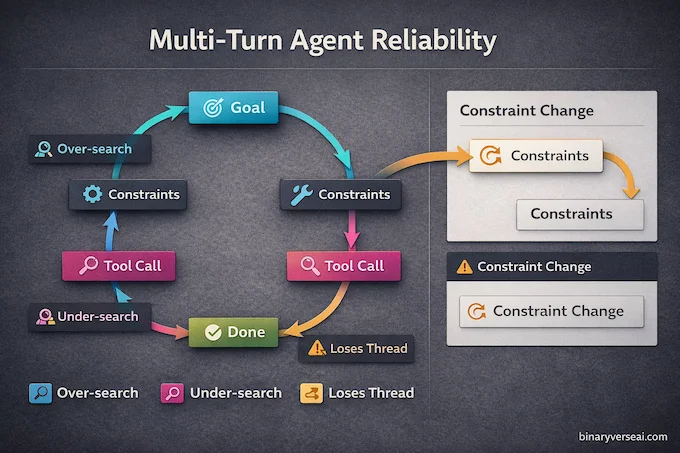
That’s why BFCL multi-turn is a meaningful signal. MiniMax M2.5 shows its value when the loop gets boring and long, and it still stays accurate. The model’s score suggests it keeps constraints stable across a conversation, even while calling tools. That’s what you want for “open repo, inspect, patch, test, revise” loops.
BrowseComp adds the web layer. Search-heavy agents often fail in three predictable ways:
- They over-search and burn tokens on noise.
- They under-search and guess when they should verify.
- They lose the thread when context gets long.
M2.5’s BrowseComp improvement over M2.1 points toward better agentic tool use patterns, fewer wasted rounds, more targeted revisions.
If you only run one quick internal eval, make it this: a multi-turn task where you change a constraint midstream and see if the agent updates the plan instead of pretending nothing happened.
6. Speed And TPS, The Quiet Multiplier
Tokens per second (TPS) sounds like a benchmark for GPU nerds. For agents, it’s economics plus user experience.
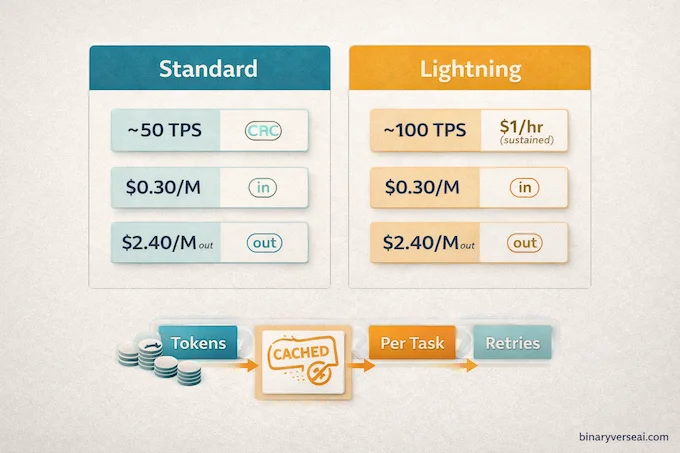
MiniMax M2.5 Lightning targets about 100 TPS, and the standard tier sits around 50 TPS. That difference changes behavior:
- You wait less, so you keep the agent in the loop.
- You can afford an extra verification pass without turning the day into a loading screen.
- Faster end-to-end runs reduce human interruption, which boosts success rate in practice.
MiniMax also reports SWE-Bench Verified finishing 37% faster than M2.1, landing close to Opus 4.6 runtime. That matters because “cheap but slow” still feels expensive when it steals your attention.
7. Pricing Deep Dive, What The Numbers Mean When You Ship Agents
This is the part most reviews botch, because they talk about per-million tokens like it’s a personality trait.
7.1 Pricing, Standard Vs Lightning
MiniMax M2.5 pricing comes down to a simple trade: speed versus per-token cost.
MiniMax offers two versions with the same capability but different speed and price:
- MiniMax M2.5 Lightning: 100 TPS class throughput, about $0.30 per million input tokens and $2.40 per million output tokens.
- M2.5 (standard): about half the price, about half the throughput.
Both support caching. For agents, caching is not a nice-to-have. It’s how you stop paying repeatedly for the same system prompt, tool schema, and repo summary.
7.2 API Pricing, PayGo Billing Notes
MiniMax M2.5 API pricing is simple, you pay per million input and output tokens, and caching can discount repeated context.
If you call the models via PayGo, billing is per million input and output tokens, plus caching rules. One detail that matters for multi-turn tool calls: keep the full conversation history consistent. If your SDK returns multiple content blocks, you append them. Otherwise your agent loses continuity and you’ll blame the model for a bug in your harness.
7.3 Cost Per Million Tokens, Translated Into “Per Task”
For MiniMax M2.5 cost per million tokens, the only translation that matters is dollars per completed task.
MiniMax reports an average SWE-Bench Verified run at 3.52M tokens per task. If you treat that as a conservative ceiling and price it like output:
- Standard tier lands around $4.22 per task.
- Lightning lands around $8.45 per task.
Real runs are usually lower because token mix matters and caching discounts repeated context. The point is the scale. You can run serious agentic coding loops without being scared of retries.
7.4 The $1 Per Hour Claim, When It’s True
Think of MiniMax M2.5 $1 per hour as a throughput math problem, not a magic coupon.
The $1 per hour claim is about sustained throughput. At 100 output tokens per second you generate about 360,000 output tokens in an hour. Multiply by the Lightning output price and you land just under a dollar, then add some input and you’re in the neighborhood.
At 50 TPS, you’re closer to $0.30 per hour. That’s why the “$1 per hour” line is not a gimmick, it’s a statement about running agents continuously.
7.5 Three Real Cost Examples
- Bugfix sprint, 10 minutes
If the run produces 120k output tokens and 40k input tokens on standard, you’re in the cents-to-low-dimes range. That’s the point where you stop optimizing prompts and start optimizing test coverage. - Feature loop, spec plus implementation
Call it 500k output tokens on standard. Roughly sixty cents for the run, plus a small amount of input. You can afford two attempts. - Overnight refactor farm
Four Lightning instances, eight hours, 70 TPS average output each. That’s about 32M output tokens total, around $77 before caching discounts. If it lands one meaningful refactor, it’s a win.
8. Is MiniMax M2.5 The Cheapest LLM API For Coding Agents?
“Cheapest LLM API” is only useful if you define the unit of work. For coding agents, the unit is a solved task, not a million tokens.
MiniMax M2.5 is often among the cheapest options for frontier-ish coding agents because it combines low prices with strong success rates on agentic benchmarks. If the model finishes in one pass instead of three, it beats a cheaper model that needs babysitting.
8.1 MiniMax Coding Plan Pricing (M2.5), When Bundles Make Sense
MiniMax also sells a Coding Plan built on M2.5. It’s positioned as predictable usage tiers, like Starter, Plus, and Max, with prompt allowances and a fixed block of agent time.
Choose the Coding Plan when you want a stable monthly spend inside the hosted agent product. Choose PayGo when you’re integrating into your own stack and you want direct control over caching, context management, and routing.
9. Comparisons, One Section, No Model Roundup Drift
9.1 MiniMax M2.5 Vs Claude Opus 4.6
Opus 4.6 still looks stronger in BrowseComp and especially in MEWC, which is basically competitive Excel. If your “coding agent” spends half its life inside spreadsheets, that gap matters.
For agentic coding, the more relevant story is economics. MiniMax M2.5 vs Opus cost is the kind of comparison that changes behavior. When the model is cheap enough, you let it verify, you let it retry, and you stop rationing attempts.
9.2 MiniMax M2.5 Vs GPT-5.2
On SWE-Bench Verified, the two are effectively tied. That means selection often comes down to integration, latency, and spend.
If you care about non-coding “office” trajectories, look at GDPval-MM and MEWC and run your own tests. The table hints that MiniMax M2.5 is solid, not dominant.
10. How To Use MiniMax M2.5 Today
You have three realistic paths:
- Native MiniMax Agent and API for the fastest “does this help me” test.
- Anthropic-compatible calling if your stack already uses that ecosystem, swap base URL and key, then test.
- Routers like OpenRouter, or managed inference via an Ollama cloud route if you want quick A/B tests without changing infra.
The workflow rule is simple: start with your existing harness, then measure task success rate, retries, and time-to-done. Benchmarks are direction. Your repo is truth.
11. Open Weights, Local Deployment, And A Clear Verdict
People want open weights. Builders want local deployment. Both are reasonable, and both require discipline.
When weights appear, verify official sources, hash artifacts, then test with a small internal suite before you put anything near production. Serving stacks like vLLM or SGLang can help, but the hard part is not serving. It’s matching behavior, latency, and context quirks to what you expect from the API model.
So, who should use MiniMax M2.5?
- Choose it if your core workload is agentic tool use, coding agents, terminal work, and search-heavy debugging, and you want frontier-like results without frontier-like burn.
- Skip it if your workload is dominated by Excel-heavy office work, or you need the strongest multilingual coding performance and you’re willing to pay for it.
CTA: Run a tight two-day trial. Pick three tasks your team actually hates, one repo bug, one terminal setup mess, one multi-turn instruction chain with a constraint change. Run them through your harness on MiniMax M2.5 and your current default. Track success rate, retries, and dollars per completed task. If it wins on those three numbers, you don’t need another debate, you need to ship the switch.
Is MiniMax M2.5 really open source and where are the weights?
MiniMax M2.5 is marketed as open, and MiniMax points to Hugging Face for downloads and local deployment. In practice, some weight pages may be gated or roll out in stages, so confirm the official Hugging Face org and the exact repo plus license before assuming “open source” in the strict sense.
How much does MiniMax M2.5 cost, what does “$1 per hour” actually mean?
The “$1 per hour” line assumes sustained high-throughput generation, basically running the model continuously around 100 tokens per second. It’s a throughput math headline, not a promise that every coding task costs $1, because real tasks include input tokens, retries, tool calls, and varying output length.
What’s the difference between MiniMax M2.5 and M2.5 Lightning?
They’re positioned as the same capability with different throughput. MiniMax M2.5 Lightning is tuned for higher tokens-per-second, and typically costs more on output tokens, while standard M2.5 aims for lower cost at lower throughput.
How does MiniMax M2.5 compare to Claude Opus 4.6 and GPT-5.2 for coding agents?
On agent-style coding benchmarks like SWE-Bench Verified and Multi-SWE-Bench, MiniMax M2.5 is reported as “frontier-parity” in the sense that scores cluster within a narrow band. The practical difference often shows up in multi-turn reliability, tool-use stability, and total cost per solved task, not just a single headline percent.
How can I use MiniMax M2.5 today (API, OpenRouter, Ollama, coding tools)?
You can use MiniMax M2.5 via the official MiniMax API, via OpenRouter routing, and via Ollama’s cloud listing depending on your workflow. For IDE and agent toolchains, the fastest path is usually an API key plus an Anthropic-compatible or OpenAI-style client wrapper, then plug it into your coding tool’s model provider settings.