

Introduction
AI model releases used to be simple: bigger context, higher scores, new logo. Now the real competition is usability. Can the model code without turning your repo into spaghetti. Can it look at a screenshot and stay honest about what it sees. Can it run a tool loop without quietly torching your budget.
Kimi K2.5 shows up as a very “engineer’s model.” It’s tuned for long context, multimodal inputs, and agent workflows. It also comes with a trapdoor: swarm execution can multiply work, and multiply cost, faster than most teams expect.
This review is built for decision makers who have to ship. We’ll do a fast verdict, then the underlying mechanics, then the only two things that matter when you deploy: benchmark signal and spend.
Table of Contents
1. Kimi K2.5 Review: The 60-Second Verdict
Kimi K2.5 is a versatile multimodal, agent-ready model with two personalities: a careful thinker and a fast sprinter. If you build software, especially UI-heavy products or tool-driven workflows, it’s immediately useful. If you mostly want casual chat, you can save money with simpler models.
Here’s the time-respecting version:
Kimi K2.5 Mode Picker
| What You’re Doing | Should You Pick Kimi K2.5 | Mode To Start With | Why It Works |
|---|---|---|---|
| Shipping product code, especially UI | Yes | Instant | Strong front-end output, fast iteration |
| Agentic search, multi-step tasks | Yes, but budget it | Thinking | Tool use plus long context adds leverage |
| OCR, docs, screenshots, mixed media | Yes | Thinking | Vision plus long outputs helps extraction |
| Long-context synthesis across huge corpora | Maybe | Thinking | Big window, but “effective” context still has limits |
| Casual chat and brainstorming | Often no | Instant | Cheaper options can match the vibe |
If you only read two sections, read this one and the pricing section.
2. What Changed In Kimi K2.5 (Vs K2 And K2 Thinking)
Kimi K2.5 feels less like a brand-new creature and more like a cleaned-up, higher-ceiling version of the K2 line. Three changes show up in real work:
- Multimodality is first-class. Image and video inputs aren’t a side quest, they’re part of the main story.
- Front-end code is better. Layouts, component structure, and visual polish land closer to something you’d actually ship.
- The agent story is explicit. Swarm execution is built in as a scaling strategy, and it’s both powerful and expensive.
If earlier K2 variants made you fight formatting, orchestration, or UI quality, this release aims straight at those pain points.
3. Under The Hood: 1T MoE, 32B Activated, MoonViT, 256K Context
Kimi K2.5 is a Mixture-of-Experts model. The headline numbers matter because they explain the feel: huge total capacity, smaller active compute per token. Published specs point to roughly 1T total parameters with about 32B activated, 384 experts, and 8 selected per token. Vision runs through MoonViT, about 400M parameters. The context window is 256K.
What that translates to in practice:
- Scale with some restraint. MoE can deliver “big model” behavior without paying full compute on every token.
- Long outputs are normal. Many evaluations assume big completion budgets, which matches how agent workflows actually behave.
- A different prompt style. You can pass full specs, long logs, and large retrieved bundles, then ask for structured work.
This is a big desk. You still need to keep it organized.
4. Modes Explained: Thinking Vs Instant (And When Each Saves Money)
You can run Kimi K2.5 in a deliberate mode or a fast mode. The naming is blunt, which I respect.
4.1 Thinking Mode
Thinking mode is for multi-step reasoning and tool orchestration. It’s also where token usage can climb, because internal reasoning and longer outputs tend to travel together.
Use it for:
- Complex debugging and root-cause analysis
- Multi-hop research with verification
- Math, logic, and long constraint lists
- Tool loops that need planning and backtracking
4.2 Instant Mode
Instant mode is the default for product work. It’s great for component generation, refactors, tests, and turning specs into clean APIs. If you’re building a system, start in Instant mode and switch only when you hit a wall. That habit saves real money.
5. Agent Swarm Reality Check: What It Is, What It Isn’t
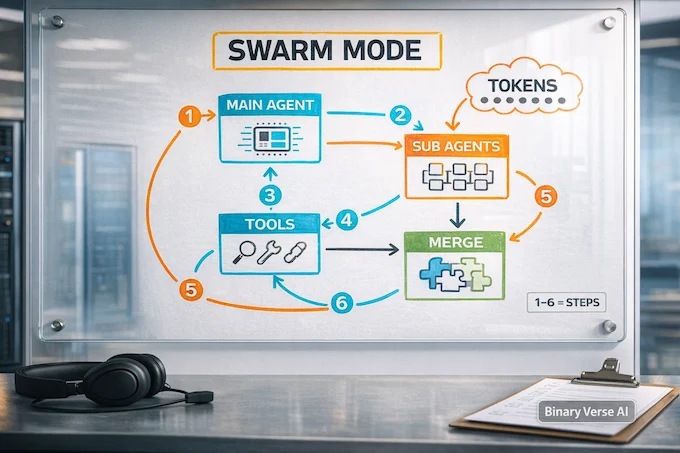
Swarm execution is a coordinated “divide and conquer” scheme: a main agent splits a task into parallel sub-tasks, spawns sub-agents, then stitches the results back together. Done right, it feels like a tiny team sprinting through a backlog.
What it is:
- Parallel coverage for tasks that naturally split
- Cleaner main-thread reasoning
- A way to scale tool usage without one messy chain
What it is not:
- A correctness guarantee
- A replacement for guardrails
- Free speed
Swarm multiplies tokens, tool calls, and context. If a single-agent plan costs X, swarm can cost 3X or 10X, fast. Use it when you can score outputs automatically and stop early. Avoid it for tasks that require one coherent mental model, like designing an architecture or proving a tricky invariant.
6. Benchmarks That Actually Predict Real Work
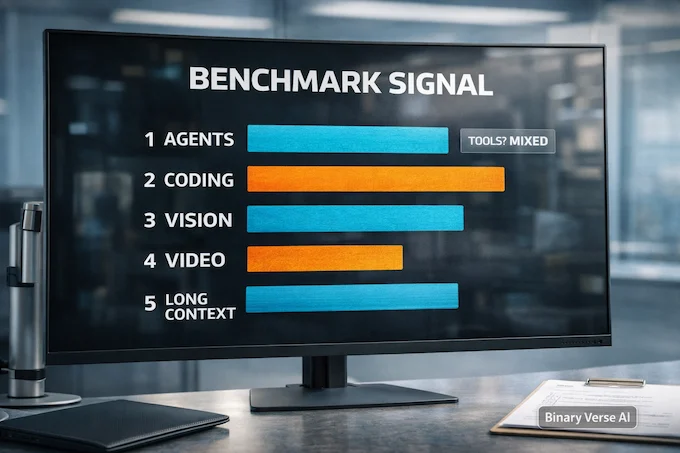
Kimi K2.5 Benchmark Scoreboard
| Benchmark Category | Kimi K2.5 | GPT-5.2 (xhigh) | Claude Opus 4.5 | Gemini 3 Pro |
|---|---|---|---|---|
| Agents: Humanity's Last Exam (Full) | 50.2 | 45.5 | 43.2 | 45.8 |
| Agents: BrowseComp | 74.9 | 65.8 | 57.8 | 59.2 |
| Agents: DeepSearchQA | 77.1 | 71.3 | 76.1 | 63.2 |
| Coding: SWE-bench Verified | 76.8 | 80.0 | 80.9 | 76.2 |
| Coding: SWE-bench Multilingual | 73.0 | 72.0 | 77.5 | 65.0 |
| Image: MMMU Pro | 78.5 | 79.5 | 74.0 | 81.0 |
| Image: MathVision | 84.2 | 83.0 | 77.1 | 86.1 |
| Image: OmniDocBench 1.5* | 88.8 | 85.7 | 87.7 | 88.5 |
| Video: VideoMMMU | 86.6 | 85.9 | 84.4 | 87.6 |
| Video: LongVideoBench | 79.8 | 76.5 | 67.2 | 77.7 |
Benchmarks are useful when they predict your workload, not when they win Twitter for a day.
A “kimi k2.5 benchmark” number only means something if you know the conditions: mode, completion budget, and whether tools were allowed. Several evaluations here are explicitly tool-augmented, including search, browsing, and code interpreter. That changes what’s being measured.
Here’s a quick map from benchmark types to real workflows:
Kimi K2.5 Benchmark Categories Map
| Category | Example Benchmarks | What It Predicts | Tool-Assisted? |
|---|---|---|---|
| Agentic Search | BrowseComp, DeepSearchQA | Retrieval planning, verification loops | Sometimes |
| Coding | SWE-bench Verified, Terminal Bench | Repo navigation, patch quality | Usually minimal tools |
| Vision And Docs | OmniDocBench, OCRBench | OCR, screenshot understanding, doc extraction | Often |
| Video Understanding | VideoMMMU, LongVideoBench | Dense video summarization, temporal reasoning | Mixed |
| Long Context | LongBench v2, AA-LCR | Staying on thread across huge inputs | No, but structure matters |
So where does Kimi K2.5 land? Strong on agentic search with tooling, competitive on multimodal understanding, and solid on coding. It’s not the uncontested winner everywhere. On SWE-bench Verified, some top peers still edge it out. The pattern is clear though: Kimi K2.5 looks tuned for workflows where tools and long context are part of the plan.
7. Front-End And “Code With Taste”: Where It Shines For UI Generation
Many models can write a function. Fewer can design. Almost none can design consistently.
Kimi K2.5 tends to produce UI code that feels intentional: sensible spacing, readable typography, and components that behave like real products. It often gets the boring details right too, like layout constraints and state wiring.
If your use case is “kimi for coding,” start by giving it a tight component spec and a short list of non-negotiables: accessibility basics, responsive breakpoints, and the exact data shape. In Instant mode, it moves fast without getting sloppy.
8. Long Context In Practice: 256K Advertised Vs Effective Context
A 256K context window is enormous. It’s also easy to waste.
Think of context like a meeting. You can invite 200 people, and the loudest voices still win. The model attends to what’s salient, recent, and structurally clear.
Failure modes you’ll recognize:
- A key constraint is buried mid-prompt and ignored
- Retrieved snippets conflict, and the model averages them into mush
- Performance slows, and the response turns generic
Mitigations that work:
- Chunk and label. Use short headings like “Spec,” “Examples,” “Non-goals.”
- Pin constraints near the end. Repeat the two or three hard constraints right before the ask.
- Be ruthless with retrieval. Rank, dedupe, include only what you can justify.
- Ask for a plan, then execute. One planning turn pays for itself when input is huge.
Kimi K2.5 gives you space. You still have to be a good editor.
9. Kimi K2.5 Pricing: Token Rates, Caching, And Three Worked Examples
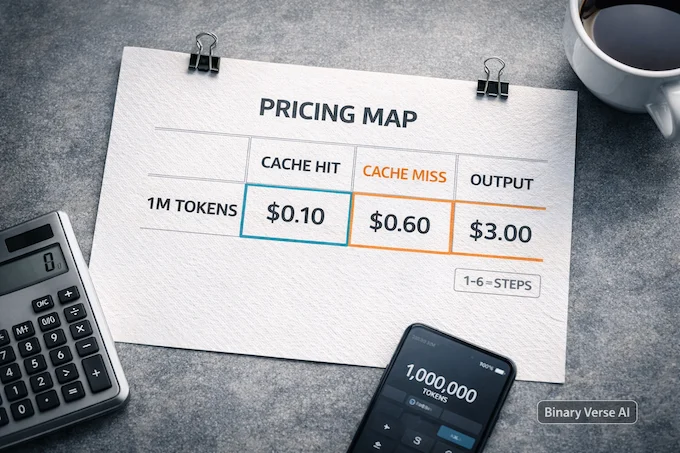
Let’s talk “kimi pricing” the only way that matters: what you’ll actually pay.
Published pricing is per 1M tokens, with separate rates for input cache hit, input cache miss, and output. The commonly cited numbers are about $0.10 per 1M for cached input, $0.60 per 1M for uncached input, and $3.00 per 1M for output, with a 256K context window.
Three patterns show up fast:
9.1 Example 1: A Daily Coding Assistant
Short prompts, short context, frequent reuse of templates.
- You get lots of cached input
- Outputs stay moderate
- The bill stays sane
This is where Kimi K2.5 feels like a bargain: high-quality code drafts at a price that doesn’t force a committee meeting.
9.2 Example 2: A Vision And Docs Pipeline
You feed screenshots and pages, then ask for structured extraction.
- Resolution drives token usage
- Outputs trend longer
- Tool calls add overhead
Keep it under control by resizing inputs, extracting only the pages you need, and enforcing a strict schema.
9.3 Example 3: Swarm Search As A Batch Job
Multiple sub-agents browse and summarize in parallel.
- Tokens multiply
- Tool calls multiply
- Context balloons
Treat swarm like batch compute. Set caps: max steps, max sub-agents, max tokens per agent, and a stop rule when confidence is high enough.
10. How To Use Kimi K2.5 (API Compatibility, Tools, Vision, Best Practices)
If you’ve built against OpenAI-style chat completions, Kimi K2.5 will feel familiar. You can use an OpenAI-compatible SDK by setting a Moonshot key and a base URL, which makes “kimi k2.5 api” integration straightforward.
A minimal pattern:
from openai import OpenAI
import os

client = OpenAI(
  api_key=os.environ["MOONSHOT_API_KEY"],
  base_url="https://api.moonshot.ai/v1",
)

resp = client.chat.completions.create(
  model="kimi-k2.5",
  messages=[{"role":"user","content":"Write a robust retry strategy for flaky APIs."}],
  max_tokens=900,
  extra_body={"thinking":{"type":"disabled"}},  # Instant mode
)
print(resp.choices[0].message.content)
Two operational gotchas:
- Many sampling parameters are fixed. If you override temperature or top_p outside allowed values, requests fail.
- Vision billing depends on image resolution and video keyframes. Resize aggressively. Ask for exactly what you need.
If you’re building tool use, treat tool calls like expensive syscalls. Log them, cap them, cache results. That’s where reliability comes from.
11. Download And Local Run Reality: Hugging Face, Hardware, And Ollama Expectations
A lot of people search for “kimi k2.5 download,” and what they really mean is “can I run this on my machine.”
The open weights are available via “kimi k2.5 huggingface,” and the release highlights native INT4 quantization. That’s great. It still doesn’t turn a 1T MoE into a laptop model.
Reality check:
- You can deploy it with vLLM or SGLang, or specialized stacks like KTransformers.
- You need serious GPU memory and bandwidth, typically multi-GPU servers.
- For most teams and individuals, the API is the sane path.
On “kimi k2.5 ollama”: Ollama is fantastic for smaller local models. For something this large, the common approach is an inference server you connect to, not a single-file local runtime. If your goal is local iteration, run a smaller model in Ollama for the tight loop, then use the hosted ceiling when you need it.
12. Kimi K2.5 Vs GPT-5.2 Vs Claude Opus 4.5 Vs Gemini 3 Pro: Choose-By-Task Cheat Sheet
Pick models like tools, not like sports teams.
A pragmatic guide:
- Agentic search and tool workflows: Kimi K2.5 is a strong pick when long context and deliberate planning matter.
- Repo-scale coding patches: If SWE-bench Verified is your proxy, test at least two models, then pick on patch acceptance rate.
- Multimodal docs and extraction: Kimi K2.5 holds up well, especially when you want structured outputs from messy inputs.
- Fast product iteration: Instant mode plus OpenAI-style compatibility makes it easy to drop into existing stacks.
The best move is boring: A/B test on your own tasks. Run 20 examples, score them with your metrics, then ship.
If you’re building a serious workflow around moonshot ai kimi k2.5, start small. Put it behind a feature flag. Add logging. Add spend caps. Scale the pieces that prove themselves.
K2.5 is not a magic brain. It’s a high-ceiling tool that rewards disciplined use. Treat it like a teammate, write clear specs, keep swarm on a leash, and it will save you weeks.
Want a practical setup for your use case? Drop your workflow in the comments, coding agent, doc extraction, or search, and I’ll map it to prompts, guardrails, and cost controls you can copy into production.
Is Kimi better than ChatGPT?
It depends on your job. Kimi K2.5 shines when you need long context, multimodal inputs, and agent workflows with tool calls. ChatGPT often wins on polished product UX, broad integrations, and general-purpose day-to-day assistance. If you ship software, A/B test both on your real tasks and pick by acceptance rate, not hype.
Is Kimi AI completely free?
Not completely. Kimi’s web/app experience can be free for many users, but heavy usage, premium modes, and developer-grade reliability usually involve limits, credits, or paid plans. API usage is billed per token, and self-hosting shifts the “cost” to your hardware and ops.
Is Kimi K2.5 cheap?
Kimi K2.5 can be cheap for practical work, especially if you use caching and keep outputs tight. It gets expensive when you let agents roam, run Swarm Mode broadly, or generate huge outputs. The cost story is mostly discipline: caps, caching, and good stop rules.
Is Kimi K2.5 safe to use?
Safe enough for many normal workloads, but treat it like any external AI service. Don’t paste secrets, private keys, confidential customer data, or regulated content unless you’ve reviewed data handling and have an approved setup. If safety is a hard requirement, self-hosting plus strong logging and access controls is the safer route.
Is Kimi from China?
Yes. Kimi is developed by Moonshot AI, which is based in Beijing, China.