
Introduction
A weird thing is happening in model land: the smartest move might be to stop arguing about “best model” and start arguing about “best loop.” Best loop wins because it runs more times.
That’s why Seed2.0 matters. Not because it’s a magical new brain. Because it changes the economics of iteration while still posting elite-looking scores in the few rows that make engineers sit up straight. When a model can flirt with top-tier reasoning and cost like a budget option, your whole stack starts to look… negotiable.
Let’s walk through the three rows that feel like a smoking gun, then translate them into what you actually do on Monday morning.
Table of Contents
1. Seed2.0 In One Paragraph: What Launched, Who It’s For, Why It Matters
Seed2.0 is ByteDance Seed’s production-focused agent family, released in three sizes, Pro, Lite, and Mini, aimed at real-world workflows where latency, multimodal input, and reliable multi-step execution matter more than poetic answers. It’s built for the messy inputs people actually paste into systems, screenshots, charts, scanned docs, half-broken code, plus constraints like “do this in five steps and don’t touch X.” The model card frames the goal as large-scale deployment quality: multimodal understanding, faster inference choices via sizing, and robust complex instruction execution.
Here’s the table excerpt that anchors most of the Seed2.0 benchmarks conversation. I’m not trying to turn you into a leaderboard tourist. I’m trying to give you the few numbers that change decisions.
Table 1: Fundamental Benchmarks Excerpt (The Rows People Actually Argue About)
| Category | Benchmark | GPT-5.2 High | Claude Sonnet 4.5 | Claude Opus 4.5 | Gemini 3 Pro High | Seed2.0 Pro |
|---|---|---|---|---|---|---|
| Science | HLENo tool | 29.9 | 14.5 | 23.7 | 33.3 Best | 32.4 |
| Science | Encyclo-KKnowledge breadth | 61.0 | 58.0 | 63.3 | 64.9 | 65.7 Best |
| Math | AIME 2025Competition math | 99.0 Best | 87.0 | 91.3 | 95.0 | 98.3 |
| Math | IMOAnswerBenchNo tool | 86.6 | 60.7 | 72.6 | 83.3 | 89.3 Best |
| Code | CodeforcesSeed2.0 Codeforces 3020 | 3148 Best | 1485 | 1701 | 2726 | 3020 |
| General | ProcBenchSeed2.0 ProcBench 96.6 | 95.0 | 87.5 | 92.5 | 90.0 | 96.6 Best |
| Context | Disco-XLong-context reasoning | 76.3 | 70.3 | 78.6 | 76.8 | 82.0 Best |
| Instruction | Inverse IFEvalConstraint following | 72.3 | 69.3 | 72.4 | 79.6 Best | 78.9 |
If you only skim one thing: the “3000 club” row, the “process following” row, and the math row that hints this isn’t just benchmark cosplay.
Now let’s interpret those rows like adults.
2. The “3000 Codeforces Club”: What 3020 Signals (And What It Doesn’t)

A Codeforces Elo over 3000 is rare enough that it becomes a social object. People treat it like a black belt. That’s partly deserved. Codeforces problems force quick parsing, precise reasoning, and implementation under constraints. A model that hits Seed2.0 Codeforces 3020 is telling you it can juggle logic and code with low tolerance for sloppy steps.
Here’s what that score actually signals in practice:
2.1. What 3020 Usually Correlates With
- Strong pattern recognition for common algorithm families.
- Comfort with multi-step derivations that must end in executable code.
- Less “vibe coding,” more “prove it by passing tests.”
In agent terms, it suggests the model won’t panic when the path to the answer has six gates and each one has a key shaped like an invariant.
2.2. What 3020 Does Not Promise
It does not guarantee great repo engineering. Competitive programming is a sprint in a sandbox. Real software is a hike through a swamp with a backpack full of other people’s decisions.
So if you’re choosing between models for “write a perfect solution to a known problem,” this row matters a lot. If you’re choosing for “navigate a large codebase with style constraints, product context, and a code review culture,” you still need more evidence. We’ll get to that in the routing section, because routing is how you stop caring about any single benchmark.
3. The Second Smoking Gun: ProcBench And Long-Chain Reliability For Agents

The row I care about most is not the flashy one. It’s the boring-sounding one: Seed2.0 ProcBench 96.6.
ProcBench is a proxy for something painfully real: can the model follow a process without drifting? Production work is mostly process. Plan, execute, verify, adapt. Your agent doesn’t fail because it can’t write a function. It fails because it forgets step 7, violates a constraint from step 2, then confidently ships a broken artifact.
So when Seed2.0 edges out GPT-5.2 on ProcBench in the model card table, I read it like this: “This model family was tuned for not getting lost.”
3.1. Why Process Following Beats Clever Answers In Production
A clever answer is great for a demo. A process-following answer is what closes tickets.
- “Write a migration” is easy.
- “Write a migration, keep backward compatibility, update docs, add tests, don’t touch these files, and match the existing lint rules” is the real thing.
That’s also why teams end up building harnesses. The harness is the boss. The model is the worker. Proc-style strength means the worker follows the boss.
3.2. The Agent Mapping: Plans, Constraints, Multi-Step Tasks
If you’re building agentic AI, ProcBench strength maps cleanly to:
- planning that doesn’t evaporate mid-run,
- tool use that respects guardrails,
- retries that don’t mutate the objective.
It’s not glamorous. It’s the difference between “cool, it wrote code” and “cool, it finished the job.”
4. Agentic Math That Matters: Putnam-200 And Multi-Turn Reasoning
Now the math row that makes me stop scrolling: Putnam-200. In the model card, it’s evaluated in an agent-based multi-turn setup with tools, and Seed2.0 Putnam-200 shows a jump that’s hard to ignore.
Table 3: Putnam-200 (Agentic Multi-Turn Math) Pass@8
| Benchmark | DeepSeek Prover V2 | Seed 1.5 Prover | Gemini 3 Pro | Seed2.0 Lite | Seed2.0 Pro |
|---|---|---|---|---|---|
| Putnam-200 Agentic multi-turn math | < 4.0 | 26.5 | 26.5 | 30.5 | 35.5 Best |
That 35.5 is the headline. It says: in a setting that rewards persistence, decomposition, and not losing the thread, Seed2.0 can push deeper than several obvious reference points.
4.1. Why Putnam-Style Tasks Stress Planning And Persistence
Putnam problems aren't "remember a fact." They're "build a bridge across a river you can't see the bottom of." The solution often requires:
- choosing the right lens,
- trying paths that fail,
- re-framing without throwing away everything learned.
That's basically agent work, just in math clothing.
4.2. Pro vs Lite Positioning, Using The Scores
The Lite number matters almost as much as the Pro number. A cheaper model beating a flagship competitor on a hard reasoning task changes how you think about orchestration. It implies a practical split: Lite handles more of the thinking than you'd expect, Pro is your escalation path when the task turns into a long-horizon maze.
5. Multimodal Isn't A Side Quest: Why Vision Plus Motion Perception Changes The Stack
A lot of teams still treat vision as "nice to have." Then they look at their actual inputs and realize half their work is screenshots.
The Seed2.0 multimodal angle is not cosmetic. The model card emphasizes that real user queries include screenshots, charts, scanned documents, and mixed-media content, and that improving visual reasoning and structured extraction reduces hallucination and boosts reliability.
If you build tools for humans, you will get:
- a screenshot of a dashboard with a red circle,
- a PDF table someone refuses to copy,
- a chart pasted into chat like it's 2007.
"Text-only" is a fantasy interface.
5.1. What I'd Test For Seed2.0 Visual Reasoning
If you want confidence, test things that resemble your production mess:
- Chart extraction: pull the right numbers, not vibes.
- UI-to-code: read a layout, produce sane HTML/CSS, keep structure.
- Diagram understanding: describe and transform, not just caption.
5.2. Motion Perception Is Quietly Important
The phrase Seed2.0 motion perception sounds niche until you remember how much modern work is video. Product demos. Bug reproductions. Sports clips. Screen recordings. If the model can track state changes over time, you can build agents that watch, not just read.
6. The Economics Shock: $0.47 Input, $2.37 Output, And Why That's Strategically Dangerous
Let's talk about the part that actually changes budgets: Seed2.0 pricing. The model card's token pricing table is blunt. The Seed2.0 API cost positions Pro as a "high capability" option priced closer to what you'd expect from a smaller tier.
Here's the exact comparison in a compact form.
Table 2: API Token Prefill And Decode Price Comparison (USD Per 1M Tokens)
| Model | Prefill (Input) | Decode (Output) |
|---|---|---|
| GPT-5.2 High | $1.75 | $14.00 |
| Claude Opus 4.5 Thinking | $5.00 | $25.00 |
| Gemini 3 Pro | $2.00–4.00 | $12.00–18.00 |
| Claude Sonnet 4.5 Thinking | $3.00 | $15.00 |
| GPT-5.0 Mini High | $0.25 | $2.00 |
| Gemini 3 Flash High | $0.50–1.00 | $3.00 |
| Seed2.0 Pro | $0.47 | $2.37 |
| Seed2.0 Lite | $0.09 | $0.53 |
| Seed2.0 Mini | $0.03 | $0.31 |
That's the "$0.47 model" story in numbers. And yes, I'm calling it strategically dangerous, because it pressures everyone else's margin structure.
6.1. Why This Matters More Than A Single Benchmark
Cost is not just "save money." Cost changes behavior.
- Cheap models get used more.
- Used more means more iterations.
- More iterations means more chances to verify.
- Verification beats raw cleverness.
This is how you end up with systems that feel smarter even when the base model isn't "the best," because the system runs a better loop.
6.2. Translating Pricing Into Cost Per Task
If your agent run does heavy reasoning plus verbose output, output pricing dominates. If you're doing retrieval-heavy workflows, input can dominate.
Either way, the Seed2.0 Pro price makes it realistic to run:
- a draft pass,
- a critique pass,
- a verification pass,
- a repair pass,
without your CFO developing a sudden interest in "manual workflows."
7. Pro vs Lite vs Mini Routing: The Production Play Everyone Asks About
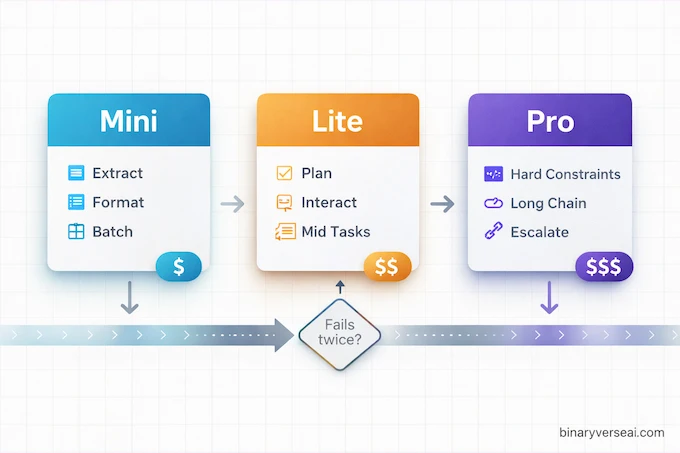
The best way to use a model family is to stop picking one model and start picking a policy.
Seed2.0 makes this tempting because the tiers are priced like you actually want to route.
7.1. Draft, Verify, Escalate
A simple policy that works surprisingly well:
- Mini for high-volume boilerplate, extraction, formatting, and cheap first passes.
- Lite for most interactive work, planning, and mid-complexity tasks.
- Pro when stakes rise: long-chain reasoning, tricky code, hard constraints, or when Lite fails twice.
You're not trying to be clever. You're trying to be reliable.
7.2. When Lite Is Enough, When Pro Is Mandatory
Lite is enough when:
- the task is bounded,
- the evaluation is easy,
- you can verify automatically.
Pro becomes mandatory when:
- the task is long-horizon,
- the constraints are strict,
- the output must be correct the first time.
7.3. Where Mini Fits Without Ruining Your System
Mini is the "throughput engine." Use it for:
- batch tagging,
- first-pass extraction,
- turning messy text into structured objects.
Then let a stronger tier validate, because that's how you keep quality without paying for Pro to do chores.
8. Comparisons People Actually Search: Seed2.0 vs GPT-5.2 vs Gemini 3 Pro vs Claude Opus
People search "Seed2.0 vs gpt 5.2" because they want a decision, not a fandom.
Based on the benchmark excerpt and pricing table, here's the decision logic I'd use:
- Choose GPT-5.2 High if you want the safest all-around top-end option and you can afford the output pricing.
- Choose Gemini 3 Pro High if your workflow leans hard on long-tail factual recall and you're already in that ecosystem.
- Choose Claude Opus if you prioritize certain styles of coding and writing behavior and your budget tolerates premium output costs.
- Choose Seed2.0 if your bottleneck is iteration cost per task and you want strong signals on math, process following, and competitive coding, without paying luxury pricing for every run.
That's the core: capability per dollar plus reliability, not "who won the internet this week."
9. Skeptic's Corner: Missing Benchmarks, Contamination Fears, And How To Sanity-Check Claims
Skepticism is healthy. Benchmarks get gamed. People "benchmaxx." Data leaks. Everyone cherry-picks.
So here's a simple checklist that keeps you honest:
9.1. Validation Checklist
- Run your own small suite: 30 real tasks from your logs beats 300 public tasks you don't care about.
- Measure variance: does it fail the same way every time, or randomly?
- Check tool discipline: does it follow your schema, your constraints, your safety rails?
- Use adversarial prompts: try to make it break rules politely.
- Track cost per solved task: not cost per token, solved task.
If a model wins a leaderboard but loses your internal "ship a feature" test, the leaderboard is trivia night.
10. How To Access Seed2.0 (And What To Do If You're Outside The Default Region)
The model card describes Seed2.0 as part of ByteDance Seed's large-scale production ecosystem, and it references developer-facing deployment patterns and MaaS usage.
In practice, access usually lands in one of these buckets:
- an official cloud API offering under ByteDance's infrastructure brands,
- partner platforms that expose the models through compatible endpoints,
- region-specific availability that varies by account and geography.
If you're outside the default region and you hit friction, keep it simple:
- test via a partner platform first,
- validate the key tasks you care about,
- then decide if it's worth the paperwork for direct access.
The goal is fast evidence, not ideological purity.
11. Bottom Line: Who Should Switch, Who Should Wait, And The One Sentence Verdict
Here's the verdict that fits on a sticky note:
Seed2.0 is the rare combo of "credible capability signals" and "economics that encourage verification loops," which makes it a strong candidate for agentic production systems where cost per task and long-chain reliability decide whether you ship.
Who should switch now:
- teams building agents that run multi-step workflows,
- developers doing heavy iteration on code, UI, extraction, and automation,
- multimodal builders who live in screenshots and docs.
Who should wait:
- teams with strict vendor constraints,
- workflows that depend on a specific ecosystem feature you can't replace yet,
- orgs that can't change routing policies, and still insist on a single-model religion.
CTA: If you're evaluating this family, don't start with internet debates. Start with your own harness. Pick 20 real tasks, run a Mini → Lite → Pro routing policy, log failures, then compute cost per solved task. If you want, paste your task list and constraints here and I'll turn it into a clean evaluation script and scoring rubric you can reuse for every model drop.
1) What is Seed2.0 Pro, and how is it different from Lite and Mini?
Seed2.0 is a three-tier family designed for production routing. Pro is built for the hardest long-chain, multi-step tasks. Lite targets a balance of quality and speed for everyday production use. Mini is optimized for throughput, concurrency, and deployment density.
2) How good is Seed2.0 Pro on coding benchmarks like Codeforces?
Seed2.0 Pro reports a Codeforces 3020 score, which is a rare “3000-tier” signal in competitive programming style evaluation. It suggests strong algorithmic coding performance, but you should still validate it on real repo work like debugging, refactors, and tests.
3) Why is Seed2.0 called the “$0.47 model”?
Because Seed2.0 Pro’s listed API pricing is $0.47 per 1M input tokens (prefill) and $2.37 per 1M output tokens (decode). That combination is unusually low for a model positioned near top-tier benchmark tables, which is why pricing becomes part of the technical story.
4) Is Seed2.0 actually better than GPT-5.2, Gemini 3 Pro, or Claude Opus?
“Better” depends on what you measure. Seed2.0 Pro’s strongest case is capability-per-dollar plus reliability on multi-step work, highlighted by benchmark rows like ProcBench 96.6 and Putnam-200 35.5. For some workflows, that beats paying more for small deltas elsewhere.
5) How do I choose between Seed2.0 Pro vs Lite vs Mini in production?
Use a simple routing rule: start with Mini or Lite for drafts and routine tasks, then escalate to Pro when you hit failures like instruction drift, multi-step instability, or hard reasoning. If your workflow involves tools, long constraints, or verification loops, Pro often pays for itself by reducing retries.