
Introduction
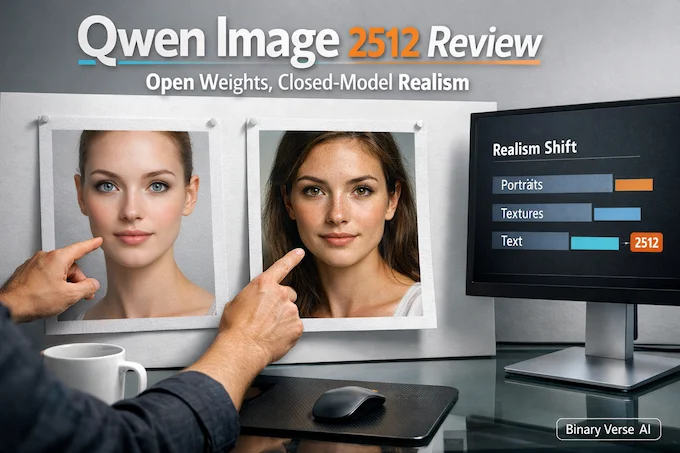
The last year of image models has felt like a tug-of-war between two worlds. Closed systems ship the “wow,” open weights ship the control. Qwen Image 2512 is one of the first releases that makes that trade feel less mandatory.
It does not magically solve image generation. It still has quirks, artifacts, and taste issues. But it moves the open side of the line in a way that matters for real workflows, especially if you care about portraits that do not scream “synthetic,” and layouts that do not turn text into decorative spaghetti.
This review is written for builders. If you just want pretty pictures, you already have options. If you want repeatable outputs, predictable typography, and a path from demo to local pipeline, Qwen Image 2512 is worth your time.
Table of Contents
1. What Qwen Image 2512 Is, And What It Is Not
Qwen Image 2512 is a base text-to-image checkpoint. Think “foundation generator,” not “edit my photo while preserving identity.” The Qwen family has editing variants, but this release is about generating from scratch, then optionally layering tooling on top.
The bigger point is what it represents inside the broader qwen image model ecosystem. Qwen’s technical report puts heavy emphasis on prompt alignment and text rendering, backed by a data pipeline and curriculum learning that start with basic text and scale up to layout-sensitive prompts. That training bias shows up in the day-to-day feel of Qwen Image 2512: it behaves less like a “style slot machine,” more like a system that tries to follow instructions.
Qwen Image 2512 Variant Guide
Quick comparison of variants for qwen image generation and editing workflows.
| Variant | What It’s For | When To Pick It |
|---|---|---|
Qwen Image (base) | General qwen image generation | If you want the original baseline behavior |
Qwen Image 2512 | Newer base generator with realism and layout gains | If you care about portraits, natural textures, and readable text |
Qwen Image Edit variants | Image-to-image editing, controlled changes | If your job is “change only this part” |
The practical takeaway: treat Qwen Image 2512 like your default base model, then decide if your task needs editing tooling rather than trying to force edits through pure prompting.
2. What Changed Since The August Qwen Image Release
If you used the earlier Qwen Image, you probably remember two things. It was surprisingly strong at text for an open model, and it still had that faint “model glaze” on people and fine textures.
Qwen Image 2512 improves the exact places where humans are unforgiving: skin, hair, age cues, and the little environmental context signals that make an image feel observed instead of synthesized. Your brain is a ruthless detector, and it flags faces first.
It also improves natural detail. Leaves stop collapsing into mush more often. Fur has more consistent strand structure. Water and mist have fewer “painted noise” vibes.
These upgrades are consistent with how the Qwen team thinks about fidelity at the representation layer. Their report describes training the image decoder on text-rich images and fine-grained detail, and explicitly calls out reducing grid artifacts while improving reconstruction. You can feel that downstream. Cleaner representations give diffusion fewer chances to hallucinate structure.
3. The Real Significance, Why This Release Actually Matters
Here’s the boring truth that turns into money later: open weights matter when you can build on them. Not just run them.
Qwen Image 2512 matters because it narrows the “closed-only advantage” to a smaller set of niche wins. If an open model gets you close on realism and beats many models on layout, you can spend your engineering calories on product layers instead of apologizing for the generator.
The technical report frames the core challenge as alignment to complex prompts, especially text rendering and multi-line layouts, and says their pipeline uses curriculum learning that ramps from basic text to paragraph and layout tasks. That is exactly the kind of unglamorous, high-leverage decision that makes a model feel useful instead of impressive.
So the “significance” is not hype. It is that Qwen Image 2512 is viable for local, reproducible pipelines where typography and instruction following are part of the product, not a bonus.
4. Portrait Reality Check, Where 2512 Looks Best
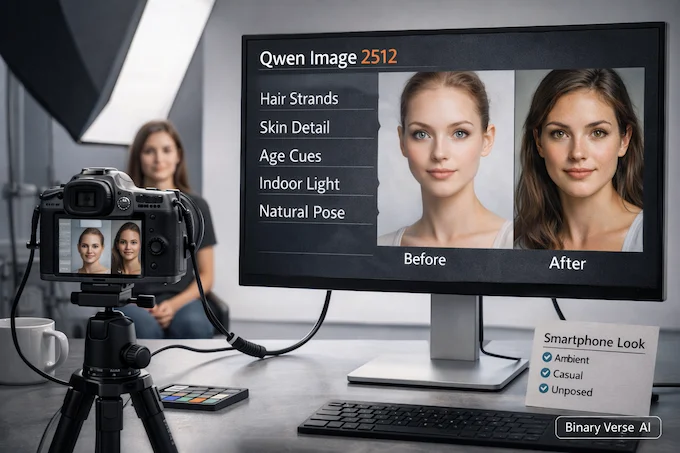
Let’s be blunt. Portraits are where models either earn trust or get you roasted in group chat.
Qwen Image 2512 tends to do best when you ask for plausible photography instead of “hyper-real cinematic perfection.” The model is strong at the mundane. Smartphone-style indoor lighting, casual composition, realistic hair density, natural pores that do not look like procedural noise.
Two things stand out:
4.1. Hair And Skin Stop Fighting Each Other
Hair is usually where models cheat. They blur strands into a single texture and hope you do not zoom. With Qwen Image 2512, strand separation is more consistent, and it interacts with lighting in a way that feels less synthetic.
4.2. Age Cues Are Less “Wax Museum”
Older faces are hard because wrinkles are not just lines. They are geometry plus lighting plus skin behavior. Qwen Image 2512 is noticeably better at those cues, which is a nice proxy for general facial understanding.
If you want the best odds, write prompts like you are describing a real photo you could have taken. Camera angle, lens hints, indoor ambient light, and simple wardrobe details help. Over-directing with ten style adjectives often makes things worse.
5. Natural Scenes And Texture, Water, Foliage, Fur, Mist
Landscapes are a different test. They are less about identity and more about texture coherence.
Qwen Image 2512 has a stronger “microstructure” feel in foliage and fur. The fur improvements show up the fastest because fur is basically a stress test for texture repetition. When models fail, they produce a carpet.
The Qwen report’s VAE section is quietly relevant here. They observed grid artifacts in repetitive textures like bushes, and reduced them by balancing reconstruction and perceptual losses. That reads like a footnote, but it maps directly to the kinds of outdoor failures users complain about.
You will still see issues. Overcooked detail can happen, where the model tries so hard to be “detailed” that it invents crunchy texture. Mist can become smeared. Fast water can look like brushed plastic. But the baseline is higher, and the failure modes are easier to spot and correct.
6. Text Rendering And Layout, The Killer Feature For Builders
This is where Qwen Image 2512 stops being “another strong generator” and becomes a builder’s tool.
The Qwen technical report is unusually explicit about text. It positions complex text rendering as a core problem where even strong commercial models struggle. Then it backs that up with benchmarks for English, Chinese characters, and long text rendering.
That focus shows up in practice:
6.1. Slides, Posters, Infographics
If you ask for a slide with a title, subhead, bullets, and labels, Qwen Image 2512 is more likely to produce something readable and aligned than most open models. It is not perfect typography, but it is good enough to iterate.
6.2. Why It Works, Not Magic, Data
The report describes synthetic data strategies that range from simple text on clean backgrounds to composited text in realistic scenes, all the way to structured templates like PowerPoint and UI mockups. That is exactly the training recipe you want if your goal is “model follows layout instructions.”
6.3. A Quiet Architecture Win
Even the positional encoding choice is aligned with mixed text and image inputs. Qwen introduces MSRoPE, treating text as diagonal positions relative to image latents to keep scaling benefits while staying sane on the text side. You do not need to care about the math to enjoy the outcome: fewer weird collisions between “text tokens” and “image tokens” when you push resolution and structure.
If you build dashboards, thumbnails, lesson posters, UI mockups, or YouTube slide assets, Qwen Image 2512 is one of the most practical open releases in a while.
7. Known Issues From Community Testing
You should go in with eyes open.
The most common complaints cluster into a few buckets:
7.1. Grid, Banding, Repetitive Texture Patterns
These show up most in large smooth gradients or repeated detail like grass and bushes. The report itself calls out grid artifacts in repetitive textures and discusses reducing them at the decoder level. In the wild, you will still see it sometimes, especially with aggressive settings or low-bit formats.
7.2. POV And Camera Angle Adherence
The model is better than earlier checkpoints, but camera direction is still a place where you need to be crisp. “Shot from below,” “overhead view,” “wide angle,” “telephoto compression” work better than vibe words.
7.3. Style Limits
Photographic realism is the headline. Stylized illustration and certain anime looks can be hit-or-miss unless you bring LoRAs or a style pipeline. This is not a moral failing, it is specialization.
The trick is not to rage-quit. Treat failures as debugging. Fix workflow first, then format, then prompt.
8. How To Try It Fast, No Local Setup
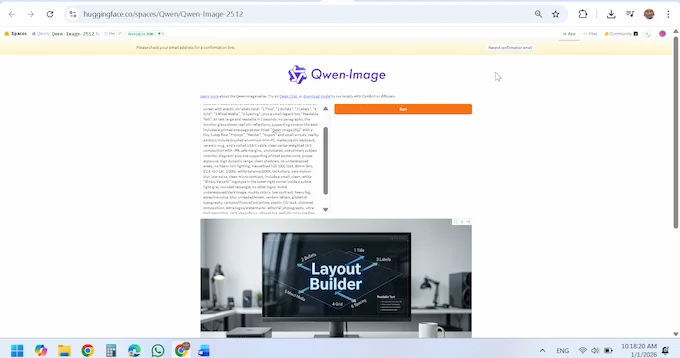
If you want a quick feel for Qwen Image 2512, use a hosted demo first. It answers the most important question: do you like the model’s taste, and does it follow your instructions?
Hosted routes also help you separate “model behavior” from “my local pipeline is cursed.” If your local output looks worse than the official samples, it is often a format or precision mismatch, not a conspiracy.
Once you have a prompt you like, save it and move local. That single habit will save you hours of confused tweaking.
9. Run Locally, Diffusers And ComfyUI Without Losing Your Weekend
Local is where the model becomes yours.
9.1. Diffusers Quick Start, Minimal And Reproducible
A good baseline is more valuable than ten half-working experiments. Start with a known resolution, a moderate step count, and conservative guidance. Lock a seed. Generate a few prompts. Only then change one variable at a time.
If you are using the official pipeline, keep the first run boring. Your goal is not art, it is sanity.
9.2. ComfyUI Workflow, What People Actually Use
A lot of builders live in node graphs because you can see the plumbing. If you search “qwen image comfyui,” you will find workflows that differ mainly in loaders and precision choices.
Common failure points are boring:
- Wrong file format for the loader
- Missing custom nodes
- Torch and CUDA mismatches
- Accidentally mixing settings from another model family
Treat ComfyUI like wiring a studio rack. If one cable is wrong, the whole rig sounds bad.
10. LoRA Compatibility And Speed-Ups
LoRAs can be a superpower or a fast way to destroy what you liked about the base model.
Old LoRAs might “work” in the sense that they run, but they can shift facial structure, lighting behavior, and typography. That is not always bad, just unpredictable.
A safe test method is simple:
- Pick one prompt.
- Fix seed, steps, resolution, guidance.
- Generate baseline.
- Enable LoRA, generate again.
- Compare changes like you are doing a diff, not a vibe check.
Speed LoRAs are worth exploring once your baseline is stable. Do not optimize a broken pipeline.
11. GGUF vs Safetensors vs FP8, BF16, What To Choose
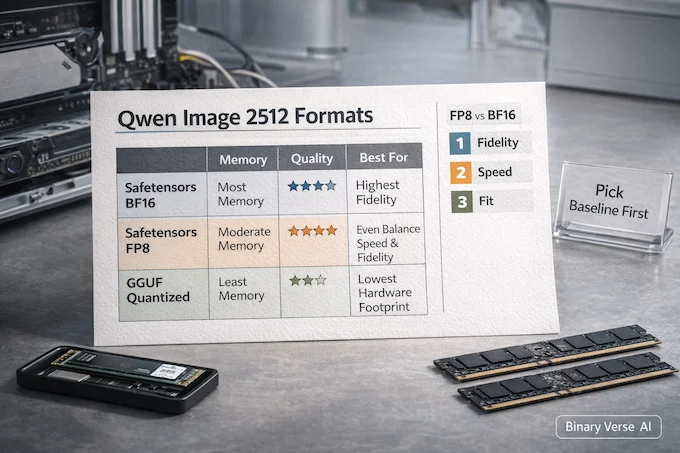
Most “the model is worse locally” stories are really “my format and precision changed the model.”
Safetensors in BF16 is usually the cleanest baseline if your GPU can handle it. FP8 can be a strong speed and memory compromise on supported hardware. Then you have GGUF, which is attractive because it opens doors for different runtimes, but it also invites quality drift depending on gguf quantization types.
This is where the keyword debate, gguf vs safetensors, stops being internet theater and becomes a practical choice.
Qwen Image 2512 Formats, Speed, and Fidelity
Choose between safetensors and GGUF by memory, speed, and output risk for local runs.
| Option | Memory And Speed | Output Quality Risk | Who It’s For |
|---|---|---|---|
Safetensors BF16 | Highest memory, steady speed | Lowest | Baseline testing, best fidelity |
Safetensors FP8 | Lower memory, often faster | Low to medium | Modern GPUs, production runs |
GGUF quantized | Lowest memory, flexible runtimes | Medium to high | Constrained hardware, experimentation |
And yes, fp8 vs bf16 can change the “feel” of results. Subtle gradients, text edges, hair microdetail, and texture repetition are exactly where precision choices show up first. If you are judging the model, judge it at a sane baseline, then decide what you can afford.
12. Best Starter Settings And Prompting Rules That Fix Most Complaints
A good rule of thumb is to start conservative and earn your weirdness.
- Steps: start mid-range, then go up only if you see undercooked structure
- Guidance: keep it modest, high guidance often amplifies artifacts and text warping
- Resolution: pick one common aspect ratio and get consistent before you chase extremes
- Prompting: prefer concrete camera and scene language over stacks of style adjectives
- Debug order: workflow first, format second, prompt last
If you are writing “photorealistic” and getting synthetic faces, try describing the photo instead. “Casual smartphone photo,” “indoor ambient lighting,” “50mm look,” “slight motion blur,” “unposed expression.” It sounds silly, then it works.
Qwen Image 2512 is not a toy release. It is an open checkpoint that is genuinely usable for real products, especially if your product includes text, layout, and instruction following. If you build with the model, treat it like engineering, not fortune telling. Set a baseline, control your variables, and document what you change.
Then do the fun part: ship something people can actually use, and let the next person argue about prompts on your behalf.
Technical background used from the Qwen-Image technical report.
What is Qwen Image 2512?
Qwen Image 2512 is the December update to the Qwen Image base qwen image model for qwen image generation. It targets more realistic humans, finer natural textures, and noticeably stronger text and layout rendering for posters, slides, and infographics.
What is a GGUF model, and why do people use GGUF for image models?
GGUF is a quantized model format that reduces memory usage, which can make running large diffusion models locally possible on smaller VRAM systems, or even CPU-only setups. The tradeoff is that some gguf quantization types can soften detail, introduce artifacts, or drift away from official sample quality.
Which GGUF quant should I choose for Qwen Image 2512?
Start with Q5 if your system can handle it and you want closer-to-reference quality. Use Q4 if your main goal is fit and speed. If you’re judging Qwen Image 2512 against official samples, avoid very low quants first, because they can hide what the base model can actually do.
Is GGUF better than safetensors for Qwen Image 2512?
Neither wins universally. In the gguf vs safetensors decision, safetensors in FP8/BF16/FP16 usually preserves image quality closer to reference outputs. GGUF often runs on more limited hardware and is popular for local deployment, but quantization can change sharpness, texture, and text clarity.
Can Qwen Image 2512 render text correctly?
Yes, Qwen Image 2512 is meaningfully improved for text and layout, especially compared to many open models. Text quality still depends on steps, CFG, sampler/workflow, resolution, and whether you’re using low-bit quants. If text looks garbled in qwen image comfyui, fix workflow and settings first, then adjust prompts.