

Intro: Why TranslateGemma Matters (Local, Open, 55 Languages)
Shipping multilingual features is rarely hard because of language, it’s hard because of tradeoffs. You want quality, speed, privacy, and a bill that doesn’t look like a surprise tax.
TranslateGemma flips that equation. It’s a translation-first model family built on Gemma 3, trained and evaluated across 55 language pairs, and released in three sizes that actually map to real devices. The big idea is simple: high-quality translation should be something you can run locally, on hardware you already own, without sending your users’ text into the cloud. The technical report backs up the claim with both automatic metrics and human evaluation.
Table 1. Which Model Should You Choose (4B Vs 12B Vs 27B)
TranslateGemma Model Picker Table
Choose the right size for your device and deployment goals.
| Your Reality | Model To Pick | Typical Hardware Target | Why It Works |
|---|---|---|---|
| Phone, edge box, “must run small” | 4B | Mobile-class SoC or small GPU, often quantized | Best latency-per-quality under tight memory |
| Laptop, desktop, local apps | 12B | Consumer GPU or CPU with enough RAM | Sweet spot for quality and throughput |
| Highest fidelity, production server | 27B | High-memory GPU or strong server | Lowest error rate, most robust on hard text |
If you want one sentence of advice: start with 12B unless you already know you can’t.
Table of Contents
1. TranslateGemma Overview: What It Is And What It’s For
TranslateGemma isn’t a general chatbot pretending to translate. It’s a model family trained specifically to translate, and the training recipe explains why it behaves like a translator instead of a talkative assistant.
The report describes a two-stage pipeline: supervised fine-tuning on parallel data, followed by reinforcement learning that optimizes translation quality with reward models like MetricX-QE and AutoMQM. That second stage is important because it pushes outputs toward being faithful and natural, not just plausible.
Where this shines:
- Offline desktop translation tools
- Privacy-first internal document workflows
- Multilingual product features where you control latency
- Research projects that need open, reproducible baselines
Where it doesn’t magically replace your whole stack:
- Full enterprise localization with style guides, review workflows, and domain-specific terminology baked in
- Every edge-case language direction under the sun, especially highly specialized domains
Treat TranslateGemma as a strong core engine, then wrap it in the product logic you already know you need.
2. Translategemma Model Picker: 4B Vs 12B Vs 27B (What To Use When)
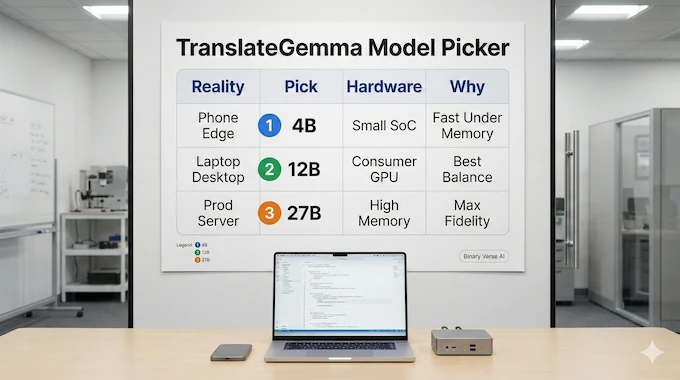
Picking between translategemma 4b, translategemma 12b, and translategemma 27b isn’t about ego. It’s about your bottleneck.
2.1 Latency, Throughput, And The Real Cost Of Bigger
Model size hits you in three places: startup time, per-request latency, and batch throughput. If you translate one sentence at a time in a UI, latency is king. If you translate thousands of product descriptions, throughput is king.
A practical rule: parameter count roughly tracks memory needs. In fp16 or bf16, weights alone land around:
- 4B ≈ 8 GB
- 12B ≈ 24 GB
- 27B ≈ 54 GB
Quantization shrinks those numbers dramatically, which is why local deployment is realistic at all.
2.2 What The Sizes Feel Like In Practice
- TranslateGemma 4B feels snappy and surprisingly competent when you’re memory constrained. It’s the one you can imagine on edge devices without heroic engineering.
- TranslateGemma 12B is the builder’s default. Quality is strong, and you can still run it on consumer hardware with sane settings.
- TranslateGemma 27B is for maximum fidelity and for text that punishes mistakes: legal phrasing, technical manuals, or nuanced tone.
2.3 The Hidden Constraint: Context
All sizes share the same core reality: many setups operate around a 2K token input context. Great for sentences, paragraphs, and short sections. Not great for entire chapters. You can still translate long documents, you just need to chunk intelligently. We’ll cover that in Section 9.
3. Translategemma Benchmark: How To Read MetricX, COMET, MQM, And Vistra Without Fooling Yourself
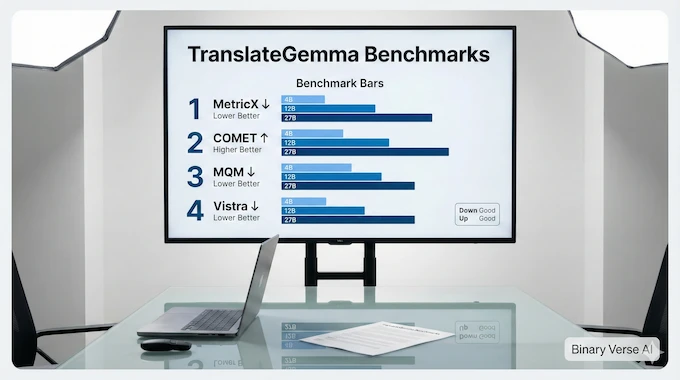
Benchmarks are useful when you treat them like instruments, not verdicts.
Here’s the short mental model:
- MetricX is an automatic score designed to align with human quality judgments. Lower is better. It’s also used as a training signal in the reinforcement learning stage.
- COMET22 is another strong automatic metric. Higher is better.
- MQM is human evaluation: professional translators mark errors, severity, and category. Lower is better.
- Vistra evaluates translating text inside natural images, so it reflects multimodal behavior.
Table 2. Benchmarks Summary And What It Means In Practice
TranslateGemma Benchmark Snapshot
A quick read on quality scaling from 4B to 27B across key evals.
| Benchmark And Metric | 4B | 12B | 27B | What It Means For You |
|---|---|---|---|---|
| WMT24++ MetricX (↓) | 5.32 | 3.60 | 3.09 | Bigger reduces errors, but 12B is already strong |
| WMT24++ COMET22 (↑) | 80.1 | 83.5 | 84.4 | Quality gains generalize across metrics |
| WMT25 MQM Avg (↓) | N/A | 7.94 | 5.85 | Humans confirm scaling trend, 27B is cleaner |
| Vistra Image MetricX (↓) | 2.58 | 2.08 | 1.58 | Image translation improves too, even without extra multimodal fine-tuning |
The headline result people love is also the one that matters: the 12B variant beats the baseline Gemma 3 27B on MetricX over WMT24++. That’s a rare “smaller is better” moment, and it translates into real deployment wins.
Also, the improvements aren’t confined to the usual high-resource languages. The report shows consistent gains across all 55 evaluated pairs, including directions involving Swahili and Icelandic.
4. Translategemma Setup: Fastest Working Hello Translation And The Prompt Template
A translategemma setup that works on the first try comes down to two things: choosing the right pipeline, and using the exact message format the model expects.
4.1 Minimal Install And First Run
This is the smallest “hello translation” that tends to behave:
TranslateGemma Pipeline Example (Text Translation)
Hugging Face pipeline setup for google/translategemma-4b-it using CUDA and bfloat16.
from transformers import pipeline
import torch

pipe = pipeline(
    "image-text-to-text",
    model="google/translategemma-4b-it",
    device="cuda",
    dtype=torch.bfloat16
)

messages = [{
  "role": "user",
  "content": [{
    "type": "text",
    "source_lang_code": "cs",
    "target_lang_code": "de-DE",
    "text": "V nejhorším případě i k prasknutí čočky."
  }]
}]

out = pipe(text=messages, max_new_tokens=200)
print(out[0]["generated_text"][-1]["content"])Once this runs, swap in bigger weights and start measuring.
4.2 The Prompt Template Everyone Trips Over (source_lang_code, target_lang_code)
TranslateGemma is opinionated. The user message must contain a content list with exactly one entry. That entry must include:
- type: “text” or “image”
- source_lang_code: ISO 639-1 like en, or a regionalized code like en-US
- target_lang_code: same format
- text for text inputs, or url for image inputs
If you send a language code the model doesn’t support, the template can throw an error early. That’s annoying at first, then comforting once you’ve been burned by silent failures.
4.3 Common Errors And Fast Fixes
- Wrong chat roles: stick to user and assistant only.
- Multiple content entries: don’t bundle multiple segments in one message if you’re using the standard template. Batch at the application level instead.
- Overly chatty prompts: this model is trained to translate, not debate. Give it clean input text.
5. Translategemma Image Translation: Translating Text Inside Photos
This is where the model feels like a product feature, not a research demo.
TranslateGemma retains multimodal capabilities from Gemma 3, and Vistra results show that translation improvements carry into image translation too, especially for larger variants.
Practical tips that save time:
- Use clear images with high contrast text.
- Crop aggressively. A sign, a menu item, a label, one region of text.
- Normalize to the expected resolution when possible. The model card uses 896×896 as the standard.
- Prefer images that contain a single text instance when you care about clean output, that’s how Vistra filtering was done.
If your goal is “translate this busy screenshot full of UI elements,” do an OCR pass first, then feed extracted strings for consistent results.
6. Local Deployment: Laptop And Desktop Inference (Performance Tips, Quantization, GGUF)
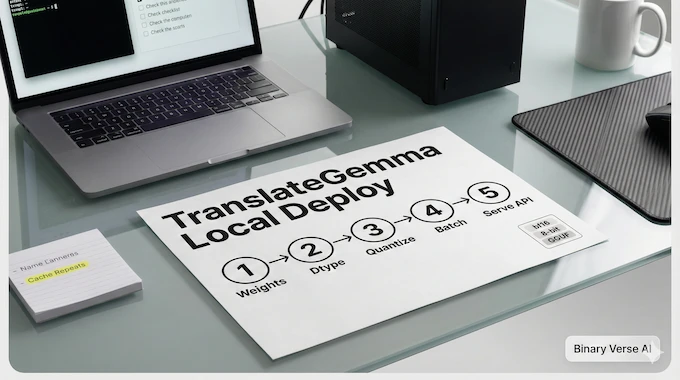
Local translation sounds romantic until you watch your laptop fan attempt liftoff.
Here’s the practical playbook:
6.1 Dtype And Memory Choices
- bf16 or fp16 is the clean baseline if you have GPU memory.
- 8-bit or 4-bit quantization is the difference between “runs locally” and “crashes politely.”
- If you are CPU-bound, focus on smaller models and quantization first, then batching.
6.2 Batching And Throughput
Translation is embarrassingly parallel. If you’re translating many short segments, batch them. Your GPU likes steady work, not tiny bursts.
6.3 Translategemma GGUF For Local-First Stacks
If your deployment ecosystem revolves around llama.cpp-style runtimes, translategemma gguf builds are the obvious next step. Quantized formats make the 12B class far more accessible on everyday machines, and that’s where local apps start to feel mainstream instead of experimental.
And yes, TranslateGemma 12B is still the “best default” for most local builds.
7. Translategemma On Phone Or Edge Devices: What’s Realistic Today
“Mobile optimized” can mean two very different things:
- It runs at all.
- It runs well enough to feel instant.
For edge deployments, the 4B size is the realistic starting line. With quantization and careful batching, you can get usable latency for short strings. You still need to respect thermal throttling and memory ceilings. Phones are fast, but they’re not data centers.
If you need camera translation on-device, keep the UX honest: crop text regions, translate small snippets, and stream results quickly. Users forgive minor imperfections, they don’t forgive waiting.
8. TranslateGemma As A Local Translation API (Vs DeepL / Google Translate API)
At some point, your team asks the inevitable question: “Can we expose this as an internal service?”
Yes. TranslateGemma can act as a self-hosted translation api service, and this is where the economics start to bite traditional providers.
A simple architecture looks like:
- FastAPI endpoint accepts {source, target, text}
- Queue for load spikes
- Cache for repeated strings
- Optional glossary layer for terminology consistency
Now the commercial comparison, kept tight on purpose:
- A hosted translation api is convenient but bills scale with volume.
- A cloud translation api is easy to wire up but pushes sensitive text off-prem.
- A language translation api like the google translate api has clear documentation, plus a known google translation api price structure, but you pay per character and you accept the privacy trade.
- Teams also evaluate deepl api pricing for quality, but it’s still a metered service.
- A free translation api often comes with strict limits, unpredictable quality, or both.
Self-hosting won’t beat managed APIs on “zero maintenance.” It will beat them on controllable cost curves, privacy posture, and the ability to tailor behavior. If those matter to you, TranslateGemma is the clean local-first option.
9. The 2K Context Question: Translating Long Documents Without Losing Quality
Long-document translation is where naive approaches quietly fail. You translate paragraph-by-paragraph, then wonder why pronouns drift and terminology mutates.
Here’s the better pattern:
9.1 Chunk With Overlap
Split text into chunks that fit comfortably within context. Add a small overlap window so sentences at boundaries have continuity. Then stitch outputs while trimming duplicated overlap.
9.2 Build A Lightweight Glossary Memory
Maintain a term table: product names, technical terms, “always translate this as that.” Inject it as a short preamble for every chunk. Keep it compact, stable, and boring.
9.3 Consistency Tricks That Work
- Use the same target locale code every time, don’t mix de-DE with de mid-stream.
- Lock style choices: formal vs informal pronouns, punctuation norms, capitalization.
- If the domain is narrow, run a second pass that checks terminology consistency and patches obvious drift.
You don’t need magic. You need discipline.
10. Quality Reality Check: TranslateGemma Vs DeepL Vs Generic LLM Translation
Let’s be blunt.
TranslateGemma wins when:
- You need local inference for privacy or compliance
- You want predictable cost and controllable latency
- You are translating lots of short segments and can batch efficiently
It struggles when:
- The text is loaded with cultural nuance, sarcasm, or deeply domain-specific jargon
- Named entities require perfect consistency across long contexts
- The language direction is rare and underrepresented in training data
DeepL and large hosted systems still have strengths, especially in polished tone for certain European language pairs. Generic LLMs can sometimes produce translations that read beautifully, then quietly hallucinate meaning. That’s the worst failure mode because it looks confident.
The practical move is iterative: use TranslateGemma as your engine, then add lightweight post-edit loops, glossary enforcement, and spot-check evaluation. That’s how you turn “good model” into “reliable product.”
11. Production Checklist: Licensing, Privacy, Safety Notes, And A Strong Next Step
Before you ship, do the boring work. Boring work is what keeps you employed.
11.1 License And Distribution
The Gemma license includes conditions around redistribution and hosted services. Read it, accept it, and document your compliance path before you expose anything publicly.
11.2 Privacy Posture
Local inference means user text stays on your hardware. That’s a huge win, but you still need to treat logs, caches, and analytics as part of the privacy surface.
11.3 Safety And Misuse
The report describes extensive safety evaluation and red-teaming across categories like child safety, harassment, hate, and representational harms, with improvements relative to earlier Gemma models. Still, your product needs its own safeguards. Translation systems can be used to launder harmful text across languages. Don’t be surprised.
Closing: Your Turn
If you’ve been waiting for a translation model that feels deployable instead of theoretical, TranslateGemma is that moment. Pick a size, run the hello translation, then stress it with your real data. The fastest way to learn is to benchmark your own workload, on your own hardware, with your own error tolerance.
Is there an API for translation?
Yes. You can use hosted APIs (Google Translate API, DeepL API, Azure Translator), or self-host by wrapping a local model like TranslateGemma behind a simple REST endpoint.
Is DeepL translator API free?
DeepL usually offers limited free access or trials, but production usage typically moves to paid tiers. “Free” commonly means strict quotas and rate limits.
Is Microsoft Translator API free?
Microsoft may include small free allowances depending on Azure quotas and billing setup. For real traffic, you should assume paid usage once you exceed the free limits.
How to use Google Translate API?
Enable Cloud Translation in Google Cloud, create credentials, then call the translation endpoint from your app. In your article, contrast that hosted flow with running TranslateGemma locally for privacy and predictable costs.
How many languages does TranslateGemma support?
TranslateGemma is positioned around 55 languages for strong, evaluated coverage. There’s also broader experimental coverage beyond that, but the “55” set is the reliable baseline to plan around.