
Introduction
OpenRouter is a unified API for accessing hundreds of AI models from different providers through a single endpoint. Instead of maintaining separate API keys and integrations for OpenAI, Anthropic, Google, DeepSeek and other model providers, developers can use one OpenRouter API and switch between models with relatively small changes to their code.
That is the simple answer to what OpenRouter is, but the reason developers use it goes further. OpenRouter also provides centralized billing, model discovery, provider routing and fallbacks, making it easier to compare models and avoid building a separate integration for every AI provider.
In this OpenRouter AI review, I’ll look at how OpenRouter works, current pricing, free models, safety and privacy, the OpenRouter API, pros and cons, and whether OpenRouter is worth using instead of connecting directly to individual model providers.
Table of Contents
1. What Is OpenRouter? The Unified Interface Explained
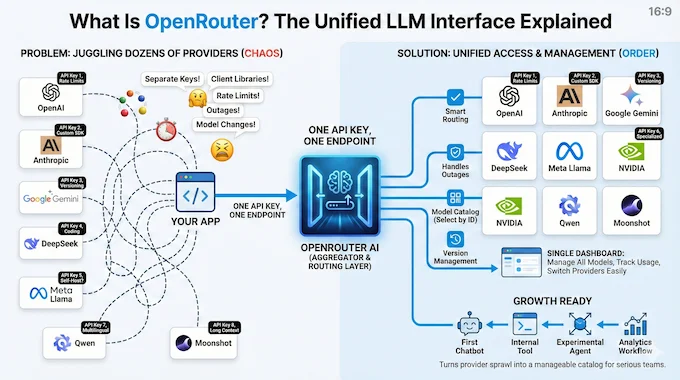
OpenRouter AI is best understood as an LLM API aggregator for modern language models. Instead of juggling separate keys, client libraries, and rate limits from dozens of providers, you point your app at one endpoint and select the model you want by ID. The service worries about the messy parts, such as routing, provider outages, and model version changes.
How Does OpenRouter Work?
Your application sends a request to OpenRouter instead of directly to an individual AI provider. OpenRouter identifies the model and provider you selected, routes the request to an available endpoint, and returns the response through a consistent API format. Depending on your routing settings, it can also use provider fallbacks when an endpoint is unavailable.
In practice OpenRouter AI gives you a single API key that can talk to models from OpenAI, Anthropic, Google, DeepSeek, Meta, NVIDIA, Qwen, Moonshot and many others. You still choose specific models, such as a Claude Sonnet variant for reasoning or a DeepSeek model for code, but you manage them from a single dashboard instead of ten.
This matters more as your application portfolio grows. The first chatbot can live happily on one provider. The third internal tool, the experimental agent, and the analytics workflow each start asking for different strengths and different trade offs. OpenRouter turns that sprawl into a catalog and a routing layer, which is exactly what serious teams want.
2. OpenRouter AI Models: DeepSeek, Llama 3, Gemini And Friends
One of the main reasons developers land on the platform is the catalog of OpenRouter AI models. The lineup includes hundreds of options across major labs and up and coming providers, with a mix of frontier reasoning models, lightweight assistants, and specialized tools for code or long context work.
You get access to open source heavy hitters such as Llama 3 variants without needing to run your own GPU fleet. You also get tightly integrated access to the latest proprietary systems, including DeepSeek reasoning models, Gemini 3 Pro style assistants, and highly tuned Claude Sonnet and Opus models. For many teams this “one catalog, many labs” view is the real value of OpenRouter AI.
There is also a long tail of niche and less restricted models that appeal to power users and character chat setups. The important thing is that you see them all through one consistent interface. You select a model, send messages in a familiar chat format, and let the routing layer handle the rest.
3. Is OpenRouter Free? Free Models And Usage Limits
For many people their first serious encounter with OpenRouter AI comes from hunting for “how do I use DeepSeek for free” threads. The platform leans into that curiosity by offering a rotating pool of free models that you can call without paying for tokens, within rate limits.
The free lineup changes over time, yet it often includes smaller NVIDIA Nemotron variants, some Llama style models, and other community friendly options. The experience feels like a sandbox. You can plug these models into your favorite front end, test quality, latency, and prompts, then decide which ones deserve paid traffic.
You will not run serious production workloads on the free tier. That is by design. Think of it as a pressure free playground where you can compare behavior, tune prompts, and let your product managers or analysts try things without worrying about surprise bills.
3.1 Example Free Models On OpenRouter
Here is a snapshot style example of how a free tier might look on a given week:
OpenRouter AI Free Model Snapshot
Quick view of OpenRouter AI free tier models, providers, context limits, pricing and ideal use cases on mobile or desktop.
| Model Name | Provider | Typical Context | Pricing (Input / Output) | Good For |
|---|---|---|---|---|
| Nemotron Nano 9B V2 (free) Free model | NVIDIA |
128K
| $0 / $0 | Reasoning experiments, chat |
| Light Llama 3 Instruction (free) Free model | Community |
16K
| $0 / $0 | Simple assistants |
| Compact Qwen Style Chat (free) Free model | Qwen |
32K
| $0 / $0 | Tools, quick automations |
The limits on the free tier are strict enough that you won’t be tempted to abuse it. Daily request caps and per minute rate limits force you to treat it as a playground, not a hosting platform. As a workflow it still works well. Prototype against free models, then move successful use cases to paid ones with a single configuration change.
4. OpenRouter Pricing: What You Actually Pay

OpenRouter pricing has two parts that are easy to confuse. The platform generally passes through the underlying model provider’s inference price without adding a markup to the token rate, but pay-as-you-go users currently pay a platform fee when purchasing OpenRouter credits.
For most users, that means you buy credits and those credits are deducted as you use different models. The major advantage is that the same balance can be used across the OpenRouter model catalog instead of maintaining separate billing accounts with every AI provider.
OpenRouter also supports Bring Your Own Key (BYOK), where you connect supported provider API keys while continuing to use OpenRouter’s routing layer. BYOK includes a plan-dependent fee-free allowance, with an additional fee applying after that allowance is exceeded.
4.1 OpenRouter Pricing Plans At A Glance
The table below captures the spirit of the public pricing tiers without copying marketing copy word for word:
OpenRouter AI Pricing Plans Overview
Compare OpenRouter AI plans, who each tier fits, model coverage, key limits and practical notes before you plug it into your stack.
| Plan | Who It Fits | Models Available | Key Limits | Notes |
|---|---|---|---|---|
| Free Best for first tests | Hobbyists, early testing | Subset of free models | Daily request caps, RPM limits | Great for exploration and quick demos |
| Pay As You Go Most popular | Indie hackers, small teams | Full public catalog | No platform rate limits on paid use | Simple credit system, flexible OpenRouter pricing |
| Enterprise For scale | Larger organizations, platforms | Full catalog plus BYOK | Custom limits and SLAs | Volume discounts, data policies, routing rules |
The main message for developers is simple. You can start with almost no friction, upgrade to serious workloads without restructuring your integration, and keep finance happy with transparent token prices.
5. Is OpenRouter Safe? Privacy, Data And Trust
Whether OpenRouter is safe depends partly on how you configure it and which downstream providers you allow. OpenRouter says it does not store the contents of your prompts or responses by default unless you explicitly enable input/output logging or opt in to allowing that data to be used.
OpenRouter does retain request metadata such as token counts and latency, while the AI providers receiving your requests can have their own logging and retention policies. That distinction matters because OpenRouter is a routing layer rather than the final model provider.
For workloads with stricter privacy requirements, OpenRouter supports Zero Data Retention (ZDR) routing. ZDR controls can restrict requests to endpoints that do not retain prompt or response data, and they can be applied at account, model-group, guardrail or individual-request level.
6. How To Set Up OpenRouter AI In Your Stack
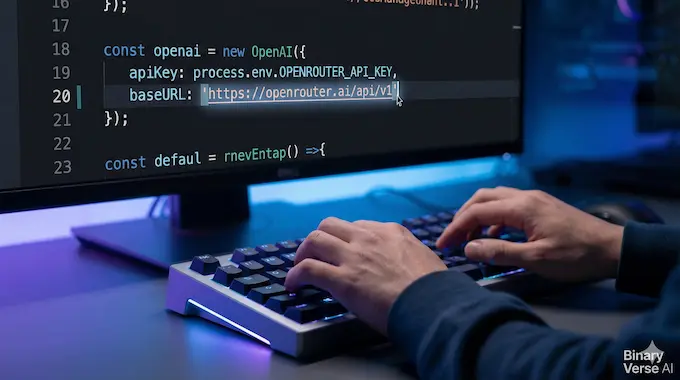
The mechanics of wiring the platform into an existing stack are refreshingly boring. You create an account, top up credits or select free models, and generate an API key. From that point you decide whether to call the native OpenRouter AI API or to keep using the OpenAI SDK with a different base URL.
Most teams already rely on the OpenAI client, so the second path feels like a gentle migration. You swap out the endpoint, drop your OpenRouter API key into configuration, and start passing model names that include the provider prefix.
6.1 Python Quickstart With The OpenRouter API
Here is a simple example using the HTTP interface with Python and the requests library:
import os
import json
import requests

OPENROUTER_API_KEY = os.environ["OPENROUTER_API_KEY"]

payload = {
    "model": "openai/gpt-4o",
    "messages": [
        {"role": "user", "content": "Explain retrieval augmented generation in plain language."}
    ],
    "stream": False,
}

response = requests.post(
    "https://openrouter.ai/api/v1/chat/completions",
    headers={
        "Authorization": f"Bearer {OPENROUTER_API_KEY}",
        "HTTP-Referer": "https://your-app.example",
        "X-Title": "Your App Name",
    },
    data=json.dumps(payload),
    timeout=30,
)

response.raise_for_status()
content = response.json()["choices"][0]["message"]["content"]
print(content)
This pattern works for any model in the catalog. You change the model field, keep the rest of the payload shape, and you are now calling a different system through the same OpenRouter AI API.
6.2 TypeScript Example With The OpenAI SDK
If your apps already uses the official OpenAI TypeScript client, you can keep that code and simply point it at OpenRouter:
import OpenAI from "openai";

const client = new OpenAI({
  baseURL: "https://openrouter.ai/api/v1",
  apiKey: process.env.OPENROUTER_API_KEY,
  defaultHeaders: {
    "HTTP-Referer": "https://your-app.example",
    "X-Title": "Your App Name",
  },
});

async function main() {
  const completion = await client.chat.completions.create({
    model: "deepseek/deepseek-r1",
    messages: [
      {
        role: "user",
        content: "Give me three creative startup ideas that use synthetic data.",
      },
    ],
  });

  console.log(completion.choices[0].message);
}

main().catch(console.error);
The same pattern works in Node back ends, edge functions, and serverless environments. You get better uptime and routing without rewriting your application layer.
7. OpenRouter vs Perplexity vs OpenAI: Which Should You Use?
Every serious team now faces a crowded decision surface. Native OpenAI access gives you first class support for features such as the Assistants API, robust embeddings, and deep integration with the broader OpenAI ecosystem. Perplexity shines as a product with integrated search and answer experience, great for research workflows and end user tools.
OpenRouter AI sits in a different spot. It plays infrastructure rather than front end. You reach for it when you want to compare DeepSeek reasoning against Claude in your own UI, or when you want fallback routing across providers without writing your own orchestration layer. The OpenRouter vs Perplexity question becomes simple once you see that they solve different problems.
For many builders the answer ends up as a hybrid. They keep OpenAI for must have native features, use Perplexity as a research surface, and lean on OpenRouter AI as the backbone that connects their internal tools to a rotating cast of models.
8. Pros And Cons: A Developer’s Shortlist
No service is magic. OpenRouter AI brings structural advantages and a few trade offs that are worth calling out explicitly.
8.1 Benefits Of Using OpenRouter AI
- One key, many models, less subscription fatigue and fewer dashboards.
- Easy access to cutting edge systems such as OpenRouter AI DeepSeek options, Claude, Gemini, and high context Qwen or Kimi models.
- Friendly exploration of OpenRouter AI models, with filters for price, context length, provider, and throughput.
- Routing and fallback that shield your users from individual provider outages and pricing swings.
- Crypto friendly credits that make it easier for global teams and indie hackers to get started.
8.2 Trade Offs And Constraints
- There is always a small amount of extra network and routing latency, even if it is usually modest.
- You need to track another service in your incident runbooks and observability stack.
- When providers adjust their pricing or deprecate a model, you rely on OpenRouter to surface those changes promptly.
For most developers the pros outweigh the cons, especially once they maintain more than one production application that touches large language models.
9. Is OpenRouter Worth It? Final Verdict
If you build anything serious with language models, you eventually hit the multi provider wall. Someone on the team wants DeepSeek for chain of thought reasoning, someone else swears by Claude for safety, and your finance team wants clearer control over token spend. OpenRouter AI turns that tension into a coherent system.
The platform works best when you treat it not as a toy playground, but as shared infrastructure for your apps. Start with a small experiment, wire the OpenRouter API into one feature, and get a feel for the routing, logs, and data policies. If you like the experience, roll it out across more services and let your product teams choose the right model for each job.
If you care about fast iteration, cost visibility, and the freedom to swap models without weeks of refactoring, OpenRouter AI deserves a permanent spot in your architecture. Kick the tires, point a side project at it this week, and see how it feels when your entire model zoo lives behind one clean endpoint.
Is OpenRouter AI free?
OpenRouter AI is free to join, but most models are billed per token. You can create an account and start using a curated set of free models with daily request limits, then move to pay-as-you-go credits when you need higher volume or premium models. The catalog includes a dedicated “Free” section that highlights zero cost options so you can prototype without an upfront bill.
Is OpenRouter safe?
Whether OpenRouter is safe depends partly on how you configure it and which downstream providers you allow. OpenRouter says it does not store the contents of your prompts or responses by default unless you explicitly enable input/output logging or opt in to allowing that data to be used.
OpenRouter does retain request metadata such as token counts and latency, while the AI providers receiving your requests can have their own logging and retention policies. That distinction matters because OpenRouter is a routing layer rather than the final model provider.
For workloads with stricter privacy requirements, OpenRouter supports Zero Data Retention (ZDR) routing. ZDR controls can restrict requests to endpoints that do not retain prompt or response data, and they can be applied at account, model-group, guardrail or individual-request level.
What is the difference between OpenAI and OpenRouter?
OpenAI is a model provider, while OpenRouter AI is a unified LLM API aggregator. OpenAI builds and serves models such as GPT-5, and exposes its own APIs and pricing. OpenRouter AI sits on top as a single gateway that lets you call OpenAI, Anthropic, Google, Meta, DeepSeek and many others through one OpenAI-compatible API, with consolidated billing and routing controls.
What is OpenRouter used for?
OpenRouter AI is used by developers to avoid vendor lock-in, cut complexity, and improve reliability across many LLM providers. Teams plug their apps into one API, then choose from hundreds of models while keeping a single key, contract, and analytics surface. The routing layer handles fallbacks when a provider is down, enforces data policies, and lets you swap models without rewriting your core integration.
Does OpenRouter AI support Perplexity or DeepSeek?
Yes, OpenRouter AI exposes both Perplexity and DeepSeek models through its catalog. You can call DeepSeek V3 style chat and reasoning models, as well as Perplexity’s Sonar family, including variants based on DeepSeek R1, through a single OpenRouter endpoint with OpenAI-compatible payloads. This often keeps access stable even when individual provider APIs are overloaded or rate limited.