
1. A Camera That Remembers You
Every creator has hit the same wall, now an then. You get an AI edit that is close, then the face morphs, the pet changes, or the logo drifts. Gemini 2.5 Flash Image fixes that all that fuss. The model, nicknamed nano banana, locks onto identity and holds it through outfit swaps, scene changes, and multi image fusion. It turns gemini image editing into something you can trust in production, not just in demos.
Table of Contents
2. What Gemini 2.5 Flash Image Actually Is
Gemini 2.5 Flash Image is Google’s latest image generation and editing system inside the Gemini app and the Gemini 2.5 Flash Image API. It is built for precise, prompt based control, fast iteration, and consistent subjects. You can start in the app for free tiers or paid tiers, then move to Google AI Studio, Vertex AI, or partner platforms when you need code and deployment. If you care about speed, reliability, and consistent outputs, this is the right door to walk through.
3. Why This Upgrade Matters
Gemini 2.5 Flash Image is not just better pictures. It is a tighter feedback loop between your idea and the pixels. Here is what changed in practical terms.
3.1 Character Consistency That Sticks

Keep the same person, pet, or product across a series without the uncanny drift. Change clothing, lighting, or viewpoint, and the face and fine traits remain intact. This is the single biggest leap for google gemini image editing.
3.2 Multi Image Fusion That Builds Scenes
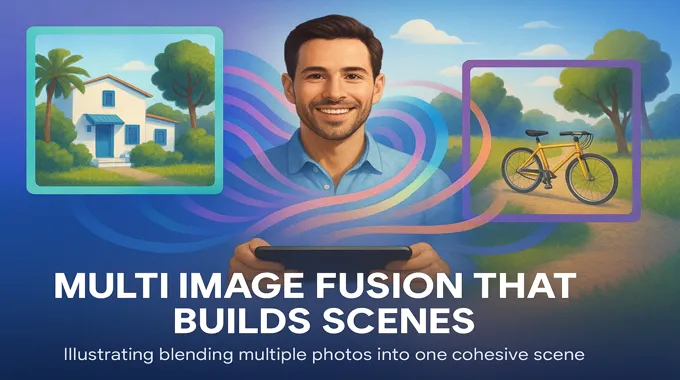
Blend several photos into one composition. Drop your dog into your portrait. Restyle a room with a new color scheme. Compose product mockups that follow a template. The result feels intentional, not stitched.
3.3 Prompt Based Local Edits
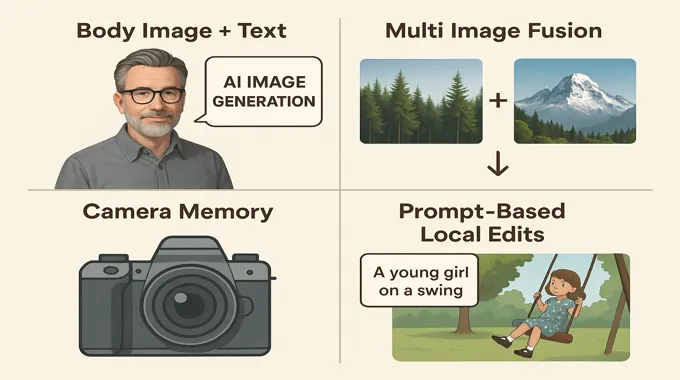
Tell it exactly what to change. Remove a person, blur a background, fix a stain, nudge a pose, or add a prop. You edit with language, the model handles masks and edges behind the scenes.
3.4 Design Mixing And Template Adherence
Lift color and texture from one image, apply them to an object in another. Keep layouts uniform across a catalog, from employee badges to real estate cards.
3.5 World Knowledge For Practical Tasks
Ask about a diagram. Request a layout that matches a known style. The model understands the content of the scene and follows complex instructions with fewer retries.
4. Where You Can Use It
You can try Gemini 2.5 Flash Image in the Gemini app today. Developers can build with the Gemini 2.5 Flash Image API through Google AI Studio or Vertex AI. OpenRouter and fal.ai widen access for teams that want quick integrations. This spreads the same capability from casual editing to production pipelines without switching tools.
5. Pricing And Limits
Token pricing makes image costs predictable, and there are sensible constraints that shape how you build.
5.1 Pricing At A Glance
The model uses token based billing for image output. Each image is 1,290 output tokens.
| Model | Pricing Basis | Typical Cost Per Image | Notes |
|---|---|---|---|
| Gemini 2.5 Flash Image | 30 dollars per 1M output tokens | 1,290 tokens per image, about 0.039 dollars | Includes visible and SynthID watermark |
| Imagen 4 | Fixed per image | 0.02 to 0.12 dollars | Strong photorealism and typography |
| Gemini App Editing | Consumer tiers | Free to try on app tiers | Good for quick tests before code |
Sprinkle this into your planning as gemini 2.5 flash image pricing. Small experiments stay cheap. Batch jobs remain predictable.
5.2 Practical Limits
Respect the current gemini 2.5 flash image limit to avoid retries and timeouts.
- Best with up to three input images per request
- Image generation does not accept audio or video inputs
- Text in images is strong, yet long passages may need an extra pass
- All outputs carry SynthID watermarking for provenance
6. Build It, API First
You can move from the Gemini app to code in minutes. Here is a clean Python example that covers both gemini 2.5 flash image generation and gemini 2.5 flash image editing with a single flow.
# pip install google-genai pillow

from google import genai
from PIL import Image
from io import BytesIO

client = genai.Client()

# 1) Text-to-image: Gemini 2.5 Flash Image Generation
prompt = "Photoreal hero shot of a vintage road bike on a coastal cliff at sunrise. 16:9 framing."
gen = client.models.generate_content(
    model="gemini-2.5-flash-image-preview",
    contents=[prompt],
)

for part in gen.candidates[0].content.parts:
    if part.inline_data:
        img = Image.open(BytesIO(part.inline_data.data))
        img.save("bike_sunrise.png")

# 2) Image editing: prompt plus image
edit_prompt = "Keep the same bike and scene. Add low fog over the ocean. Slightly warmer light."
base = Image.open("bike_sunrise.png")

edit = client.models.generate_content(
    model="gemini-2.5-flash-image-preview",
    contents=[edit_prompt, base],
)

for part in edit.candidates[0].content.parts:
    if part.inline_data:
        out = Image.open(BytesIO(part.inline_data.data))
        out.save("bike_sunrise_edited.png")
This is the fastest way to prove value with the gemini 2.5 flash image api. Start with a single prompt. Save the result. Chain an edit. Keep the identity stable across the sequence.
7. A Practical Workflow You Can Ship
For teams, the win is repeatability. Here is a simple loop that maps well to creative ops, product imagery, or marketing.
7.1 Define Your Canonical Subject
Collect two or three clean reference images for the hero subject. A face, a product angle, or a room. These seed images guide identity and layout.
7.2 Lock A Style And Template
Decide on framing, color space, and background rules. Build a small prompt library that matches your brand system. Commit to it.
7.3 Generate The First Pass
Use gemini 2.5 flash image generation to create base shots at your target aspect ratio. Save outputs with consistent filenames and metadata so they are easy to diff.
7.4 Perform Local Edits
Apply gemini 2.5 flash image editing for background swaps, object removal, and lighting tweaks. Keep edits scoped to one or two elements per pass. The model responds best to clear requests.
7.5 Blend Multiple Inputs
When you need composition, use multi image fusion. Combine a subject with a location plate or merge a product with a stylized texture. The identity holds while the scene changes.
7.6 Approve And Batch
Once art direction is locked, run batches. Track costs with the pricing math above. This is where gemini image editing shifts from novelty to pipeline.
8. When To Pick Gemini Or Imagen
Imagen and Gemini overlap, yet they shine in different moments. Use this as a quick compass.
| Capability | Gemini 2.5 Flash Image | Imagen 4 |
|---|---|---|
| Character consistency across edits | Excellent | Good |
| Multi image fusion and composition | Excellent | Good |
| Prompt based local edits without masks | Excellent | Good |
| Photoreal detail and typography | Strong | Stronger |
| Conversational multi turn editing | Native | Limited |
| Pricing model | Token based, about 0.039 dollars per image | Per image, 0.02 to 0.12 dollars |
| Best fit | Iterative editing, brand systems, templates | Highest fidelity stills and type heavy graphics |
Think of Imagen when the single frame matters most. Think of Gemini 2.5 Flash Image when you want a living workflow that keeps subjects stable across many outputs.
9. How It Stacks Up Against Popular Editors
It helps to set expectations when choosing tools for a team stack.
| Feature | Gemini 2.5 Flash Image | Photoshop Generative Fill | Midjourney | DALL E 3 |
|---|---|---|---|---|
| Identity consistency across a series | Strong | Manual layers and masks | Variable by prompt | Good but variable |
| Multi image fusion | Native | Manual compositing | Indirect via prompt | Supported with edits |
| Prompt based local edits | Native and fast | Strong with masks | Limited control | Good inpainting |
| Style control | Strong and repeatable | Excellent with hands on work | Very strong aesthetic styles | Strong |
| Speed to first result | Fast | Depends on assets | Fast | Fast |
| Best use | Systematic brand and product flows | Pixel accurate artisan work | Concept art and mood | General purpose generation |
No single tool is the answer to everything. Many teams pair Gemini 2.5 Flash Image with Photoshop for finishing touches. That mix covers both scale and polish.
10. Crafting Better Prompts
Good prompts read like a short creative brief. Tell the model what matters.
- Describe the scene in full sentences, not just keywords
- Use camera language to set framing, lens, and light
- Name the subject’s traits if identity must persist
- Ask for one or two changes at a time for tight control
- Keep a small prompt library, then version it like code
Here is a compact pattern that works well.
Studio-lit product shot of a matte black wireless mouse on a soft gray acrylic surface.
Three point lighting with gentle rim light. 35 mm equivalent. Shallow depth of field.
Keep brand logo crisp. 16:9 aspect ratio. Export at 1024 by 1024 for master.
Feed this to Gemini 2.5 Flash Image once, then apply a second prompt that changes only one variable, for example the background texture. Consistency emerges from restraint.
11. Reliability, Attribution, And Policy
Every image from Gemini 2.5 Flash Image includes a visible mark and SynthID watermark. That is healthy for the ecosystem. It signals attribution, helps platforms filter misuse, and keeps your brand on the right side of policy. As you scale, document your acceptable use rules, keep a content log with prompts and seeds, and audit a sample of outputs per batch. Guardrails plus creativity make a sustainable practice.
12. What Comes Next
The roadmap focuses on longer text rendering, even tighter identity locks, and richer factual detail in busy scenes. The direction is clear. Gemini 2.5 Flash Image will keep pushing from cool demo to dependable daily tool. For teams that already use Google Gemini image editing in the app, the step to code is a short one.
13. Closing Thoughts And Call To Action
If you tried image editing a year ago and bounced off the wobble, come back. The nano banana release turns Gemini 2.5 Flash Image into a practical system for creators, product teams, and engineers. Start in the app to feel the speed. Move to the gemini 2.5 flash image api when you want automation. Track gemini 2.5 flash image pricing with the table above, and build around the gemini 2.5 flash image limit so runs stay smooth. Then ship something real this week.
Ready to put it to work? Spin up a quick project in AI Studio, drop in your reference images, and let Gemini 2.5 Flash Image handle the rest.
1) What is Gemini 2.5 Flash Image?
Gemini 2.5 Flash Image is Google’s new image generation and editing model inside the Gemini app and the Gemini API. It keeps a person or pet looking like themselves across many edits, blends multiple photos into one scene, and follows precise, natural-language instructions for local changes such as removing objects, changing backgrounds, or tweaking poses. It benefits from Gemini’s world knowledge, so it can follow multi step instructions and handle template-like tasks for brands and products. It is already available for both consumers and developers.
2) How to use Gemini 2.5 Flash Image in the Gemini app?
Open the Gemini app, upload a photo, then describe what you want changed. You can try a costume or location swap, blur a background, remove a person, or combine two photos into a single composition. Keep iterating in multiple turns until it looks right. The update is live for free and paid users, with every image carrying a visible mark and an invisible SynthID watermark. Some coverage also notes you can turn edited photos into short videos inside the app.
3) Gemini 2.5 Flash Image API access and setup?
Start in Google AI Studio, select the model “gemini-2.5-flash-image-preview,” create an API key, then call the API with a prompt and optional input images. You can build in Python or JavaScript and deploy on your stack. For enterprise, the same model is available via Vertex AI. The developer blog notes the model is in preview today in the API and AI Studio, with a stable release to follow. The docs also include sample code and show how to mix text and images in one request.
4) Gemini 2.5 Flash Image pricing per image?
Pricing is token based. Image output is billed at 30 dollars per one million output tokens. A generated image up to 1024 by 1024 pixels uses 1,290 output tokens. That comes to about 0.039 dollars per image. The same rate appears in both the Gemini API pricing page and Google’s developer announcement. If you run on Vertex AI, the pricing table lists the same 30 dollars per million output tokens for image output under Gemini 2.5 Flash.
5) Does Gemini add SynthID watermark?
Yes. Google applies a visible watermark and an invisible SynthID digital watermark to all images created or edited with Gemini 2.5 Flash Image. This policy covers consumer edits in the Gemini app and outputs made through the Gemini API. The goal is to help viewers and platforms identify AI-generated imagery while allowing creators to work with powerful editing features like character consistency, multi image fusion, and targeted local edits.