
Introduction
If you have ever tried to pull a table out of a PDF, you know the feeling. The text shows up, sure, but the meaning gets scrambled. Columns swap places. Labels drift away from their values. A neat invoice turns into a ransom note.
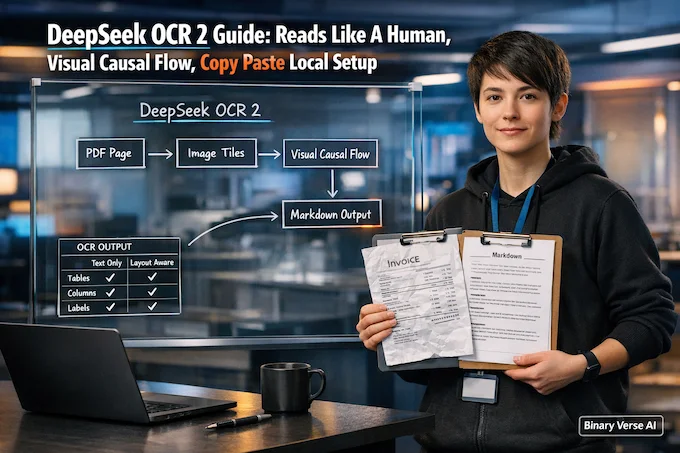
DeepSeek OCR 2 is interesting because it treats document reading as structure first, text second. It does not just transcribe pixels into characters. It tries to keep layout intact, the way a person would, and that changes what you can automate.
This post is for people who want the fast path. You will get a clear mental model of what changed, a local setup you can copy and paste, and a PDF to Markdown pipeline you can ship.
Table of Contents
1. Why DeepSeek OCR 2 Matters, Not Just OCR
Most OCR systems answer the wrong question. They ask, “What letters are on the page?” Real work asks, “What does this page mean?” Meaning lives in relationships: label to value, row to row, footnote to figure.
DeepSeek OCR 2 is built for those relationships. It shines on messy, real layouts: two columns, tables with merged cells, forms with tiny fields, and screenshots with UI clutter.
DeepSeek OCR 2 Output Fixes Table
| What You Need | Why It Matters | What The Model Usually Produces | First Fix If It Looks Off |
|---|---|---|---|
| Image to Markdown | Layout is the product, not just text | Markdown with headings, lists, and tables | Use the grounding prompt, keep decoding deterministic |
| Tables and forms | Labels must stay glued to values | Rows and columns that mostly survive | Bump base_size a bit, retry with a table specific instruction |
| Mixed layouts | Columns break classic OCR | Coherent reading order | Turn crop_mode on, lower image_size if VRAM is tight |
| Figure understanding | Sometimes you need “what is this chart saying” | A short, accurate description | Ask “Parse the figure” and keep the request narrow |
If you only care about plain text, classic OCR still has a place. If you care about layout, and you probably do, DeepSeek OCR 2 earns a slot in your toolbox.
A quick SEO note if you are building content around this space: treat DeepSeek OCR as the parent topic, and link this guide under that hub so readers can go broad or go deep.
2. What Changed In DeepSeek OCR 2, DeepEncoder V2 And Visual Causal Flow
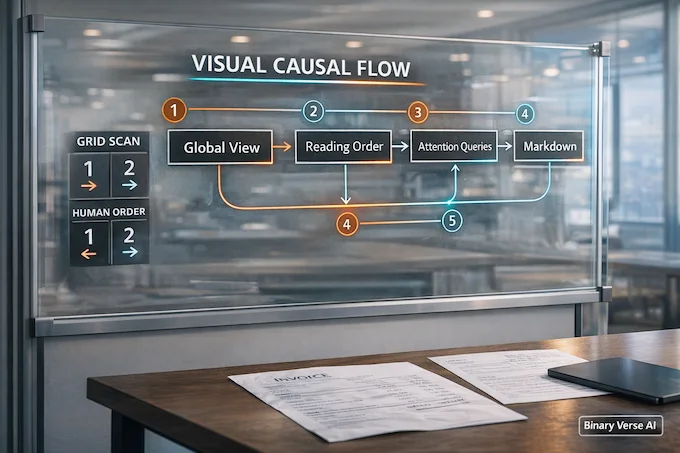
Old school vision models read like a printer head. They scan in a rigid pattern, usually top left to bottom right, chopping the page into a grid. That works for a single paragraph. It breaks on structure.
DeepSeek OCR 2 starts with a different move. First it forms a global impression of the page, the quick glance a human does. Then it decides what to read first, next, and next. That learned reading plan is the point of DeepEncoder V2 and what the project calls a visual causal flow.
The payoff shows up in the failure modes you actually care about:
- Columns stop bleeding into each other.
- Table headers stick to their cells.
- “Total Due” stays attached to the number beside it.
- Forms keep their label value pairing instead of turning into soup.
When the model is confident about structure, it becomes boring in a good way. It stops improvising. It just reads.
3. Token Budget And Resolution Modes, Why OCR2 Stays Efficient
Document models love to eat tokens. Give them a long PDF and they will happily turn your GPU into a space heater, then send you the bill.
DeepSeek OCR 2 fights that with an explicit “visual token” budget and dynamic resolution. Instead of forcing one giant view of the whole page, it mixes a global view with smaller crops, often several 768 by 768 tiles plus one wider 1024 by 1024 pass.
Practical rules that save time:
- Out of memory, lower image_size first.
- Tables look mushy, increase base_size slightly.
- Batch jobs, keep the default crop strategy unless you have a reason to change it.
OCR2 is not magic, it just makes the economics less punishing.
4. Benchmarks That Actually Predict Real Work
DeepSeek OCR 2 Benchmarks That Matter
Important snapshot only, centered on overall quality and the table and formula metrics that usually decide real-world document extraction.
| Model | Type | V-token (max) ↓ | Overall ↑ | Formula CDM ↑ | Table TEDs ↑ | Table TEDs_s ↑ |
|---|---|---|---|---|---|---|
| PP-StructureV3 | Pipeline | – | 86.73 | 85.79 | 81.68 | 89.48 |
| MinerU2.5 | Pipeline | – | 90.67 | 88.46 | 88.22 | 92.38 |
| PaddleOCR-VL | Pipeline | – | 92.86 | 91.22 | 90.89 | 94.76 |
| Gemini-2.5 Pro | End-to-End | – | 88.03 | 85.82 | 85.71 | 90.29 |
| Qwen3-VL-235B | End-to-End | >6000 | 89.15 | 88.14 | 86.21 | 90.55 |
| DeepSeek-OCR (9-crops) | End-to-End | 1156 | 87.36 | 84.14 | 85.25 | 89.01 |
| DeepSeek OCR 2 | End-to-End | 1120 | 91.09 | 90.31 | 87.75 | 92.06 |
Benchmarks can feel like a strange sport. Lots of numbers, little intuition. The trick is to map each metric to a failure mode you have actually seen.
Here is a cheat sheet that matches common OmniDocBench style signals to real output behavior.
DeepSeek OCR 2 Benchmark Signals Guide
| Benchmark Signal | What It Predicts | What You Notice In Output |
|---|---|---|
| Text edit distance goes down | Fewer typos and missing characters | Names and IDs stop drifting |
| Table structure score goes up | Better row and column integrity | Tables stop collapsing into paragraphs |
| Reading order error goes down | Less column mixing | Left column stays left, right stays right |
| Formula score goes up | Better math and symbols | Equations keep their structure |
The numbers are useful, but your documents are the truth. Build an evaluation pack, run it, and keep it around as a regression test.
5. Hardware And Requirements, Practical VRAM Targets
Let us keep this grounded.
For single images, 8GB of VRAM can work. For comfortable testing and higher resolution, 16GB feels better. For concurrency, bigger batches, and fewer compromises, 24GB or more turns it into a smooth ride.
A representative environment looks like:
- Ubuntu
- NVIDIA drivers working, nvidia-smi must succeed
- CUDA 11.8 style stack
- Python 3.12
- PyTorch CUDA build
- Transformers, plus Flash Attention
If torch.cuda.is_available() is false, fix that before you debug anything else. It is rarely the model.
6. DeepSeek OCR 2 Install, Ubuntu Setup That Actually Works
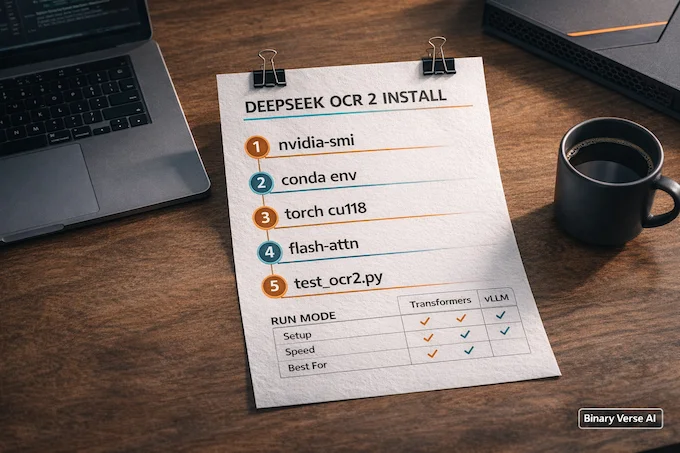
This is the part where guides either drown you in trivia or skip the one command that fails. Let us do neither.
6.1. System Prereqs
sudo apt update
sudo apt install -y git wget build-essential
nvidia-smi
6.2. Clone DeepSeek OCR 2 GitHub And Create An Env
git clone https://github.com/deepseek-ai/DeepSeek-OCR-2.git
cd DeepSeek-OCR-2

conda create -n deepseek-ocr2 python=3.12.9 -y
conda activate deepseek-ocr2
6.3. Install Torch, Requirements, Flash Attention
pip install torch==2.6.0 torchvision==0.21.0 torchaudio==2.6.0 --index-url https://download.pytorch.org/whl/cu118
pip install -r requirements.txt
pip install flash-attn==2.7.3 --no-build-isolation
6.4. Flash Attn Build Fix
pip install -U pip wheel setuptools ninja packaging
pip install flash-attn==2.7.3 --no-build-isolation
If you still get a build error, it is almost always a mismatch between your driver, CUDA tooling, and the wheel you installed.
7. DeepSeek OCR 2 Transformers, Minimal Script And Prompts That Behave
Transformers is the quickest way to validate that everything works.
Create test_ocr2.py:
python
from transformers import AutoModel, AutoTokenizer
import torch

MODEL = "deepseek-ai/DeepSeek-OCR-2"

tokenizer = AutoTokenizer.from_pretrained(MODEL, trust_remote_code=True)
model = AutoModel.from_pretrained(
    MODEL,
    trust_remote_code=True,
    use_safetensors=True,
    _attn_implementation="flash_attention_2",
).eval().cuda().to(torch.bfloat16)

prompt = "<image>\n<|grounding|>Convert the document to markdown. "
# prompt = "<image>\nFree OCR. "

out = model.infer(
    tokenizer,
    prompt=prompt,
    image_file="your_image.jpg",
    output_path="outputs",
    base_size=1024,
    image_size=768,
    crop_mode=True,
    save_results=True,
)
print(out)
Two prompts carry most of the workload:
- “Free OCR” for plain text
- The Markdown prompt with the grounding token for layout
A small but important habit: keep your instruction narrow. Ask for Markdown, not a summary, not an essay, not a story about the invoice. Then lock decoding down. Temperature zero, no sampling, let it read.
8. DeepSeek OCR vLLM, DeepSeek OCR 2 vLLM For Speed And Batching
If Transformers is a screwdriver, vLLM is a power drill. You reach for it when you have many pages, many users, or both.
Why it helps:
- Better batching, higher throughput
- More stable latency under load
- A cleaner path to a service
The repo includes runners for image streaming and concurrent PDF processing. The pattern is simple: split a PDF into images, run pages in parallel, then stitch outputs.
8.1. DeepSeek OCR Ollama, A Reality Check
People will ask about deepseek ocr ollama. It can be doable, but it is not the happy path. This model leans on custom image handling and document prompts. If you want “works today,” start with Transformers or vLLM.
9. Pdf To Markdown Python, Image To Markdown Without Tears
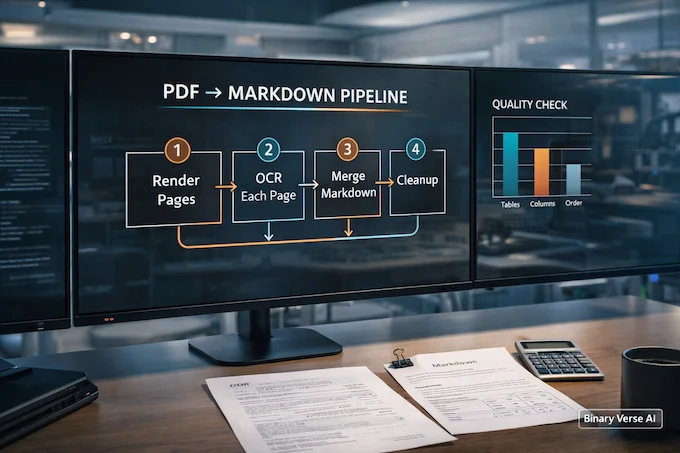
PDF is not an input format, it is a container. OCR models do not want containers. They want images.
So the reliable play is:
- Render PDF pages to images.
- Run DeepSeek OCR 2 page by page with the Markdown prompt.
- Merge the Markdown, then clean it with a few rules.
Here is a minimal pdf to markdown python skeleton using PyMuPDF:
python
import fitz  # pymupdf
from pathlib import Path

def render_pages(pdf_path: str, out_dir: str, dpi: int = 200):
    out = Path(out_dir)
    out.mkdir(parents=True, exist_ok=True)

    doc = fitz.open(pdf_path)
    scale = dpi / 72
    mat = fitz.Matrix(scale, scale)

    paths = []
    for i in range(len(doc)):
        pix = doc.load_page(i).get_pixmap(matrix=mat, alpha=False)
        p = out / f"page_{i:04d}.png"
        pix.save(p.as_posix())
        paths.append(p.as_posix())
    return paths
9.1. Image To Markdown Cleanup Tips
After you merge pages, do a quick cleanup pass:
- Collapse triple blank lines into one
- Normalize headings so page breaks do not create random H1s
- Keep tables intact, do not reflow lines
Treat that output as a product. Your downstream search, indexing, and analytics will thank you.
10. Reliability Fixes, Repetition, Skew, Missing Headers
OCR fails in patterns. Once you recognize them, fixes get boring, and boring is good.
10.1. Deterministic Decoding Checklist
- Temperature 0.0
- No sampling
- Generous max tokens so tables do not cut off
10.2. Preprocessing That Helps
- Deskew scans, even a few degrees matters
- Crop huge margins on photographed pages
- Repetition, reduce image_size
- Missing headers, increase base_size first
Also be honest about language coverage. DeepSeek OCR 2 is trained heavily on Chinese and English data. It can generalize, but push it hard into unsupported languages and you may see drift.
11. DeepSeek OCR API, Serve DeepSeek OCR 2 Locally With A Small Wrapper
Once local inference works, the next step is packaging. A small wrapper turns a demo into something your team can call from anywhere.
Here is a minimal FastAPI endpoint:
python
from fastapi import FastAPI, UploadFile, File
from transformers import AutoModel, AutoTokenizer
import torch, tempfile, shutil

app = FastAPI()
MODEL = "deepseek-ai/DeepSeek-OCR-2"

tokenizer = AutoTokenizer.from_pretrained(MODEL, trust_remote_code=True)
model = AutoModel.from_pretrained(
    MODEL,
    trust_remote_code=True,
    use_safetensors=True,
    _attn_implementation="flash_attention_2",
).eval().cuda().to(torch.bfloat16)

@app.post("/ocr/markdown")
async def ocr_markdown(image: UploadFile = File(...)):
    with tempfile.NamedTemporaryFile(suffix=".png", delete=False) as tmp:
        shutil.copyfileobj(image.file, tmp)
        path = tmp.name

    prompt = "<image>\n<|grounding|>Convert the document to markdown. "
    out = model.infer(
        tokenizer,
        prompt=prompt,
        image_file=path,
        output_path="outputs",
        base_size=1024,
        image_size=768,
        crop_mode=True,
        save_results=False,
    )
    return {"markdown": str(out)}
11.1. Pdf To Markdown API Deployment Notes
If you want a pdf to markdown api, keep the pipeline explicit. Upload PDF, render pages, run pages concurrently, merge Markdown. Add basic rate limiting and a simple cache for repeated documents.
12. Intelligent Document Processing, Ocr Open Source Choices, And When To Use Tesseract OCR
Intelligent document processing is a fancy label for a simple workflow: extract content, keep structure, then feed it into business logic. DeepSeek OCR 2 fits nicely as the front door for that workflow, especially if you want to stay in the ocr open source world instead of sending sensitive docs to a hosted service.
Still, there is no single winner.
12.1. Ocr Open Source, Where OCR2 Wins
- Complex layouts, tables, columns, forms
- Markdown as a clean intermediate format
- Local first control for privacy, cost, or latency
- Light figure understanding, not just transcription
12.2. Tesseract OCR, Where Classic OCR Still Wins
- Clean, single column scanned text
- Low resource environments
- Simple extraction where layout does not matter
- Languages where classic OCR has strong tuned models
Think of it this way. Tesseract OCR is a reliable hammer. DeepSeek OCR 2 is a compact workshop. If you only need nails, grab the hammer. If you need to rebuild a cabinet from a photograph, grab the workshop.
One practical note: keep an eye on the DeepSeek OCR 2 GitHub repo and the wider deepseek ocr ecosystem. Document models move fast. The best workflows stay modular so you can swap pieces without rewriting everything.
DeepSeek OCR 2 is not just a better OCR. It is a better reader. That distinction is why it feels like a new category.
Now do the thing that makes this real: pick ten documents that represent your actual pain, run them through DeepSeek OCR 2, and compare the output to your current stack. If it saves you even one manual cleanup session per week, it pays for itself. If you want more practical guides like this, bookmark Binary Verse AI, subscribe, and send me the weirdest PDF that broke your pipeline. I will happily take the bait.
1) What is DeepSeek OCR 2, and what does “Visual Causal Flow” change?
DeepSeek OCR 2 is a document vision model that focuses on layout-aware extraction, not just text. “Visual Causal Flow” means it learns a human-like reading order, so it follows columns, keeps labels tied to values, and renders tables more coherently instead of scanning rigidly top-left to bottom-right.
2) How do I do a DeepSeek OCR 2 install on Ubuntu, Transformers vs vLLM?
For a quick local test, use DeepSeek OCR 2 transformers: create a Python env, install CUDA-matched PyTorch, requirements, then run the provided inference script. Use DeepSeek OCR 2 vLLM when you need batching, faster throughput, or serving. Start with Transformers to validate your GPU stack, then switch to vLLM for production-like workloads.
3) How much VRAM do I need for DeepSeek OCR 2, and what settings reduce VRAM?
A practical baseline is 8GB VRAM for lighter runs, 16GB for smoother bfloat16 inference, and 24GB+ for heavier concurrency or tuning. To reduce VRAM, lower image_size first, then base_size, and keep decoding deterministic. If you’re processing PDFs, reduce parallel page concurrency before you start cutting resolution aggressively.
4) Can DeepSeek OCR 2 convert PDF pages to Markdown and preserve tables/columns?
Yes, DeepSeek OCR 2 can do strong image to markdown extraction and preserve tables and columns, but you typically convert PDFs into page images first. The most reliable pipeline is: render PDF pages → run the Markdown prompt per page → merge Markdown → apply light cleanup (headers/footers, spacing, table normalization). This is the dependable pdf to markdown python approach.
5) Is there a DeepSeek OCR 2 API, or an OpenAI-compatible endpoint for pipelines?
Yes. You can serve DeepSeek OCR 2 behind a local HTTP service using vLLM and expose an OpenAI-style route, which makes it easy to drop into apps and automation. For teams, this becomes a clean deepseek ocr api layer. If you’re productizing the PDF pipeline, wrap it as a pdf to markdown api endpoint that accepts PDFs, renders pages, batches OCR, and returns merged Markdown.