
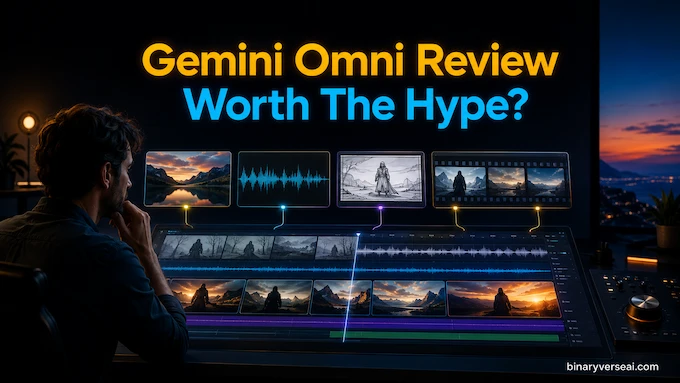
Gemini Omni arrives with the kind of demo that makes product teams whisper, “Well, there goes the roadmap.” Type a prompt, feed it an image, add audio, point it at a rough clip, and suddenly the model is editing video as if it has a tiny film crew trapped inside the weights. That is the promise, at least.
The useful question is not whether the demos look magical. They do. The question is whether this thing survives normal users, limited credits, weird prompts, safety filters, and the ancient enemy of every video model, human hands.
My read: Gemini Omni is a genuine step forward in conversational video editing. It is also expensive, tightly controlled, and occasionally very funny in the ways only multimodal models can be funny. Think brilliant intern, expensive workstation, nervous legal team.
Table of Contents
1. What Is Gemini Omni? The Shift To Conversational Video Editing
At its core, Gemini Omni is not another text-to-video toy. Google frames it as a multimodal creation and editing model that takes text, images, audio, and video as input, then produces high-resolution video with audio. The important part is editing. You are asking the model to change an existing world.
That is why the “Nano Banana for video” comparison works. Nano Banana made image editing feel less like Photoshop and more like texting a very obedient art department. Gemini Omni brings that loop to video. Change the butterfly to a bee. Move the camera over the violinist’s shoulder. Keep the room, but turn the person into a felt puppet. Make apartment lights pulse to music.
The mental model matters. Traditional video generation is a slot machine with a prompt box. Conversational editing is closer to working with a junior editor who remembers the scene, preserves what works, and changes only what you asked for. When it works, it feels like direction.
| Feature | What It Means In Practice | Why It Matters |
|---|---|---|
| Multimodal Input | Text, image, audio, and video can guide one output. | You can steer motion, style, sound, and structure together. |
| Iterative Editing | You can request changes across multiple turns. | Less need to regenerate the entire clip after one small mistake. |
| Reference Control | Sketches, photos, storyboards, and videos can shape the result. | Better consistency than pure text prompts. |
| Audio-Aware Generation | Action can be synced to music or sound cues. | Useful for ads, shorts, explainers, and social clips. |
| Safety And Provenance | Outputs are filtered and watermarked. | Good for trust, frustrating when filters overfire. |
This is the real product shift. The prompt box is becoming a timeline. The model is trying to keep a little simulated world coherent across time.
2. The Quota Trap: Why Four Videos Can Drain A Plan
The first shock for many users is not quality. It is the meter.
Video generation burns compute like a small bonfire. A text model predicts tokens. A video model has to reason about objects, camera movement, lighting, temporal continuity, audio, and sometimes an input clip or reference image. Then it has to render all of that into frames that do not collapse into dream soup halfway through.
That explains the complaints about strict usage limits. A few short generations feel harmless, then the quota disappears and you are left staring at a plan page like you mined Bitcoin on a toaster.
This is not just Google being stingy. The economics are brutal. Multimodal video editing is one of the most expensive consumer AI workloads. Every extra input, reference image, and audio sync request adds pressure. The model is preserving a dynamic state across time.
The advice is simple. Do not treat first prompts as disposable. Work like a director, not a gambler. Test style and framing cheaply, then spend the serious generation on the version that has a real chance. A bad prompt here is a tiny invoice.
3. The Physics Debate: Does It Understand The Real World?
Google’s pitch leans heavily on world understanding. The model is presented as capable of following real-world logic, simulating forces like gravity and fluid dynamics, and drawing on science, history, and culture. That is the right ambition. Video without physics is expensive wallpaper.
But “understanding physics” is doing a lot of work in that sentence.
There is a difference between narrative logic and spatial logic. Narrative logic means the model knows what a marble track is, what protein folding might look like, or why a capybara belongs under the letter C. Spatial logic means a hand remains a hand while turning, gripping, reflecting light, and interacting with a moving object for ten seconds. The second one is much harder.
This is where Gemini Omni hallucinations enter the conversation. Users notice third legs, teleporting props, vanishing objects, and motion that looks plausible until your visual cortex files a complaint. The scene can feel right at a glance, then break under inspection.
That does not make the technology fake. It means statistical world modeling is still learning continuity. Video exposes every weakness because time is merciless. A weird finger in an image is a blemish. A weird finger across 240 frames becomes a character arc.
4. Gemini Omni Vs Seedance 2.0: Why Reddit Keeps Comparing Them
The phrase Gemini Omni vs Seedance 2.0 has become a useful shorthand for a bigger argument. Users are not only comparing image quality. They are comparing product philosophy.
Google’s model sits inside a heavily governed ecosystem. It is safer, more traceable, and more cautious. That matters for a company shipping to billions of users. It also means power users can hit refusal walls, especially when they want intense action, recognizable characters, edgy visual treatments, or anything that smells like legal risk.
Seedance 2.0, at least in the user debate, represents the opposite pole. The appeal is fewer guardrails, stronger photorealism in some human scenes, and less friction when generating material that Google would sanitize or reject. That does not automatically make it better. It makes it less domesticated.
The tradeoff is obvious. Fewer visible limits can feel more creative, until you need provenance, brand safety, or enterprise approval. A safer model can feel responsible, until you try to make a harmless cyberpunk chase scene and the system acts like you asked it to forge passports.
For creators, the winner depends on temperament. If you want polish inside a controlled platform, Google has the better long game. If you want raw aesthetic range today, the offshore rivals will keep pulling the impatient crowd.
5. The Veo 3 And Sora 2 Comparison: Which Model Wins?
The internal comparison with Veo is more interesting than the external one. Veo is the clean cinematic engine. It rewards detailed, prescriptive prompts. You tell it the shot, lens, motion, subject, mood, and environment. It gives you a polished result when the recipe is strong.
Gemini Omni is messier in a useful way. It is built for editing, references, and conversation. You can bring an existing video, add a sketch, use audio, and ask for changes in steps. It is less like ordering a finished trailer and more like sitting next to the editor.
Sora 2, as users discuss it, sharpens the frame. The next battle is not “who can make the prettiest ten seconds?” That race is crowded. The better question is who can give creators control without forcing them to write a cinematography textbook.
For now, use Veo-style systems when you know exactly what you want from scratch. Use Gemini Omni-style editing when you have ingredients, references, or a clip that needs transformation rather than replacement.
6. Gemini Flow, Price, And Access: The Less Glamorous Bit
Most users will meet the model through Gemini Flow, the Gemini app, YouTube experiments, or Google’s creative tools rather than a raw developer API on day one. That packaging matters because the interface shapes the behavior. In a prompt-only box, users think like writers. In Gemini Flow, they start thinking like directors, editors, and storyboard artists.
Now for the transactional question: Is Gemini Omni free? In any meaningful production sense, no. Free access, if available, will be limited, promotional, or too constrained for serious work. The real experience lives behind paid tiers and usage limits.
The Gemini Omni price conversation will probably stay confusing because users are not buying a single model call. They are buying access to a shared creative system where video generations compete with plan limits, priority access, and possibly different product surfaces. That makes the cost feel fuzzy.
Think less about “price per prompt” and more about “cost per usable clip.” If five attempts produce one usable ten-second asset, that is the unit that matters. Prompt quality, references, and preplanning are budget control.
7. The Gemini Omni Prompt Guide: How To Not Waste Your Quota
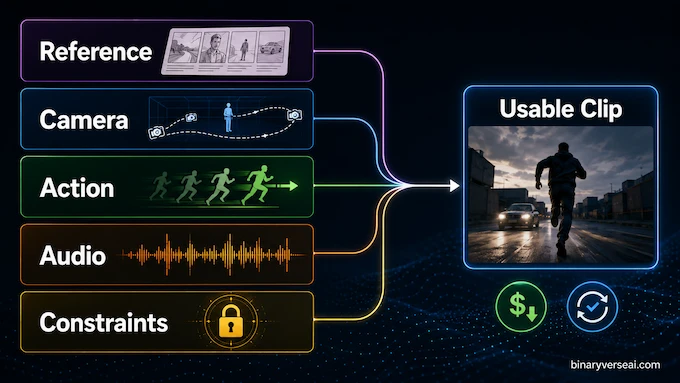
A good Gemini Omni prompt guide should not be a shrine to adjectives. It should reduce failed generations. The model responds well when you give it scene structure, camera intent, timing, visual style, and constraints. You do not need to describe every pixel. You do need to remove ambiguity where ambiguity is expensive.
| Prompt Element | Weak Version | Stronger Version |
|---|---|---|
| Camera | “Make it cinematic” | “One continuous shot, slow push in, medium close-up, locked background” |
| Action | “Make it cool” | “When the hand opens, a small machine rises from the palm, propeller spinning” |
| Style | “Make it futuristic” | “Retro-futuristic, grainy, moody, warm practical lighting, 1980s product film” |
| Audio | “Add music” | “No music, only realistic room sound and soft mechanical hum” |
| Consistency | “Use this character” | “Preserve the character’s face, clothing, body scale, and walking motion” |
7.1 Shot Framing And Camera Direction
Use real camera language. “Wide shot,” “medium close-up,” “locked off,” “static,” “push in,” “punch in,” “dolly zoom,” “natural smartphone zoom,” and “oner” are not decoration. They tell the model how the viewer should move through the scene.
If you want stability, ask for it. “One continuous shot” often behaves better than a vague cinematic request. If the action is complicated, keep the camera simpler. Do not ask for a dragon, a mirror transformation, a 360-degree orbit, and perfect text in one breath.
7.2 Syncing Audio And Text
Audio is one of the places where the model feels genuinely new. Ask for lights to turn on in sync with music. Ask for words to appear one at a time on beat. Ask for realistic sound only when music would cheapen the scene.
Text still needs discipline. Specify placement, pacing, exposure, and quantity. Short phrases beat paragraphs. The model is better than older systems, but it is not a typesetter with a law degree.
7.3 Using Storyboards And Reference Images
References are your friend. A sketch can define movement. A photo can preserve character identity. A storyboard can impose order on a ten-second sequence that would otherwise become interpretive soup.
The strongest workflow is hybrid. Start with a reference image or rough storyboard, define the camera, describe the action beat by beat, then add style and sound. That gives the model a spine. Beautiful accidents are not a workflow.
8. Safety, SynthID, C2PA, And The “Crazy Tight” Filter Problem
Google is not shy about safety. The model card describes internal safety reviews, human red teaming, automated red teaming, policy checks, and production filters. Content made or edited through Google surfaces also includes SynthID watermarking, and Google has been expanding C2PA Content Credentials across its media ecosystem.
That is the responsible answer. It is also the source of user frustration.
Safety systems are classifiers sitting between imagination and output. They do not understand your intent like a human collaborator. They see patterns, risks, and policy categories. Sometimes they block bad requests. Sometimes a normal prompt trips the wrong wire.
For casual users, this is annoying. For serious creators, it changes the medium. You learn to write around filters, soften scenes, remove loaded words, and turn “violent storm of debris” into “high-energy swirling particles.” Welcome to prompt engineering as airport security.
The speech-editing restriction is telling. A model that can alter what people say in video is powerful, useful, and obviously dangerous. Google is right to move carefully. Creators are right to notice the locked door.
9. Real Use Cases Beyond Ten-Second Internet Fireworks
The cheap take is that this is for TikTok gimmicks. The better take is that short video is simply where the interface becomes visible first.
Education is the obvious winner. Imagine a claymation explainer of protein folding, a skeuomorphic animation of the hippocampus, or a physics demonstration where the model can adjust the camera and pacing on request. A teacher who cannot hire an animator can still produce a visual metaphor that helps a student remember the idea.
Research communication may be even more interesting. Scientific diagrams are often static because animation is expensive. If multimodal editing becomes reliable, papers can ship with generated explanatory clips, not as decoration but as cognitive scaffolding.
Advertising teams will use it for rapid prototyping. Not final Super Bowl spots, at least not yet. Mood tests, concept boards, internal pitches, and social variants are fair game. The value is getting from “what if?” to “look at this rough version” in minutes.
Game developers and filmmakers will use it as visual scratch paper. Designers will test motion. Musicians will make audio-reactive visuals. The serious use case is not automation. It is faster iteration before expensive human craft takes over.
10. Final Verdict: Brilliant, Limited, And Very Much Alive
Gemini Omni is the kind of product that makes the future feel unevenly distributed inside one browser tab. In one moment, it feels like a new creative interface. In the next, it refuses a harmless idea, mangles a hand, burns your quota, and reminds you that miracles still run on infrastructure.
That tension is the story.
The model is important because it moves video generation away from one-shot prompting and toward conversational control. That is the right direction. Creators do not want infinite random clips. They want to shape scenes, preserve good accidents, fix bad details, and build toward intent.
The limits are real. Usage caps make experimentation painful. Safety filters make some creative work feel negotiated rather than directed. Consistency remains fragile when motion gets complex. Text is better, not solved. Physics is impressive, not conquered.
So, is it worth the hype? Yes, if you treat it as an early editing instrument rather than a magic vending machine. No, if you expect unlimited cinematic perfection from casual prompts.
The people who get the most from it will not be the ones shouting the longest prompts. They will be the ones who think clearly, reference deliberately, test cheaply, and direct with taste. That is the quiet lesson beneath the spectacle. The future of AI video will still reward human judgment.
Try it with a plan. Bring references. Keep prompts clean. Track which words waste generations. And when the model finally gives you a clip that feels impossible, save the prompt, because that is where the new craft begins.
Is Gemini Omni free to use?
No, Gemini Omni is not fully free to use. Full access is tied to Google’s paid AI subscription tiers, including Google AI Plus, Pro, and Ultra. Some limited Gemini Omni features may appear inside YouTube Shorts, but full conversational video editing requires a premium plan.
Why does Gemini Omni drain my usage limit so fast?
Gemini Omni drains usage limits quickly because video editing is far more compute-heavy than normal text chat. It has to reason across text, images, audio, motion, timing, and video frames at once. Early users report that only a few short video generations can consume a large part of a five-hour Gemini usage quota.
How does Gemini Omni compare to Seedance 2.0 and Sora 2?
Gemini Omni is strongest at conversational video editing, multi-turn changes, and reference-based scene control. Seedance 2.0 is often praised by users for raw photorealism and fewer creative restrictions, while Sora 2 is usually discussed as a direct rival in high-quality AI video generation. Gemini Omni’s advantage is editing control, not unlimited creative freedom.
Does Gemini Omni actually understand real-world physics?
Gemini Omni appears to understand physics at a narrative level, meaning it can create scenes that look broadly logical and realistic. It can simulate gravity, motion, fluids, and cause-and-effect prompts better than older video tools. Still, it can hallucinate details, especially with complex motion, hands, object permanence, and long scene consistency.
How do I use Gemini Omni for video editing?
You can use Gemini Omni through the Gemini app or Google Flow, depending on your subscription tier and region. Start with a base video, image, sketch, or prompt, then edit through natural language. For example, you can ask it to change the camera angle, swap an object, alter the visual style, or sync an action to music.