
Introduction
Most model install guides have two failure modes. They’re either “paste this and pray,” or they’re a graduate seminar disguised as a README.
This one is neither.
You’re going to install LLaDA2.1-mini, run it once, watch it chew almost an entire 48 GB GPU, and then verify it’s actually thinking by making it solve two tiny problems that have no sympathy for broken inference pipelines. Along the way, you’ll learn what makes this model weird in a good way: it’s a diffusion language model that drafts tokens in parallel, then edits itself mid-flight using explicit token editing thresholds. That’s the whole trick, and it’s the point of the paper too.
If you’re here for the llada2.1 mini install path, you’re in the right place. If you’re here because you saw “editable generation” and thought “that sounds like it will either be brilliant or chaotic,” also correct. If you’re evaluating where this fits among the best LLMs for coding in 2025, diffusion-based decoding gives you a genuinely different control surface worth understanding.
Table of Contents
1. LLaDA2.1-mini In One Paragraph
LLaDA2.1-mini is an instruction-tuned diffusion LLM that doesn’t commit to text one token at a time like an autoregressive model. It drafts chunks in parallel, then refines them, and it can retroactively fix earlier tokens while continuing forward. In practice, that means you get a different control surface: threshold, editing_threshold, block_length, max_post_steps, plus eos_early_stop. You’ll install LLaDA2.1-mini, run a math smoke test, then a logic puzzle, then do a 60-second tuning pass so you can choose “fast and slightly rough” or “slower but cleaner” without guessing. This kind of agentic AI approach to generation — iterative, self-correcting, parallel — is what separates diffusion LLMs from the autoregressive mainstream.
| What You’ll Do | Time | What “Good” Looks Like |
|---|---|---|
| Install deps and run once | 5–10 min | First run downloads weights, later runs start fast |
| Smoke test 1, math | 30 sec | Output includes -208 somewhere |
| Smoke test 2, logic | 30–60 sec | Final order is Carol, Bob, Alice |
| Tune generation knobs | 2 min | Less stutter, better coherence, predictable speed |
2. Hardware Baseline And Realistic Minimums
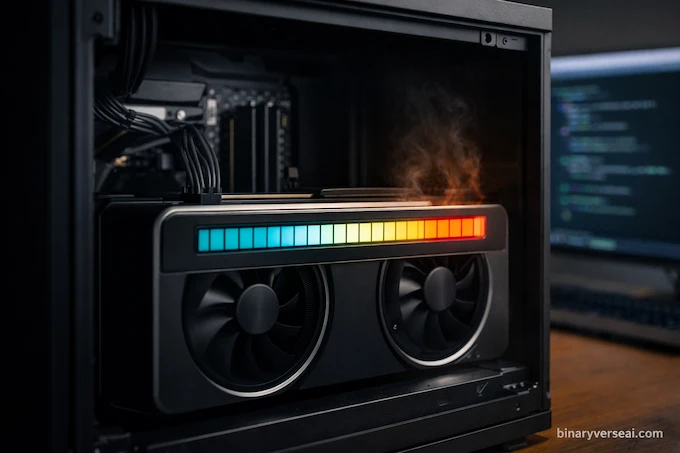
Let’s not romanticize this. LLaDA2.1-mini is small by modern leaderboard standards, but it’s still a serious model and it can be a serious VRAM hog.
Baseline used here
- Ubuntu
- NVIDIA RTX 6000, 48 GB VRAM
- Expected VRAM during inference: about 47 GB
That last bullet is the one that bites people. “CUDA OOM” is not a personality test, it’s just arithmetic. For a broader look at how GPU hardware handles modern AI workloads, the TPU vs GPU AI hardware war guide puts this VRAM ceiling in useful context.
2.1 What Happens On Smaller GPUs
If you have much less than 48 GB VRAM, LLaDA2.1-mini can fail at load time or fail the moment generation starts. Your fastest escape hatches:
- Switch dtype: bfloat16 vs float16 is not a culture war, it’s compatibility. Some setups choke on bfloat16, and float16 often loads on more cards.
- Be honest about throughput: offloading can work, but it turns “fast diffusion decoding” into “my PCIe bus is now the main character.”
- Keep block_length reasonable: more parallel tokens means more memory pressure.
2.2 Benchmark Snapshot So You Know What You’re Installing
Here’s a compact slice of the published numbers for the mini line, showing LLaDA2.1-mini in Speed Mode vs Quality Mode, plus LLaDA2.0-mini as a baseline. Scores are paired with TPF (tokens per forward), which is basically “how much parallel work the model is doing per step.”
| Benchmark | 2.0 Mini (Score | TPF) | 2.1 Mini S Mode (Score | TPF) | 2.1 Mini Q Mode (Score | TPF) |
|---|---|---|---|
| Average | 63.39 | 2.60 | 62.24 | 5.34 | 63.90 | 3.12 |
| GPQA | 47.76 | 2.73 | 48.36 | 3.62 | 53.28 | 2.12 |
| ZebraLogic | 64.20 | 2.30 | 68.50 | 5.38 | 77.10 | 2.93 |
| LiveCodeBench | 31.83 | 3.34 | 28.85 | 6.42 | 30.40 | 3.63 |
| HumanEval+ | 81.71 | 5.16 | 80.49 | 12.32 | 82.93 | 7.77 |
| AIME 2025 | 36.67 | 2.41 | 36.67 | 6.34 | 43.33 | 3.29 |
The vibe is consistent: Speed Mode buys parallelism, Quality Mode buys restraint, and the whole point is that token editing gives you a dial instead of a cliff. For a deeper comparison of how these numbers stack up against frontier models, see the LLM math benchmark performance 2025 breakdown.
3. Create A Clean Working Folder
Keep this boring. Boring is reproducible.
You’ll create a tiny workspace and keep app.py there. Your model weights will download into the usual Hugging Face cache, so your folder stays clean even if your SSD gets emotional.
4. Install Prerequisites
This guide assumes a Python environment that won’t surprise you later. Use venv, conda, uv, whatever keeps your global site-packages from becoming a museum of regrets.
Below are the exact install prompts.
pip install torch torchvision torchaudio --index-url https://download.pytorch.org/whl/cu124
pip install transformers accelerate sentencepiece protobuf
pip install einops safetensors
Two notes that matter more than they sound:
- “Latest transformers” matters here because LLaDA2.1-mini relies on custom generation code exposed via transformers trust_remote_code.
- If your CUDA stack and your torch build disagree, they will not negotiate politely.
5. Create app.py
You’re about to run LLaDA2.1-mini locally with a minimal script. Copy-paste this exactly.
import torch
from transformers import AutoModelForCausalLM, AutoTokenizer

model_path = "inclusionAI/LLaDA2.1-mini"
device = "cuda"

print("Loading model...")
model = AutoModelForCausalLM.from_pretrained(
    model_path,
    trust_remote_code=True,
    device_map=device,
    torch_dtype=torch.bfloat16
)
model.eval()

print("Loading tokenizer...")
tokenizer = AutoTokenizer.from_pretrained(model_path, trust_remote_code=True)

# -------------------------
# Test Prompt (Math)
# -------------------------
prompt = """Calculate 1+5-28*0.5-200=?"""

print(f"\nPrompt: {prompt}")
print("\nGenerating response...")

input_ids = tokenizer.apply_chat_template(
    [{"role": "user", "content": prompt}],
    add_generation_prompt=True,
    tokenize=True,
    return_tensors="pt",
).to(device)

# Diffusion / generation settings
generated_tokens = model.generate(
    inputs=input_ids,
    eos_early_stop=True,
    gen_length=512,
    block_length=32,
    threshold=0.5,
    editing_threshold=0.0,
    temperature=0.0,
    max_post_steps=16,
)

generated_answer = tokenizer.decode(
    generated_tokens[0],
    skip_special_tokens=True,
)

print(f"\nResponse:\n{generated_answer}")
This script is intentionally simple. It loads the model, applies a chat template, and calls the custom generate method with diffusion-specific knobs. That’s where the “diffusion LLM” behavior lives. If you’re curious how this kind of LLM inference pipeline can be optimized for speed and latency, the decoding knobs in the next section are exactly the levers that matter.
6. Test #1, Math Smoke Test
Run it.
mkdir -p ~/mycode/ldr
cd ~/mycode/ldr
python app.py
What you should see:
- First run downloads model weights and caches them.
- Subsequent runs load quickly from cache.
- The math result is -208, so the output should include -208 somewhere, even if the formatting is casual.
If you get -208, congrats. Your GPU, drivers, torch build, and LLaDA2.1-mini all agreed on reality.
7. Test #2, Logic Puzzle
Now swap the prompt inside app.py with this exact block:
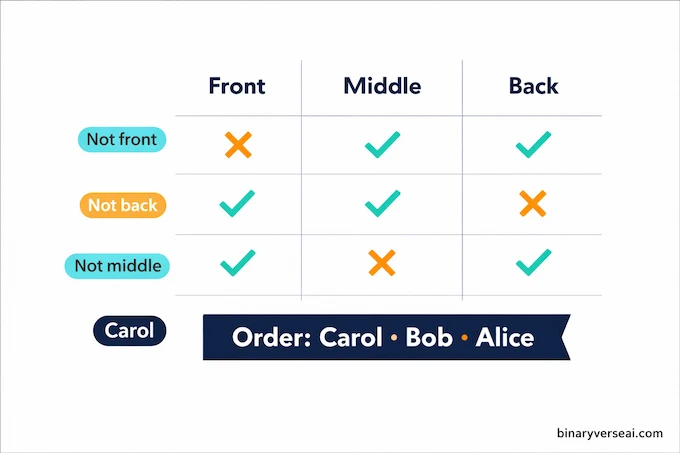
prompt = """Three friends - Alice, Bob, and Carol - are standing in a line. We know:
1. Alice is not at the front
2. Bob is not at the back
3. Carol is not in the middle

What is the order of the three friends from front to back?"""
Run again:
python app.py
During generation you may see diffusion-style progress lines like:
- [Diffusion Step 3/16] Refining predictions…
- [Diffusion Step 4/16] Checking for errors…
- [Diffusion Step 5/16] Applying retroactive corrections…
- [Diffusion Step 6/16] Final refinement…
That’s normal. It’s the model iteratively refining its draft.
Expected final answer:
Therefore, the order from front to back is: Carol, Bob, Alice
If you got that, you’ve confirmed the fun part: it’s not just printing tokens, it’s doing constraint satisfaction without immediately face-planting. This kind of reasoning under constraints maps directly to how societies of thought models approach multi-step logic, and it’s worth understanding the parallel.
8. Understand The Diffusion Generation Knobs
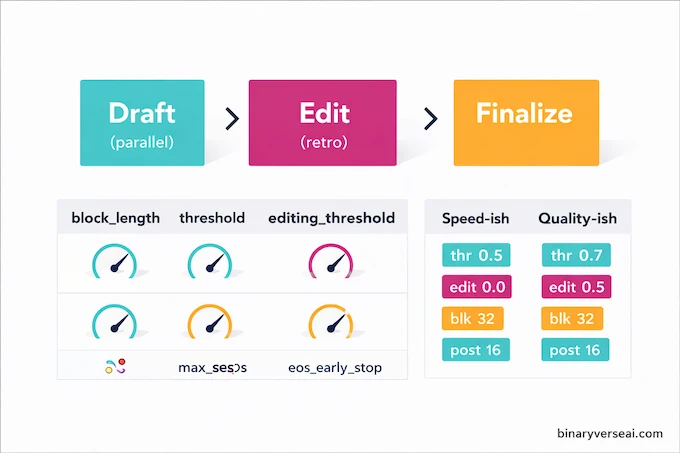
Autoregressive models mostly give you max_new_tokens and a sampling story. LLaDA2.1-mini gives you a decoding policy.
Here’s the cheat sheet you’ll actually use.
8.1 block_length
block_length is how many tokens the model drafts in parallel. Bigger blocks can increase throughput, and they also increase the chance you’ll see local weirdness that needs cleanup.
If you’re flirting with VRAM limits, this is one of the first knobs to keep conservative.
8.2 threshold
threshold controls how aggressively the model stops denoising masked tokens into final tokens. Lower can be faster. Too low can produce stuttering or repetition, because you’re accepting shaky drafts.
8.3 editing_threshold
editing_threshold controls when the model is allowed to retroactively edit previously generated tokens. Set it to 0.0 and you’re basically saying, “Draft and don’t second-guess yourself.” Raise it and you invite correction, which often improves coherence.
This is the token editing lever people are excited about, because it turns error correction into part of decoding instead of a post-hoc hack. The autoregressive models guide covering CALM and next-vector inference is a useful counterpoint if you want to understand exactly what LLaDA2.1-mini is departing from here.
8.4 max_post_steps
max_post_steps is how many refinement iterations you allow after the initial draft. More steps can improve quality and stability, at the cost of time.
8.5 eos_early_stop
eos_early_stop is a stopping rule tuned for this decoding style. It helps avoid wasting refinement steps when the model has already settled.
8.6 Two Simple Presets
Keep it simple:
- Speed-ish: threshold=0.5, editing_threshold=0.0, max_post_steps=16, block_length=32
- Quality-ish: threshold=0.7, editing_threshold=0.5, max_post_steps=16, block_length=32
That “two personas” framing is not marketing fluff, it’s the core idea: draft fast, then fix with token-to-token editing, or draft cautiously and refine less aggressively.
9. Troubleshooting: Five Fast Fixes
9.1 CUDA OOM And VRAM Usage
If you hit CUDA OOM, treat it like a resource constraint, not a mystery. LLaDA2.1-mini can sit around 47 GB VRAM in the baseline setup.
Ways out:
- Reduce parallelism pressure by keeping generation conservative.
- Make sure nothing else is occupying VRAM.
- Consider a different machine if you’re far below the baseline.
9.2 bfloat16 Issues
If bfloat16 causes errors, switch to float16 exactly like this:
Change:
- torch_dtype=torch.bfloat16
To:
- torch_dtype=torch.float16
9.3 Slow First Run
First run downloads weights. That’s normal. Second run should feel dramatically faster.
If every run is slow, check disk speed, cache location, and whether you’re re-downloading due to a permissions problem.
9.4 trust_remote_code Concerns
device_map and transformers trust_remote_code are not cosmetic flags here. The model’s generation behavior depends on custom code.
The practical takeaway: only pull models from sources you’re comfortable running code from, and pin versions once you have a working setup.
9.5 Stuttering Or Repetition
If output stutters, raise threshold. If it still stutters, consider turning on editing by increasing editing_threshold. The paper explicitly calls out that aggressively low masking thresholds can cause artifacts, and editing helps clean them up.
10. Practical Notes From Threads
People don’t argue about the same things researchers benchmark. They argue about what breaks on a Tuesday.
Here are the big ones, without the drama:
- CPU-only expectations: yes, you can try, but diffusion’s parallel drafting is built to shine on GPU. On CPU, it’s mostly a patience exercise.
- Multi-GPU: possible in serving stacks, not the beginner path. Get single-GPU working first.
- Tokens per second vs real cost: throughput is only half the story. Your workload cares about latency, batching, and whether you need deterministic answers or creative sampling.
The nicest part of LLaDA2.1-mini is that it gives you knobs that map to behavior. You can tune “draft confidence” and “willingness to edit,” instead of praying that temperature=0.7 magically means “smart.” Early community benchmarks shared on social threads like this one confirm that these knobs produce real, observable differences across tasks.
11. Optional: Run As A Local LLM Server With SGLang
If you want an endpoint, not a script, this is the cleanest on-ramp: run an SGLang server and hit it over HTTP. This is the “LLM server / inference serving” route. For teams thinking about how this fits into production, the LLM orchestration guide covering ToolOrchestra and 8B benchmarks covers the layer above this well.
Minimal command:
python3 -m sglang.launch_server \
  --model-path inclusionAI/LLaDA2.1-mini \
  --dllm-algorithm JointThreshold \
  --tp-size 1 \
  --trust-remote-code \
  --mem-fraction-static 0.8 \
  --max-running-requests 1 \
  --attention-backend flashinfer
You get a local service that can handle requests without you wrapping everything in your own Flask app. It’s also the more realistic path if you plan to share a box or run repeated experiments.
This is the point where “run llada2.1-mini locally” stops meaning “one Python file” and starts meaning “a thing my other tools can call.” That transition — from script to service — is exactly what agentic AI tools and frameworks are designed to help you manage at scale.
12. Quick Next Steps Checklist
You’ve installed LLaDA2.1-mini, validated it with math, validated it with logic, and you now have a mental model for the decoding knobs. Don’t stop at “it runs.” That’s the easy dopamine.
Here’s what’s worth doing next:
- Pin your environment once stable. Save your torch and transformers versions.
- Log VRAM during different block_length and threshold settings.
- Try a small coding task with temperature=0.0 first, then loosen it if needed.
- Compare Speed-ish vs Quality-ish on the same prompt so you can feel what token editing changes.
- Keep a tiny prompt suite of 5–10 tests so every tweak has a scoreboard.
If you want one simple plan: keep the current script, add a second file with your own prompts, then iterate on threshold and editing_threshold until the model’s behavior matches your taste. For context on how diffusion-style LLM pricing compares across the broader model landscape as you scale up, it’s worth a look before committing to infrastructure.
And if you publish results, even messy ones, share them. Diffusion LLMs are still young, and the fastest way they get better is more people running them, breaking them, and writing down what happened. The broader BinaryVerse AI community is a good place to share findings and follow what others are discovering.
CTA: Run the install today, record your VRAM usage and the two smoke test outputs, then tweak one knob at a time. When you find a setting that’s surprisingly good, post it, because the next person searching “llada2.1-mini setup ubuntu” will quietly thank you.
What Is Serving In LLM?
Serving is running a model behind an interface (CLI, local HTTP server, or API) so prompts can be sent repeatedly without reloading weights each time. It’s the difference between “one-off test run” and “usable tool” you can call on demand.
What Is An LLM Server?
An LLM server is a process that keeps the model loaded in RAM and VRAM and exposes an endpoint, usually HTTP. Apps send prompts, the server returns outputs, and you avoid the huge startup cost of reloading the model for every request.
What Is LLM Inference And Serving?
Inference is the act of generating outputs from a trained model. Serving is the engineering wrapper that makes inference practical at scale: routing requests, batching, managing GPU memory, handling timeouts, and keeping latency stable under real traffic.
What Does LLM As A Judge Mean?
It’s when an LLM evaluates another model’s answers, scoring correctness, quality, or preference. It’s common in benchmarks and quick evaluations. Useful for fast iteration, but it’s still a proxy, not a replacement for human review.
What Is A Diffusion LLM (And Why Does LLaDA2.1-mini Feel Different)?
A diffusion LLM drafts tokens in blocks and refines them through denoising and optional token editing, instead of committing token-by-token strictly left-to-right. That’s why you see extra generation knobs like threshold and editing_threshold, and why outputs may show step-style refinement.